Configuring your notification preferences
Last updated: September 26, 2026
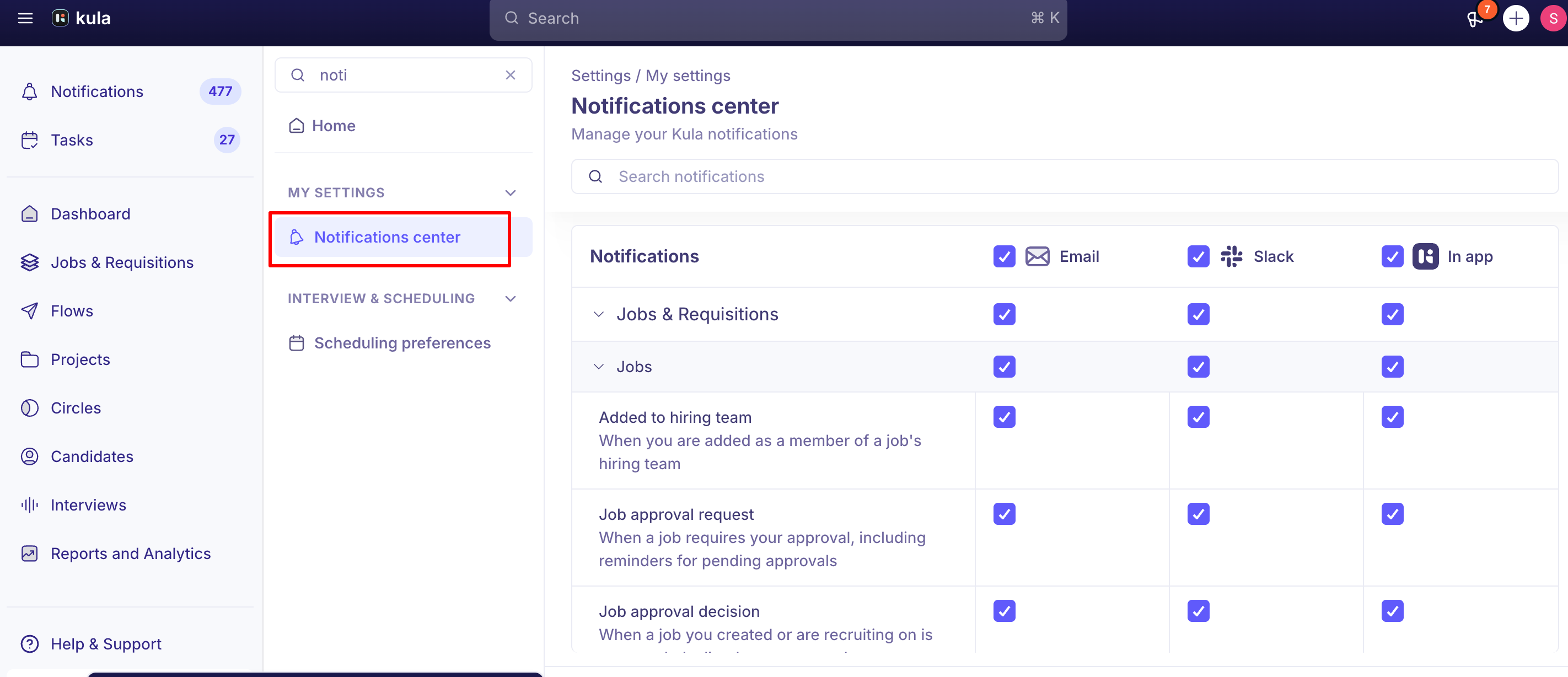
Kula's Notification Center lets you control how and where you receive notifications — by channel (Slack, Email, In-app) and by notification type — so you're not overwhelmed by updates you don't need to see everywhere at once.
Who can do this: Any user can configure their own notification preferences — this is a personal, individual-level setting, not something an admin sets on your behalf.
Where to find it: Settings → My Settings → Notifications center
What you can configure
Channel, per notification type. For each kind of update (for example, interview scheduling, scorecard reminders, referral submissions, offer acceptances, flow replies), you can independently choose whether it comes through Slack, Email, In-app, or some combination of the three.
A centralized place to manage everything. Rather than digging through separate settings per feature, all notification preferences live together in one Notification Center.
How the Notification Centre is organized
Kula supports well over 70 distinct notification types, so the Notification Centre groups them into categories rather than presenting one long flat list.
Categories can nest — for example, outreach-related notifications live under an Outreach area, with Flows as a more specific category inside it (Settings → Notifications → Outreach → Flows), covering events like replies, bounces, and link clicks on a Flow. Other notification types — like interview scheduling, scorecard reminders, and offer/approval events — are grouped under their own relevant categories.
Each category still lets you set channel preferences (Slack, Email, In-app) independently, the same way as any other notification type.
Notifications that can't be fully muted
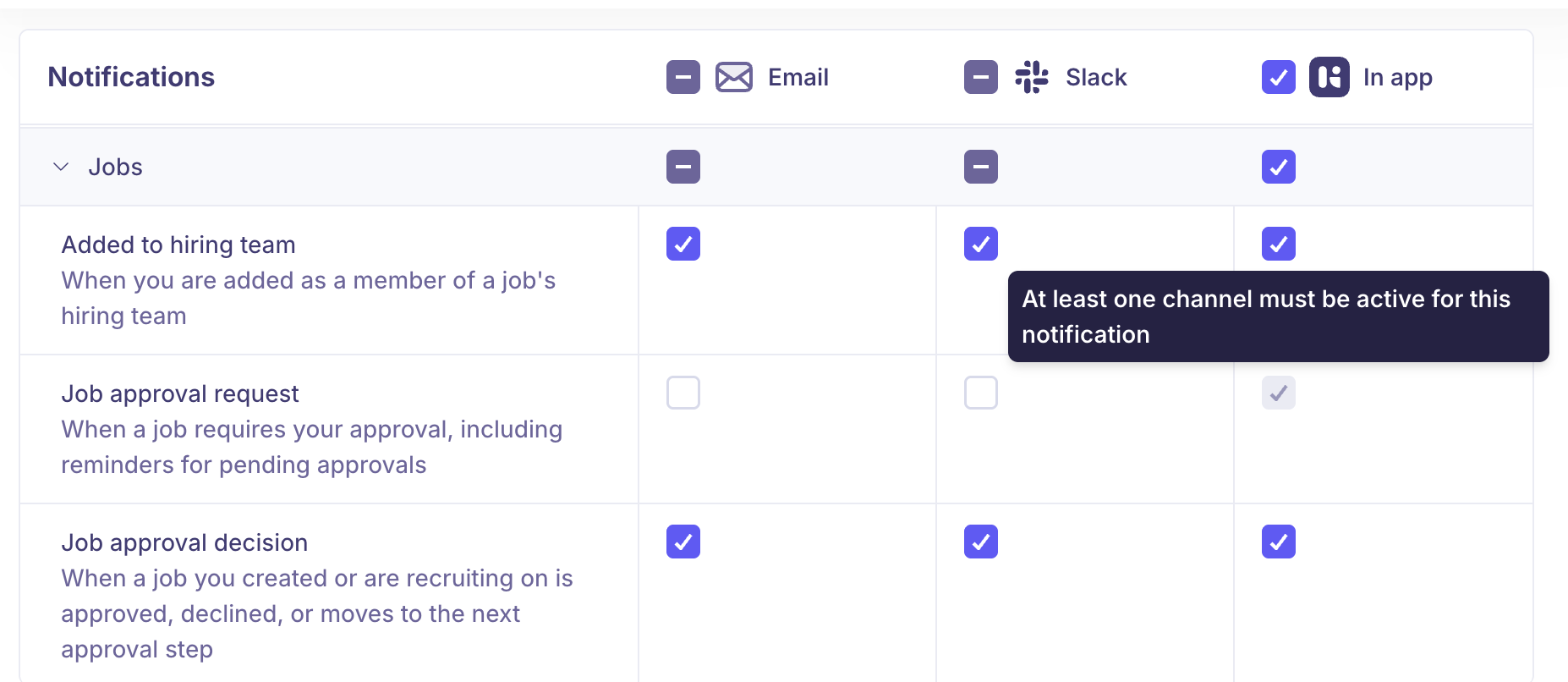
A small set of critical, workflow-blocking notifications — like Job Approval Requests and Scorecard Fill Reminders — are enforced to always have at least one channel active. You can choose which channel carries them, but you can't turn them off across the board, since missing one could stall a hiring workflow.
Good to know
This is a personal setting. Each user configures their own notification preferences — there's no account-wide override that changes it for everyone.
Job Approval Requests and Scorecard Fill Reminders always require at least one active channel. These can be routed to whichever channel you prefer, but not disabled entirely.
You can't yet control notification volume, only channel routing. If a specific notification type is generating too much noise, changing its channel (for example, moving it from Slack + Email down to just one) is currently the only lever available — reducing frequency or batching isn't supported yet.
A disconnected integration will stop a channel from working even if it's enabled in your preferences. If you've turned on Slack notifications for a type but aren't receiving them, check that your Slack integration itself is still connected — that's a separate issue from your notification preferences.
Email notifications can get buried by your own inbox's filtering — this isn't a Kula delivery issue. For example, Gmail sometimes routes Kula emails (like an Offer Accepted notification) into the Promotions tab rather than Primary, and that classification is decided independently per recipient by Gmail, not by Kula. Slack is a good choice for urgent notifications, because it isn't affected by inbox filtering..
The Notification Centre groups notification types into categories, and categories can nest. For example, Flow-related notifications live under Settings → Notifications → Outreach → Flows, rather than sitting in one flat, unsorted list — worth exploring the category structure if you're looking for a specific notification type and can't find it right away.
Not every channel option shown for a notification type is fully functional yet. Flow Activities notifications display an email toggle, but delivery for that type is currently Slack/in-app only — a good reminder to verify a channel is actually working, not just enabled, if you're troubleshooting a missed notification.
FAQ
Where do I go to control which notifications I get? Settings → My Settings → Notifications center. From there you can choose, for each notification type, which channels (Slack, Email, In-app) it should use.
Can I turn off a specific type of notification completely? For most notification types, yes — just disable all channels for that type. A small set of critical notifications, like Job Approval Requests and Scorecard Fill Reminders, always require at least one channel to stay active.
I'm getting too many notifications of the same type — can I reduce how often they come in? Not yet. Today's controls are channel-based (where a notification goes), not volume-based (how often or how many). Batching/digesting similar notifications isn't available yet, though it's expected as a future update.
I disabled a channel but I'm still getting notified there — what's wrong? Double check the specific notification type's channel setting in the Notification Center — preferences are set per type, not globally. If it's a Slack notification specifically, also confirm your Slack integration is still connected.
Does my admin control my notification settings, or do I? You do — this is an individual, user-level setting each person configures for themselves.
How many different kinds of notifications does Kula actually send? Quite a few — support has described the Notification Center as covering more than 70 distinct notification types, grouped into categories rather than one long list.
I turned on email for a notification type but I'm not getting the emails — why? A couple of possibilities: your email provider may be filtering it (for example, Gmail sometimes routes Kula emails into Promotions instead of Primary, independent of anything Kula controls), or — for a small number of notification types, like Flow Activities — email delivery for that specific type isn't fully available yet even though it's shown as an option. If Slack or in-app notifications matter more to you for a given type, those tend to be more consistently delivered today.
Need help?
If you have questions or need assistance, reach out to us at support@kula.ai or use the in-app chat.