AI in application screening
Last updated: September 10, 2026
Kula's AI Scoring (also called the Screener or Scoring agent, depending on where you configure it) evaluates candidates against criteria you define and surfaces a score during Application Review. This article covers how it actually works, where it fits in the evaluation pipeline, what data it does and doesn't use, and Kula's stated compliance position on AI-based screening.
Who can do this: Configuring AI Scoring for a job requires access to that job's settings — typically the Recruiter assigned to the job, or Admin/Super Admin. Reviewing AI-scored candidates in Application Review is available to Recruiter, Hiring Manager, Admin, and Super Admin; External Collaborators have restricted visibility (they can only see candidates they personally added).
Where to find it: Two paths configure the same scoring: Job → Settings → Job Information → Set up AI Scoring (available on every account, no add-on required), or, on accounts with AI Teammates enabled, Job → AI Teammates tab → Scoring agent. Scored candidates and their AI Score appear as a column in Job → Candidates → Application Review.
How AI Scoring actually works
You describe your Ideal Candidate Profile (ICP) — either by typing it in plain language or letting Kula auto-generate attributes from a resume or job description.
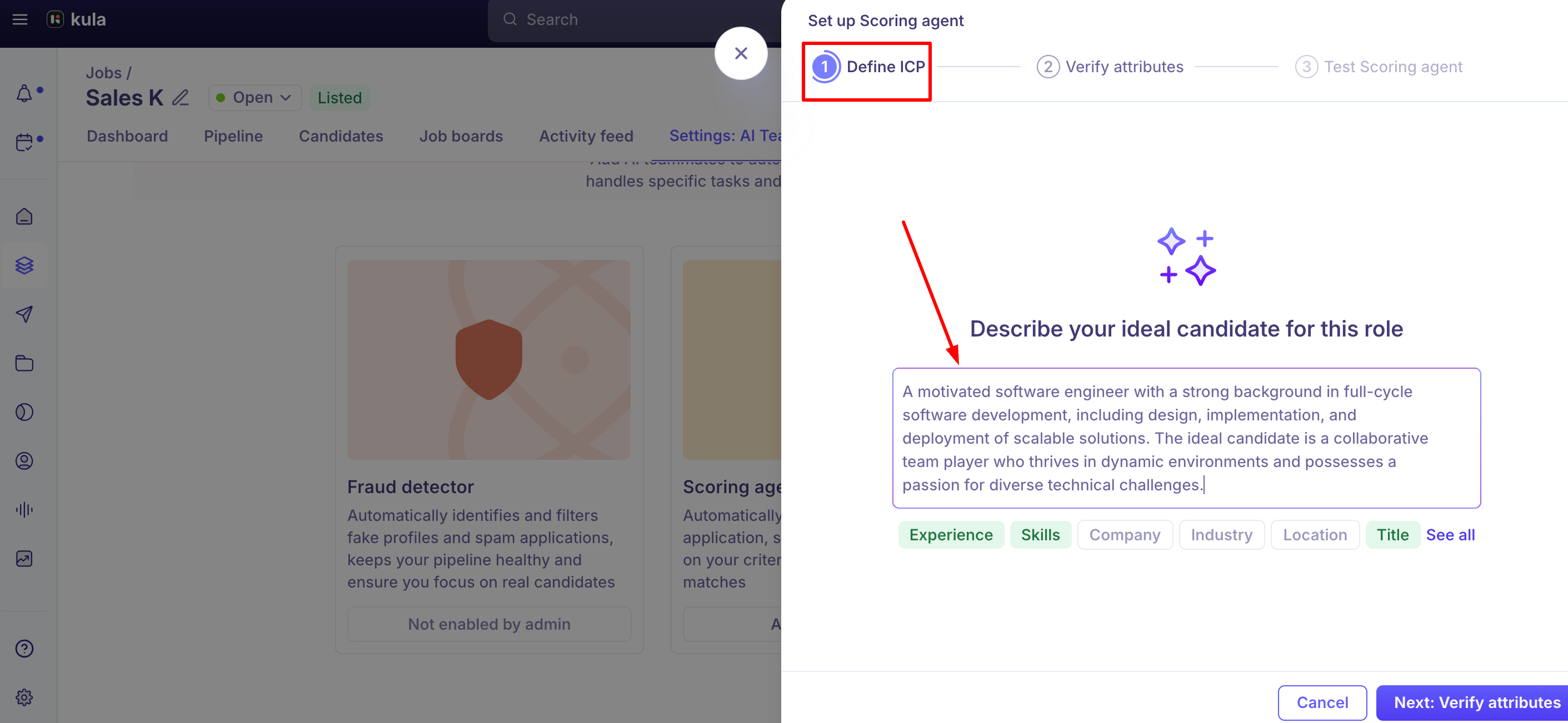
Kula reviews the ICP and generates scoring attributes (skills, experience, education, and similar), which you can review, rename, reorder, or reweight — attributes higher in the list carry more weight in the final score.
Before saving, you can test the configuration against a sample résumé to see the score and per-attribute breakdown; testing is recommended but not required. Full step-by-step instructions are in "How to set up Advanced AI Scoring."
Once live, Kula compares each candidate's résumé against your configured attributes and the job description, and produces a numeric score with a per-attribute High/Average/Low breakdown and an explanation of strengths and gaps.
What data AI Scoring evaluates — and its current limits
Scoring is built primarily around the candidate's résumé.
If a candidate was added via LinkedIn and has no résumé on file, Kula will use their LinkedIn profile instead — but if a résumé is present, the LinkedIn URL is not used for scoring, even if one was also supplied.
If your hiring process relies on custom fields rather than résumés (for example, roles where candidates rarely have a traditional résumé), verify scoring is actually running as expected before depending on it.
Scoring re-runs automatically when a candidate's résumé is updated.
There's no way today to feed AI Scoring a free-form custom prompt or rule (for example, "score zero if the candidate doesn't have a vehicle") — scoring is limited to the attribute-based ICP model. Customers have asked for more flexible, custom-logic scoring beyond the current four-ish attribute structure; this remains an open, unbuilt request.
Where scoring fits in the evaluation pipeline
For a given application, Kula evaluates in a fixed order: Knockout Question rules first, then Fraud detection (if enabled), then AI Scoring (on Application Review stages), then any stage-level automation. AI Scoring only runs on candidates who reach Application Review — it doesn't evaluate candidates still in Prospect, and its attributes can't be pulled into interview scorecards, since scoring happens before a candidate is deep enough in the pipeline to have one.
If a candidate can't be scored (for example, insufficient profile data), Application Review shows them as Failed rather than silently skipping them — you can still review them manually.
Auto-rejection and rejection reasons
You can set a minimum score threshold below which Kula automatically rejects a candidate — this is off by default, and Kula's own setup guidance recommends reviewing scores manually for a while before turning it on, to build confidence in the scoring before letting it act automatically.
When a threshold rejection happens, "Below AI score threshold" is used as the rejection reason — it's a system-default reason present on every account, not something you need to create yourself.
Known issues
AI Scoring can display an overall score of 100 even when individual attributes are scored Average, Low, and High — a real, currently open bug (reported via internal testing of the Test Scoring Agent flow), not yet fixed as of this writing.
A candidate's language proficiency could be scored low even when clearly stated on their résumé — this was a real, confirmed bug (a dedicated "Languages" section on a résumé wasn't being included in the scoring input) and has been fixed.
Cloning a job has been reported to sometimes carry over the source job's AI Scoring attributes even after the new job's attributes were edited — reported to engineering; not confirmed fixed as of this writing.
AI Scoring has had multiple historical accuracy complaints resolved as real bugs, not user error — two separate real-customer cases (both since fixed) involved candidates being scored implausibly high (98%+) despite clearly not meeting stated requirements. If a customer reports scores that look obviously wrong, don't assume it's a configuration mistake on their end without checking — Kula has a track record of this being a real, fixable scoring bug.
Good to know
"Advanced AI Scoring" and the AI Teammates "Scoring agent" are two entry points into the same feature, not two different scoring systems — but which one you see depends on your account's configuration.
Scoring is résumé-first. LinkedIn is only used as a fallback when no résumé is present and the candidate was added via LinkedIn. Reliability against custom application-form data alone is unconfirmed.
Auto-rejection on AI score is opt-in and off by default — Kula's own guidance is to review manually first.
There's no free-form custom-prompt scoring option today — only the attribute/ICP model. If your use case needs bespoke rule logic beyond weighted attributes, that's a real, current product gap, not a configuration you're missing.
An unexpectedly high score relative to a candidate's real experience can mean the job's attributes were generated under an older model — re-saving attributes retriggers scoring with the current model.
AI Scoring can be configured to auto-reject, which is a form of automated action — despite Kula's general "decision support" framing, don't tell a customer it never takes automated action if their job has an auto-reject threshold set.
FAQ
Is "AI Scoring" the same as "Screener"? Yes — different names for the same feature depending on where you're looking at it (see "Kula AI overview" and "Which features use AI?").
Does AI Scoring use anything beyond what the candidate submitted? No — per Kula's stated position, it evaluates only candidate-provided data (résumé, and LinkedIn as a fallback) against recruiter-defined criteria. It doesn't scrape or enrich with third-party data.
Can AI Scoring infer things like culture fit or personality traits? No — Kula's validation is intended to block configuring scoring attributes based on traits like grit, culture fit, or leadership potential specifically because of the legal risk those create.
Does AI Scoring automatically reject candidates? Only if you turn on an auto-reject threshold for that job — it's off by default, and Kula recommends reviewing scores manually first.
Why is a candidate's AI Score showing as much higher than their real experience justifies? This can happen if the job's scoring attributes were generated under an older model. Re-saving or updating the attributes retriggers scoring with Kula's current model.
Does AI Scoring work if my application form doesn't collect a résumé? This is currently unconfirmed — scoring is built primarily around résumé content, and whether it reliably evaluates custom form-field data instead is an open question as of this writing. Contact support if this is your setup before relying on scoring.
Can I write a custom scoring rule, like a specific disqualifying condition? Not today — AI Scoring only supports the weighted-attribute ICP model, not free-form custom logic. For hard disqualifying conditions, see "Knockout questions" instead.
Need help?
If you have questions about AI Scoring configuration, accuracy, or its compliance position, reach out to us at support@kula.ai or use the in-app chat.