Record a hire / no-hire decision
Last updated: July 21, 2026
Once your hiring team has scored and discussed a candidate, the final step is recording the outcome — moving them to Hired or rejecting them — so the decision is reflected everywhere: the pipeline, your reports, and any connected HR system.
Who can do this: Recruiter or Hiring Manager on the job's hiring team, or any Admin or Super Admin.
Where to find it: Candidate's profile → Move To Stage → Hired, or Reject
Recording a hire
Open the candidate's profile and click Move To Stage.
Choose Hired.
If your account has requisitions turned on and this job doesn't already have one linked, Kula prompts you to create or associate a requisition before the move completes — a hire can't be recorded without one.
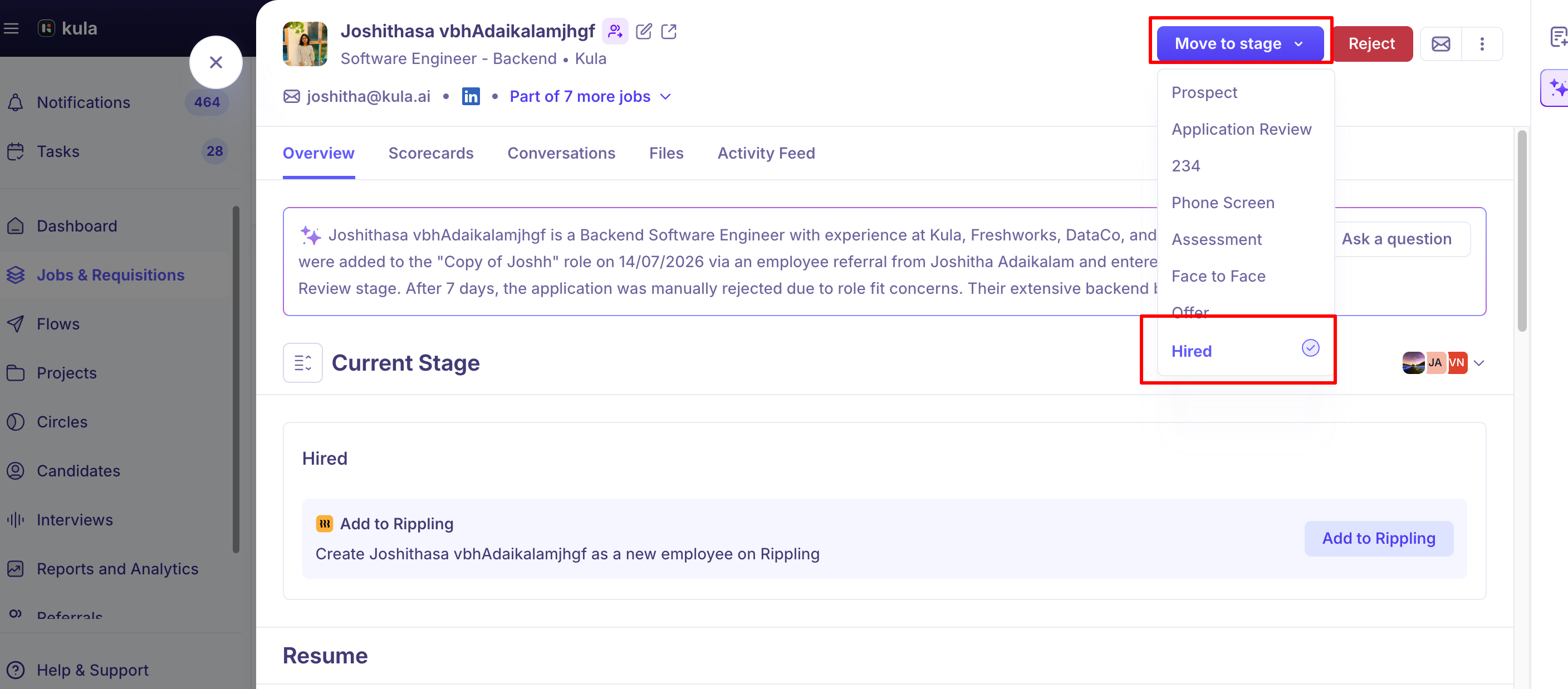
Once the move goes through, the linked requisition is automatically marked consumed, and the Hired date is set to the date of this move. There's no separate field to backdate or edit the hire date in the normal flow — if it needs correcting, that requires a support request.
If you've connected an HRIS integration (BambooHR or Rippling via Kombo), an option to push the candidate's details to HR appears once they're marked Hired. For Rippling specifically, this can also auto-attach their resume and signed offer letter, but only if you've turned that on in Rippling Settings — it's off by default.
Recording a no-hire (reject)
From the candidate's profile or their card in the pipeline, click Reject.
Select a rejection reason. Kula tracks who rejected the candidate alongside the reason, so it shows up consistently across reports and the activity feed.
Choose whether to send a rejection email. If your organisation uses candidate surveys, you can attach one directly to the rejection email from this same step.
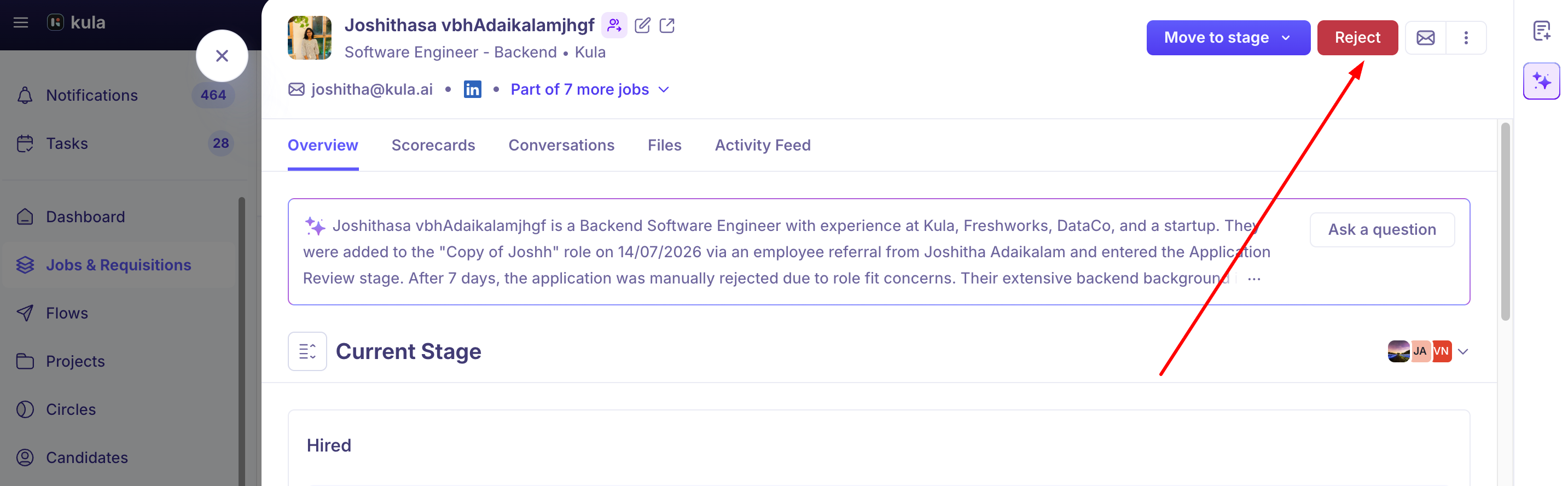
Rejecting doesn't require the job to still be open — you can reject a candidate on a closed job the same way.
Rejecting more than one candidate at a time
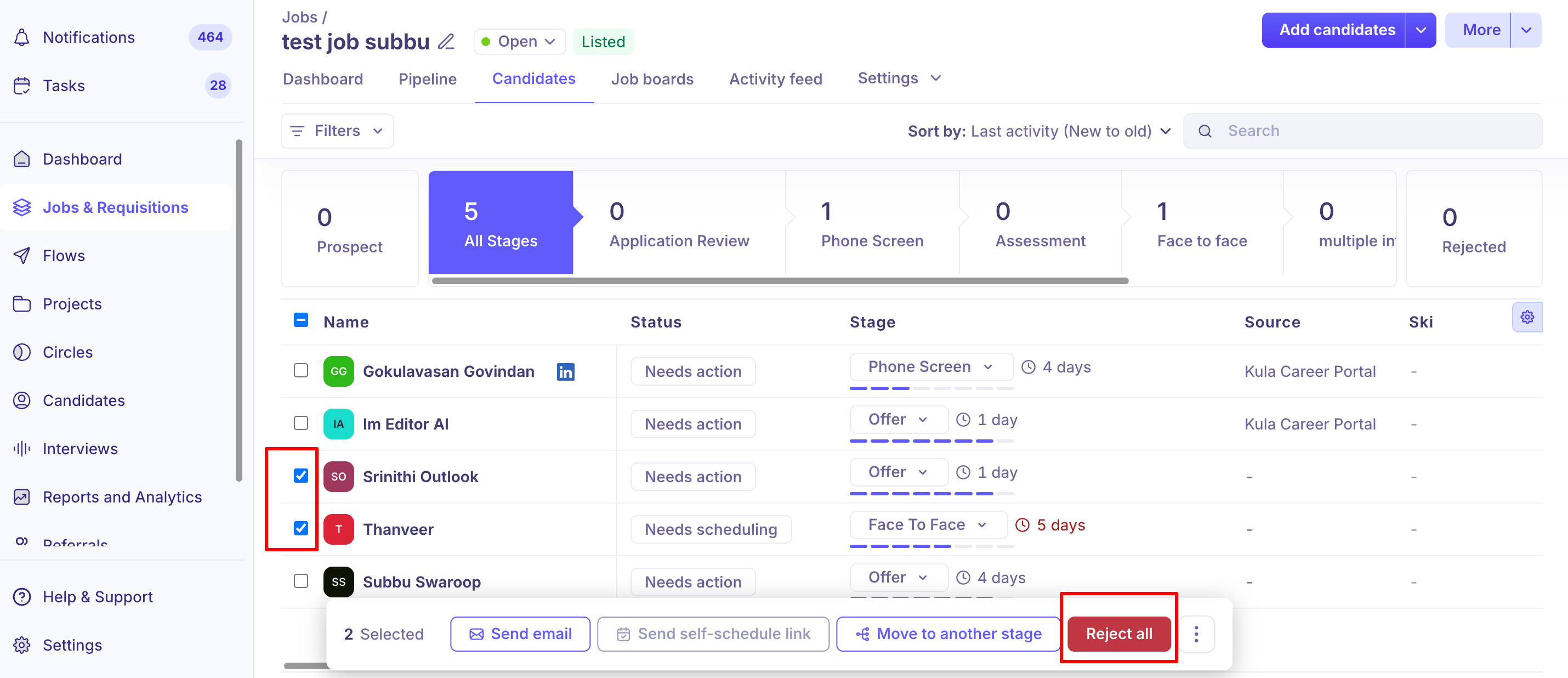
Select multiple candidates from the candidate list and reject them together. This now works across every candidate matching your current filters, not just the ones on the page in front of you.
If you're closing out a job, you can also bulk-reject everyone still active in that job's pipeline in one action — useful for clearing a pipeline once a role is filled.
Changing a decision after the fact
Hired and Rejected aren't permanent labels — you can move a candidate from one to the other later, and their record follows the corrected status. A couple of things to know if you do:
Reactivating a rejected candidate sends them to the Application Review stage — not necessarily wherever they were rejected from.
Rejecting someone doesn't rule them out for good. A rejected candidate can still be transferred to a different open job, and their scorecards, notes, and interview history move with them.
Good to know
A linked requisition is required to record a hire, if requisitions are enabled for your account. Kula lets you create or associate one at the point of hiring rather than forcing you to go set one up first.
The Hired date is set automatically to whenever the candidate was last moved to the Hired stage — it isn't a field you fill in yourself.
Bulk reject has no page limit. It applies to every candidate matching your current filters, not just the 25 or so visible on screen.
You can reject candidates on a closed job, individually or in bulk, to properly clear out a pipeline after hiring is done.
Reactivating a rejected candidate resets their stage to Application Review, not their previous stage — plan on re-triaging them from there.
FAQ
A candidate shows as Hired or Rejected but nobody on our team made that call — what happened?
This is usually inherited data — most often from a migration where the candidate's status came in exactly as it was in your previous ATS — rather than something Kula set on its own. You can correct it: move the candidate to the right stage, and their record updates to match.
If I reactivate a candidate I'd rejected, where do they land?
The Application Review stage, not wherever they were sitting when you rejected them. Plan to re-triage them from there rather than expecting them to reappear at their old stage.
Can I reject more than one candidate at once?
Yes. Bulk reject works across every candidate matching your current filters, not just the current page.
Can I reject candidates after I've already closed the job?
Yes, individually or in bulk for everyone still left in the pipeline — useful for cleaning up once a role is filled.
Once I've rejected a candidate, is that it for them?
No. You can transfer a rejected candidate to a different open job, and their scorecards, notes, and interview history move with them rather than starting over.
Why is Kula asking me to create or link a requisition when I try to mark someone Hired?
If requisitions are turned on for your account, a hire needs a linked requisition — it's what gets marked filled, and it's what your hiring reports are built on. You can create or associate one right from the Hired move instead of setting it up beforehand.
Related articles
Managing Requisitions — for setting up and linking requisitions to jobs
Managing Rejection Reasons and Templates — for configuring the reasons and email templates used when rejecting
Transfer a Candidate Between Jobs — for moving a candidate (rejected or not) to a different role
Connecting an HRIS (BambooHR, Rippling) — for setting up the post-hire push
Need help?
If you have questions or need assistance, reach out to us at support@kula.ai or use the in-app chat.