Setting up a webhook
Last updated: August 19, 2026
A webhook tells your systems the moment something happens in Kula — an application arrives, an offer is accepted, an interview is booked — instead of you polling for changes. This article covers creating one, choosing events, securing it, and testing it before you rely on it.
Who can do this: Super Admin, Admin — anyone with the webhook management permissions
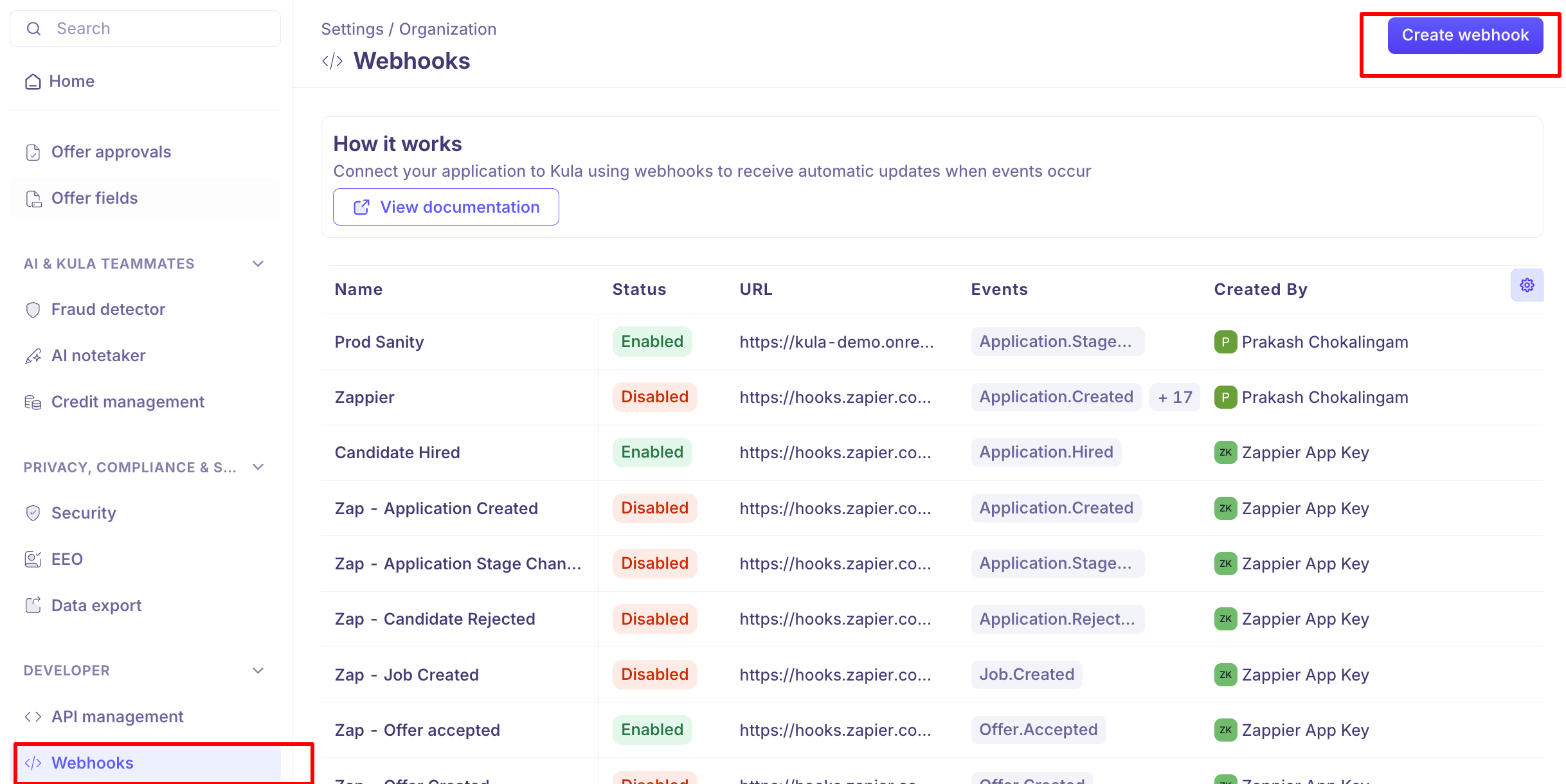
Where to find it: Settings → Organization → Webhooks
Create a webhook
Go to Settings → Organization → Webhooks and create a new one.
Enter a Webhook name, and a Description if it helps others recognise it later.
Enter the Webhook URL — the endpoint Kula should send to. It must be a valid
httporhttpsaddress, and each URL can only be used once per account.Set the Secret, or let Kula generate one. This is what your endpoint uses to verify that a request genuinely came from Kula.
Under Events to monitor, select one or more events.
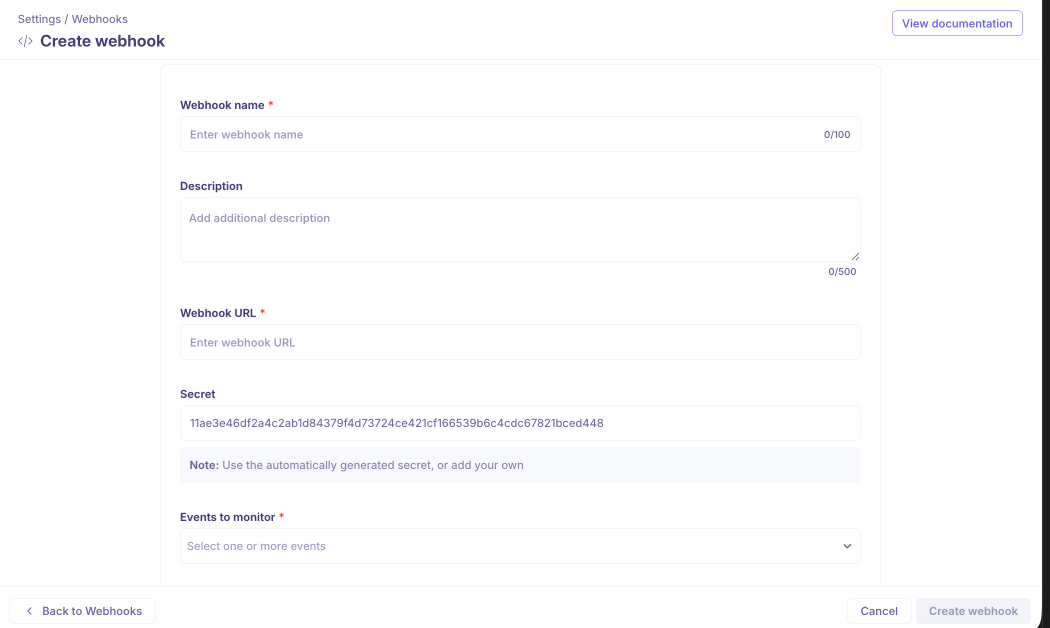
Save.
Choose your events
Kula publishes 28 events across six groups. Subscribe only to what you'll act on — every event you add is traffic your endpoint has to handle.
Candidate
Event | Fires when |
|---|---|
| A new candidate is created |
| A candidate profile is updated |
Application
Event | Fires when |
|---|---|
| A new application is submitted |
| Screening completes, including AI screening |
| An application is substantially updated |
| An application moves to a different stage |
| An application is rejected |
| An application status becomes hired |
Job
Event | Fires when |
|---|---|
| A new job is created |
| A job is updated |
| A job posting goes live |
| A published posting is modified |
Offer
Event | Fires when |
|---|---|
| A new offer is created |
| An offer is modified |
| An offer is approved in workflow |
| An offer is cancelled or deleted |
| A candidate accepts |
| A candidate declines |
Requisition
Event | Fires when |
|---|---|
| A new requisition is created |
| A requisition is updated |
| A requisition is opened |
| A requisition is filled |
| A requisition is closed |
Interview
Event | Fires when |
|---|---|
| An interviewer-availability search finishes, successfully or not — the payload carries a status to branch on |
| An interview is scheduled and the calendar event is created |
| An interview is changed — rescheduled, moved, interviewers swapped |
| An interview is cancelled |
| An attendee's RSVP changes |
For the payload each event sends, see the .
Secure it
Every request Kula sends is signed, so your endpoint can confirm it's genuine rather than trusting anything that arrives at the URL.
Kula sends these headers with each delivery:
Header | What it carries |
|---|---|
| The signature, as |
| When it was sent |
| The event type |
| A unique id for the event |
| The same id, for de-duplicating retries |
Your endpoint should recompute the signature from the secret and compare. The signature is only accepted within five minutes of the timestamp, which stops an intercepted request being replayed later — so your server's clock needs to be roughly right.
Use the idempotency key. Kula retries failed deliveries, so the same event can arrive more than once. Treating a repeated id as a duplicate prevents double-processing.
The exact verification steps and code samples are in the .
Regenerating the secret
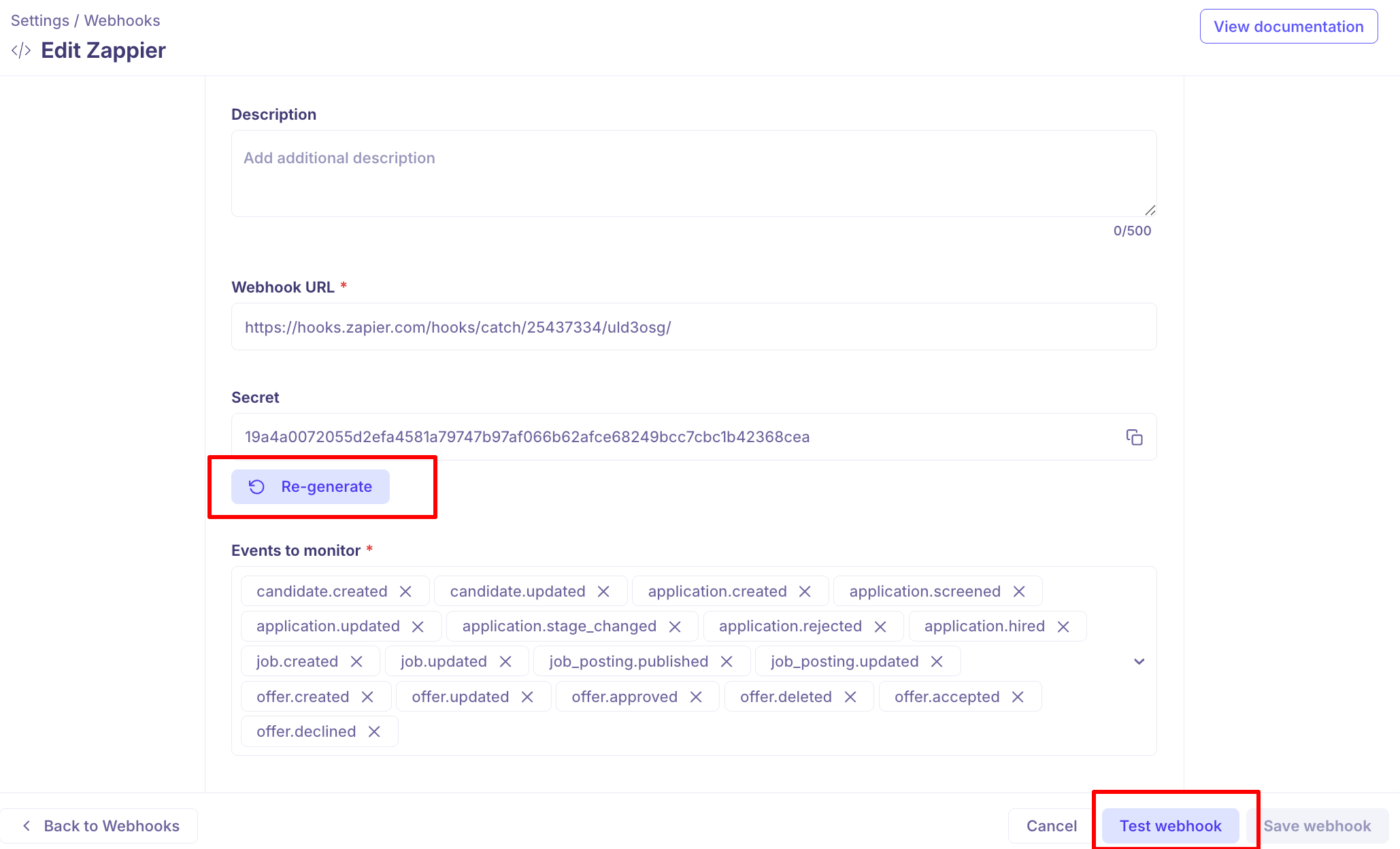
You can regenerate a webhook's secret at any time from the webhook itself — useful if it may have been exposed, or on a routine schedule.
Regenerating takes effect immediately. Deliveries signed with the new secret start at once, so update your endpoint at the same time or verification will start failing.
Test it before you rely on it
Send a test delivery from the webhook to confirm your endpoint is reachable and responding as expected. Do this before you depend on the webhook in a live process — it's much easier to debug a test than a missed application.
If the test fails, check the URL is publicly reachable, that it accepts POST, and that it returns a success response quickly.
Manage existing webhooks
The Webhooks page lists what you have, with actions on each:
Action | What it does |
|---|---|
Webhook logs | Opens the delivery history — see [Monitoring webhook deliveries] |
Disable webhook | Stops deliveries without deleting the configuration. |
Enable webhook | Turns a disabled webhook back on. |
Delete webhook | Removes it permanently. |
Disabling is the reversible option — use it while you fix an endpoint, rather than deleting and rebuilding.
Good to know
Each URL can be used once per account. You can't point two webhooks at the same address.
The secret is required. If you don't set one, Kula generates it.
Regenerating the secret is immediate — update your endpoint at the same time.
Signatures expire after five minutes. A clock badly out of sync will cause verification failures.
The same event can arrive twice. Retries mean your endpoint must handle duplicates; use the idempotency key.
Subscribe narrowly. Every extra event is traffic to handle and noise in your logs.
FAQ
Which events should I subscribe to? Only the ones you'll act on. application.created and application.stage_changed cover most pipeline syncing; offer and requisition events matter if you're syncing to an HR system.
How do I know a request really came from Kula? Verify the X-Kula-Signature header against your webhook's secret. Requests older than five minutes should be rejected. Code samples are in the .
We think our secret leaked. What now? Regenerate it on the webhook and update your endpoint at the same time — the change takes effect immediately, so a gap means failed verification.
Can I point two webhooks at the same URL? No. Each URL can only be used once per account. Subscribe one webhook to multiple events instead.
We're getting the same event twice. That's expected — failed deliveries are retried, so an event can arrive more than once. Use the X-Kula-Idempotency-Key header to ignore ones you've already processed.
I need to stop a webhook temporarily. Disable it rather than deleting it. Disabling keeps the configuration and can be undone.
Need help? If you have questions or need assistance, reach out to us at support@kula.ai or use the in-app chat.