Monitoring webhook deliveries
Last updated: August 19, 2026
When a webhook stops working, the symptom is usually silence — another system quietly falls out of step. The delivery logs tell you what Kula sent, what came back, and whether it's still retrying.
Who can do this: Super Admin, Admin — anyone with the webhook management permissions
Where to find it: Settings → Organization → Webhooks → your webhook → Webhook logs
Spot a problem from the list
Before opening any logs, the Webhooks list itself tells you a lot. Alongside each webhook's Name, URL and the Events it's subscribed to, you get:
Status — Enabled or Disabled. A webhook that has been disabled delivers nothing.
Last triggered on — when it last fired. A webhook that should be busy but hasn't triggered in days is the clearest early warning you'll get.
Created by / Created on and Updated by / Updated on — who set it up and who last changed it.
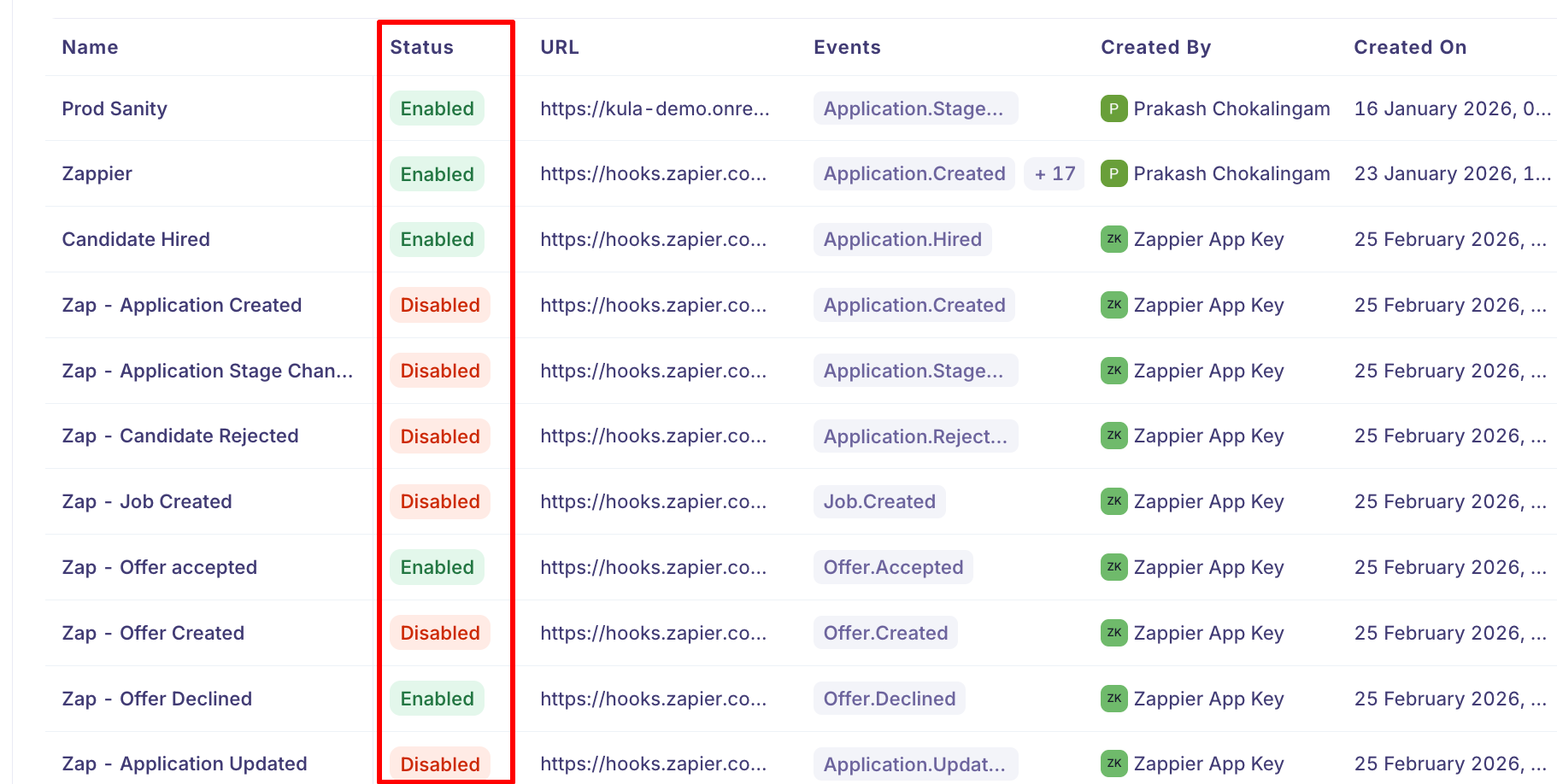
If a webhook shows Disabled and nobody remembers disabling it, Kula switched it off automatically — see below.
Read the delivery log
Open Webhook logs on a webhook to see its recent deliveries, listed newest first and paginated. Refresh data re-fetches them — the view doesn't update on its own, so refresh if you're watching something in progress.

Column | What it tells you |
|---|---|
Status | The HTTP response code your endpoint returned, with a coloured dot: green delivered, red failed, amber still pending. |
Event ID | The unique id for that event — the same value your endpoint receives as the idempotency key. |
Event type | Which event was sent. |
Number of retries | How many attempts have been made so far. |
First attempted at | When Kula first tried. |
Last attempted at | The most recent attempt. |
Response time | How long your endpoint took to answer, in milliseconds. |
The Status column is the most useful one. Because it shows the actual response code, you can tell the difference between problems that look identical from the outside: a
401or403means your endpoint rejected the request — often a signature or secret mismatch; a404means the URL is wrong; a500means your handler errored; and a dash with a red dot usually means Kula couldn't reach the endpoint at all.Match on Event ID when chasing something across systems — it's the same id your endpoint receives, so it links Kula's record to yours.
If a webhook has never fired you'll see No logs found.
What the log doesn't show
Two things people expect and won't find:
The payload isn't stored. Logs record that an event was delivered and what came back, not what was in it. To see payload structure, use the , or send a test delivery and capture it at your end.
The next retry time isn't shown. You can see how many attempts have happened, but not when the next one is due. The retry schedule below tells you roughly what to expect.
What happens when a delivery fails
Kula doesn't give up on the first failure. A delivery is attempted up to seven times, with the wait growing each time:
Attempt | Roughly when |
|---|---|
1 | Immediately |
2 | After 1 minute |
3 | After 5 minutes |
4 | After 30 minutes |
5 | After 2 hours |
6 | After 8 hours |
7 | After 16 hours |
So a failing delivery keeps being retried for around a day before Kula stops. A short outage on your side usually resolves itself — the event lands on a later attempt without anyone intervening.
Each retry also carries a small random delay, so a large batch of failures doesn't all retry at the same instant and overwhelm an endpoint that's just come back up.
Retries mean duplicates are possible. If your endpoint received an event but failed to respond in time, Kula will try again. Use the idempotency key to ignore events you've already handled.
When a webhook is switched off automatically
If an endpoint fails 25 times within 24 hours, Kula disables the webhook rather than continuing to send into a black hole.
That's a protection, not a punishment — but it does mean deliveries stop entirely until someone re-enables it. If a webhook has gone quiet, check whether it's been disabled before looking for a subtler cause.
To recover: fix the endpoint, send a test delivery to confirm it's healthy, then re-enable the webhook.
How long logs are kept
Delivery logs are retained for 30 days. Anything older is removed, so if you need a longer audit trail, record deliveries on your own side as they arrive.
Good to know
Seven attempts over roughly a day. After that Kula stops retrying that event.
25 failures in 24 hours disables the webhook. Nothing is delivered until it's re-enabled.
Logs are kept for 30 days, then deleted.
Duplicates are expected. Retries can deliver the same event more than once — de-duplicate on the event id.
Response time matters. A slow endpoint risks timing out and being retried, which looks like a failure even when you processed the event.
Logs show delivery, not processing. A success means your endpoint accepted the request — what you did with it afterwards is invisible to Kula.
Payloads aren't kept. The log records the outcome, not the content.
Check Last triggered on in the webhooks list to spot a webhook that has quietly stopped firing.
FAQ
Our webhook stopped receiving anything. Check whether it's been disabled. After 25 failures in 24 hours Kula disables an endpoint automatically. Fix the endpoint, send a test delivery, then re-enable it.
A delivery failed. Will Kula try again? Yes — up to seven attempts, spaced from a minute to sixteen hours apart, over roughly a day. Brief outages usually resolve without intervention.
We processed an event but Kula shows the delivery as failed. Kula records whether your endpoint responded in time, not what it did. If your handler was slow, the request may have timed out despite the work succeeding — hence the retry. Acknowledge quickly and process afterwards.
We're seeing the same event more than once. Expected behaviour when a delivery is retried. Use the X-Kula-Idempotency-Key header to skip events you've already handled.
How far back do the logs go? 30 days. Keep your own record if you need longer.
Where do I see what was actually sent? The payload isn't stored in the logs — they record the event type, id, response code, attempts and timings only. For payload structure see the ; to capture a real one, send a test delivery and log it at your end.
The Status column shows 401 on every delivery. Your endpoint is rejecting the request. That's almost always signature verification — check the secret matches the one on the webhook, and that your server's clock is accurate, since signatures are only valid for five minutes.
A delivery shows no response code at all. Kula couldn't get a response — usually the endpoint was unreachable, or it took too long to answer. Check the URL is publicly accessible and that it responds quickly.
Need help? If you have questions or need assistance, reach out to us at support@kula.ai or use the in-app chat.