Integrate third-party assessment tools
Last updated: July 22, 2026
Kula's built-in assessments work for most take-home tasks, but for technical coding tests, cognitive/skills testing, or video responses, you can connect a dedicated provider instead — HackerRank, HackerEarth, Criteria Corp, CodeInterview, or HireFlix.
Once connected, sending an assessment through any of them works the same way as sending a Kula assessment: from the candidate's profile, with the result syncing back automatically.
Who can do this: Admin or Super Admin can connect a provider. Sending an assessment through an already-connected provider follows the same access as any other assessment: Recruiter or Hiring Manager on the job's hiring team, or Admin/Super Admin.
Where to find it: Settings → Integrations → Assessments
Which tool fits which kind of assessment:
Tool | Best for | How results come back |
HackerRank | Technical coding tests, or live coding interviews | Scorecards stay fully managed in HackerRank; a HackerRank work account is required |
HackerEarth | Coding assessments | Score, pass/fail, and a link to the full report sync to the candidate's Assessments tab |
Criteria Corp | Pre-built skills and aptitude assessment templates | Report and scorecard available once the candidate completes it |
CodeInterview | Technical coding assessments | Scored report syncs back automatically the moment the candidate submits |
HireFlix | Async video assessments | Submission status updates in real time; supports sending to one candidate or in bulk |
Connect a tool
Log in with an Admin or Super Admin account and go to Settings → Integrations → Assessments.
Select the tool you want to connect.
Click Connect and log in with your account for that tool (an active account with admin access on their side is required).
Authorize Kula to access it.
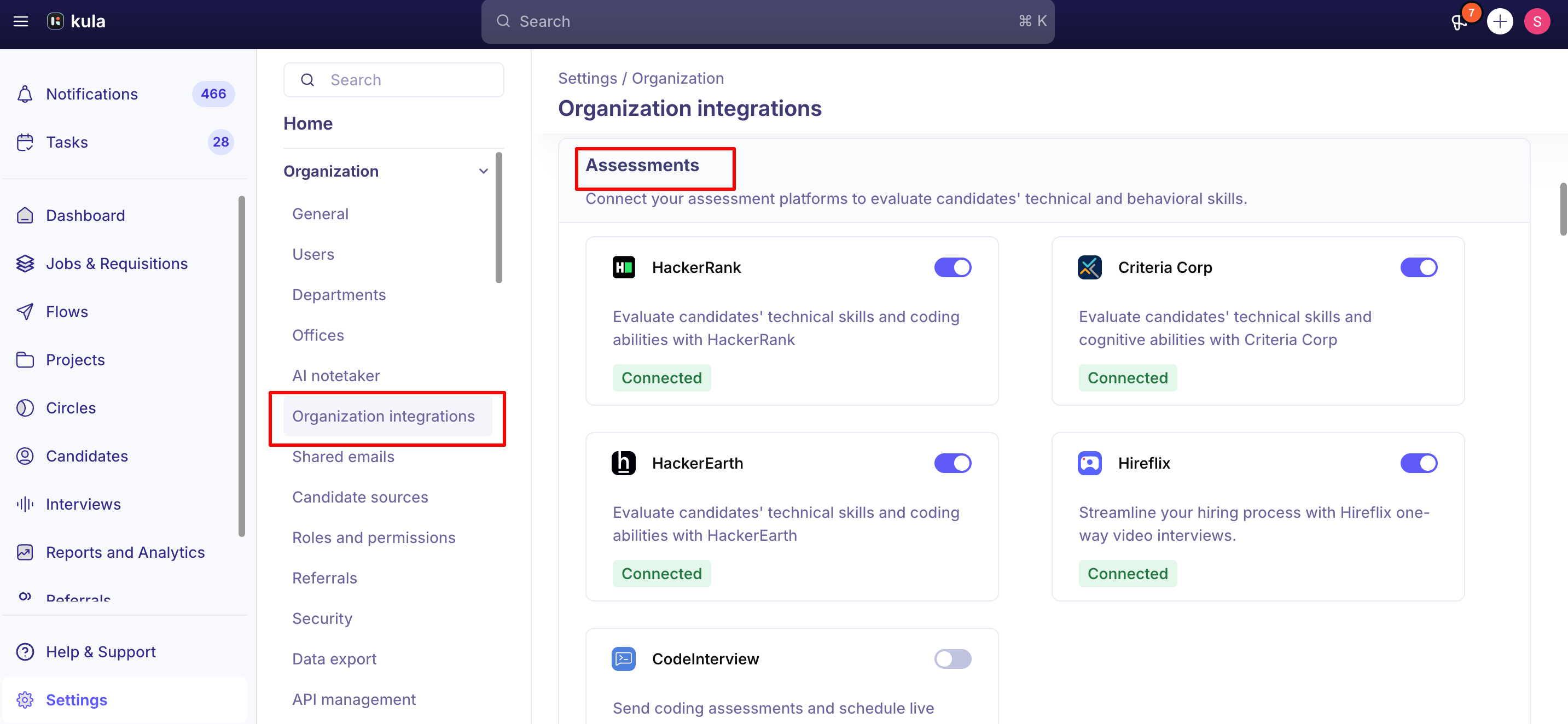
Once connected, the tool shows as Active under Integrations, and it becomes available as a provider option whenever anyone sends an assessment.
Sending an assessment through a connected tool
Once a tool is connected, sending through it works the same as any other assessment — see Send a skills assessment to a candidate for the full flow. The one difference: you'll choose the provider and pick from the tests or templates synced from that tool, rather than writing questions directly in Kula.
Good to know
Tests and templates are created in the provider's own platform, not in Kula. Kula fetches and displays what's already set up there — you can't build a HackerEarth or HackerRank test from inside Kula itself.
Billing for the assessment tool is handled directly by the provider, not through Kula.
A HackerRank test can only be sent once per candidate. If it's already sent or still pending, you can't resend it — cancel or wait for it to resolve first.
If a candidate never completes a third-party test, it stays Pending in Kula — there's no automatic follow-up or expiry.
FAQ
Can I write or edit the actual test questions from inside Kula? No. Tests and question sets are created and managed in the provider's own platform — Kula only fetches and displays them once you're connected. For more, see How to Set Up and Use the HackerEarth Integration with Kula (link to be added).
Who do we pay for the assessments themselves — Kula or the provider? The provider. Billing for HackerRank, HackerEarth, Criteria Corp, CodeInterview, or HireFlix is handled directly through your account with that tool, separately from Kula. For more, see How to Set Up and Use the HackerEarth Integration with Kula (link to be added).
Can a recruiter connect a new assessment tool, or does it have to be an admin? It has to be an Admin or Super Admin — connecting a provider requires Kula Admin Settings access plus an admin-level account on the provider's side. Once it's connected, anyone with standard sending permissions can use it. For more, see Send a skills assessment to a candidate (link to be added).
A candidate hasn't finished their HackerRank/HackerEarth test — what does that look like in Kula? It shows as Pending on their profile until they submit. Kula doesn't chase them automatically, so follow up directly if it's overdue. For more, see Send a skills assessment to a candidate (link to be added).
Need help?
If you have questions or need assistance, reach out to us at support@kula.ai or use the in-app chat.