Set up Google Meet and Microsoft Teams for interviews
Last updated: October 23, 2026
Google Meet and Microsoft Teams aren't on the Organization integrations page, and there's nothing for an admin to turn on. Both come from the calendar each person connects to their own Kula account: connect Google Calendar and you get Google Meet; connect Outlook Calendar and you get Teams. This article covers connecting, who needs to connect, what you see when scheduling, and choosing who hosts a Google Meet interview.
Who can do this: Super Admin, Admin, Recruiter, Hiring Manager, Organization Member — each person connects their own calendar
Where to find it: Settings → My settings → My integrations → Calendar
Why these two are not on the integrations page
Zoom is authorised once by an admin for the whole organisation, so it appears as a card under Conferencing tools. Google Meet and Teams work differently: the meeting link is created by the organiser's own calendar, so the connection is personal rather than organisation-wide.
Conferencing option | Connected by | Where |
|---|---|---|
Zoom | An admin, once for the whole organisation | Settings → Organization → Organization integrations |
Google Meet | Each person, by connecting Google Calendar | Settings → My settings → My integrations |
Microsoft Teams | Each person, by connecting Outlook Calendar | Settings → My settings → My integrations |
How to Connect your calendar
Go to Settings → My settings → My integrations.
Find the Calendar section.
Turn on Google Calendar or Outlook Calendar.
Sign in and approve access.
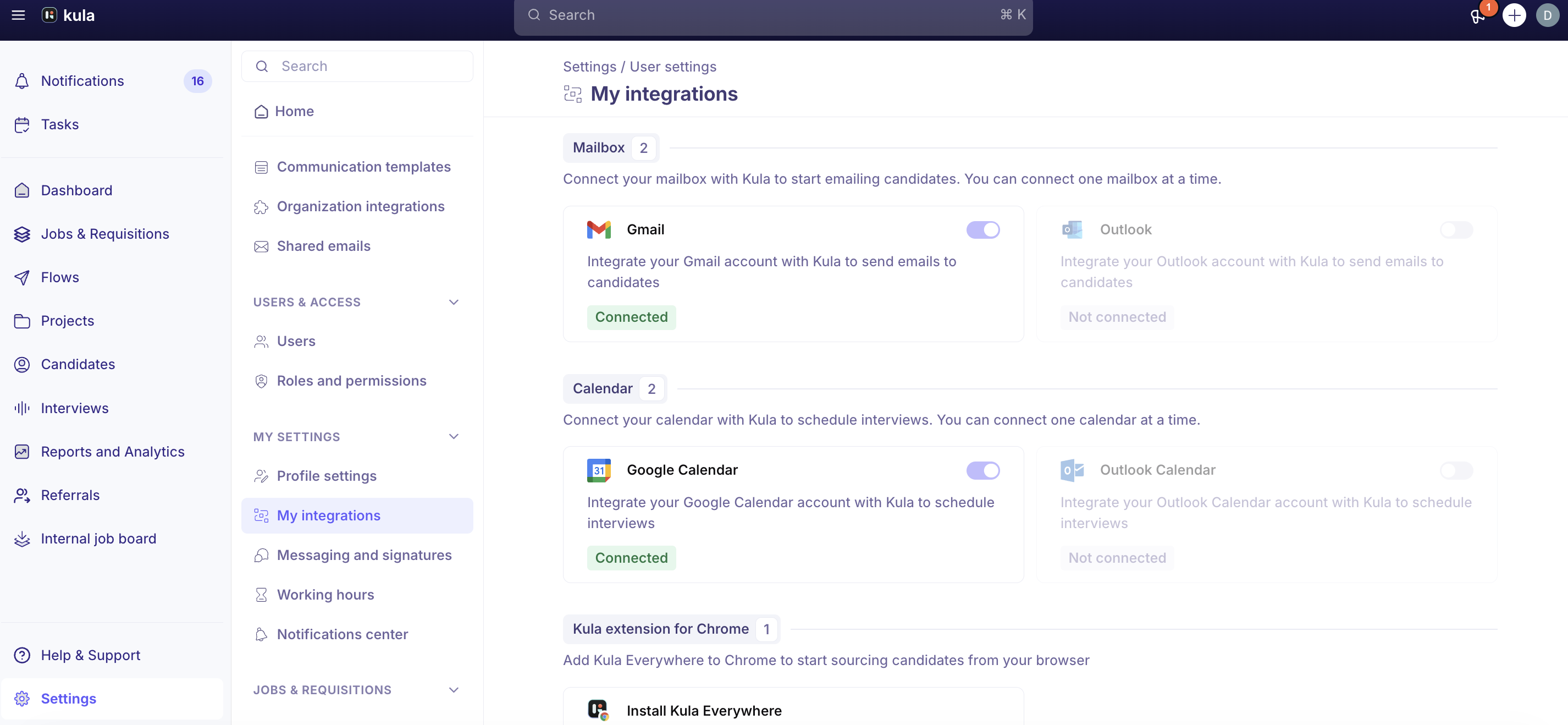
You can connect one calendar at a time. Once you connect one, the other is disabled until you disconnect the first. This is why nobody has both Google Meet and Teams available at the same time.
Who actually needs to connect a calendar
This is the most common misunderstanding, so it is worth being precise. Two different things are going on, and only one of them needs a calendar connection.
Does this person need to connect their calendar? | |
|---|---|
Scheduling an interview | Yes. Kula creates the interview on your calendar, as you. No connected calendar means you cannot schedule at all. |
Being scheduled as an interviewer | No. An interviewer who was auto-provisioned and never opened their calendar settings can still be booked. |
Once the person scheduling has connected their calendar, Kula reads everyone else's availability through that connection. You see interviewers' busy blocks and Kula avoids double-booking them, without those interviewers doing anything.
You do not need to ask your whole organization to connect their calendars. Only the people who schedule interviews — recruiters and coordinators — need to.
Why an interviewer's busy times might not show
Reading other people's availability depends on how your Google Workspace or Microsoft 365 administrator has set calendar sharing across the organization. There are three levels, and they behave differently.
Workspace sharing setting | What the person scheduling sees | Can they still schedule? |
|---|---|---|
Share all information | Busy blocks and event titles | Yes |
Only free/busy (hide event details) | Busy blocks, but no titles | Yes |
No sharing | Nothing at all | No — availability lookup does not work |
Most organizations run one of the first two, which is why this works without any setup for the majority of customers. No sharing is a real option though, and if your workspace is set that way the person scheduling will not be able to see anyone else's events. That is a change your Google Workspace or Microsoft 365 administrator makes, not something Kula can override.
Which option each person sees
The conferencing options offered when scheduling depend on the calendar of the person doing the scheduling, not on the candidate or the interviewers.
What you have connected | Options you see when scheduling |
|---|---|
Google Calendar | Google Meet, plus Zoom if an admin connected it |
Outlook Calendar | Microsoft Teams, plus Zoom if an admin connected it |
No calendar | Zoom only, if an admin connected it — plus Onsite and Phone |
Onsite and Phone are always available. HackerRank appears as a location too, once HackerRank is connected for the organisation.
What happens when you schedule
You do not paste a link in. Kula asks the calendar provider to create the meeting when it creates the event.
Google Meet — Kula asks Google Calendar to generate a Meet link as part of the event, so the link is a genuine Google Meet room, not a placeholder.
Microsoft Teams — Kula flags the Outlook event as an online meeting with Teams as the provider, and Microsoft generates the Teams link.
Either way, the link lands on the calendar invite that goes to the candidate and interviewers. For the full flow, see Schedule an interview.
Recording with the AI Notetaker
The AI Notetaker joins Zoom, Google Meet and Microsoft Teams interviews. There is no separate setup per platform — if the interview has a video link from any of the three, the notetaker can attend.
Choose who hosts a Google Meet interview
Google Meet has three access settings, controlled in Google Workspace, not in Kula:
• Anyone can join using the link: nobody needs to admit anyone, so the host choice doesn't matter.
• Anyone with access to the interview can join: interviewers and the candidate can join without the host admitting them, even if someone else is the host.
• The host must let participants in: the host has to join and admit everyone. Choose a host who will attend.
If your organization uses the second setting, you can keep the recruiter as host and interviewers can still admit the candidate and the Notetaker.
Step 1: The future host grants permission (once)
Being chosen as a Meet host needs one extra Google permission, which each person grants themselves:
Go to Settings → My settings → My integrations.
On the Google Calendar card, click Re-authenticate.
Approve the extra permission when Google asks.
People who connect Google Calendar for the first time are asked for it as part of the same sign-in. Until someone has granted it, they appear in the host list greyed out with Action needed (or No Google Meet access). Hovering explains that they need to connect or refresh their Google Calendar.
Step 2: Set a default host on the interview plan (optional)
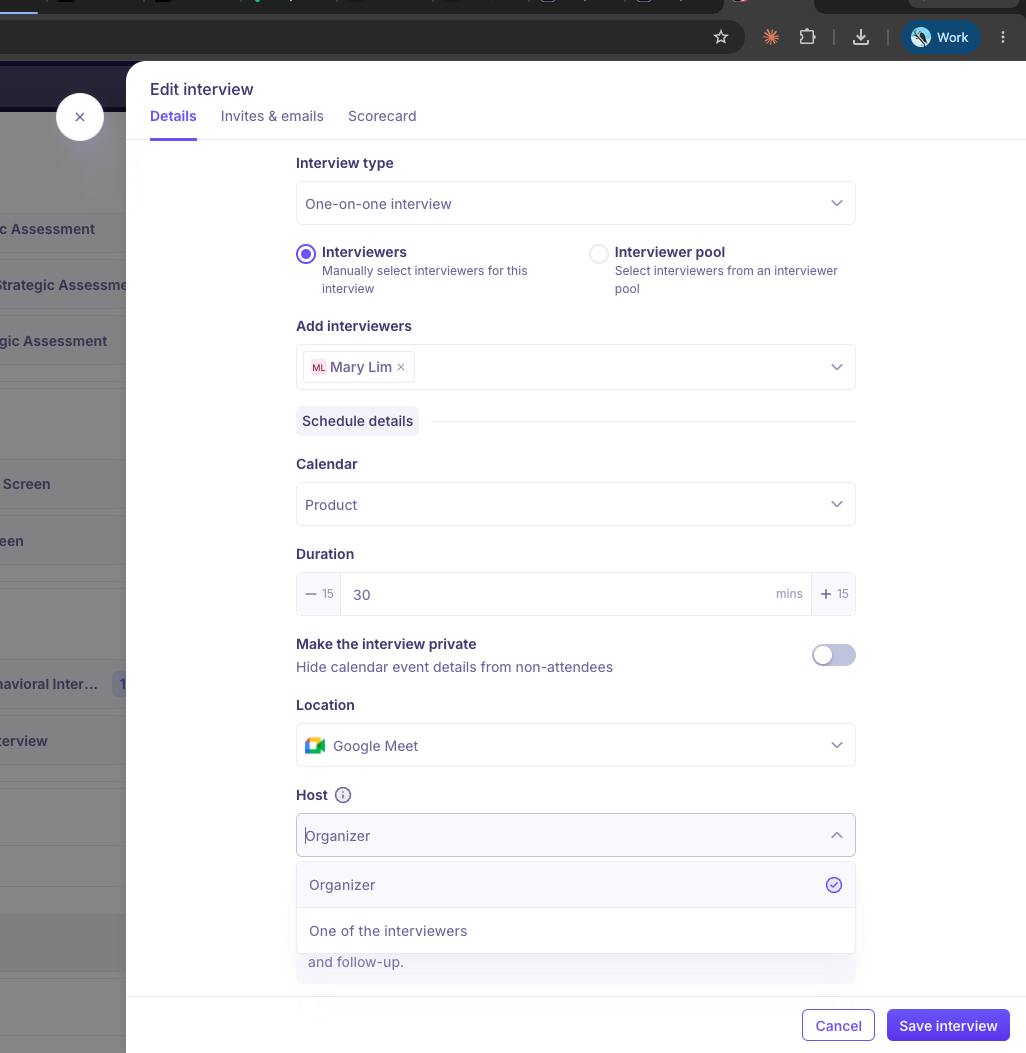
In the job's interview plan, the interview activity has a Host setting when the location is Google Meet: Organizer or One of the interviewers. Every interview scheduled from that plan starts with that choice. See What is an interview plan?
Step 3: Choose the host when scheduling
One interview: when the location is Google Meet, a Host field appears. Pick one of the interviewers or yourself.
Schedule all interviews: each interview has its own host, so set each one before confirming.
Kula then creates the Meet room owned by the host, and the other people are invited to it.
Good to know
One calendar per person, so one video option per person. Someone on Outlook can't schedule a Google Meet interview, and someone on Google Calendar can't schedule a Teams interview.
Google Meet shows whenever Google Calendar is connected. Kula doesn't check whether your Google Workspace plan includes Meet.
A Teams link on a Google Calendar invite also appears in the event description, so attendees can always join.
Changing a Teams interview to a non-video location may not work on personal Microsoft accounts. Cancel and re-create the interview instead.
No admin switch, no bulk connect. Admins can't connect calendars for other people. If a recruiter doesn't see the option they expect, check their own My integrations page.
Organization Members can't schedule interviews, so they don't need a calendar. To schedule, someone needs a role such as Hiring Manager and must be on the job's hiring team.
The Meet host must be on the interview: one of its interviewers or the person scheduling it.
A host is required for Google Meet. The person scheduling is selected by default.
Ad-hoc interviews start with the organizer as host. You can change it.
Self-schedule, one-on-one interviews with no interviewer chosen yet use the organizer as host, because the interviewer isn't known until the candidate picks a slot.
FAQ
Where do I turn on Microsoft Teams? I can only see Zoom in integrations.
There's nothing to turn on. Teams is available as soon as you connect Outlook Calendar under My integrations.
One recruiter can pick Google Meet and another can't. Why?
They have different calendars connected. Check each person's My integrations.
Does everyone in Kula have to connect their calendar?
No. Only the people who schedule interviews.
Kula isn't showing any interviewers' busy times.
Your calendar sharing is probably set to No sharing. Ask your workspace administrator to allow at least free/busy sharing.
Can I connect both Google Calendar and Outlook Calendar?
No. One calendar per person.
An Organization Member needs to schedule interviews. Is connecting their calendar enough?
No. They need a role that can manage the job's candidates, such as Hiring Manager, and to be on the job's hiring team.
Candidates are stuck in the Google Meet lobby. Why?
Your Meet settings only let the host admit people, and the host isn't on the call. Choose a host who'll attend.
It says I can't make someone the host.
They haven't granted the host permission yet. Ask them to click Re-authenticate on their Google Calendar card. You can still schedule with yourself as host.\
Does the interviewer need to be the host to let the candidate and Notetaker in? Not if your Google Meet setting lets anyone with access to the interview join. It matters only if your setting says the host must let participants in.
Need help?
If you have questions or need assistance, reach out to us at support@kula.ai or use the in-app chat.