Embedding Kula job boards in an external careers page
Last updated: August 13, 2026
Show your Kula job listings and application process on your own website instead of sending candidates to the Kula-hosted career page.
Who can do this: Requires Super Admin or Admin permissions, plus someone who can edit your website's HTML or CMS to paste in the embed code.
Where to find it: Settings → Career page and job boards → Career Page Settings → Career Page Embedding.
Setting up the embed
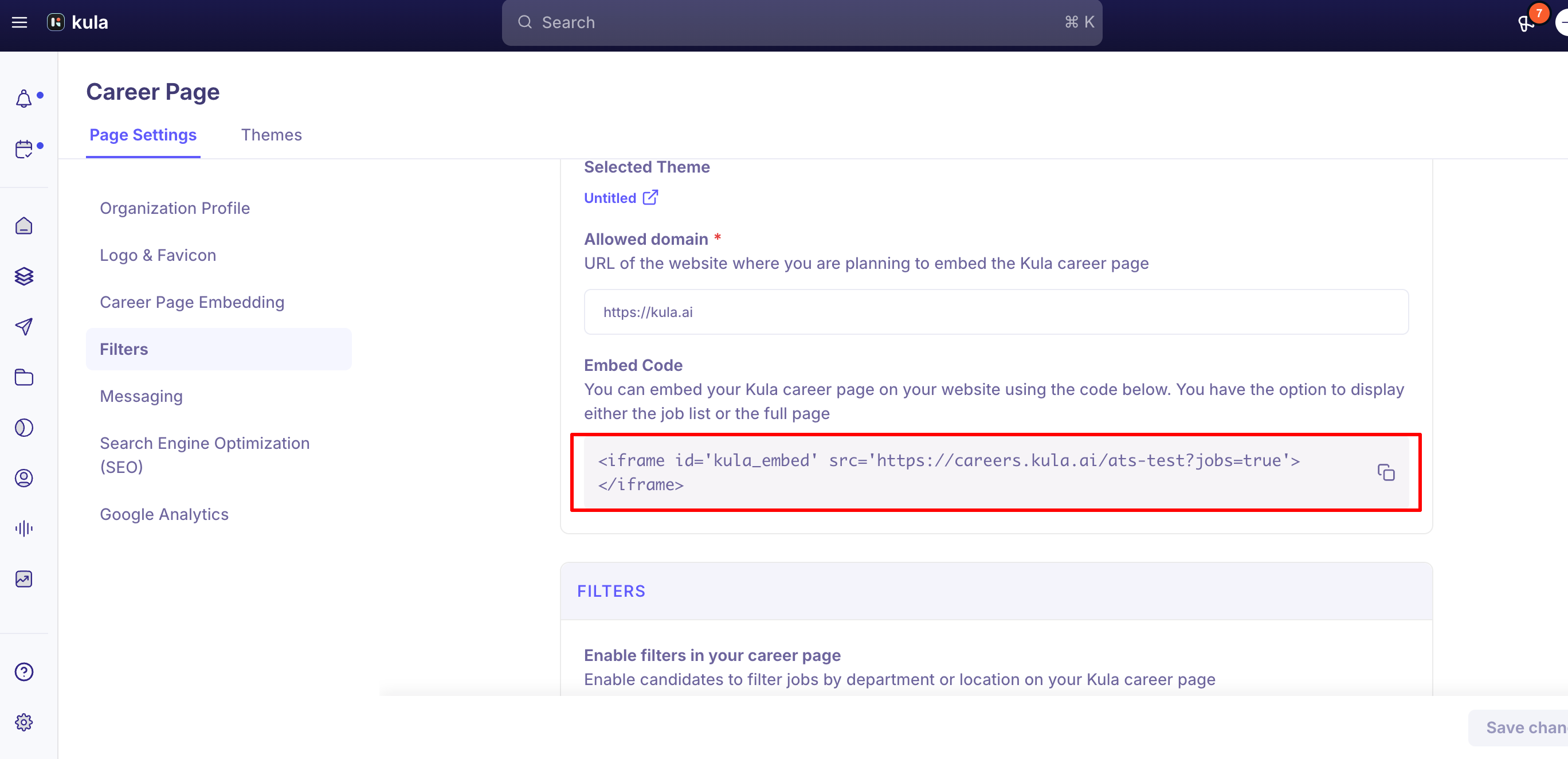
Go to Career Page Embedding and choose what to embed: Job List Only (just the list of open roles) or Full Page (the whole career portal, branding and all).
In Allowed Domain, enter the domain where you'll embed the page (e.g. https://www.yourcompany.com). The embed will only load on domains you've authorized here.
Click the copy icon to copy the embed code, then paste it into your site's HTML or CMS where you want the job listings to appear.
Use the responsive embed pattern, not a fixed height
A plain iframe with a fixed height cuts off content or adds an unwanted scrollbar as your job list grows or shrinks. The recommended pattern listens for a message from the Kula page and resizes the iframe to fit automatically:
<!-- Responsive Kula.ai Careers Embed -->
<div style="width: 100%; overflow: hidden;">
<iframe
id="kula_embed"
src="https://careers.kula.ai/your-company-name?jobs=true"
style="width: 100%; border: none; height: 80vh;"
allowfullscreen
></iframe>
</div>
<script>
window.addEventListener("message", function (event) {
const iframe = document.getElementById("kula_embed");
const { origin, data } = event;
if (origin === "https://careers.kula.ai" && data?.event === "onload") {
iframe.style.height = data.data.height + "px";
}
});
</script>
The height: 80vh is just a fallback shown before the page finishes loading — once it loads, the script resizes the iframe to match the actual content height, and the origin check keeps the resize message restricted to Kula's domain.
iframe embedding vs. the Job Board API
An iframe embed is the fastest way to get listings on your site, but it comes with real trade-offs:
Individual job URLs won't appear in the browser address bar. Because the whole board loads inside an iframe (similar to embedding a video), navigating between jobs doesn't change your page's URL. Candidates can still get a direct link by opening a job in a new tab (Cmd/Ctrl-click), but you can't natively deep-link to a specific job from your own site's URL structure.
If you need real, indexable job URLs on your own domain — for SEO, sharing, or a fully native look and feel — use the Job Board API instead of an iframe, and build the listing and job detail pages natively on your site.
Job Board API docs: https://developers.kula.ai/docs/jobboards-api/kula-job-board-api
Good to know
The "Back to Job List" link inside an embedded job page now stays on your site. This used to always redirect back to the Kula-hosted careers page, breaking out of your embedded experience — it's now configurable to return to your own careers page instead.
Hosting your own job pages with just the Kula application form embedded can create duplicate, competing search listings. If you build your own job description pages and embed only the Kula application form, Google may index both your version and the Kula-hosted version of the same job — and has been reported to favor the Kula-hosted one. There's currently no canonical URL, noindex, or redirect setting to fix this from the Career Page Builder; it's an open request.
An embedded job list can occasionally show fewer roles than actually exist, or a role can disappear when filtered by department despite showing under "All Departments." This has come up on more than one account. If your embed looks incomplete, it's worth reporting rather than assuming your setup is wrong.
You can remove Kula's own branding from the embedded experience. If the embed still shows "Made with Kula" or similar, that's a configurable setting, not a fixed limit.
Test on a staging page first, and keep the Allowed Domain field limited to domains you actually control. Anyone can generate a copy of your embed code, but it will only render on domains you've explicitly authorized.
FAQ
Where do I get the embed code for my career page? Settings → Career page and job boards → Career Page Settings → Career Page Embedding — choose Job List Only or Full Page, set your Allowed Domain, then copy the code.
Why does my embedded job list have a scrollbar or cut-off content? You're likely using a fixed-height iframe. Switch to the responsive pattern that listens for the page's resize message and adjusts the iframe height automatically (see the code sample above).
Why doesn't the URL in my browser change when I click into a job on the embedded board? That's expected with an iframe embed — the board loads inside the frame like an embedded video, so navigation happens inside it without changing your page's URL. Use the Job Board API instead if you need real, linkable job URLs on your own domain.
Can I stop the embedded "Back to Job List" link from taking candidates to the Kula-hosted page? Yes — this is now configurable to return to your own site's careers page instead of the Kula-hosted one.
If I build my own job pages and just embed the Kula application form, will that hurt my SEO? It can — both your page and the Kula-hosted version of the same job can get indexed, and Google has been reported to prioritize the Kula-hosted one. There's no canonical/noindex control for this yet; it's an open request.
Need help?
If your embed isn't loading correctly, roles are missing from an embedded list, or you need help choosing between iframe embedding and the Job Board API, contact Kula support.