How to Reopen a Job
Last updated: February 24, 2025
Reopening a job in Kula ATS is a simple process that allows you to reactivate a job posting that was previously closed.
How to Reopen a Job
Start by navigating to the Jobs page. From the list of jobs, locate the job that you wish to reopen. Closed jobs are marked with a "Closed" status, making them easy to identify.
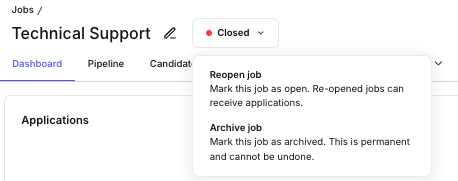
Next to the job title, you will see a button that displays the current status of the job (which should read "Closed"). Click on this status button, and a dropdown menu will appear. From this menu, select the "Reopen job" option.
FAQs
Q: What happens to the previous candidate data when I reopen a job?
A: All candidate information remains intact, and you can continue to manage applications as before. Reopening a job does not affect any data related to candidates who have already applied.
Q: Will candidates who previously applied be notified?
A: No, reopening a job does not automatically notify candidates who previously applied.