Setting up AI screening criteria
Last updated: September 25, 2026
AI scoring rates each applicant against what you're looking for in the role. You describe your ideal candidate, Kula turns that into weighted attributes, and every applicant gets a score and a breakdown. You can also reject applicants below a score automatically. AI scoring is also called the Screener or Scoring agent; they're the same feature.
Who can do this: anyone who can edit the job
Where to find it: the job → Settings → Job Information → Set up AI scoring. You can also set it up while creating the job
Describe your ideal candidate
Open the job, go to Settings → Job Information, and click Set up AI scoring.
Describe your Ideal Candidate Profile (ICP): the skills, experience, education and qualities you want. Use the guidance on screen to cover the key points.
Click Next. Kula turns your description into scoring attributes.
Check the attributes
On Verify attributes you can:
edit an attribute's name or description
drag attributes to reorder them. Higher in the list carries more weight
open Score breakdown to see how each attribute adds to the score
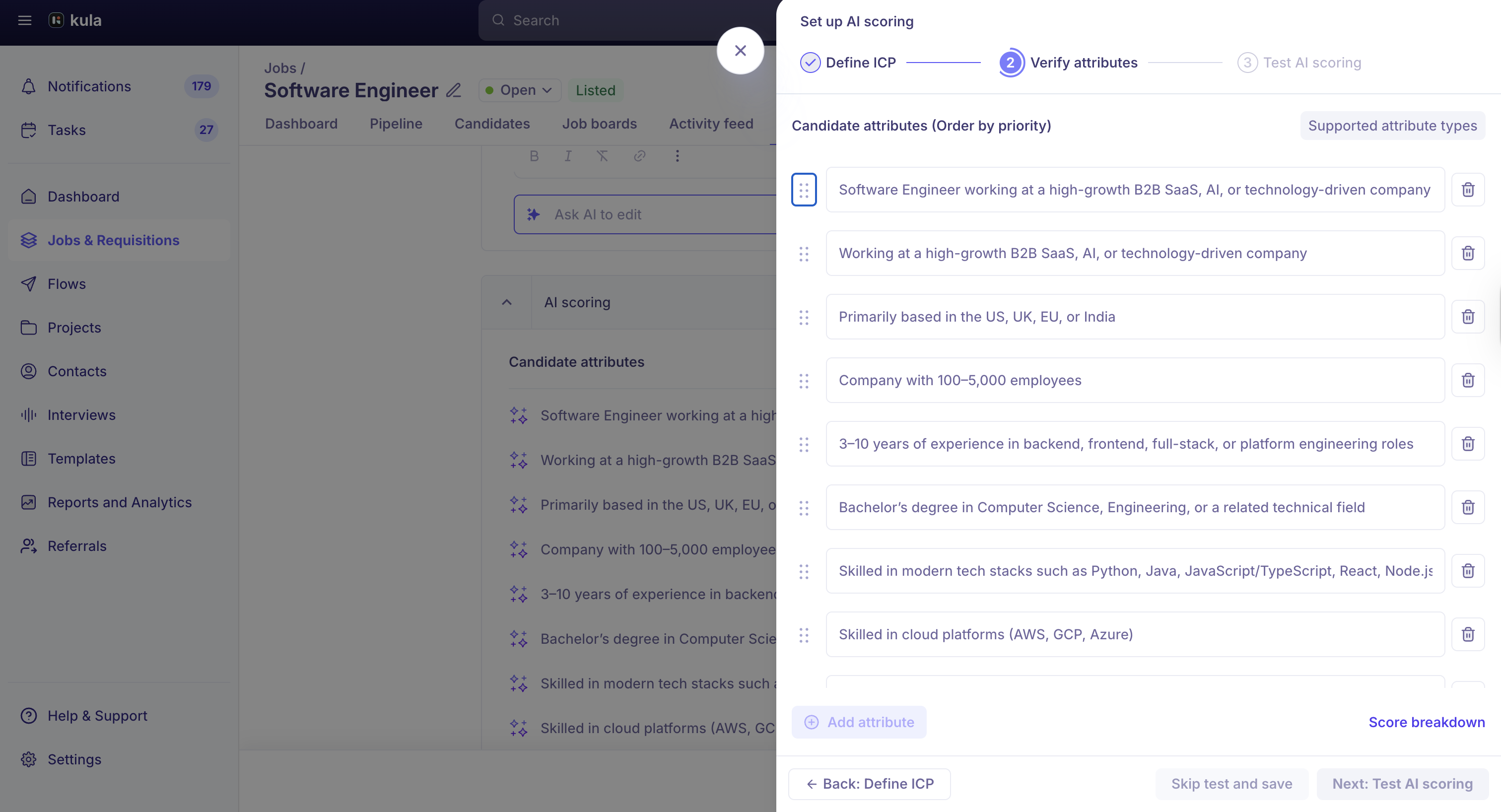
Make sure each attribute matches what the role really needs.
Test before you save
Click Next and pick a sample resume for the role.
Check the score and the attribute breakdown.
If it's not right, go back and adjust the attributes. When you're happy, save. Or use Skip test and save.
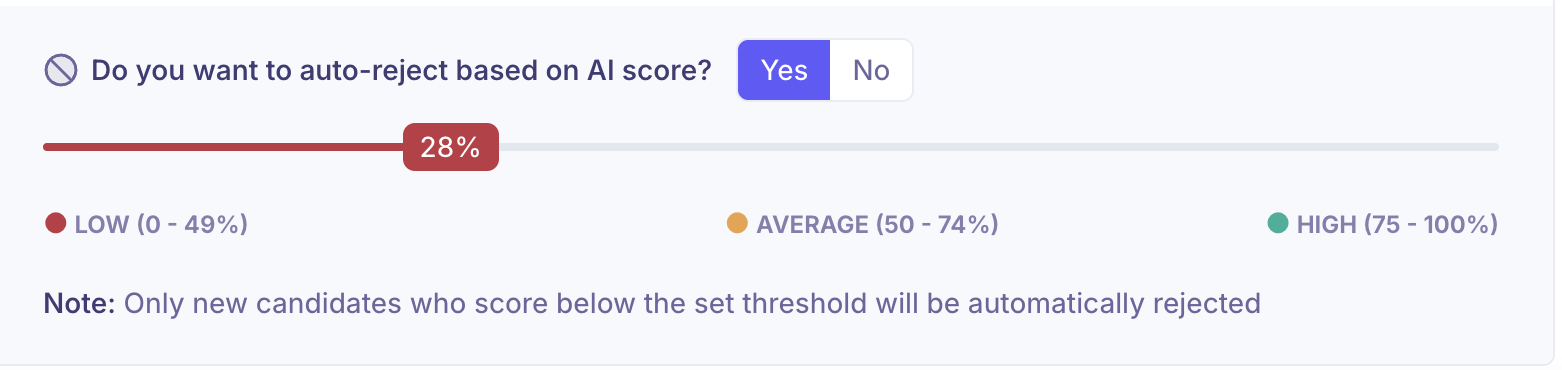
Reject below a score automatically
Set an Auto-reject threshold to reject applicants who score below it, for example 28. Rejected applicants get the reason "Below AI score threshold". To email them, turn on the rejection email in the same settings. It's separate from any knockout rule emails.
Start by reviewing scores yourself for a while, and turn on auto-reject once you trust the results.
How applicants are scored
Kula compares each applicant's resume with your attributes and the job description. It gives a score, a High / Average / Low rating for each attribute, and a summary of strengths and gaps.
Scoring uses the resume. If a candidate was added from LinkedIn and has no resume, their LinkedIn profile is used instead. Kula doesn't use any outside data.
Scores update when a candidate's resume is updated.
When scoring happens: knockout rules run first, then the Fraud detector (if it's on), then AI scoring, then any stage automation. AI scoring runs on candidates in Application Review, not on prospects.
"Failed" means the resume didn't have enough information to score. Review those applicants yourself.
Good to know
Scores guide you; they don't decide. Unless you set an auto-reject threshold, you make every decision.
You can change it any time. Update the attributes, their order or the threshold from the job's AI scoring settings.
Check scores that look wrong. If a score seems much too high or low, look at the attribute breakdown. Re-saving the attributes scores applicants again with Kula's current model.
Check scoring after cloning a job. Open the new job's AI scoring settings and confirm the attributes are the ones you want.
No custom rules. Scoring uses weighted attributes only. For a hard yes/no condition, use auto-rejection rules and knockout questions.
No resume on your application form? Contact support before relying on AI scoring, since it's built around resumes.
FAQ
How does weight work? Attributes higher in the list count for more. Drag to reorder.
Do I have to test before saving? No, but it's recommended. Skip test and save goes straight on.
Is AI scoring the same as the Screener? Yes. It's the same feature under different names.
Does AI scoring reject candidates on its own? Only if you set an auto-reject threshold for the job.
Why is a candidate's score much higher than their experience suggests? The attributes may have been created with an older model. Re-save them to score applicants again.
Can I write a custom rule, such as "must have a driving licence"? Not in AI scoring. Use a knockout question.
Should I turn on auto-reject straight away? We recommend reviewing scores yourself first.
Need help?
If you have questions or need assistance, reach out to us at support@kula.ai or use the in-app chat.