How to connect your email and calendar
Last updated: September 24, 2026
Connecting your mailbox lets you email candidates as yourself. Connecting your calendar lets you schedule interviews. Both are personal connections — you make them for your own account, and every Kula user does their own.
Who can do this: Every user, for their own account. Nobody can connect a mailbox or calendar on someone else's behalf.
Where to find it: Settings → My Settings → My integrations
What each connection gives you
Connection | What it unlocks | What happens without it |
|---|---|---|
Mailbox (Gmail or Outlook) | Sending emails to candidates from your own address. | Your name does not appear in the From list, so you cannot be picked as a sender. |
Calendar (Google or Outlook) | Scheduling interviews. | Every scheduling route opens a reconnect prompt instead of the scheduler. |
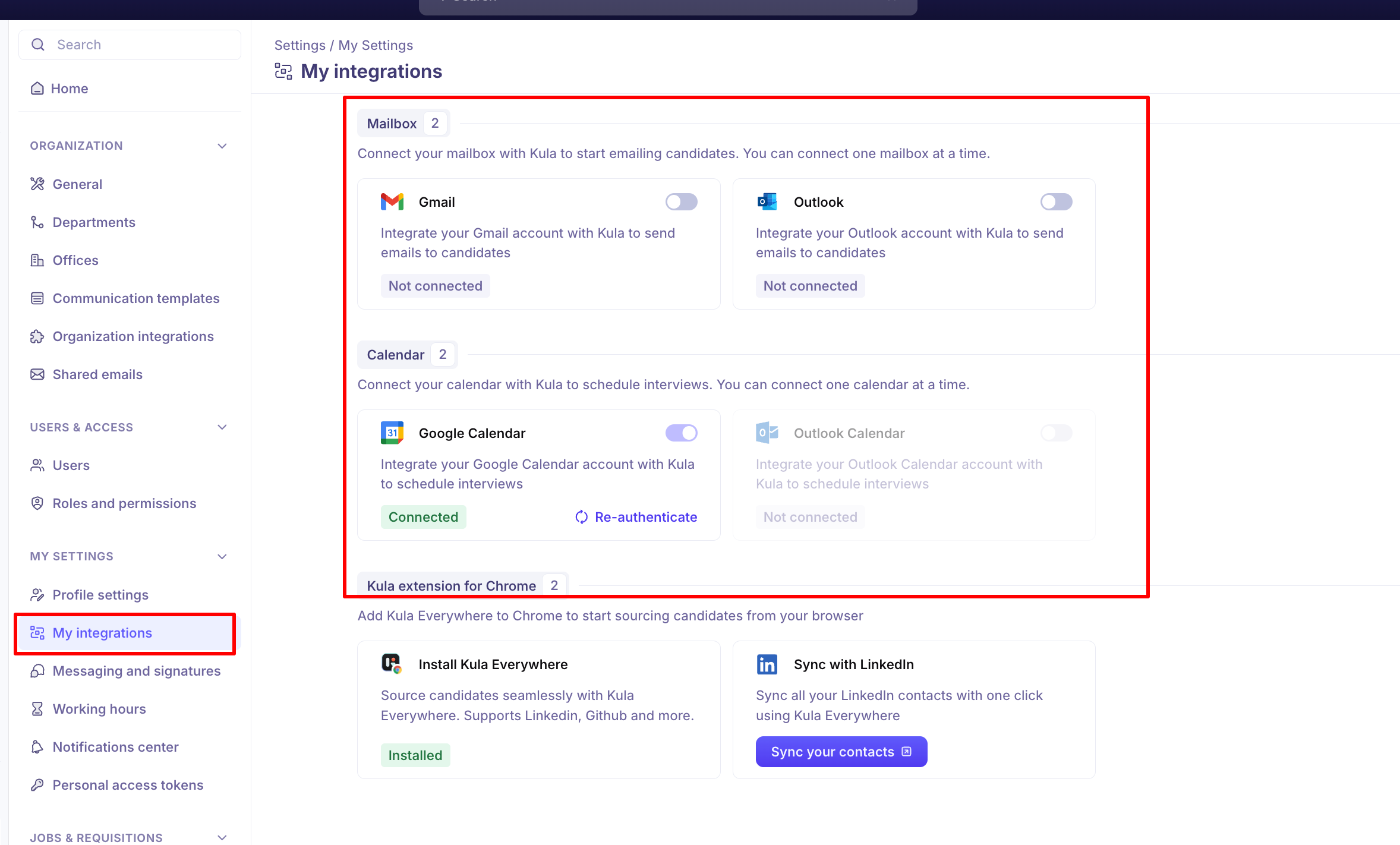
Connect your mailbox
Go to Settings → My Settings → My integrations.
Under Mailbox, turn on the toggle on the Gmail or Outlook card.
Sign in to that account and approve the permissions Kula asks for.
The card changes to Connected when it works.
Connect your calendar
On the same page, find the Calendar section.
Turn on the toggle on the Google Calendar or Outlook Calendar card.
Sign in and approve the permissions.
One at a time
You can connect one mailbox and one calendar, and no more. Once a mailbox is connected, the other mailbox card fades and its toggle stops responding. The calendar section behaves the same way.
Your mailbox and calendar do not have to be the same provider — a Gmail mailbox with an Outlook calendar is fine, and so is the reverse.
If you use Google Meet as a host
Being selectable as the host of a Google Meet interview needs one extra permission beyond ordinary calendar access.
If you connect Google Calendar now, Kula asks for it as part of the same sign-in. There is nothing extra to do.
If you connected before this was introduced, a Re-authenticate link appears on the Google Calendar card. Click it and approve the extra permission.
The link disappears once the permission is granted. Until then you show as ineligible with a "No Google Meet access" chip when someone tries to pick you as a Meet host.
If your connection drops
A connection can end without you doing anything — access expires or is revoked, a password changes, or IT changes your email domain. Kula notices and tells you rather than failing quietly.
What you get
You are notified on every channel you use: an in-app notification, an email, and a Slack message if your workspace has the Slack integration on.
Situation | What the notification says |
|---|---|
Your mailbox disconnected | "[Attn] Reauthenticate your Kula email integration" |
Your calendar disconnected | "[Attn] Reauthenticate your Kula calendar integration" |
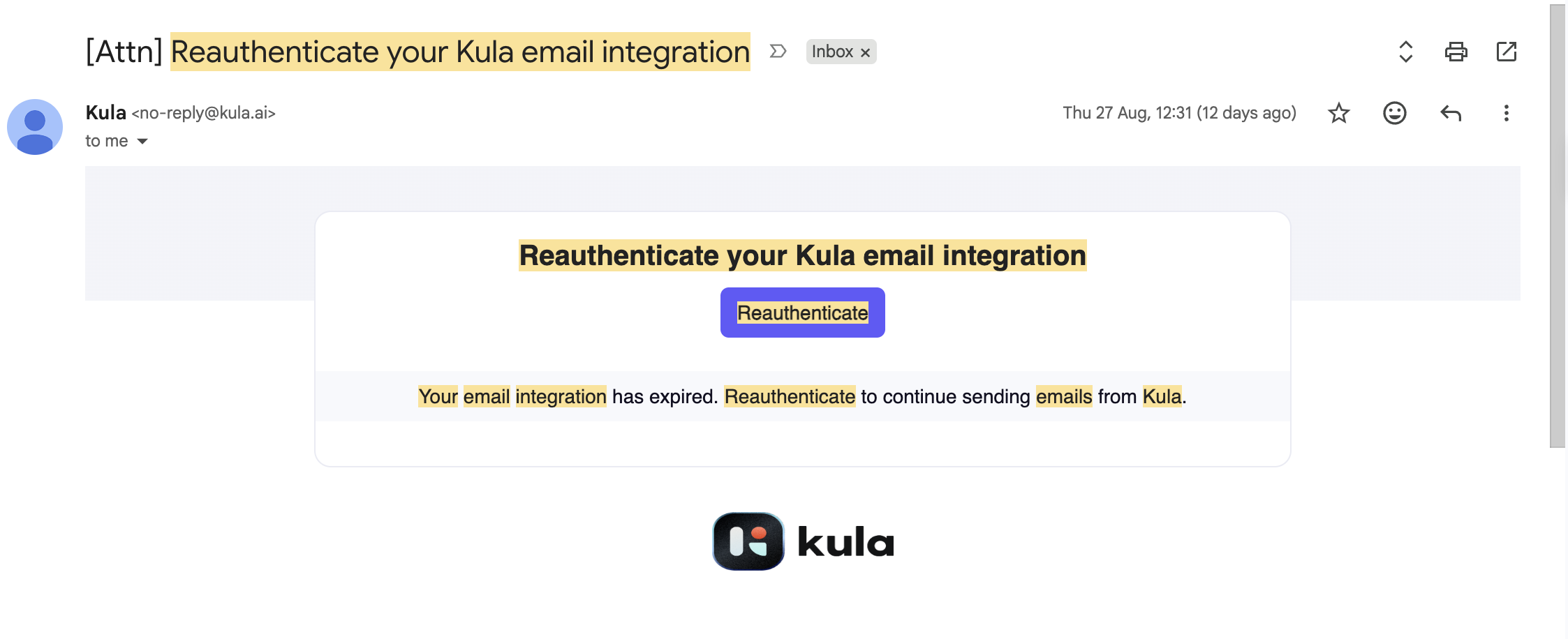

Each one links straight to My integrations so you can reconnect in a click.
How often it repeats
A reminder goes out once every 24 hours.
You get at most three reminders in total — Kula does not chase you indefinitely.
Reminders only arrive on your working days, in your own timezone. If a reminder falls on a non-working day, it waits for your next working day.
Reminders stop immediately once you reconnect, even if you had some left.
Reminders do not start if you are out of office for a week or more, or if you have no working schedule set.
Your working days and timezone come from Settings → My Settings → Working hours.
If you send emails in a Flow, other people are told too
This is the part worth knowing. If your mailbox disconnects and you are set as the sender on any Flow steps, Kula also notifies the owner of each affected Flow — naming you and listing the flows that have stopped:
"[Attn] {your name} as message sender on Flows have stopped. Email integration needed!"
So a disconnected mailbox is not only your problem. Any flow relying on you as sender pauses until you reconnect, and its owner finds out.
Zoom and meeting rooms
The same reminders exist for two organisation-level integrations, sent to whoever administers them rather than to you:
"[Attn] Reauthenticate your Kula Zoom integration", linking to Organization integrations.
"[Attn] Reauthenticate your Kula Microsoft Meeting Rooms integration", linking to Meeting rooms.
Good to know
You cannot disconnect from this page. The toggle on a connected card is inert by design — it connects, it does not disconnect. To disconnect, or to swap from one provider to the other, contact support at support@kula.ai.
A connection can drop on its own. Expired or revoked access, a password change, or an email-domain change can all end it. When that happens Kula shows a banner reading "Your email integration requires reauthentication" and emails you, so you are not left guessing.
Microsoft accounts may need IT approval. On organisations using Azure AD or Entra sign-in, turning on Outlook or Outlook Calendar can trigger a request for IT admin consent. The connection stays pending until an administrator approves it — this is a Microsoft tenant setting, not something Kula controls.
Connecting Gmail does not connect Google Calendar. They are two separate cards and two separate approvals. Connecting one and assuming the other is a common cause of "why am I being asked to connect my calendar again".
FAQ
I can't find my own name in the From list when sending a candidate email. Why? Only users with a connected mailbox appear in the From list. Connect Gmail or Outlook under My integrations and your name appears. The same applies to colleagues — if someone is missing from the list, their mailbox is not connected.
I need to disconnect my calendar and reconnect it, because our IT is migrating accounts. How do I do that? There is no disconnect control in the interface, so contact support at support@kula.ai and they will disconnect it for you. You can then reconnect it yourself from My integrations.
I have my Outlook calendar connected, but Kula keeps asking me to connect Google Calendar when I schedule. What's wrong? That prompt normally means the calendar Kula can see is not connected for the person being scheduled — often an interviewer or external collaborator rather than you. Check that everyone on the interview has their own calendar connected. If yours shows Connected and you still see it, contact support.
My mailbox keeps disconnecting itself. Is that expected? No. Occasional re-authentication is normal after a password or permission change, but a mailbox that drops repeatedly is a bug worth reporting. Reconnect from My integrations and contact support with the dates it happened.
Need help? If you have questions or need assistance, reach out to us at support@kula.ai or use the in-app chat.