How to Post a Job to Job Boards
Last updated: May 9, 2025
Posting jobs to external job boards is a key step in attracting a diverse pool of candidates. Kula ATS makes it easy to share your job postings on various job boards, both free and premium.
Posting Jobs
Navigate to the job you've created and go to the Job Boards section.
Enable the LinkedIn option.
Enter all the necessary details and click on Save.
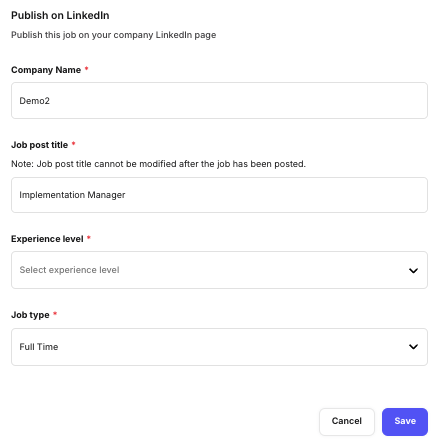
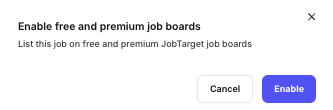
Free & premium job boards
Premium Job Boards
Navigate to the job you've created and go to the Job Boards section.
Within this page, enable the Free & premium job boards. You can select from a variety of top job boards such as LinkedIn, Indeed, and Monster.
After selecting your job boards, review the total cost in the cart.Note: Some job boards may require specific additional information, which you can fill out on the same page.
Enter your payment details and confirm the transaction.
Once payment is processed, you’ll be able to download the invoice and review the order.Note: The job posting will initially show as "Active" and "Delivery in Progress." As the job goes live, its status will be updated, and links to view it on each board will be available.
Free Job Boards
Navigate to the job you've created and go to the Job Boards section.
Enable the Free & premium job boards.
Search for the Free Organic Posting using the Search Bar and select.
Once done, your job will be posted in all the free job boards that are supported within the next 24 hours.
When you choose to post jobs through JobTarget's Organic Sites bundle, your job postings will be shared across the following platforms:
MyJobHelper
Adzuna
ZipRecruiter
JobCube
Talent.com
Remotive
SAE
JobLeads
Bandana
EverlongMedia
Important Update on LinkedIn Job Postings
LinkedIn is making changes to its job posting options, and as a result, JobTarget will no longer be able to support organic job postings on LinkedIn. However, this does not impact paid job postings.
You can continue to:
✅ Purchase individual LinkedIn job postings
✅ Access LinkedIn through our Programmatic tools
✅ Use your existing LinkedIn inventory via JobTarget
FAQs
Q: Are there any costs associated with posting to premium job boards?
A: Yes, posting to premium job boards may involve additional costs. Be sure to review the pricing details before enabling these options.
Q: How do I add my LinkedIn Inventory to JobTarget?
A: Kindly click here for the Job Target guide.