User Roles in Kula
Last updated: April 10, 2026
Admin, Recruiter, Hiring Manager, Interviewer, Sourcer
When a user is added to Kula, their assigned role determines what they can manage and the actions they can perform within the platform. Each role is provisioned with a specific set of permissions aligned to the various modules of the Kula environment. Assigning the right role ensures your team members have exactly the access they need — no more, no less.
This article covers the six default roles in Kula — Super Admin, Admin, Recruiter, Hiring Manager, Organization Member, and External Collaborator — along with guidance on when and how to use each.
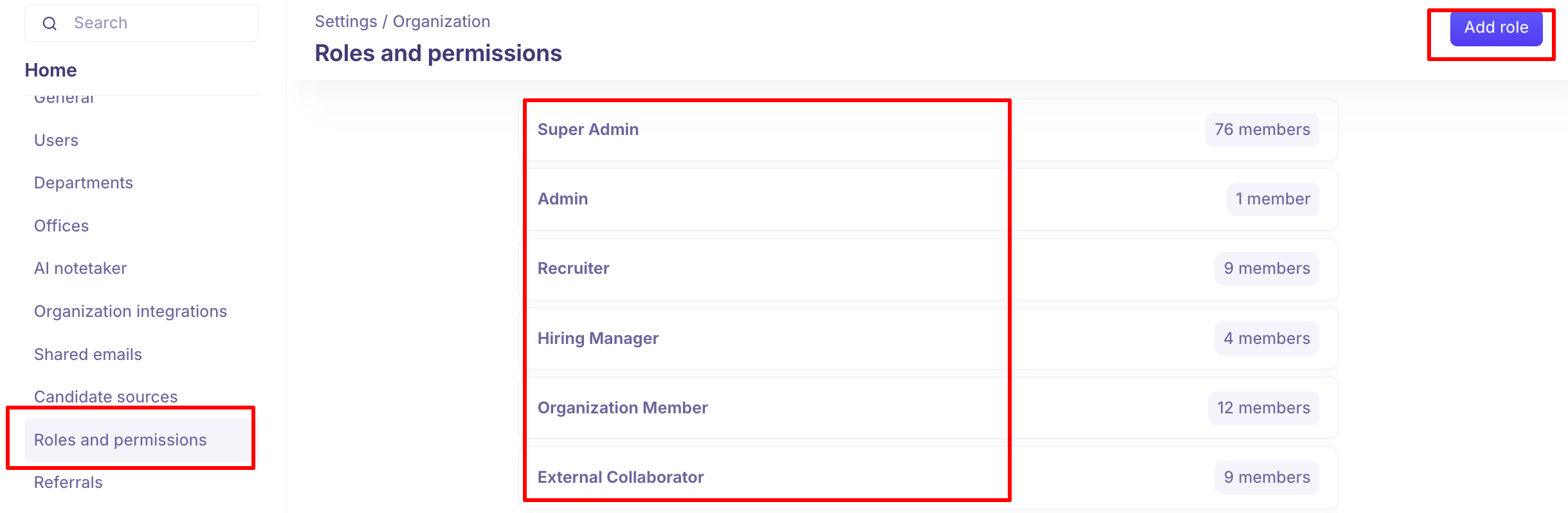
Overview of Roles
Kula provides six default roles, each tailored to a specific type of user in your hiring organisation:
Role | Typical Users | Summary |
Super Admin | CHRO, Head of HR, Head of Recruitment | Full access to all settings, jobs, flows, projects, and users. Can add or delete Super Admins. |
Admin | Recruitment Leader, Lead Recruiter, Senior Recruiter | Manage jobs, flows, projects, and most settings. Can add or delete users (except Super Admins). |
Recruiter | Junior Recruiter, Recruiting Coordinator | Create and manage jobs, flows, contacts, and projects. Part of hiring teams. |
Hiring Manager | Hiring Manager | Added to hiring teams; can view all contacts and participate in hiring workflows. |
Organisation Member | Non-recruitment employees | Can act as interviewers, refer candidates, and apply via the internal job board. |
External Collaborator | Agency Recruiter, Contractor | Can be added to hiring teams with limited access to relevant jobs. |
Role Descriptions
Super Admin
The Super Admin role is the highest level of access in Kula. It is best suited for senior HR leaders such as the CHRO, Head of HR, or Head of Recruitment who need complete visibility and control over the platform.
Full access to all organisation settings, including departments, offices, and work types
Can manage roles and permissions for all users
Can add or remove other Super Admins
Access to all reports, analytics, jobs, flows, projects, and contacts
Manages confidential jobs and candidate access settings
Admin
The Admin role is designed for recruitment leaders and senior recruiters who need broad access to manage the hiring function but do not require full system-level control.
Can manage jobs, flows, projects, and most platform settings
Can add or remove users, except Super Admins
Access to reports, analytics, and data downloads
Can manage integrations, job boards, offer templates, and interview plans
Recruiter
The Recruiter role is intended for day-to-day recruiters who are actively managing candidates and hiring workflows. This role covers both junior recruiters and recruiting coordinators.
Can create and manage jobs, flows, contacts, and projects
Can be added to hiring teams
Can view all contacts and manage contacts they create
Can fill scorecards for other users
Can manage email and flow templates
Hiring Manager
The Hiring Manager role is for team leads and managers who are part of the hiring process but are not full-time recruiters. They participate in hiring workflows and interviews without needing administrative access.
Can be added to hiring teams for relevant jobs
Can view all contacts and create new contacts
Can be added to flows and participate in hiring workflows
Can manage email and flow templates they are part of
Organisation Member
The Organisation Member role is for non-recruitment employees who need limited access to Kula — primarily to participate as interviewers, refer candidates, or browse internal job postings.
Can act as an interviewer in hiring workflows
Can refer candidates through the referral portal
Can apply to open roles via the internal job board
Does not have access to candidate data or recruiting workflows
External Collaborator
The External Collaborator role is designed for agency recruiters and contractors who need limited, controlled access to Kula. This role allows them to contribute to specific hiring efforts without accessing the broader platform.
Can be added to hiring teams for specific jobs
Can be added to flows related to their assigned jobs
Can create and view contacts relevant to their roles
No access to admin settings, reports, or organisation-wide data
Custom Roles
If the six default roles do not meet your organization's needs, Kula allows you to create custom roles with tailored permission sets. Custom roles can be configured to grant specific levels of access to any module within your Kula environment.
To create a custom role, navigate to Settings > Organisation > Roles & Permissions and click Add Role. Once created, custom roles can be assigned to new or existing users from the Users settings page.
How to Choose the Right Role
Use the following questions as a guide before assigning a role:
Does this user need system-wide control? If yes, assign Super Admin or Admin.
Will this user actively manage candidates and hiring workflows? If yes, assign Recruiter.
Is this user only participating in interviews or reviewing candidates? If yes, assign Hiring Manager or Organisation Member.
Is this user external to your organisation, such as an agency recruiter? If yes, assign External Collaborator.
Need Help?
If you have questions or need assistance with setup, feel free to reach out to us at support@kula.ai or use the in-app chat for assistance.