Marking a candidate as a no-show
Last updated: September 23, 2026
When a candidate doesn't turn up for a scheduled interview, mark them as a no-show so the interview reflects what actually happened instead of sitting there as if it's still pending.
Use this once it's clear the candidate isn't going to join, rather than leaving the interview open indefinitely.
Who can do this: Recruiter, Hiring Manager, Admin, Super Admin on jobs they have access to.
Where to find it: The scheduled interview's menu, on the candidate's Interview activity.
Mark a no-show from the scheduled interview's menu, on the candidate's Interview activity.
Marking a candidate as a no-show
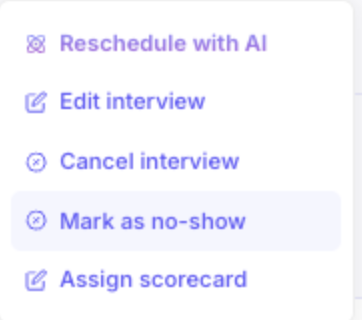
On the scheduled interview, open the menu and select Mark as no-show.
Confirm. The interview organiser and every interviewer are notified that the candidate was a no-show and that the interview didn't happen.
Check in first with AI. If your account has the Coordinator Agent turned on you can have Kula call the candidate first, using Call candidate from the same menu, to check in before marking them a no-show.
Undoing a no-show
If you marked a candidate a no-show by mistake, or they turn out to have joined after all, select Undo no-show and confirm. What happens next depends on timing:
If the interview's scheduled time has already passed, Kula treats it as complete and sends scorecards to interviewers immediately.
If the interview's scheduled time hasn't passed yet, it continues as scheduled, and scorecards go out to interviewers at the end as normal.
Good to know
The option appears once the interview has started. Mark as no-show isn't offered before the scheduled start time.
It disappears once feedback is in. If any interviewer has already submitted a scorecard, you can't mark the candidate as a no-show.
Everyone on the interview is told. The organiser and every interviewer are notified that the interview didn't happen.
FAQ
Why can't I see Mark as a no-show?
Either the interview hasn't started yet, the candidate is already marked as a no-show, or someone has already submitted a scorecard for it.I marked the wrong candidate. Can I undo it?
Yes. Select Undo no-show from the same menu and confirm.Do interviewers still get a scorecard after I undo a no-show?
Yes. If the interview time has passed, scorecards go out straight away; if not, they go out at the end of the interview as normal.
Need Help?
If you have questions or need assistance with setup, feel free to reach out to us at support@kula.ai or use the in-app assistance.