View and Apply for Internal Roles
Last updated: March 25, 2026
Use the Jobs tab in Referrals to explore and apply for internal roles. You can browse open positions, search for specific roles, and submit your application directly.
This article explains how to view open internal roles and apply for them using the Jobs tab.
Prerequisites
Access to the Referrals module
Required permissions to view and apply for internal roles
Steps to View and Apply for Roles
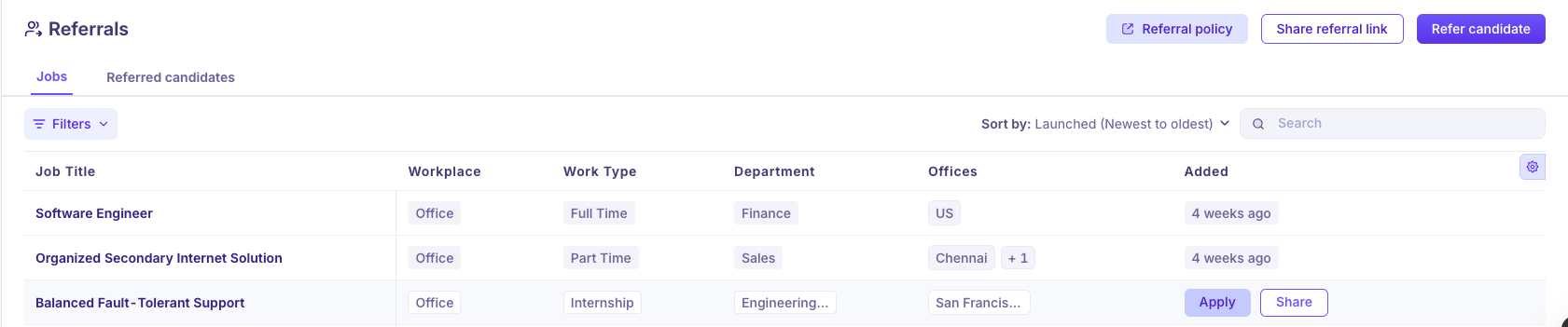
Step 1: Open the Jobs tab
To view available roles:
Click Referrals in the left navigation menu.
Click the Jobs tab.
The list of open roles loads.
The Jobs tab displays only roles that are open for internal applications.
Step 2: Search and filter roles (optional)
To find a specific role:
Enter a job title in the search field.
Use filters to narrow results by location, or department.
Step 3: Review a role
To view role details:
Click the job title.
Review the job description, requirements, and other details.
Step 4: Apply for a role
To apply for a role:
Open the role you want to apply for.
Click Apply.
Complete the application form.
Click Submit.
Notes
Only roles listed in the Jobs tab are open for internal applications.
If you do not see a role, it is not currently accepting internal applications.