Job-Level Permissions and Visibility
Last updated: April 10, 2026
Kula gives you control over who can see a job and what they can do with it. This is managed through two separate settings: job visibility (who sees the job on the career portal and job boards) and job-level access (which internal users can view and manage the job).
Job Visibility: Listed vs. Unlisted
Every job in Kula has a visibility setting that controls whether it appears publicly.
Setting | What it means |
Listed | The job is publicly visible on your Kula career page, internal job board, and any connected job boards (LinkedIn, Indeed, etc.). Candidates can discover and apply directly. |
Unlisted | The job does not appear on any board. Candidates can only be added manually or via a direct link. The application form and auto-rejection rules are not available for unlisted jobs. |
How to update visibility:
Open the job
Go to Settings → Job Post
Toggle the listing status
Save
When a job is closed or deleted, Kula automatically removes it from connected job boards (where the integration credentials are still valid).
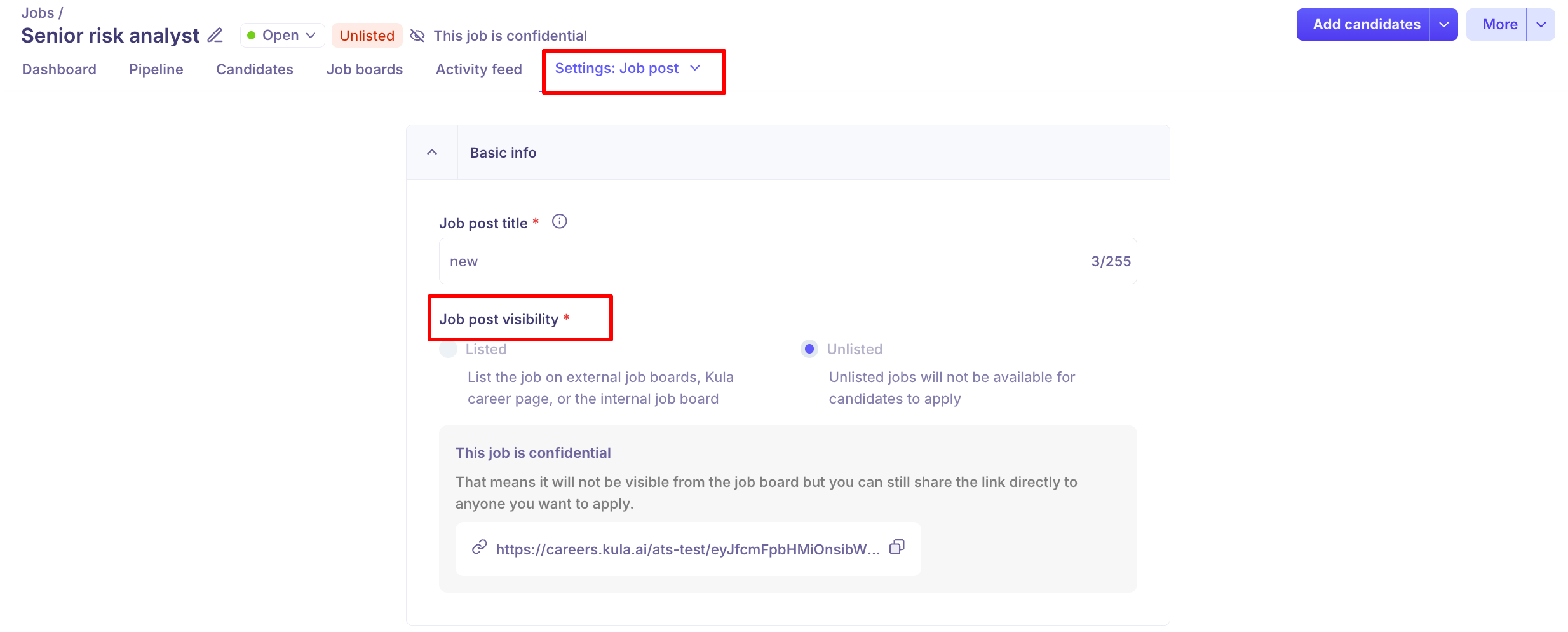
Confidential Jobs
Marking a job as Confidential adds an extra layer of internal access control. Confidential jobs are hidden from team members who are not directly assigned to the hiring team.
What confidential means:
The job is hidden from the jobs list for anyone not on the hiring team
The job is automatically set to Unlisted and removed from job boards and the career page
A confidential badge appears on the job for those who can see it
If the job is later marked as not confidential, it remains Unlisted until you manually set it to Listed
When to use confidential:
Executive or sensitive leadership roles
Backfill roles where the current employee hasn't been notified
Roles with competitive sensitivity
How to mark a job as confidential/not confidential:
Open the job
Go to Settings → Job Info or use the More Options (⋯) menu
Toggle Mark as Confidential/ Mark as Not confidential for the jobs already marked as confidential
Save


Internal Access: Who Can See a Job
Beyond public visibility, internal access to a job in Kula is governed by a combination of user roles and hiring team membership.
Admins and Super Admins
Full access to all jobs in the organization, regardless of hiring team membership.
Recruiters and Hiring Managers
Can see jobs they are added to as part of the hiring team. Depending on their role permissions, they may also have visibility into all jobs across the organization.
Interviewers and Coordinators
Can only see jobs they have been explicitly added to via the hiring team.
External Collaborators (Agency Recruiters)
Can only see and manage the specific jobs they have been added to under the External Recruiters section of the hiring team. They cannot see other jobs in your account.
Role-Based Permissions on a Job
What a team member can do on a job depends on their system role (set in Settings → Roles & Permissions) and their hiring team role on that specific job.
Action | Admin / Super Admin | Recruiter | Hiring Manager | Interviewer | External Collaborator |
View job | ✅ All jobs | ✅ Assigned jobs | ✅ Assigned jobs | ✅ Assigned jobs | ✅ Assigned jobs only |
Edit job details | ✅ | ✅ | ❌ | ❌ | ❌ |
Add candidates | ✅ | ✅ | ✅ | ❌ | ✅ (own candidates only) |
View all candidates | ✅ | ✅ | ✅ | ✅ (assigned stages) | ❌ (own candidates only) |
Move candidates | ✅ | ✅ | ✅ | ❌ | ❌ |
Submit scorecard | ✅ | ✅ | ✅ | ✅ | ❌ |
Manage hiring team | ✅ | ✅ | ❌ | ❌ | ❌ |
Open / Close job | ✅ | ✅ | ❌ | ❌ | ❌ |
Exact permissions may vary depending on how your organization has configured custom roles in Settings → Roles & Permissions.
FAQs
Q: Can I make a job visible only to specific internal users? Yes — mark the job as Confidential. Only users on the hiring team will be able to see it.
Q: If I mark a job confidential, will it be removed from the career page? Yes. Confidential jobs are automatically unlisted and removed from all job boards and the career page.
Q: Can an agency recruiter see candidates added by my internal team? No. External Collaborators (agency recruiters) can only see and receive notifications about candidates they personally submitted.
Q: What happens to a confidential job's visibility if I remove the confidential tag? It stays Unlisted. You must manually change it to Listed if you want it to appear publicly again.
Q: Can I restrict a recruiter from seeing jobs they're not assigned to? This depends on the permissions configured for the Recruiter role in Settings → Roles & Permissions. Contact your admin to adjust role-level access settings.
Need Help?
If you have questions or need assistance with setup, feel free to reach out to us at support@kula.ai or use the in-app chat for assistance.