Conversational Analytics in Kula
Last updated: March 7, 2025
What is Conversational Analytics in Kula? Conversational analytics in Kula allows users to interact with an AI assistant to gain real-time insights about their recruitment data. Users can retrieve key hiring metrics by simply conversing with the AI, track candidate progress, and analyze recruitment performance without manually sifting through reports.
Key Benefits of Kula Conversational Analytics
Instant Access to Insights - Get quick answers to hiring-related questions through a simple conversation.
Data-Driven Decision Making - Leverage AI-powered analytics to optimize recruitment strategies.
Enhanced User Experience - No need for complex reporting; just ask and get answers.
Time-Saving Automation - Reduce manual data retrieval with AI-powered responses.
Accurate and Reliable Analytics - Ensure data consistency with AI-driven insights.
How to Use Conversational Analytics in Kula
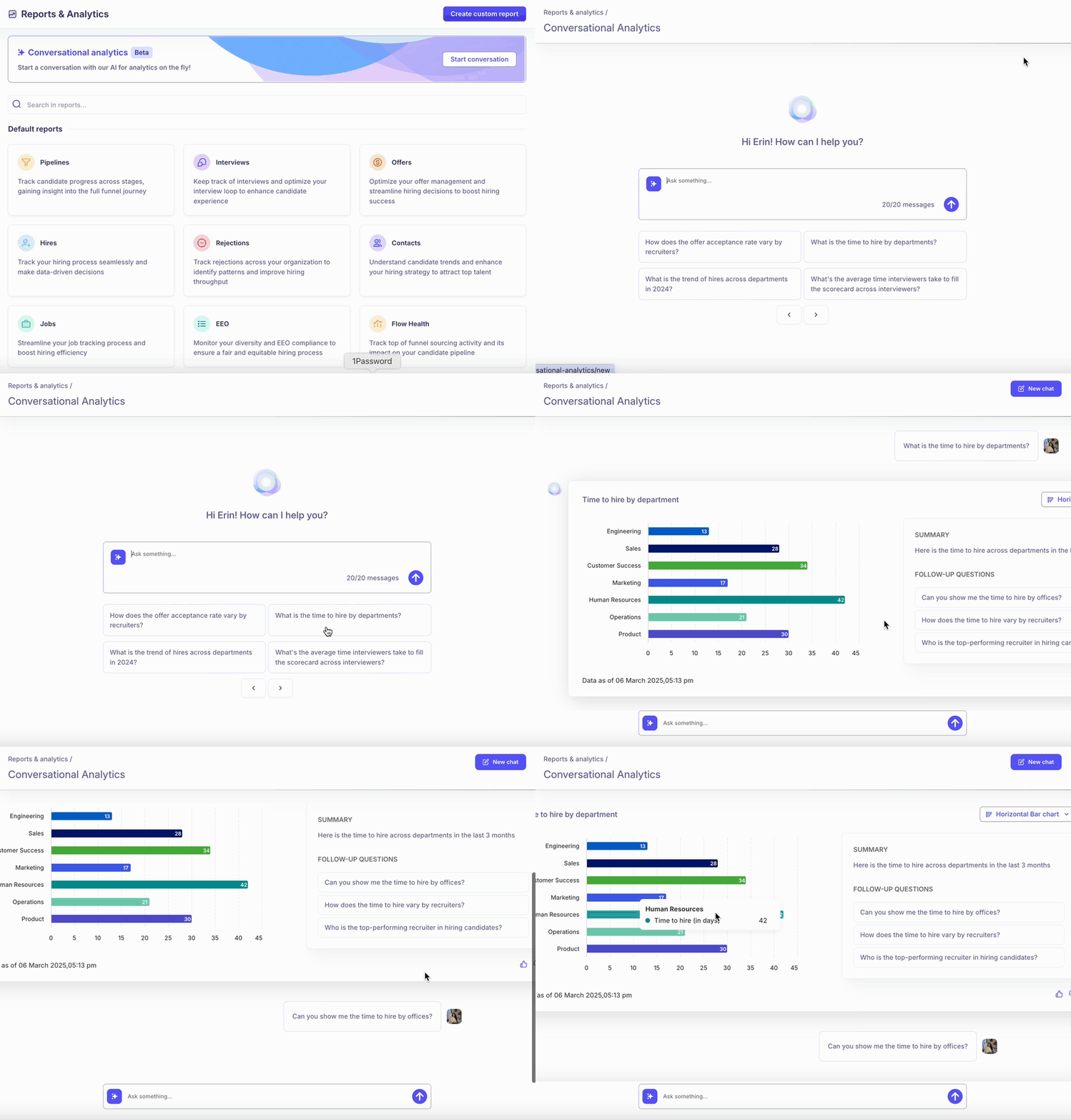
Go to Reports and Analytics - Navigate to the Reports and Analytics section in Kula.
Click Start Conversation - Initiate a chat with the AI assistant.
Ask a Question - In the text box, type your question under the "Ask something" box and hit enter.
Choose from Pre-Defined Questions (Optional) - Select from a list of suggested questions for quick insights.
Review AI-Generated Insights - The AI will provide relevant data using bar charts or tables.
Ask Follow-Up Questions - Refine your insights by continuing the conversation with additional queries.
Common Use Cases
Candidate Pipeline Tracking - Ask how many candidates are in different hiring stages.
Hiring Performance Analysis - Query metrics like time-to-hire and offer acceptance rates.
Source Effectiveness - Determine which hiring channels bring the best candidates.
Recruitment Funnel Optimization - Identify bottlenecks in the hiring process.