Building your own careers page on the Job Boards API
Last updated: October 13, 2026
The Job Boards API lets you list your open roles on your own website instead of sending candidates to a Kula-hosted page. This article covers the four ways to do it, what an admin sets up in Kula, and the limits worth knowing before your developer starts.
Who can do this: Super Admin, Admin — anyone with the Manage API tokens permission creates the key. Building the page itself is a developer's job.
Where to find it: Settings → Organization → API management, and the developer documentation at
Four ways to put your jobs on your own site
You don't have to build everything. The four options differ in how much of the candidate journey you own — pick the lightest one that gets you what you need.
Option | You build | Kula handles | API work |
|---|---|---|---|
Hosted career portal | Nothing — you link to it | The whole portal: listings, job details, application form | None |
Linked job listings | The list of roles on your site | Job details and the application form, on your Kula career page | Least |
Embedded apply | The list and the job details on your site | The application form, opened in an overlay on your page | Medium |
Native apply form | Everything — list, job details, and the form | Storing and processing the application | Most |
Each option is demonstrated with live data on the in the developer documentation.
If you only want your roles on your own domain and don't need to own the apply experience, linked job listings gets you there with very little work.
What the Job Boards API gives you
Every request goes to https://api.kula.ai.
What you want | Endpoint |
|---|---|
Your published roles, as a list |
|
One role, with its full description |
|
The fields that role's application form needs |
|
Upload a CV, cover letter or photo |
|
Submit the application |
|
Departments, as a nested tree |
|
Offices, with city and country |
|
Suggestion lists for form fields — companies, industries, locations, institutions, disciplines, degrees |
|
Payload shapes, parameters and error codes live in the rather than here, so there's one version of them.
Give the key only what it needs
Create a Job board key, not a Private key — a Job board key can only reach the endpoints above. When you create it, choose Custom and tick only the grants your integration uses. There's a Job board / careers site starting template that pre-selects a sensible set.
Grant | Covers | You need it for |
|---|---|---|
Read job posts and application forms | Listing posts, post details, form fields | Every option |
Submit applications | Submitting an application, uploading files | Native apply form only |
Read departments and offices | The department tree and office list | Filters on your listing page |
Read reference data | Company, industry, location, institution, discipline and degree lookups | A native form with type-ahead fields |
If a key calls something it wasn't granted, the request is rejected with a 403 error naming the missing grant. You can add that grant under Settings → Organization → API management and retry — the key keeps working, and doesn't need rotating. Keys created before grants existed are unrestricted and keep working unchanged.
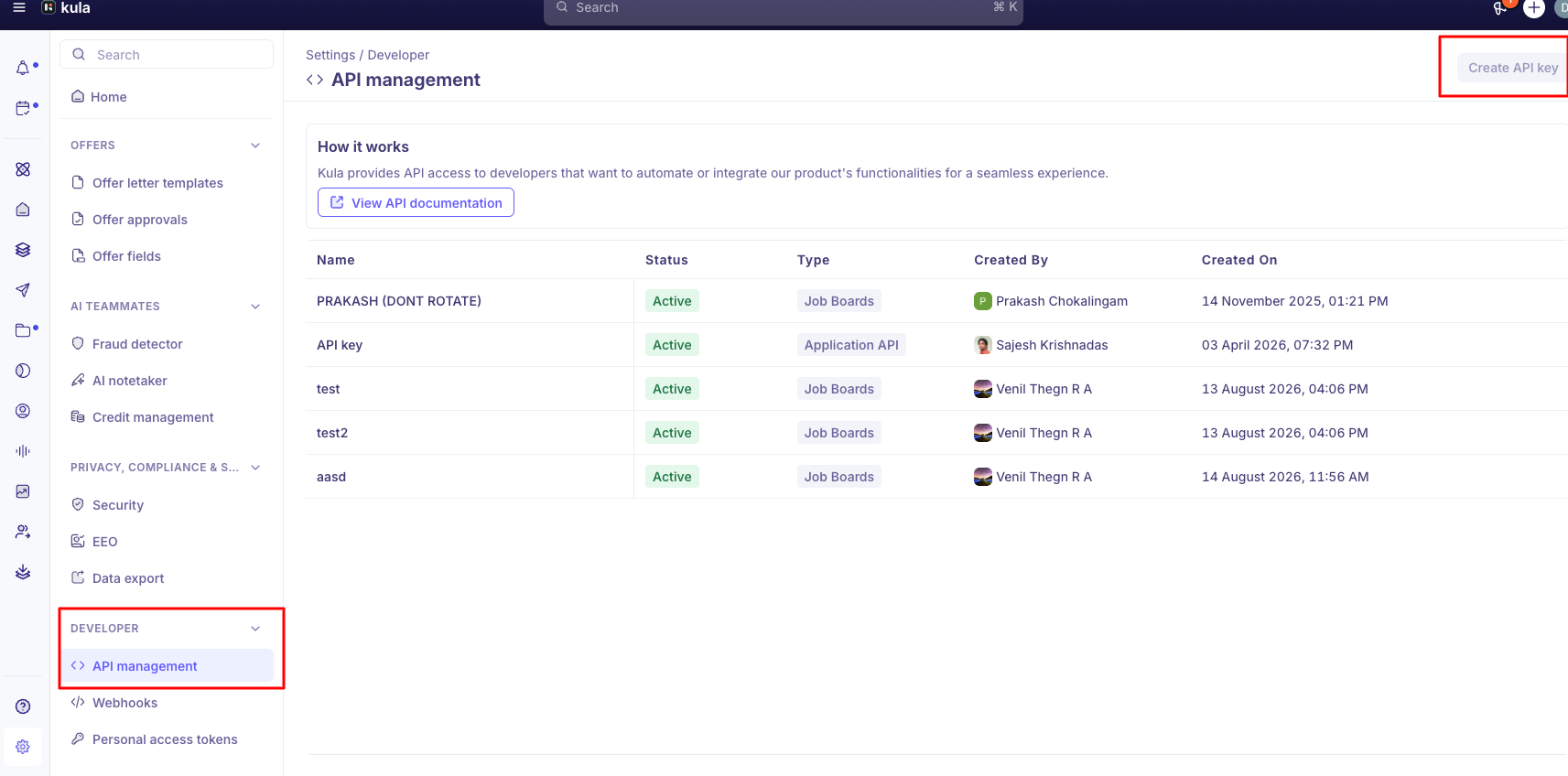
For the steps to create and hand over a key, see Generating and managing API keys.
Which of your jobs appear in the API
A job post is returned by the API only when all three are true:
The job post is published
The job post is listed
Its visibility includes external — either external, or internal and external
Internal-only postings never appear. This is the same rule the Kula-hosted career page uses, so if a role shows there but not through the API, the cause is almost always caching on your side rather than the job's settings.
Good to know
An account can hold 5 API keys at most. he limit can't be raised. Delete a key you no longer use, or have people use their own personal access token instead (Settings → My Settings → Personal access tokens, once a Super Admin has turned personal access tokens on)
Attachments must be PDF or DOCX, except a photo field, which takes JPEG or PNG. The cap is 20 MB per file, and the filename must be under 255 characters.
The list endpoint returns 20 roles per page by default, and 100 at most per page. Page through it rather than asking for everything at once.
The job description is only on the single-post endpoint. The list endpoint leaves it out to stay fast, so fetch the detail when a candidate opens a role.
Compensation appears only when it's switched on for that job. If a role has no
compensationin the response, check the job's own settings before treating it as an API problem.Your job pages and Kula's are both indexable by search engines. If you host your own job pages and also have a Kula career page, both carry the same job description at different URLs, and Google may rank Kula's instead of yours. You can turn on the "Hide Kula careers page from search engines" toggle under SEO settings (Settings → Sourcing → Career Page Builder → SEO) to keep the Kula page live but out of search results, or unpublish it entirely if you don't need it — both are self-serve.
FAQ
Do we have to build a careers page to use the Job Boards API?
No. If you only want your roles on your own site, linked job listings is the lightest option: you list the roles, and Kula's career page handles job details and the application form.
Which kind of API key should our developer use?
A Job board key, not a Private key. Choose Custom and tick only the grants your integration uses, or start from the Job board / careers site template.
Our developer is getting a 403 error. What's wrong?
The key is calling something it wasn't granted, and the error names the missing grant. Add it under Settings → Organization → API management and retry — you don't need a new key.
A job shows on our Kula career page but not through the API. Why?
Both use the same rule — the post must be published, listed and visible externally — so it's almost always caching on your side.
Why isn't the job description in the list of roles?
The list endpoint leaves it out to stay fast. Fetch the single post when a candidate opens a role.
Can we have more than 5 API keys?
No, the limit can't be raised. Delete a key you no longer need, or give each person their own personal access token under Settings → My Settings → Personal access tokens. A Super Admin has to turn personal access tokens on first.
Can I embed my jobs on my own website? Yes. Use the Job Boards API to show your Kula jobs on your site. The lightest option is linked job listings: the list of roles sits on your site, and each job opens on your Kula career page. Embedded apply keeps the job details on your site and opens the application form as an overlay. The native apply form lets you build the whole experience yourself. If you only want a link, you can also point your website to your Kula career page.
Need help? If you have questions or need assistance, reach out to us at or use the in-app chat.