Bulk actions on candidates
Last updated: September 26, 2026
Instead of acting on candidates one at a time, Kula lets you select multiple candidates and apply an action to all of them at once.
This article covers where bulk actions are available, what you can do in bulk, and a few current limits.
Who can do this: Bulk actions follow the same access as the individual action they represent — for example, bulk-rejecting requires the same permission as rejecting a single candidate, and bulk email requires the same access as sending an individual email.
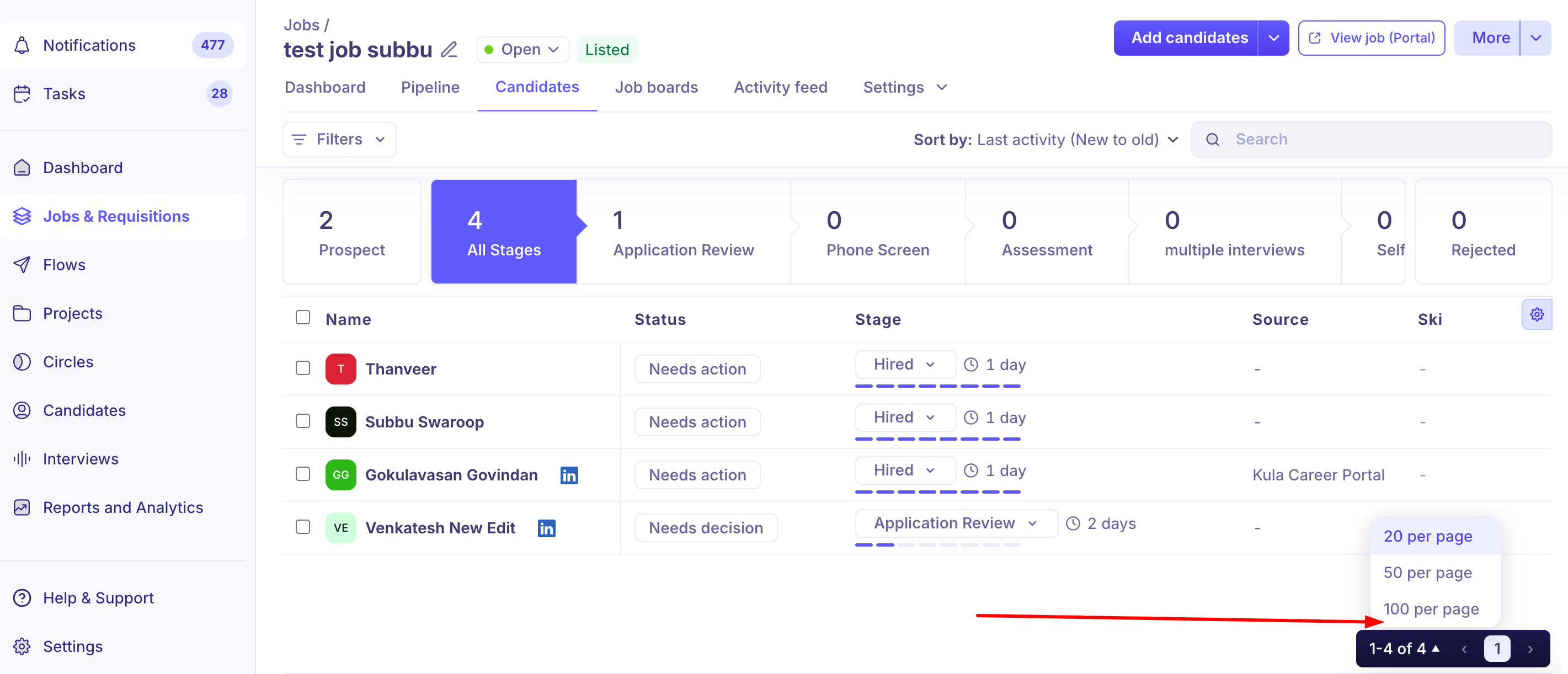
Where to find it: Select multiple candidates using the checkboxes on a job's Candidates tab, or on the account-wide Candidates page, then use the bulk action menu (often under "More Options") that appears once candidates are selected.
What you can do in bulk
Move to another stage — move a selected group of candidates to a new stage at once.
Reject — reject multiple candidates in one action, including sending a rejection email if configured. This can now be applied across an entire filtered result set, not just the candidates visible on the current page.
Send email — send the same email (from a template or custom) to every selected candidate.
Send self-schedule link — send self-scheduling invites to up to 20 candidates at a time for a given interview activity. Before sending, Kula validates the selection and shows an error if any selected candidate is missing an email address, or a warning if a candidate already has an interview scheduled for that activity.
Add tags — apply one or more tags to every selected candidate at once, available both from a job's Candidates tab and from the account-wide Candidates page.
Add to another job / Add to a flow / Add to a project — add the selected candidates to another job, an outreach flow, or a CRM project in one action.
Export to CSV — export the selected candidates' data.
Merge — from the Candidates page, select up to 3 candidate records and merge them into one, useful for cleaning up duplicates.
Stop / Remove candidates — within Projects and Flows specifically, stop or remove candidates in bulk.
Selecting more than one page at a time
You're not limited to the candidates visible on a single page. You can choose a page size (20, 50, or 100 in Projects and Flows) or use "Select all" to apply a bulk action to an entire filtered set rather than paging through in batches of 20 or 25.
Good to know
Bulk self-scheduling is capped at 20 candidates per send. For larger volumes, you'll need to send in multiple batches.
There's no one-click "reject all open candidates" when you close a job. Closing a job doesn't automatically reject the candidates still in process — you'll need to bulk-select and reject them yourself if you want to close the loop with everyone.
There's no API endpoint for bulk candidate rejection by criteria today. You can't reject candidates in bulk through the API.
Survey templates aren't yet available in the bulk email template picker. Only email templates appear in the bulk email picker. Send surveys one at a time, or from a pipeline stage.
There's no bulk option to send skills assessments yet. Assessments currently have to be sent one candidate at a time, unlike bulk email or bulk self-scheduling.
The "Send email" button doesn't proactively disable itself for candidates missing an email address. If your bulk selection includes a candidate without an email on file, you may only find out after attempting to send, rather than seeing it flagged upfront.
Bulk actions across multiple pages of a filtered list have had reliability issues. If you use "Select all," then manually deselect a few candidates on the currently visible page, the remaining selection hasn't always carried through correctly to the bulk action. It's worth double-checking your final selection count before confirming a large bulk action, especially with filters applied.
FAQ
Where do I find bulk actions for candidates? Select candidates using the checkboxes on a job's Candidates tab, or on the account-wide Candidates page, then use the bulk action menu (often under "More Options") that appears.
Can I bulk-reject candidates across my entire filtered list, or only the current page? You can now bulk-reject across an entire filtered result set, not just the candidates shown on the current page.
How many candidates can I send self-schedule links to at once? Up to 20 at a time. For a larger group, you'll need to send in multiple batches.
Does closing a job automatically reject the candidates still in the pipeline? No — you'll need to bulk-select and reject them yourself if you want to close the loop with candidates before or after closing a job.
Can I send a candidate survey to a group of candidates using bulk email? Not currently — survey templates aren't yet available in the bulk email template picker, so surveys need to be sent through a different path.
Need help?
If you have questions or need assistance, reach out to us at support@kula.ai or use the in-app chat.