The candidate profile and activity timeline
Last updated: September 25, 2026
Kula shows a person in two places: their candidate profile, which covers everything about them across every job, and their application, which covers them in one job's pipeline. Both have an activity timeline recording what's happened. This article covers each part of the profile, the application, and the timeline.
Who can do this: anyone who can see the candidate. Some fields and tabs depend on your role and your account's field settings
Where to find it: the profile from the Candidates page; the application from a job's Pipeline or Candidates tab
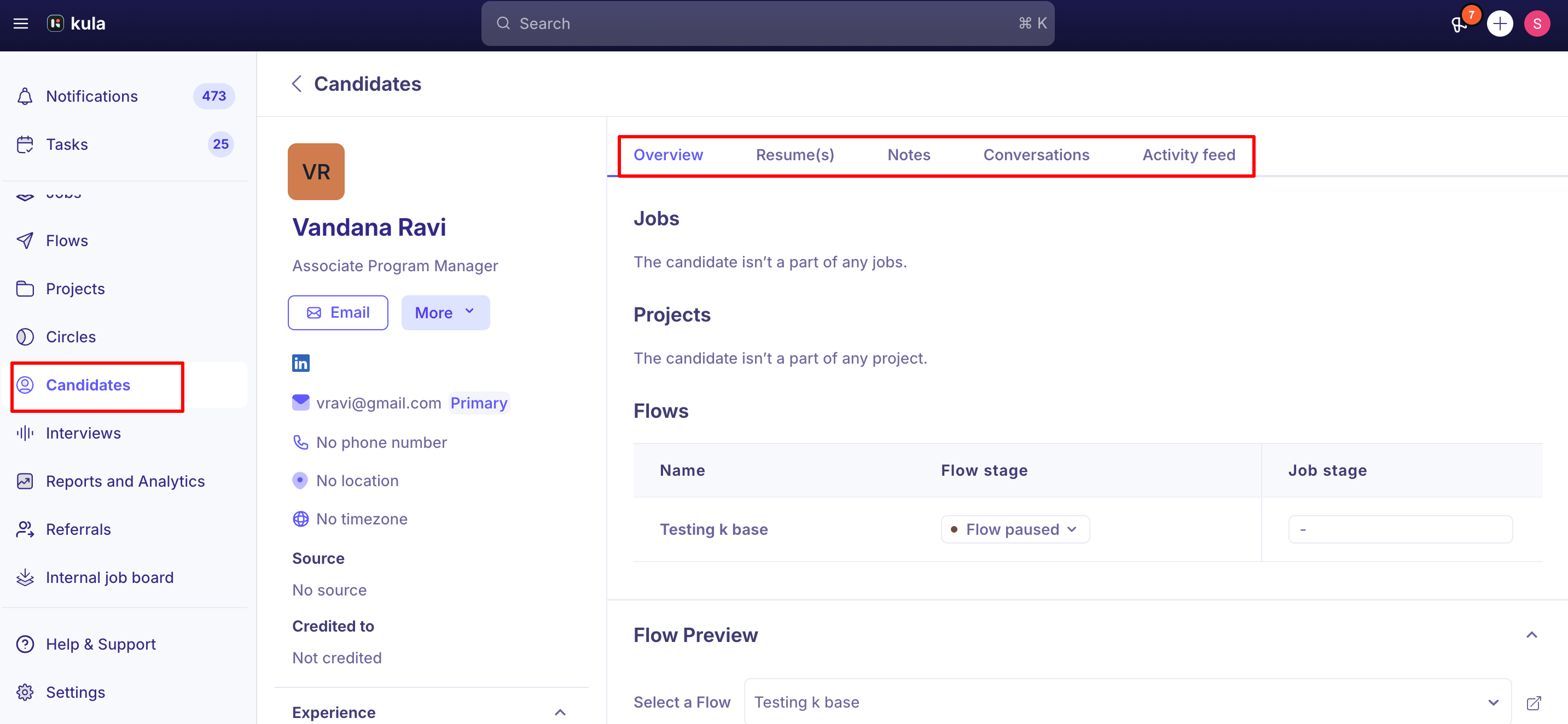
The candidate profile
One record per person, however many jobs they've been in.
Tab | Shows |
|---|---|
Overview | Contact details, contact source, tags, custom fields, skills and experience |
Resume(s) | Every resume on file |
Notes | Notes on the candidate, plus notes from their applications on jobs you can access |
Conversations | Every email and message with them, across jobs and flows |
Activity feed | Everything that's happened on their record |
The application
Their record for one job. At the top is an AI summary that updates as things change. See Asking Application Intelligence about a candidate. The tabs can include:
Tab | Shows |
|---|---|
Current job | Their stage, status and activities in this job |
Resume | The resume for this application |
Scorecard | Every scorecard for this job, with an AI summary across rounds. Download the full history as a PDF |
Candidate info | Their details, which you can edit here |
Forms | Their application form answers |
Inbox / Conversations | Messages about this application |
Notes | Notes for this application only |
Files | Documents for this application, including email attachments saved with Add to files |
Activity feed | What's happened on this application |
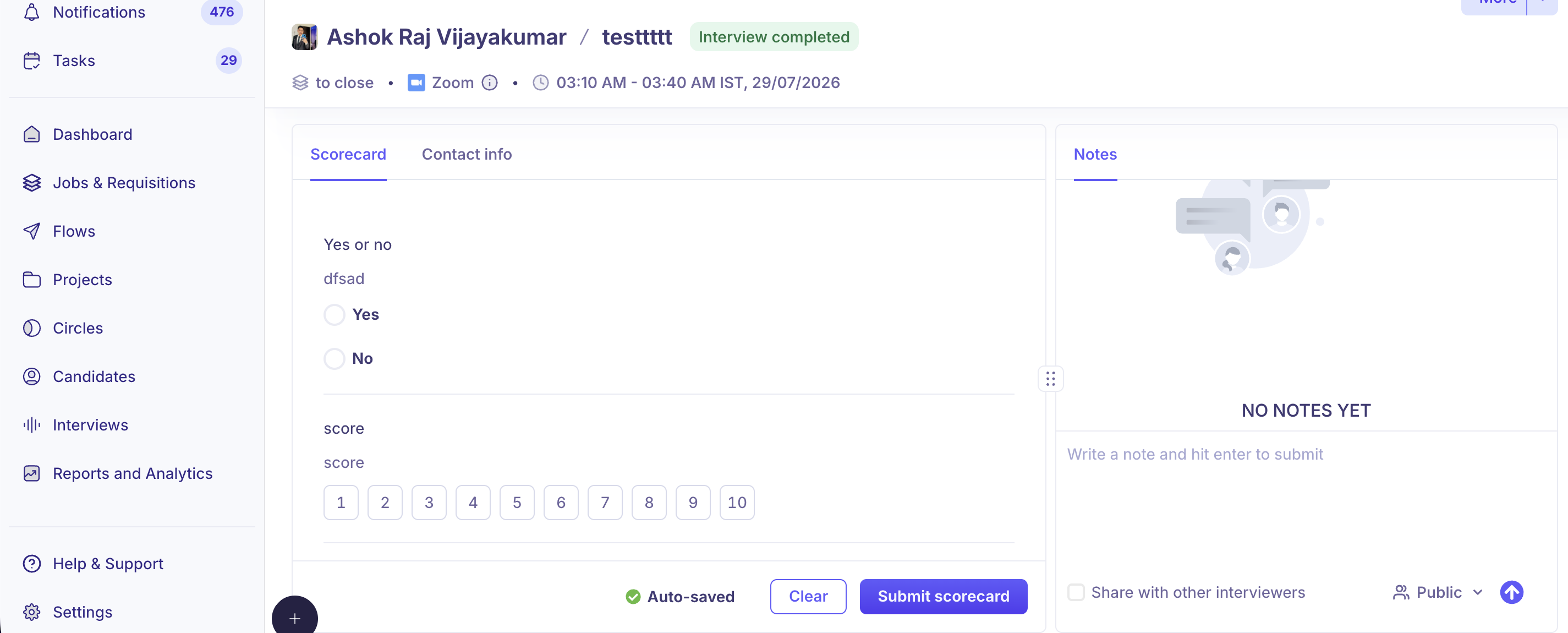
Interviewers see a different layout around an interview: the resume on the left, and the scorecard and notes on the right.
For interviewers: a different layout
When an interviewer is reviewing a candidate around an interview, Kula shows a side-by-side layout instead: resume on the left, scorecard and notes on the right, with resizable panels that remember your preferred width. A floating action bar surfaces relevant actions and adapts automatically before, during, and after the interview — and minimizes itself once the interview is complete so the scorecard and AI summary stay in focus.
The activity timeline
Kula records these automatically:
Recorded | Examples |
|---|---|
Stage moves | Including the stage a candidate was added into |
Interviews | Scheduled, rescheduled, cancelled, ended; scorecard submitted |
Self-scheduling | Link sent, and each reminder |
AI scoring | A score created or re-run, and how it changed |
Referrals | Shown as "on behalf of" the referrer |
Approvals and offers | Approvers and offer status changes |
Consent | Consent withdrawn |
Integrations | For example a background check update, or a hire sent to your HRIS |
Transfers | The jobs they moved between |
Actions done automatically, including through an API key, show System as who did them.
Good to know
Application notes stay with that application. Open the profile's Notes tab for the full picture.
The job's activity feed is different. It shows job-level changes, such as approvals and hiring team edits. Moves and rejections of a candidate appear on that candidate's timeline.
Transferred candidates keep a separate history per job.
For reporting, use reports. The timeline isn't designed for pulling activity at scale, and there's no API for it. See Building your first custom report.
The AI summary respects permissions. Private notes, offer details and restricted fields appear only for people who can see them anyway.
FAQ
What's the difference between the profile and the application? The profile is the person across all jobs; the application is them in one job.
Why don't I see the same notes under another job? Application notes stay with their application. Check the profile's Notes tab.
Does the timeline show flow opens and replies? No. Flow activity shows in the flow itself.
What does "System" mean? The action was automatic, for example a reminder, an automation or an API key, rather than done by a person
Need help?
If you have questions or need assistance, reach out to us at support@kula.ai or use the in-app chat.