Editing or revoking an offer
Last updated: September 25, 2026
You can change an offer's details at any point: while it's a draft, after it's approved, or even after it's been sent or signed. If you need to withdraw it, you can revoke it. What happens depends on which fields you change and whether the offer has an active e-signature request with DocuSign, Adobe Sign or PandaDoc.
Who can do this: Super Admin, Admin, and the Recruiter or Hiring Manager on the job's hiring team.
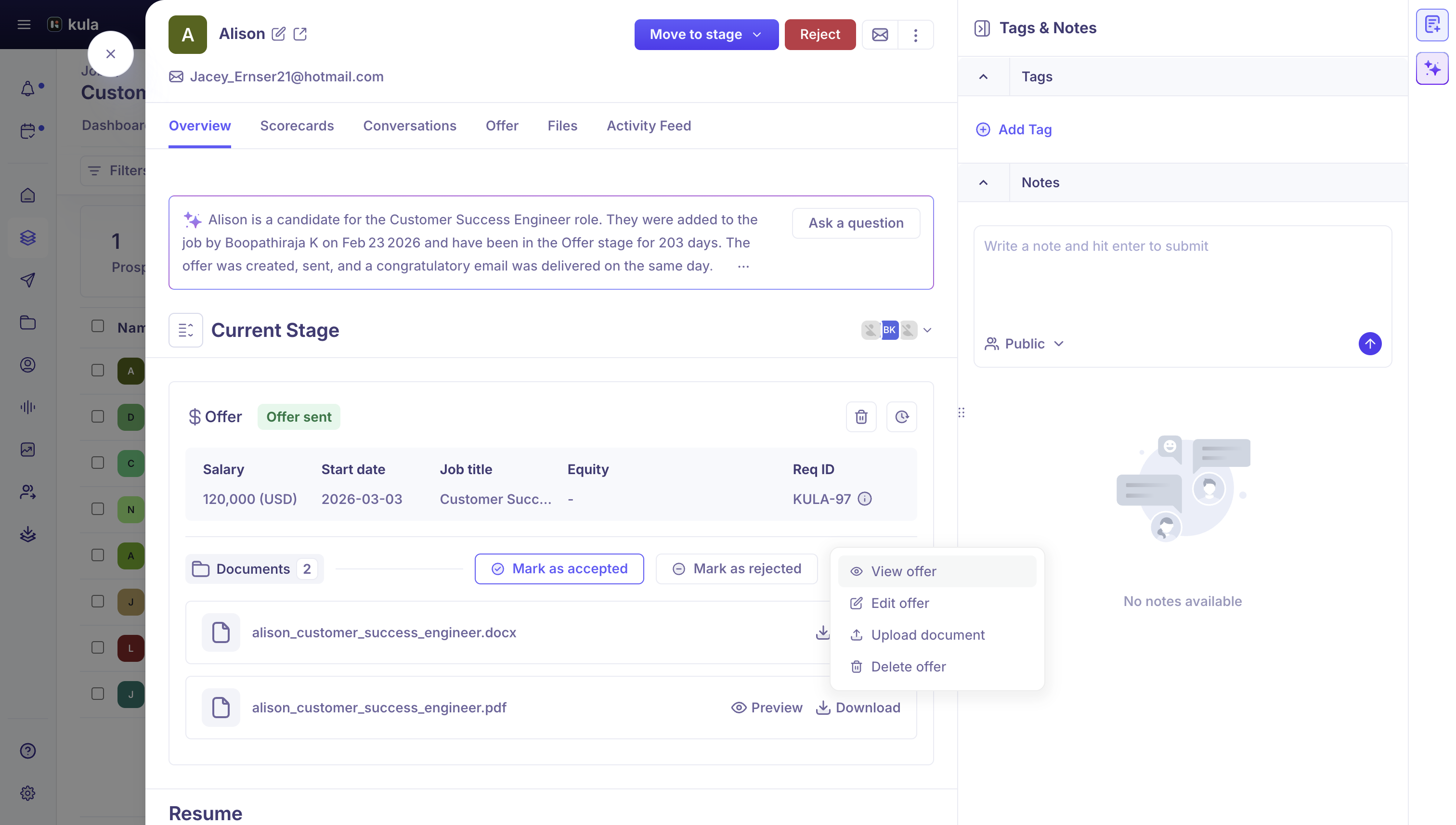
Where to find it: the candidate's application → Current job tab → Offer stage → the offer's More menu → Edit offer or Delete offer.
Edit an offer
From the offer's More menu, click Edit offer.
Change what you need. You can edit any of the offer's details, or switch to a different offer letter template.
Save.
What you can change
Section | Fields |
|---|---|
Offer details | Offer date, start date, salary and salary frequency, additional bonus (one-time), offer expiration date |
Additional compensation | Type of equity, equity units or money, equity strike price, vesting period, equity cliff, post cliff vesting cycle |
Candidate details | Phone and address. The candidate's name and email can't be changed once the offer exists |
Job details | Job title, reporting manager, department, office, Req ID |
Custom fields | Any offer fields your organization has added |
Which fields you see, and which are required, depends on your organization's offer field settings.
What happens after you save
You changed a field marked "Requires re-approval": the offer goes back through approval before it can be sent. Your organization chooses these fields; salary, job title, department, office and the equity fields are common ones. See How to create and manage offer fields.
You didn't change any of those fields: Kula saves the change. The offer doesn't need approving again.
You switched the offer letter template: Kula generates the offer document again with the new template, even if the candidate has already signed.
The offer is out for e-signature: generating a new document voids the existing envelope in DocuSign, Adobe Sign or PandaDoc, and Kula warns you first. Send the offer again once you've finished editing.
Revoke an offer
From the offer's More menu, click Delete offer.
Kula tells you what deleting will do, based on the offer's e-signature status. Confirm.
The offer… | What deleting does |
|---|---|
Has no e-signature request | Deletes the offer permanently. You can create a new offer for the candidate |
Has an active e-signature request (not yet signed or declined) | Deletes the offer and voids the DocuSign envelope, PandaDoc document or Adobe Sign agreement. You can create a new offer |
Was already signed or declined in the provider | Deletes the offer in Kula, but the provider won't void a completed or declined request, so it stays in your account with that provider |
Keep the offer but stop the signature (DocuSign only): use Mark as rejected. It voids the DocuSign envelope and marks the offer rejected without deleting it, so the offer's history stays in Kula. For PandaDoc and Adobe Sign, delete the offer to void an active request.
Good to know
Re-approval depends on the fields you change, not on a choice you make when saving. Admins set this per field under Settings → Offers → Offer fields.
The candidate's name and email are locked once the offer is created. To change them, delete the offer and create a new one.
Salary can include commas such as "120,000". Kula removes them for you.
Salary above the requisition's range shows an Above range tag.
Signed or declined signature requests can't be voided. That's a rule of DocuSign, PandaDoc and Adobe Sign. Remove it in the provider's own account if you need to.
FAQ
I changed the salary on an approved offer. Why does it need approval again?
Salary is set to need re-approval in your organization, so any change sends the offer back for approval.
I changed the offer's template. Will the document update?
Yes. Kula generates the offer document again with the new template, even after the candidate has signed.
Can I change the candidate's email on an offer?
No. Delete the offer and create a new one.
How do I withdraw an offer I've already sent?
Use Delete offer in the offer's More menu. If there's an active e-signature request, it's voided too. Can I stop a DocuSign request but keep the offer?
Yes. Use Mark as rejected. Why is the offer still in DocuSign after I deleted it in Kula?
It was already signed or declined, and DocuSign doesn't allow those to be voided.
Need help?
If you have questions or need assistance, reach out to us at support@kula.ai or use the in-app chat.