Posting through JobTarget — organic, paid, and Easy Apply
Last updated: October 16, 2026
JobTarget is Kula's job board aggregator — one integration that can distribute a job to many boards at once, for free (organic) or as a paid, sponsored placement, without you connecting each board individually.
Who can do this: Connecting JobTarget at the account level requires Admin or Super Admin access to global settings. Enabling JobTarget on a specific job and completing purchases in the Marketplace requires the same job-editing permissions used to manage a job's posting settings, typically Recruiter, Admin, or Super Admin.
Where to find it: Account-level setup: Settings → Career page and job boards → Job boards → Job Board Aggregators → JobTarget. Job-level posting: within a job, the Job Boards tab → JobTarget card.
One-time account setup
Go to Settings → Career page and job boards → Job boards.
Scroll to Job Board Aggregators and turn the JobTarget toggle on.
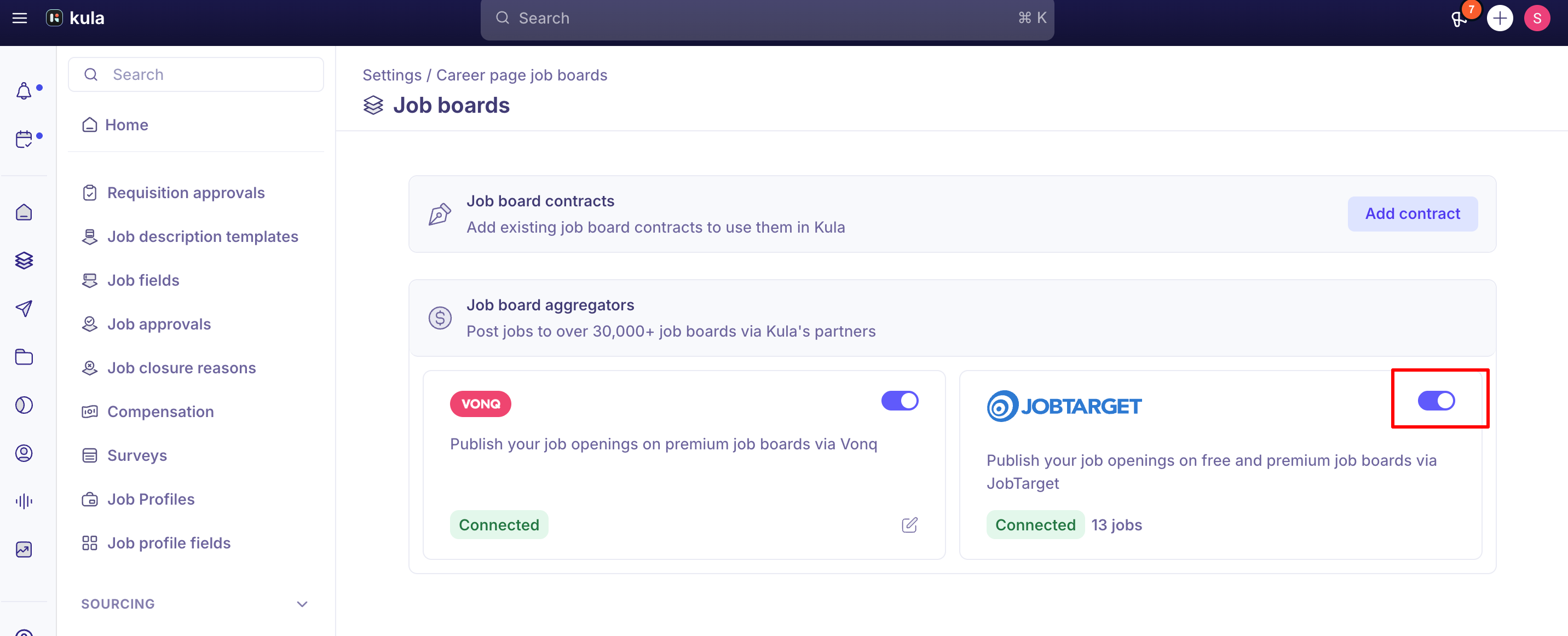
This is purely an account-level connection step — you don't need a separate JobTarget account or login of your own; Kula handles that behind the scenes.
Posting a specific job through JobTarget
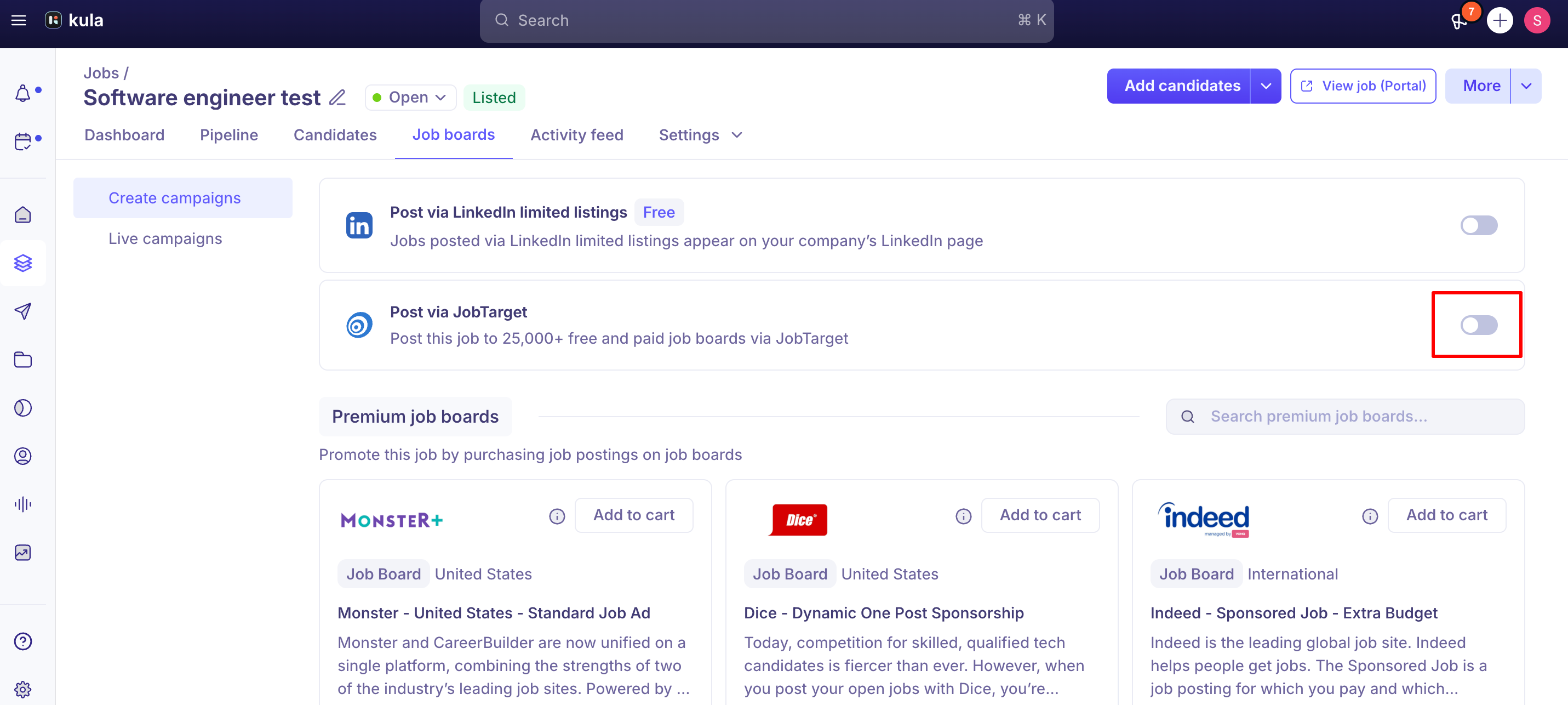
Open the job and go to its Job Boards tab.
Find the JobTarget card and toggle it on for that job. This enables both free (organic) and paid postings for that job together — you don't choose free-vs-paid at this step.
Turning it on opens a Manage panel — this is JobTarget's own marketplace experience embedded in Kula, not something Kula builds or hosts, which is why its look and feel can change independently of Kula releases.
Inside the Marketplace, you can browse available boards under Home; check My Favorite Sites or Contract Sites if your organisation has existing site relationships; see each board's price and posting duration for paid boards; and add the boards you want to your cart, review the summary, agree to the terms, and check out. Nothing is charged until you check out in the Marketplace.
Free/organic postings go out to all of JobTarget's available free boards simultaneously — you can't currently hand-pick individual free boards the way you can add individual paid ones to your cart.
Easy Apply is not supported
JobTarget offers an "Easy Apply" posting type for boards that require it, but Kula does not currently support it. This isn't a settings toggle you're missing — the option was deliberately removed from Kula's JobTarget integration in 2024 because the feature was never built.
The practical impact: some job boards reachable through JobTarget (SEEK is a confirmed example) will only accept Easy Apply postings. Without Easy Apply, JobTarget can still post the job, but it collects applications on its own side and forwards them to you by email instead of routing them into the candidate's application in Kula. That means those applications won't show up in your pipeline automatically, and you lose the usual tracking, source attribution, and stage automation for them.
If you're evaluating a JobTarget package or board that specifically markets Easy Apply support, confirm with JobTarget (or Kula support) whether that board will work in a degraded, email-forwarding mode without it, rather than assuming it will flow into Kula normally.
Good to know
You generally cannot pick individual free/organic boards — enabling organic posting distributes the job to all of JobTarget's available free boards at once, not a chosen subset.
"User already exists" is a known JobTarget configuration error, seen when trying to enable the integration or configure it for certain roles. If you hit this exact error, it's a recognised issue rather than something wrong with your account setup — contact support.
The Marketplace's look has changed at least once without a corresponding Kula release — it's hosted by JobTarget, not Kula, so UI changes there aren't announced in Kula's own release notes. If it looks different from a screenshot or prior walkthrough, that's expected.
FAQ
What's the difference between "JobTarget via LinkedIn Promotion" and just "LinkedIn" in my source report? LinkedIn (organic) is the free, direct path — candidates who found the job on your LinkedIn company page. JobTarget via LinkedIn Promotion is a paid/sponsored placement distributed through JobTarget. Same platform, two different posting mechanisms, tracked separately.
Does JobTarget support Easy Apply? JobTarget itself offers Easy Apply as a posting type, but Kula doesn't support it. Boards that require Easy Apply (like SEEK) will still accept the posting, but applications come back to you by email from JobTarget rather than flowing into the candidate's application in Kula.
Can I choose exactly which free job boards my organic posting goes to? Not currently — organic/free postings go out to all of JobTarget's available free boards at once rather than a hand-picked subset.
I turned off my free campaign and my paid campaign stopped too — is that expected? If you only want to pause one side, check both campaigns after making a change rather than assuming they're independent.
I paid for a package that promised a specific number of matched candidates and got far fewer — what do I do? Contact Kula support with your job link so it can be raised with JobTarget directly rather than assuming it's expected behaviour.
Need help?
If a JobTarget posting isn't behaving as expected — applications aren't flowing in, a paid package underdelivered, or you hit a configuration error — contact Kula support with the job link and account name.