Hires
Last updated: May 19, 2025
Gaining visibility into hiring trends is crucial for effective workforce planning and streamlining your recruitment efforts. The Hires Report in Kula.ai offers valuable insights into your organization’s hiring performance over time. By tracking key metrics such as total hires and time-to-hire, you can uncover patterns, anticipate future hiring demands, and make informed decisions that strengthen your overall talent acquisition strategy.
Metric Overview
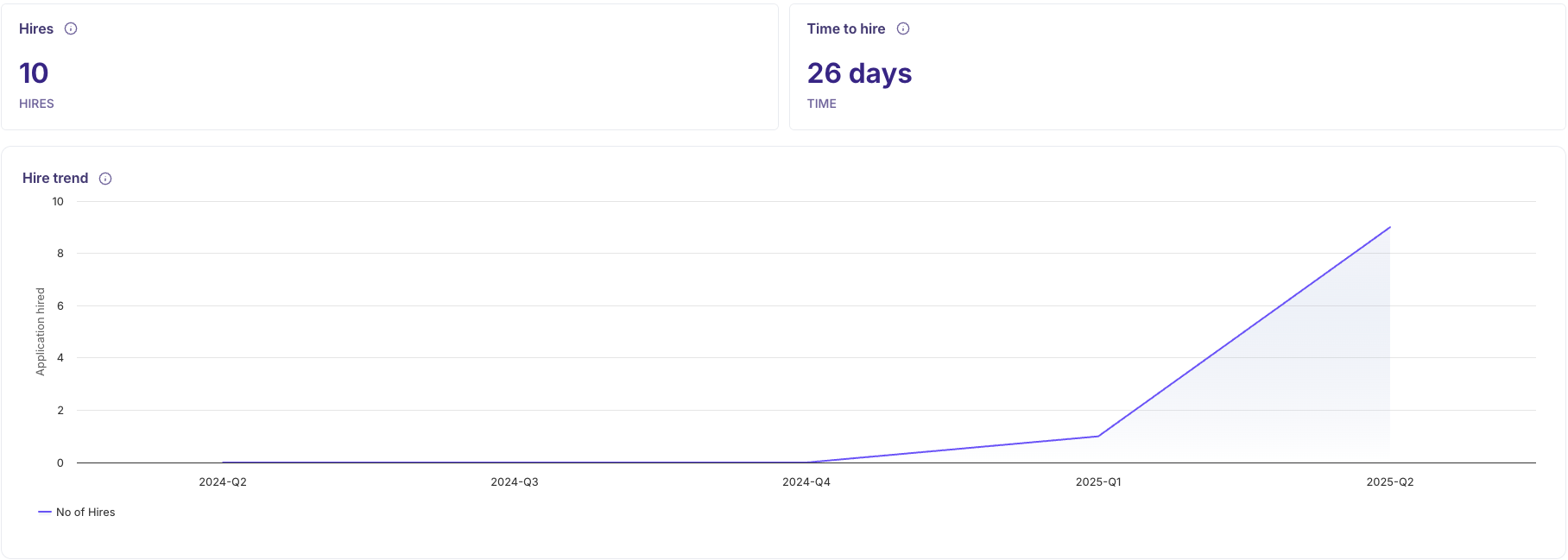
Hired: This metric reflects the total number of candidates who were marked as "Hired" within the chosen timeframe. It provides a clear snapshot of the successful placements made during the specified period, helping you assess your hiring achievements.
Time to Hire: This key metric measures the average duration between a candidate’s application date and the point they are marked as "Hired." It offers insight into how efficiently your recruitment process is operating by showing the average time-to-hire within the selected timeframe.
Hire Trend: A line chart that visualizes hiring activity over time, allowing you to spot patterns, identify periods of high or low hiring, and gain a clearer understanding of overall recruitment trends.
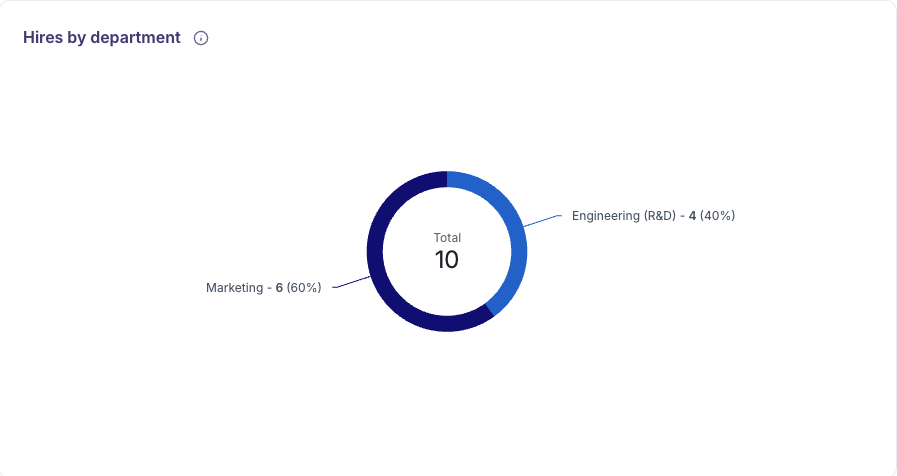
Hires by Department: A pie chart that segments total hires across departments, offering a clear view of where organizational growth is occurring and highlighting departments that may require additional focus or resources.
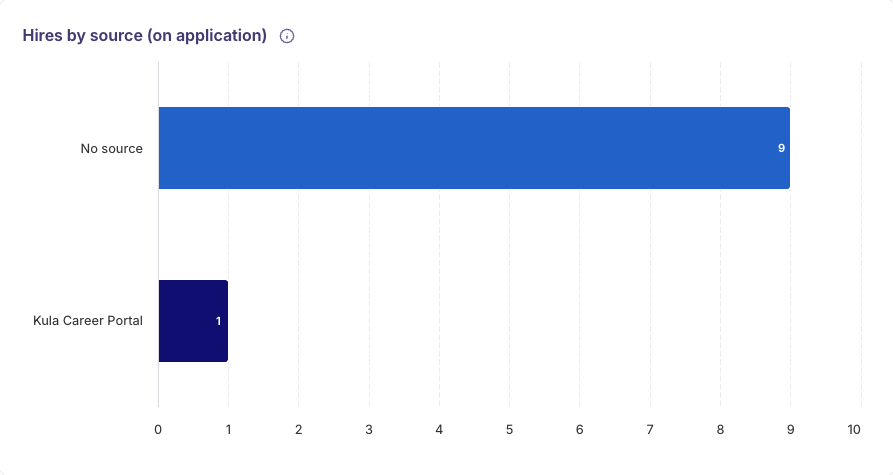
Hires by Source: A bar chart that highlights the origin of your successful hires—such as job boards, employee referrals, or other recruitment channels—helping you identify which sources are delivering the best results.
Data Analysis & Breakdown
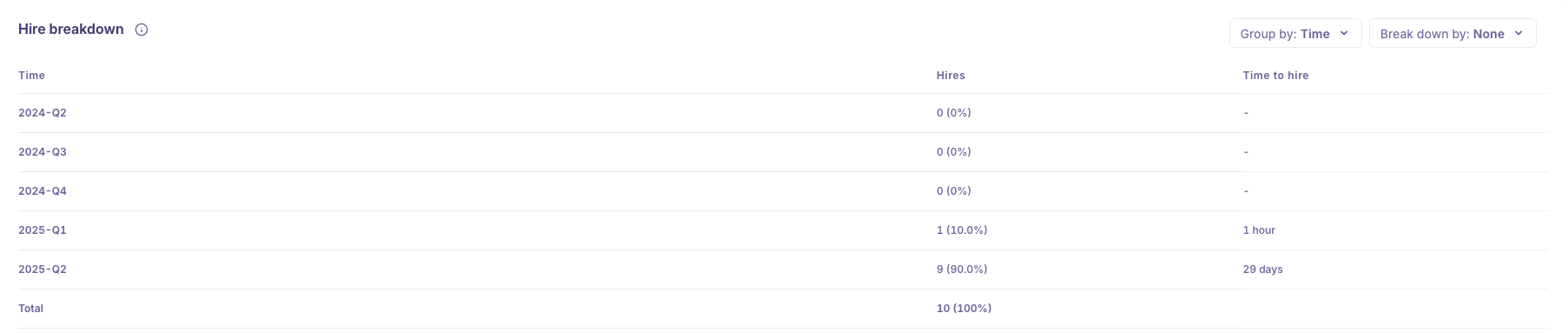
You can utilize the Group By and Breakdown By filters in the Hire Report to segment and refine your data, unlocking deeper and more actionable insights.
Group By
The Group By feature allows you to organize and summarize hire data based on specific attributes. This helps uncover trends, track performance, and identify patterns across various dimensions of your recruitment process. You can group data by:
Time – Analyze hiring trends over days, weeks, or months to understand fluctuations and seasonality.
Job Name – View consolidated metrics for each job opening to assess performance at the individual role level.
Primary Recruiter – Gain insight into recruiter-specific metrics to evaluate individual workload, efficiency, and contribution to hires.
Primary Hiring Manager – Measure hiring outcomes by manager to understand their impact on the process.
Source – Identify which channels (e.g., job boards, referrals) are generating the most successful hires.
Department – Track hiring trends and volume across different teams to understand where growth is happening.
Credited To (On Application): Credited To (On Application): See who is credited for sourcing the successful hires.
Breakdown By
The "Breakdown By" filter allows you to add a secondary level of analysis to your grouped data, helping you uncover more granular insights within broader hiring trends. This enables deeper exploration of recruitment performance and hiring patterns across different dimensions.
None: Displays data based solely on the selected "Group By" category, without any additional segmentation.
Job Name: Breaks down data by job titles within each group, helping you understand role-specific hiring patterns.
Primary Recruiter: Further analyzes performance within each group based on the recruiters involved, offering visibility into individual contributions.
Primary Hiring Manager: Adds an additional layer of insight into how different hiring managers are impacting the hiring outcomes.
Source (On Application): Segments the data by the source of application (e.g., job board, referral), showing which channels are most effective in driving hires within each group.
Department: Refines the view by department, allowing you to identify which functions are driving hiring activity within the grouped category.
Location (On Application): Breaks down data based on the job application’s geographic location, offering insights into regional hiring trends.
Credited To (On Application): Highlights the recruiter credited for the hire within each group, helping assess sourcing effectiveness and recognize top contributors.
Date range
Analyze your Hire stage over different periods:
Yesterday, 7 Days, 30 Days, 3 Months, 12 Months: Track short-term and long-term trends.
Custom: Define specific date ranges for tailored reporting.
Filters
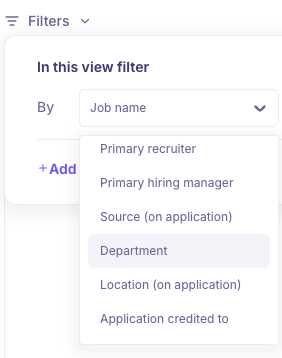
To ensure the Hire Report reflects insights most relevant to your organization, you can tailor the data using a variety of filter options. These filters help you narrow down your analysis and focus on specific segments of your recruitment process.
Job Name: Filter the report by specific job titles to track hiring performance for particular roles.
Job Type: Focus on employment types such as full-time, part-time, contract, or internships to analyze hiring patterns.
Job Status: Refine your data view based on the current status of job postings—such as open, closed, or filled positions.
Department: View hiring data across different departments to understand organizational growth and departmental hiring trends.
Primary Recruiter: Assess recruiter performance by filtering the report to show metrics for specific recruiters.
Primary Hiring Manager: Focus on the hiring manager overseeing the recruitment to evaluate their impact on hiring outcomes.
Source (On Application): Identify which sourcing channels (e.g., job boards, referrals) are yielding the most successful hires.
Location (On Application): Analyze geographic hiring trends based on the location specified in the job application.
Application Credited To: Filter by the individual credited with sourcing the candidate, offering visibility into sourcing effectiveness.
Functionalities
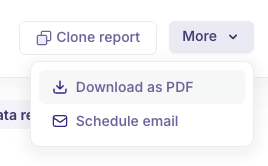
Download as PDF: Export and share your reports with stakeholders in a professionally formatted PDF.
Schedule Email: Automate report delivery at set intervals to ensure your team stays informed.
Clone Report: Easily duplicate existing reports for reuse or customization.
Refresh Date:

Indicates the last time the report data was updated, helping you ensure you're viewing the most recent insights. Our Analytics data will be refreshed every 6 hours.
📌 Use Case:
Optimizing Hiring Strategy Across Departments
Scenario:
A recruiter at a rapidly scaling tech company is tasked with preparing a quarterly review of hiring outcomes for each department. Using the Hire Report in Kula.ai, they are able to:
Track the number of hires by department to understand where the most growth is happening (e.g., Engineering vs. Sales).
Use “Time to Hire” metrics to pinpoint roles that are taking longer to close, such as Data Science roles, which may require additional sourcing effort or revised job descriptions.
Analyze hiring sources to determine that employee referrals are driving the most successful Engineering hires, while job boards are performing better for Sales roles.
Apply the “Credited To” filter to identify which recruiters are contributing the most to recent hires, helping to recognize top performers and balance workload across the team.
Outcome:
By leveraging the report, the recruiter is able to present data-backed hiring insights to leadership, fine-tune sourcing strategies, and improve time-to-hire for hard-to-fill roles—ultimately streamlining recruitment efforts and ensuring team alignment.
❓ FAQs
How often is the data refreshed?
Every 6 hours.What does "Credited To (On Application)" mean?
Shows who is credited for sourcing the hired candidate.Can I customize the report date range?
Yes, using preset or custom date filters.How is "Time to Hire" calculated?
From application date to the candidate being marked as hired.Can I export or share the Hire Report?
Yes, via PDF download or scheduled email.What’s the use of "Group By"?
Organizes data by a primary category like Department or Recruiter.What’s the use of "Breakdown By"?
Adds a second layer of detail to grouped data for deeper insights.