Closing a Requisition
Last updated: April 15, 2026
Closing a requisition signals that hiring for a role is no longer active. This could be because the role has been filled, the headcount was cancelled, or hiring has been paused. Kula requires you to select a close reason when closing a requisition, so your team has a clear record of why each opening ended.
Closed requisitions can be reopened if hiring resumes, or archived to retire them from active views permanently.
How to Close a Requisition
You can close a requisition from two places:
From the Requisitions list
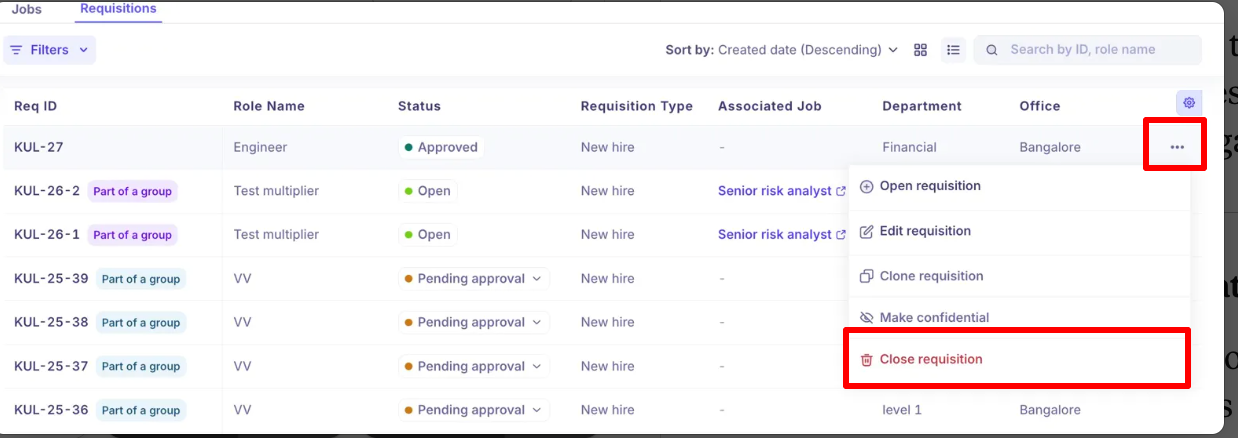
Navigate to Jobs & Requisitions > Requisitions.
Find the requisition you want to close.
Click the
...(more actions) menu on the right side of the row.Select Close requisition.
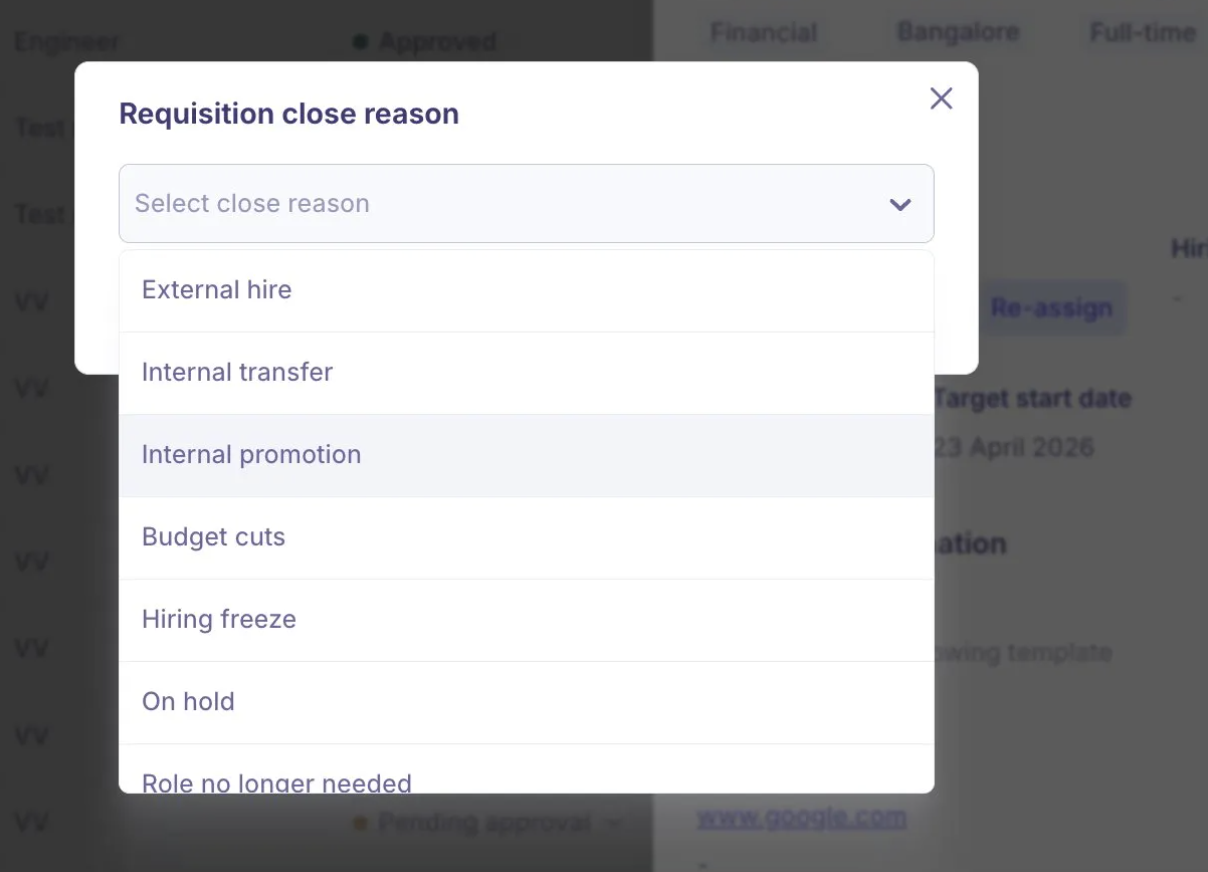
In the Requisition close reason modal, select the reason from the dropdown.
Confirm to close.
From within the requisition
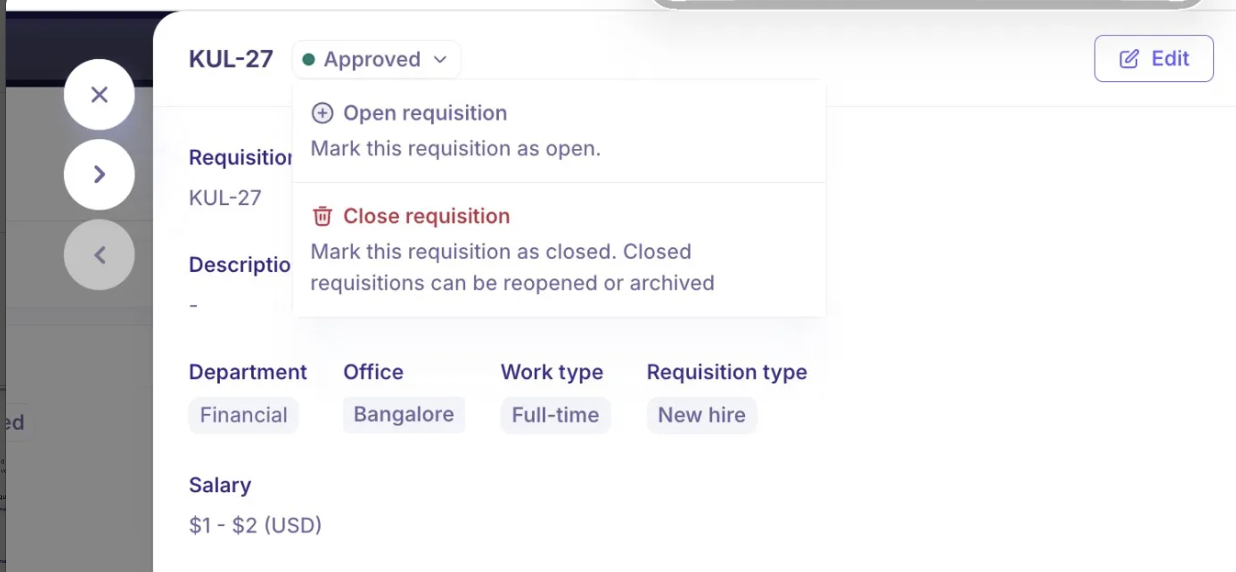
Open the requisition.
Click the status dropdown (e.g. Approved, Open) at the top of the panel.
Select Close requisition — shown with the description "Mark this requisition as closed. Closed requisitions can be reopened or archived."
In the Requisition close reason modal, select the reason from the dropdown.
Confirm to close.
Close Reasons
When closing a requisition, you must select one of the following reasons:
Close Reason | When to use |
External hire | The role was filled by hiring someone externally |
Internal transfer | The role was filled by moving someone from another team |
Internal promotion | The role was filled by promoting an existing employee |
Budget cuts | Headcount was removed due to budget reduction |
Hiring freeze | Hiring has been paused organisation-wide or for this team |
On hold | Hiring is temporarily paused but may resume later |
Role no longer needed | The position has been eliminated or restructured away |
Created by mistake | The requisition was created in error |
Others | Any other reason not covered above |
Selecting an accurate close reason improves your requisition analytics and gives your team a reliable record for headcount planning and audits.
What Happens After Closing
Once a requisition is closed:
The status changes to Closed
The requisition remains visible in the Requisitions list and can be found by filtering on Status = Closed
The Assign and Reassign buttons are greyed out — the requisition can no longer be associated with new jobs or offers
The requisition is counted in Requisitions closed in your analytics report
The requisition can be reopened or archived from this state
Reopening a Closed Requisition
If hiring resumes for a role that was previously closed, you can reopen the requisition without creating a new one.
Open the closed requisition.
Click the status dropdown.
Select Open requisition — this marks it as Open and makes it available for job and offer associations again.
Requisitions that were closed after being Filled (i.e. a hire was made) cannot be reopened. The Filled status is a terminal state tied to an accepted offer or a hired candidate.
Archiving a Closed Requisition
Archiving removes a requisition from your default working views. Use this for requisitions that are fully retired and no longer relevant to day-to-day operations.
You must close a requisition before you can archive it — you cannot archive an open or pending requisition directly.
Once archived:
The requisition moves to Archived status
It no longer appears in default list views
It can still be found by filtering on Status = Archived
The Assign, Reassign, and Associate a job buttons are all greyed out — no further actions can be taken on the requisition
Closed vs Archived: Closed means hiring is paused or cancelled — the record is still active in your working list. Archived means the requisition is fully retired — it is removed from default views but remains in your records for reporting and audit purposes.
Closing Requisitions in a Group (Bulk)
For requisitions created as part of a bulk headcount group, closing works at the individual requisition level:
You can close one requisition at a time from a group — it will be removed from the group view after closing
Or you can close all requisitions in the group at once from the group actions menu
Closing all requisitions in a group moves every member of that group to Closed
Frequently Asked Questions
Q: Do I have to select a close reason? Can I leave it blank?
Yes, selecting a close reason is required. The close reason dropdown must have a value before you can confirm the closure. If none of the listed reasons fit, select Others.
Q: Can I reopen a requisition after closing it?
Yes, as long as the requisition was not previously in a Filled state. Closed requisitions that were never filled can be reopened at any time via the status dropdown. Filled requisitions cannot be reopened — the fill is tied to an accepted offer or hire record.
Q: What is the difference between closing and archiving a requisition?
Closed keeps the requisition visible in your active list and filterable — hiring is paused but the record is still in your working view. Archived fully retires it from default views — use this when the requisition is no longer relevant and you want to keep your list clean. You must close a requisition before you can archive it.
Q: I accidentally closed a requisition. Can I undo it?
Yes. Open the requisition, click the status dropdown, and select Open requisition to reopen it. This restores it to Open status, and it becomes available for job and offer associations again.
Q: Can I close a requisition that is still Pending approval?
Yes. The Close requisition option is available from the ... menu for requisitions in any active status — including Draft, Pending approval, Approved, Ready to open, and Open. You will still be prompted to select a close reason.
Q: Will closing a requisition affect the associated job?
Closing a requisition does not automatically close or unpublish the associated job. The job continues as normal. However, once the requisition is closed, it can no longer be used for new offers — you would need to reopen it or associate a different requisition with the job if hiring continues.
Q: Does closing a requisition appear in analytics?
Yes. Closed requisitions are counted in the Requisitions closed metric in the Requisitions analytics report. The close date is also used in time-based breakdowns and trend charts, so using accurate close reasons and dates helps keep your workforce planning data reliable.
Q: Can I close requisitions in bulk if they are part of a group?
Yes. For grouped requisitions (created via the headcount toggle), you can close all members of the group at once using the group actions menu, or handle them individually. Each requisition will prompt you to select a close reason.
Need Help?
If you have questions or need assistance with setup, feel free to reach out to us at support@kula.ai or use the in-app chat for assistance.