Load balancing across interviewers
Last updated: September 23, 2026
Interview load balancing helps Kula recommend interviewers based on who has the most room left in their week, instead of defaulting to whoever's easiest to book. It's what keeps interview load from piling up on the same few people in a large interviewer pool.
Turn it on if interviewing tends to concentrate on your busiest interviewers, or if you want a consistent, fair way to decide who gets recommended when more than one person could take an interview.
Who can do this
Super Admin and Admin, or anyone on a custom role with the Manage interview load balancing permission.
Where to find it
Settings → Interview & Scheduling → Interview load balancing
Load balancing affects interviewer recommendations everywhere Kula suggests one: manual scheduling, candidate self-scheduling links, and AI-assisted scheduling.
Step 1: Turn on load balancing
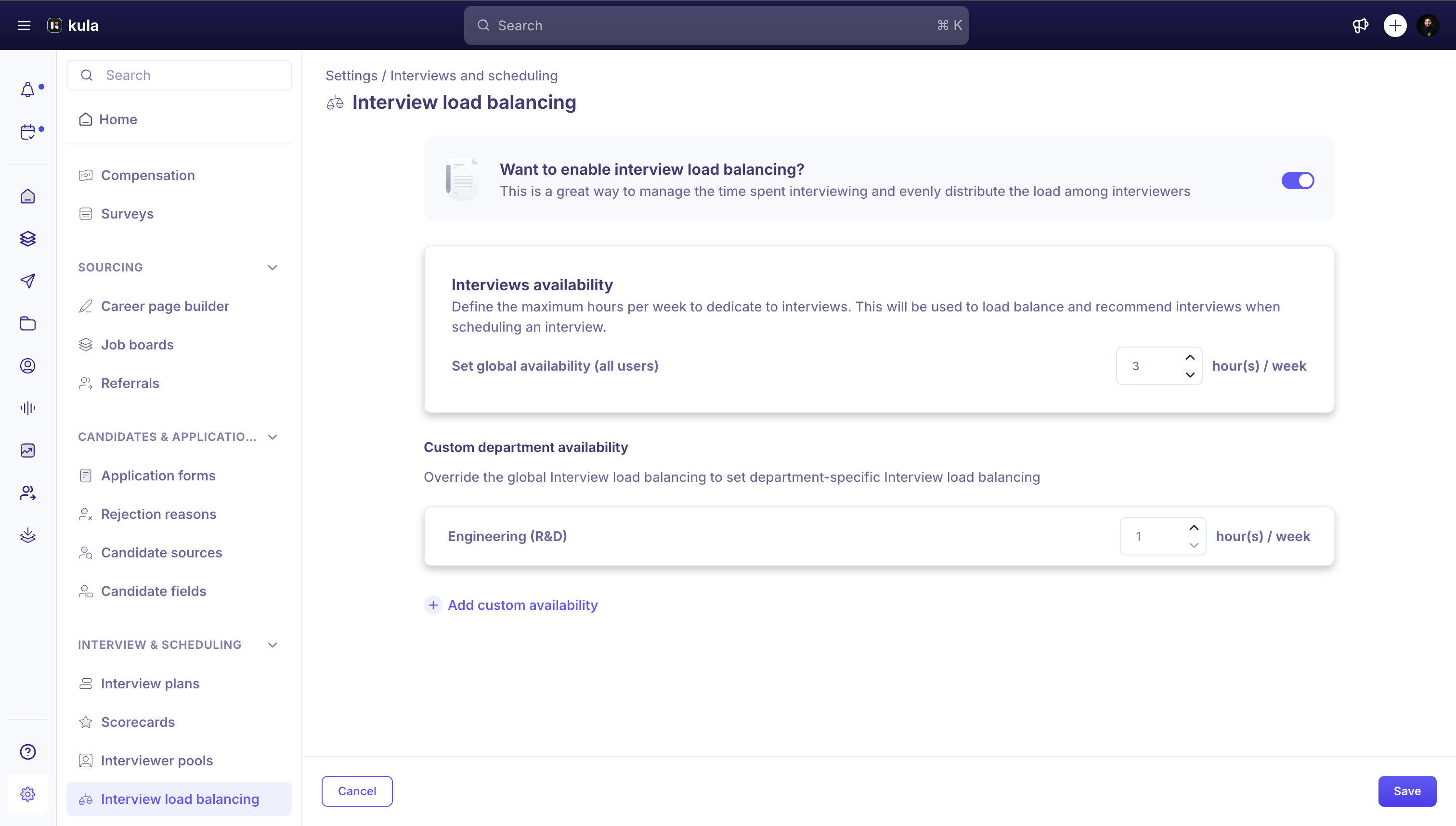
Go to Settings → Interview & Scheduling → Interview load balancing.
Turn on Want to enable interview load balancing?.
Step 2: Set a weekly interview hour limit
Under Interview availability, set Set global availability (all users) to the maximum hours per week you want any interviewer to spend interviewing, from 1 to 168.
If a specific department needs a different limit, click Add custom availability under Custom department availability, choose the department, and set its own hour limit. A department's custom limit overrides the global one for everyone in that department.
Click Save.
Note: Removing a department's limit. Hover over the department's row and click the trash icon, then click Save. The department falls back to the global limit.
How Kula uses this when scheduling
For each interview being scheduled, Kula looks at how many interview minutes a candidate interviewer has already booked for the current week, starting Sunday, against their weekly limit, either their department's custom limit or the global one. Anyone already at their limit, or who doesn't have enough time left for this interview's length, is left out of the recommendation entirely. Among everyone left, Kula recommends whoever has used the smallest share of their own weekly limit.
When you schedule a one-on-one interview manually, this shows up as a Recommended suggestion under the interviewer field, labeled "Based on interview load and availability," with one click to select that person. You can still search for and pick someone else instead.
Note: If load balancing is off, Kula still uses each interviewer's relative hours booked this week to rank recommendations; it just doesn't enforce a hard weekly limit or exclude anyone for being over it.
Good to know
Limits are hours per week. Each limit can be from 1 to 168 hours, and the week starts on Sunday.
A department limit replaces the global one. Everyone in that department is measured against the department's limit, not the global limit.
It's a recommendation, not a lock. When you schedule manually you can still search for and pick an interviewer who isn't recommended.
Buffer time is set elsewhere. Gaps between self-scheduled interviews are set under Scheduling preferences, not on this page. See Setting buffer times between interviews.
FAQ
Why isn't an interviewer being recommended?
They have already reached their weekly limit, or don't have enough of it left for the length of this interview.
What happens when I remove a department's custom limit?
Everyone in that department goes back to the global limit.
Does Kula balance interviews if load balancing is off?
Kula still ranks interviewers by the share of their week already booked, but it doesn't enforce a weekly limit or leave anyone out for being over it.
Need help?
If you have questions or need assistance, reach out to us at support@kula.ai or use the in-app chat.