Referring a candidate
Last updated: August 25, 2026
There are two ways a candidate ends up logged as an employee referral in Kula: an employee refers them directly, or a recruiter logs the referral on an employee's behalf after receiving a resume some other way (an email, a forwarded message, a hallway conversation). This article walks through both, plus what a referrer can expect to happen — and be notified about — once they've referred someone.
Who can do this: Any employee with access to the Referrals page can refer a candidate themselves. Logging a referral on someone else's behalf is a recruiter-side action, available to Recruiter, Admin, and Super Admin.
Where to find it: Employee-facing: left navigation → Referrals. Recruiter-side: Contacts page, a job's candidate list, or the quick-create option — each offers a "credit this as a referral" path.
Referring someone yourself
Confirm the role you want to refer for is actually open to referrals — see "Setting up a referral" if you're not sure, since a job that isn't configured for referrals will show a "no job found" error.
From the Referrals page, either click Refer on a specific job, or use Global Search (⌘K) to find the candidate or job directly.
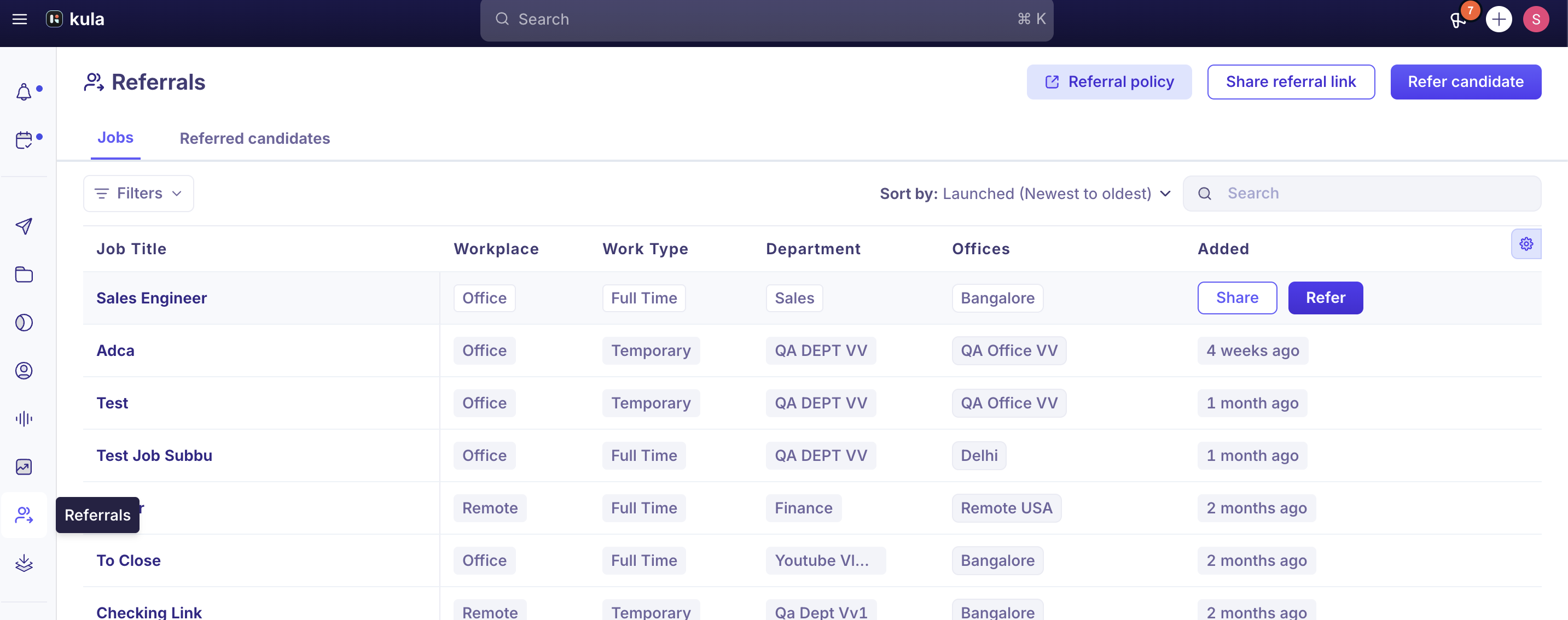
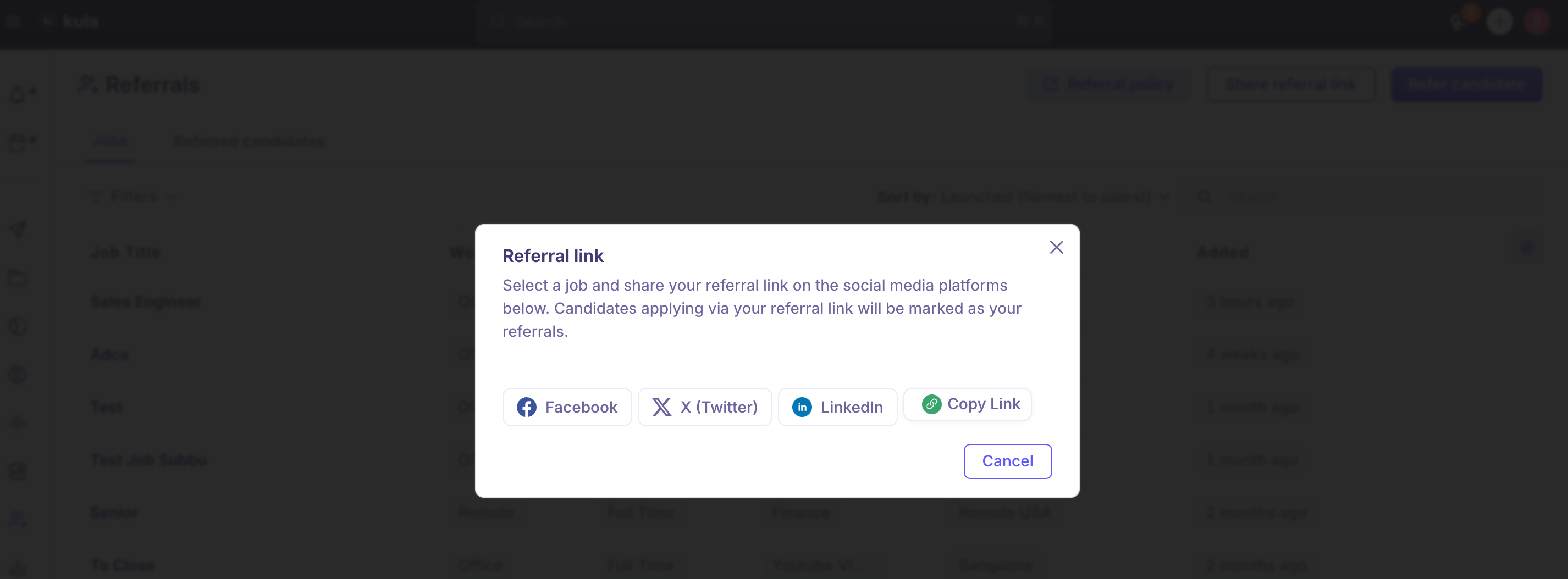
Submit the candidate's details. If you'd rather send them a link to apply on their own instead, use Share referral link from the Referrals page — this generates a link scoped to the job you pick (or to all open-for-referral jobs).

If you're posting that link publicly (LinkedIn, X, Facebook) rather than sending it directly, use the Share button, which posts the same link.
Good to know
Referral links are scoped per job, not universal. Each job open to referrals has its own Share option and generates a link specific to that job. There's currently no way to prevent a candidate who has a referral link from using it to apply to more than one role — if that matters for your program, it's worth knowing rather than assuming the link enforces a single application.
Referring someone triggers automatic notifications — for you and for the candidate. When a referral is submitted, the referrer gets a notification, the referred candidate gets an email letting them know they've been referred, and the referrer continues to get "Referral Progress Update" notifications (email, Slack, and/or in-app) as the candidate moves through stages — including reaching Offer. This is on by default and managed individually per employee (Settings → My Settings → Notifications Center → Applications & Pipeline → Referrals → Referral Progress Update); there's no admin-level way to turn it off for everyone at once, and an employee can't currently opt out of just the offer-stage update while keeping the rest.
That default notification behavior has caused a real confidentiality problem. One customer had two employees separately refer candidates for what the hiring manager considered a single confidential backfill. Because both referrers automatically got notified when their referral moved to Offer, it became obvious to the team that two people were being hired instead of one — inadvertently signaling an upcoming departure before it was meant to be known. If you're running referrals against a confidential or sensitive requisition, be aware that referral-progress notifications aren't currently suppressible at the job or account level.
A referred candidate can end up with no formal application on file. Referring someone doesn't require them to complete the application questions or compliance fields a direct applicant would answer — a referral can be logged with just the essentials. If your process depends on every hire having a completed application, that's not automatically enforced for referrals today.
Recruiters can't yet get their own notification when a referral or internal applicant comes in. Only the referrer is notified on submission; there's no current option for a recruiter to be alerted whenever a new referral lands on one of their jobs, beyond what's already surfaced in the pipeline.
FAQ
What's the difference between referring someone myself and a recruiter adding my referral for me? Functionally, both end with the candidate tagged as your referral. The difference is entry point: you use Refer, a referral link, or a social link yourself; a recruiter uses this when a referral arrives some other way (like a forwarded resume) and wants to credit it to you instead of logging it as a plain add.
Can I share one referral link that covers every open role? You can generate a link scoped to "All Jobs" from Share referral link, but individual job-specific links are also available and are what's generated by default from a specific job's Share option.
Will I be notified if my referral gets an offer? Yes — referral progress notifications, including offer-stage updates, are on by default and go out automatically unless you've turned off "Referral Progress Update" in your own Notifications Center settings. There's currently no way to turn off just the offer notification while keeping the rest.
Does a referred candidate have to fill out the same application as everyone else? Not necessarily — referrals can be logged without the standard application questions or compliance fields being completed, so it's worth checking with your recruiting team if a formal application is expected for every hire.
I'm a recruiter — can I get notified whenever someone refers a candidate for my job? Not currently. Only the person making the referral is notified on submission.
Need help?
Reach out to us at support@kula.ai or use the in-app chat.