Setting up a referral
Last updated: August 24, 2026
Referring a candidate in Kula means two things have to be true: the job has to actually allow referrals, and the referral has to be submitted in a way that correctly credits the referrer. This article covers both — the job-level setting that has to be on before anyone can refer, and the ways an employee can actually submit a referral — plus how credit attribution works and where it can go wrong.
Who can do this: Any employee with access to the Referrals page can submit a referral. Whether a specific job accepts referrals is controlled separately, at the job level (see below) — typically by whoever manages that job's post settings (Recruiter, Admin, Super Admin).
Where to find it: Employee-facing: left navigation → Referrals. Job-level referral setting: open the job → Settings → Job Post.
Prerequisite: the job has to allow referrals
Before anyone can refer a candidate for a role, that job's post settings need to permit it.
If a job is set to a visibility like "Internal — Only employees can apply" without also enabling the Referral module, employees trying to refer someone for it will hit a "no job found" error — even though the job is open and other people have successfully referred candidates for other roles.
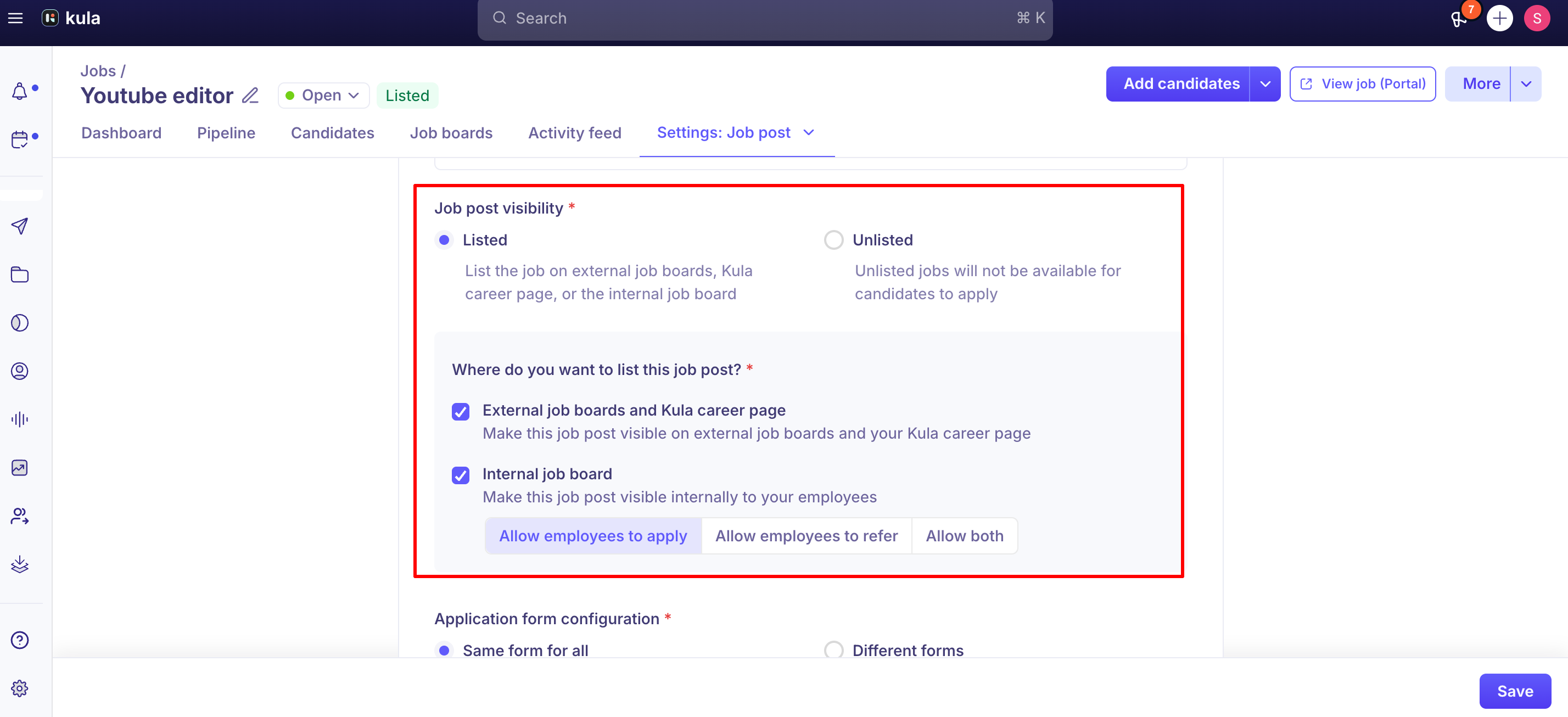
To fix this: open the job → Settings → Job Post, and in the Referral module, select either:
Allow both — employees can apply directly and refer others, or
Allow employees to refer only
If neither of these is selected, the job simply won't be referable, and the error an employee sees won't obviously point to this as the cause.
Ways to submit a referral
Once a job accepts referrals, there are a few ways to actually refer someone:
Refer a candidate directly — from the Referrals page's Jobs tab, or via Global Search (⌘K), find the candidate or open a job and click Refer, then submit their details directly.
Share a personal referral link — from Referrals → Share referral link, pick a specific job (or All Jobs), and copy the generated link. The candidate applies on their own; their application is automatically tagged as a referral from you.
Share a social link — the same referral link, posted directly to Facebook, X, or LinkedIn via a share button, or copied manually.
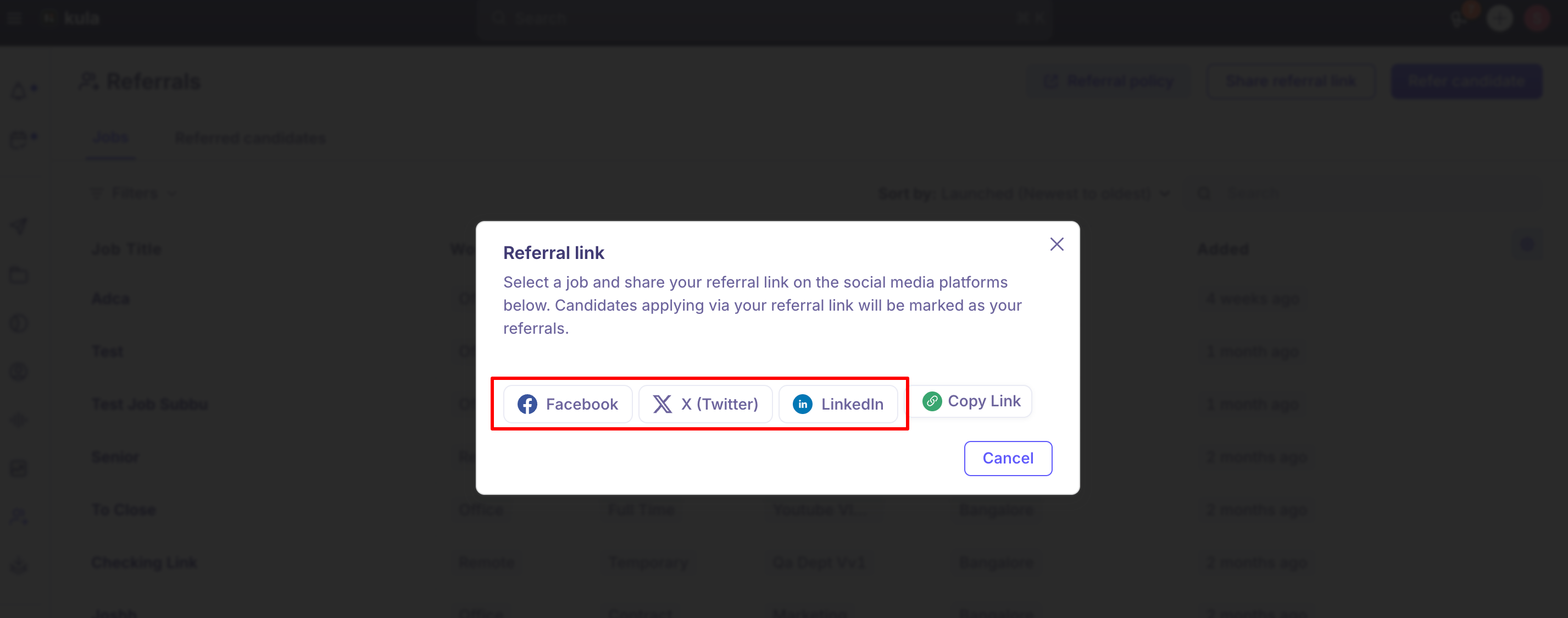
All three ultimately produce the same result: a tagged referral, attributed to the referring employee, once the details below are respected.
How credit attribution actually works
This is the part that most often goes wrong, so it's worth being explicit about:
A referral link's attribution depends on a unique code appended to the URL — for example, https://careers.kula.ai/yourcompany/11937?code=hyCRkmczbjmh. That code is what ties an application back to the referring employee. If the code gets stripped or altered when the link is shared or pasted — a common issue when links get shortened, reformatted, or manually retyped — the resulting application won't be credited to anyone, and it can look like the referral system silently failed.
The "Credited to" field can only be set to someone with an actual Kula user account. If you're crediting a referral to a colleague who doesn't have a Kula login (a common gap for referrers outside the recruiting org, or before someone's account is provisioned), they won't appear as an option, and the field defaults to whoever added the candidate — which can look like someone claiming a referral that isn't theirs, when it's really just a default. The workaround is to add a note recording who actually referred the candidate, since giving them a full user seat just for referral credit may not be worth it.
A referral needs a job selected before it can be marked as one. Trying to save a candidate as "referred" without a job attached used to produce a confusing backend error ("Referral requires at least one job"); this has been fixed so the option isn't available until a job is added, but it's a reminder that referral status is always tied to a specific job, not a general flag on the candidate.
Good to know
Manually setting a candidate's Source to "Employee Referral" doesn't behave identically to referring them through the product's referral flows. The referral tag historically only auto-populated when a candidate applied via a unique referral link or was added directly through the Referrals page — not from manually editing the Source field elsewhere. If you need a referral to show up and be tracked correctly, use Refer, a referral link, or a social link rather than editing Source after the fact.
Publicly shared referral links can be used by people who were never actually referred. If a referral link is shared somewhere public (a LinkedIn post, a public job board), anyone who finds and applies through it gets tagged as a referral and attributed to whoever shared it — without being shown the referral-specific application questions (like "how do you know this person?") that would normally help verify the relationship. This is a real, currently open gap, not a hypothetical — treat widely-shared referral links as a real source of unverified "referral" attribution, particularly if referral bonuses are tied to hire outcomes.
Hiring teams can see who referred a candidate. A "Referred by [name]" indicator is shown on the candidate, so recruiters and hiring managers don't have to dig for attribution.
There's currently no way to filter the Referrals page by recruiter — if you manage referrals across multiple recruiters' jobs, this is a known, in-progress gap rather than something you're missing in the UI.
Candidates who apply through LinkedIn have, in the past, been mistakenly tagged as Employee Referral even when no one referred them — a historical, now-fixed bug, but worth knowing this class of misattribution has occurred before if you ever see a referral tag that doesn't make sense.
FAQ
An employee is getting a "no job found" error when trying to refer someone — why? Almost always because the job's post settings don't have the Referral module enabled — check Job → Settings → Job Post and set it to "Allow both" or "Allow employees to refer only."
I shared a referral link but the candidate who applied isn't showing up as my referral — what happened? Most likely the unique code at the end of the link was stripped or changed when it was shared. Generate a fresh link and copy it exactly, without editing the URL.
Why can't I credit a referral to a specific colleague? The "Credited to" field only lists people with a Kula user account. If your colleague doesn't have one, add a note identifying them instead — the field will otherwise default to whoever added the candidate.
If I manually change a candidate's Source to "Employee Referral," does that count as referring them? Not reliably — the referral tag has historically only auto-populated through the actual referral flows (Refer, referral link, social link), not by editing Source directly.
Can someone who wasn't actually referred still show up as a referral? Yes, if a referral link is shared publicly and someone unrelated applies through it — this is a known, currently unresolved gap, since publicly-shared links don't trigger the referral-verification questions.
Where do I find my company's referral policy or bonus details? Referrals → Referral policy. If it's blank, your company likely hasn't published one yet — contact HR.
Need help?
For tracking the status of candidates you've referred, see "Referred candidates" and "stages on referred candidates." For anything else, reach out to us at support@kula.ai or use the in-app chat.