Setting up and applying to the internal job
Last updated: September 25, 2026
Give employees a dedicated place to browse, apply to, and track internal openings — separate from the referrals workflow.
Who can do this: Configuring which jobs appear requires the same job-editing permissions used to manage a job's posting settings. Any logged-in employee (Organization Member or above) can browse and apply on the internal job board itself.
Where to find it: Per job: Job → Settings → Job Post → Internal Job Board. For employees: the dedicated Internal Job Board module (separate from Referrals).
Enabling a job on the internal board
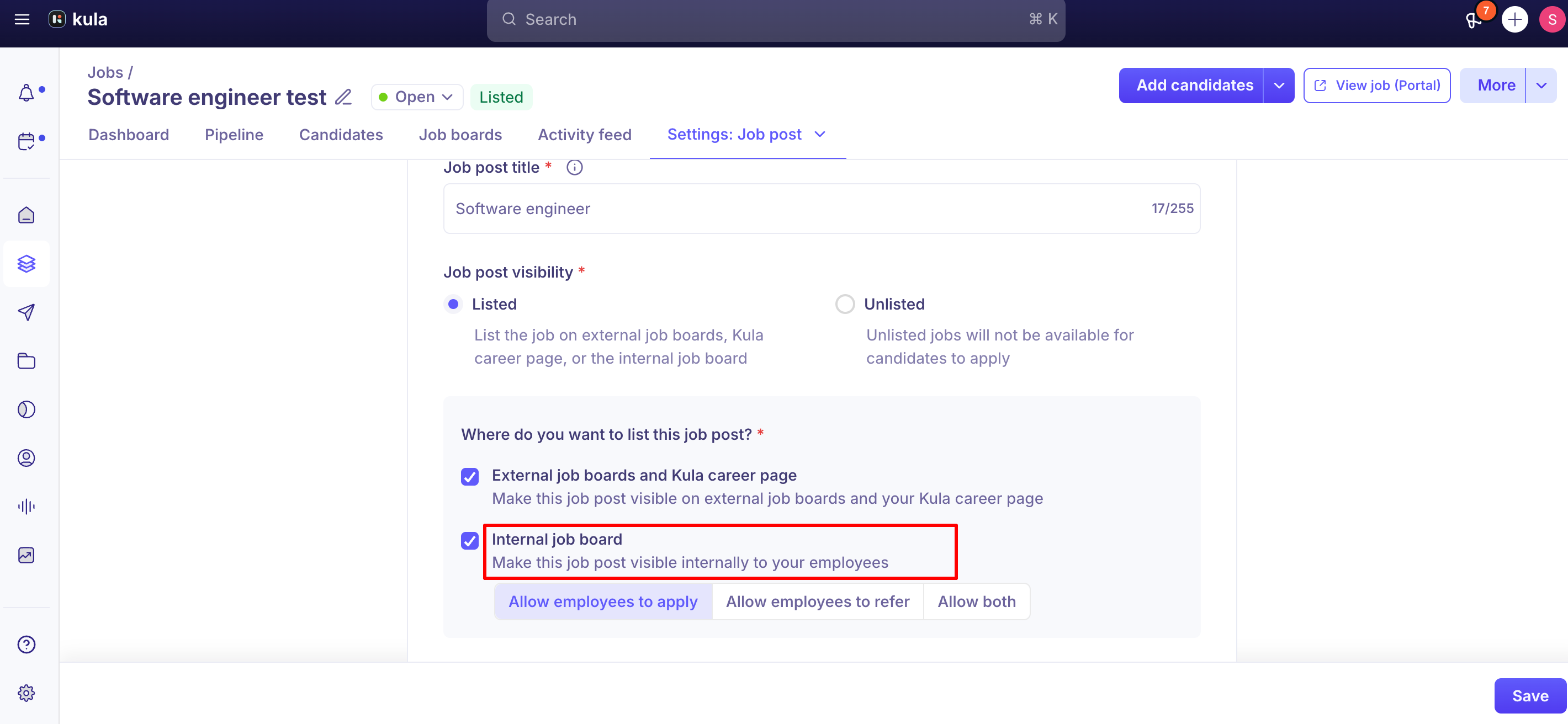
Open the job and go to Settings → Job Post.
Under Job post Listing, select Internal job board.
Choose what employees can do:
Option | What employees can do |
|---|---|
Allow employees to apply | The job appears on the internal job board, and employees can apply to it themselves. |
Allow employees to refer | The job stays off the internal job board. Employees can still refer external candidates to it. |
Allow both | The job appears on the board for applications, and employees can also refer candidates. |
If you clear Internal job board, the job is removed from the board for all employees.
Apply to an internal job
Employees browse open internal roles on the dedicated board — separate from Referrals — with search, filters, sorting, and pagination.
Click Internal job board in the left navigation.
On the Jobs tab, find the role you want. You can search by job title, use Filters, or change Sort by.
Click the job title. You can also hover over the row and click Apply.
Read the job description on the left. The recruiter and hiring manager for the role are shown above it.
Optional: upload your resume in the box at the top of the form. Kula reads it and fills in the matching fields for you.
Complete the application form on the right. Fields marked with an asterisk (*) are required.
Click Apply at the bottom of the page.
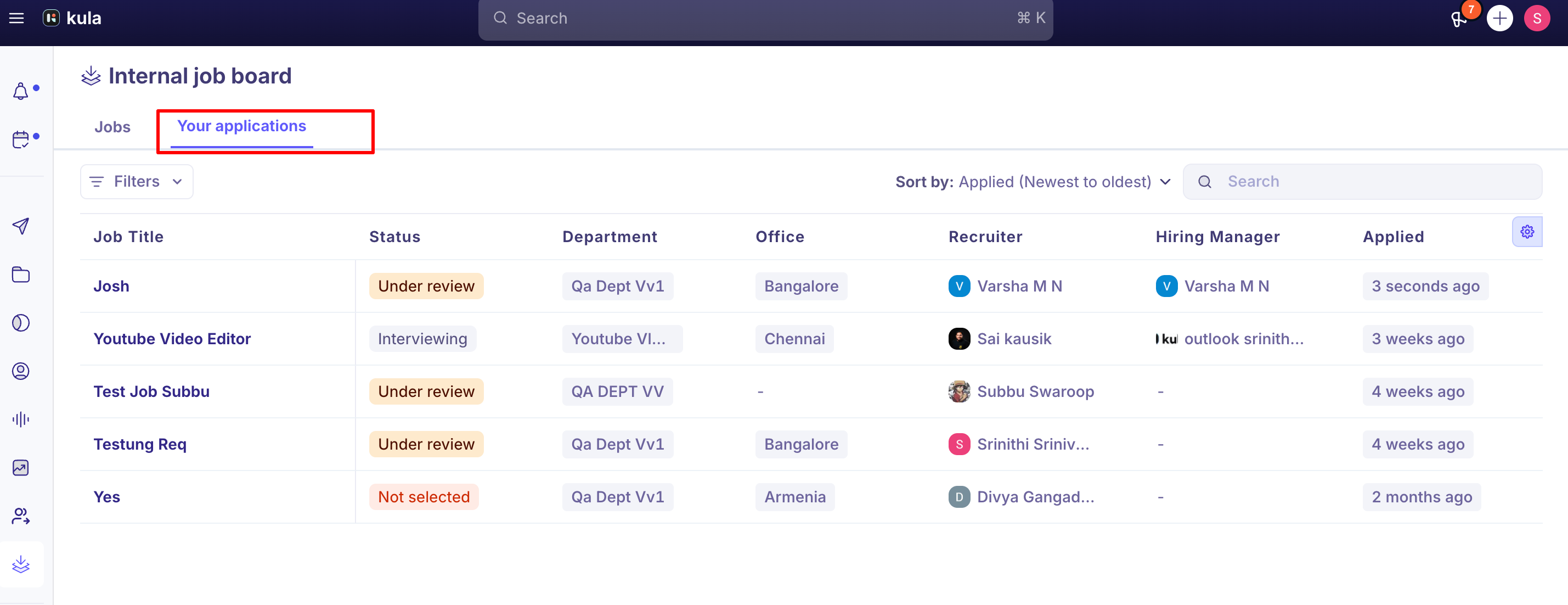
Kula shows Applied to job successfully and takes you to the Your applications tab, where the new application appears at the top.
What changes after you apply
The job stays on the board with an Applied tag. It isn't hidden. The job title can't be clicked, and the row no longer shows an Apply button.

You can apply to each job once. If you open a job you've already applied to, for example from a saved link, Kula shows You've already applied to this job with a link to View your applications.
Track your applications
The Your applications tab lists every job you've applied to, with a status that updates as the hiring team moves your application forward.

What each status means
Status | What it means |
|---|---|
Under review | The hiring team is reviewing your application. |
Interviewing | You're at an interview stage. |
Offer | You've reached the offer stage. |
Hired | You've been hired for the role. |
Not selected | Your application isn't going forward for this job. |
You see the status only. Stage names, interview feedback and hiring team notes are not shown on this tab.
How internal applications show for the hiring team
Internal applications have the source Internal Job Board.
The candidate pipeline shows an Internal applicant indicator, so recruiters can tell at a glance that the applicant is an employee.
You never see your own application in the hiring pipeline or candidate lists. This applies even if you're a recruiter or admin on that job.
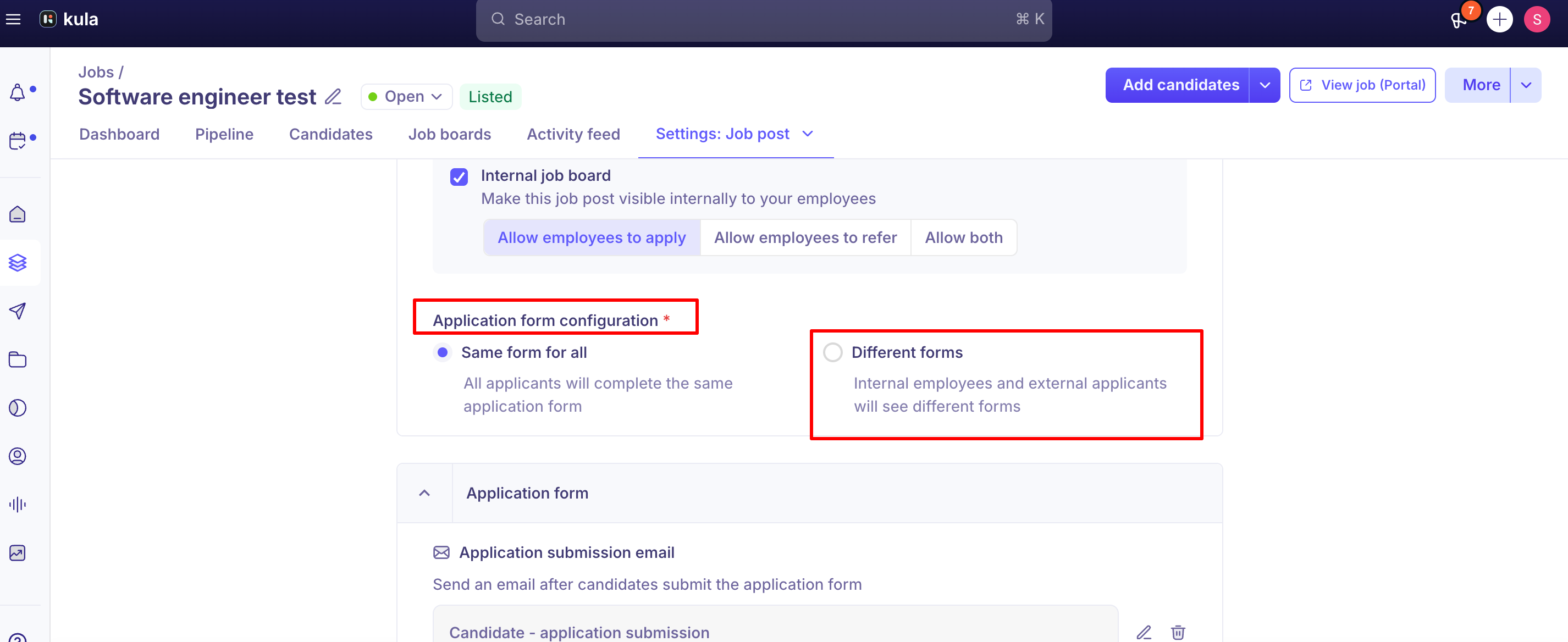
Internal vs. external application forms
By default, internal applicants fill out the same application form as external candidates.
Some accounts can configure a separate, dedicated internal application form instead — useful if you want a different set of questions for employees. When a separate internal form is used, note that knockout rules only apply to external applicants, not internal ones.
Good to know
Your application is linked to your Kula account, not to the email you type. It appears in Your applications even if you enter a personal email on the form, and your work email is added to your candidate profile.
Apply is for your own application only. If you enter someone else's details on the Apply form, the application is still recorded against you. To put forward someone else, use Referrals.
Refer-only jobs can't be applied to. They don't appear on the board. If an employee opens one from a direct link, Kula shows This job is not open for internal applications.
If the job sends an application confirmation email, internal applicants get it too.
There are no automatic notifications for new internal postings. Announce new roles through your usual internal channels.
Referral bonuses are not shown on internal postings.
You can download a report of which jobs are on the internal job board. Go to Settings → Privacy, Compliance & Security → Data export, export Jobs, and include the Where is this job posted column. It shows each job as Internal job board (Apply only), (Refer only) or (Apply and refer)
To limit the board to certain openings, turn the internal job board off job by job. There is no bulk option.
FAQ
How do employees find internal openings?
From Internal job board in the left navigation. The Jobs tab lists every role set to Allow employees to apply or Allow both.
How do I apply to an internal job?
Open the job from the Jobs tab, complete the form on the right, and click Apply. You'll land on Your applications, where you can follow its status.
Can I see where my application stands?
Yes. The Your applications tab shows each application with a status: Under review, Interviewing, Offer, Hired or Not selected.
I applied, but the job is still on the board. Did my application go through?
Yes. Jobs you've applied to stay on the board with a green Applied tag, and they also appear on the Your applications tab. You can't apply to the same job twice.
Can an employee use the Apply form to submit someone else's resume?
No. The application is always recorded against the employee who is signed in, whatever details they enter. To put forward someone else, use Referrals. For more, see Referring a candidate.
How do I keep a job off the internal job board but still allow referrals?
Set it to Allow employees to refer. The job stays off the board, and employees can still refer candidates to it.
Can internal applicants have a different application form?
Some accounts can set up a separate internal form. Otherwise, internal applicants use the same form as external candidates. For more, see Configuring your application form.
How can recruiters tell an applicant is internal?
Look for the source Internal Job Board and the Internal applicant indicator in the pipeline.
Need help?
If a job isn't showing up correctly on the internal board, an employee can't apply, or you need help configuring internal vs. external application forms, contact Kula support.