Job Reports
Last updated: May 29, 2025
The Job Analytics module in Kula offers a detailed overview of the performance and status of all job requisitions—both open and closed. It enables you to monitor the entire lifecycle of each job posting, from creation to the final hiring decision. With insightful metrics and visualizations, this module helps you refine recruitment strategies, uncover trends, and make data-driven hiring decisions.
Metrics Overview
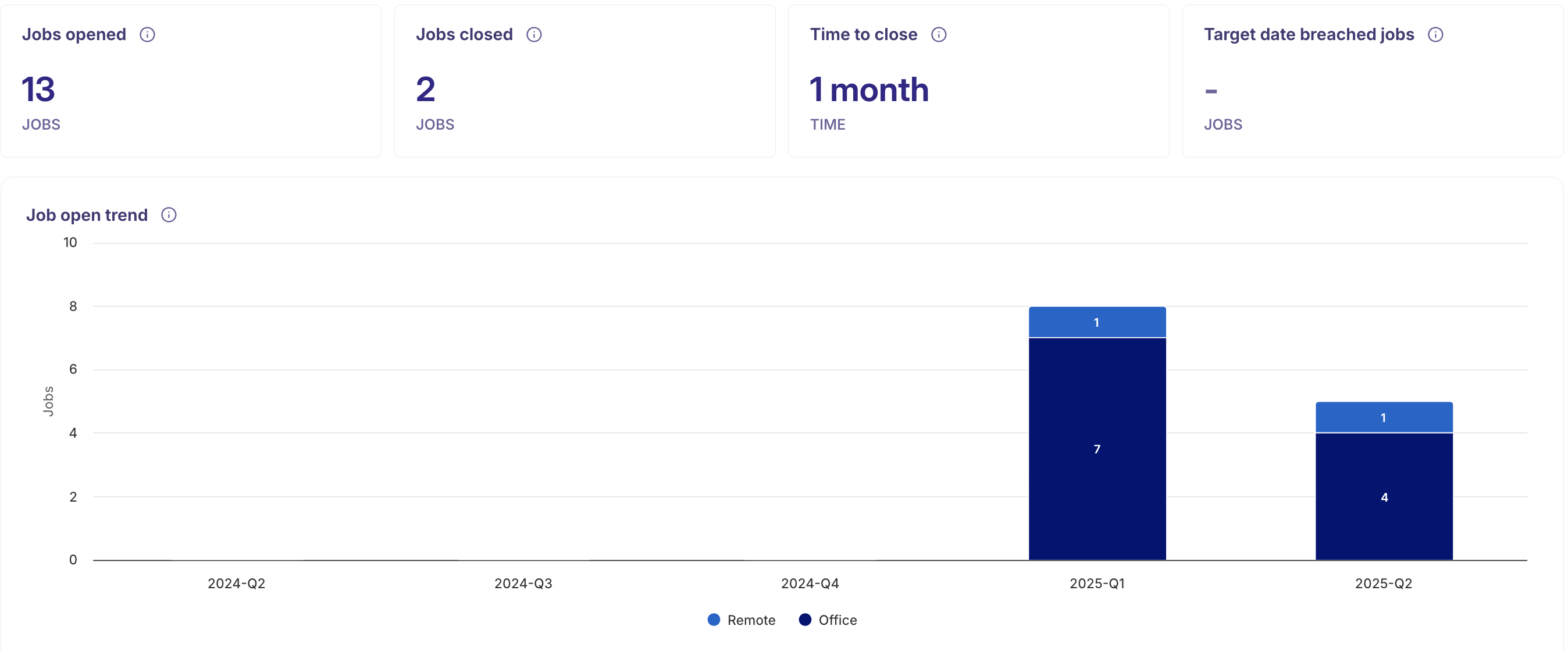
Jobs Opened
This metric shows the total number of job postings created within a selected timeframe. It helps you monitor overall recruitment activity and assess your organization’s hiring demand over time.Target Date Breached Jobs
This highlights job postings that have exceeded their target closing dates. It points to potential delays or inefficiencies in the hiring process that may require further investigation or action.Jobs Closed
This refers to the number of job postings that have been successfully filled and closed. It serves as an indicator of recruitment effectiveness and how well hiring goals are being met.Time to Close
This metric measures the average time it takes to fill a job—from the date it was opened to when it was closed. It offers insight into the speed and efficiency of your hiring process.Job Open Trend
This is a bar chart that displays the number of jobs opened over a specific period. It helps identify hiring trends, seasonal patterns, and fluctuations in recruitment activity.Jobs Opened by Department
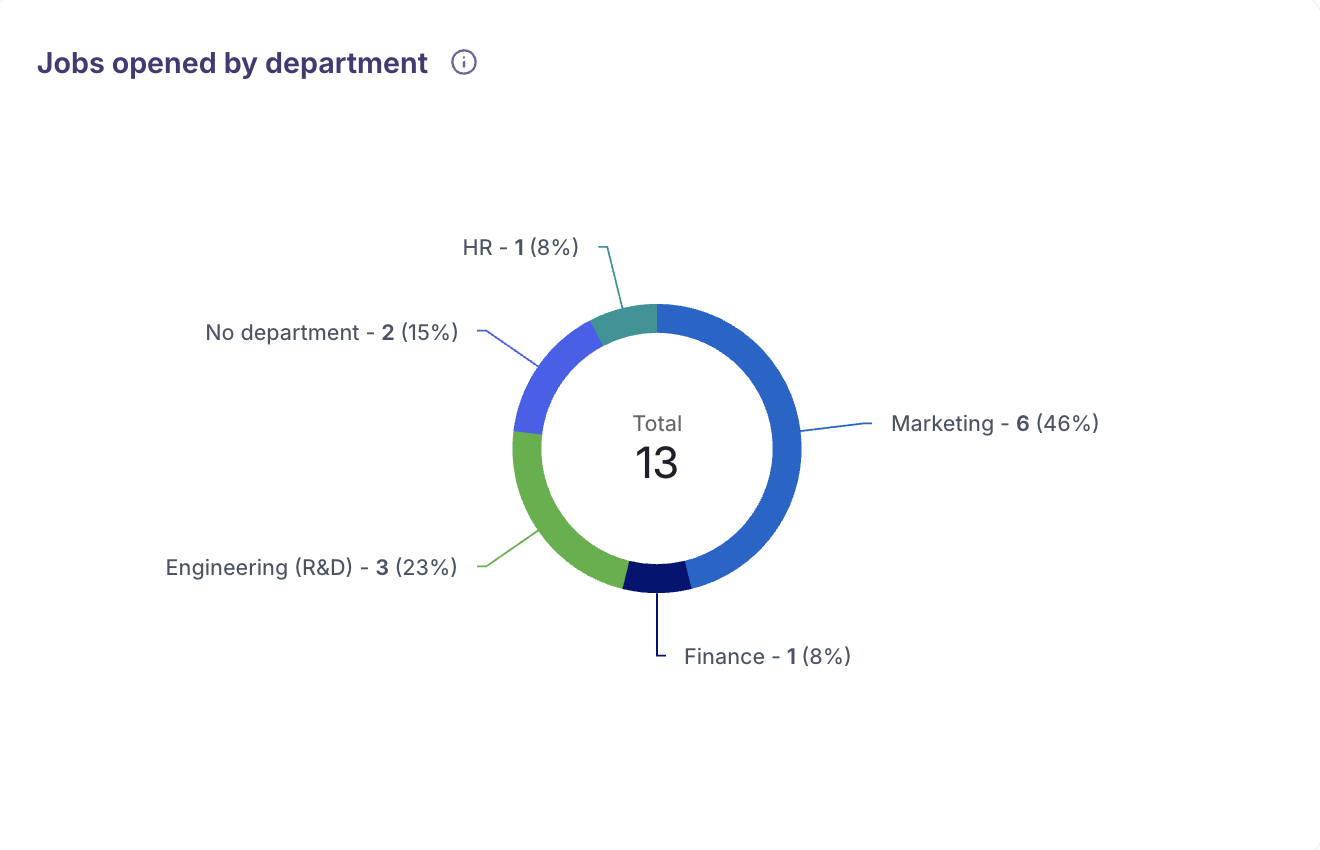
A pie chart illustrating job openings across various departments. It provides a clear view of which teams are most active in hiring and helps align recruitment efforts with departmental needs.Jobs Opened by Location
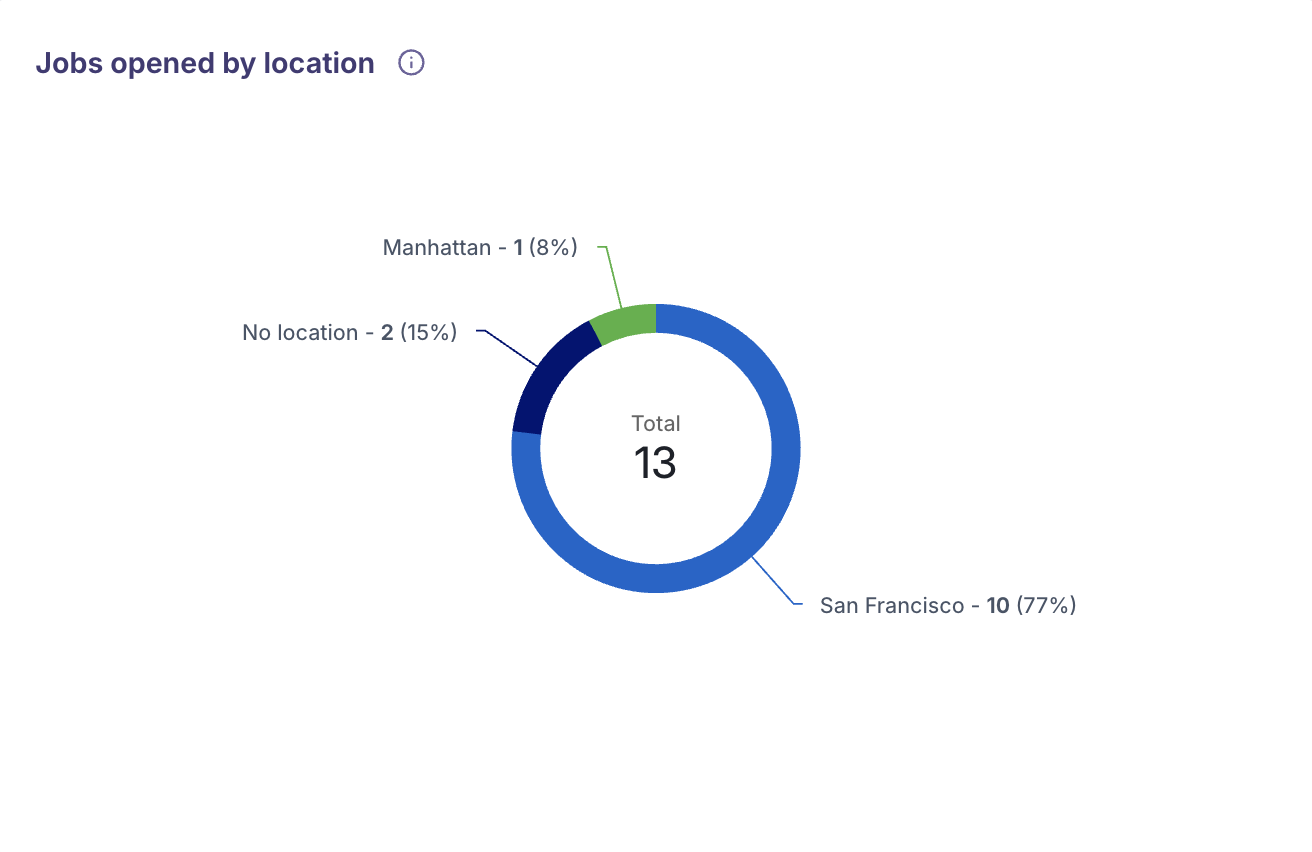
A pie chart visualizing the geographical distribution of job openings. This enables a better understanding of regional hiring needs and supports location-specific recruitment planning.
Data Analysis & Breakdown
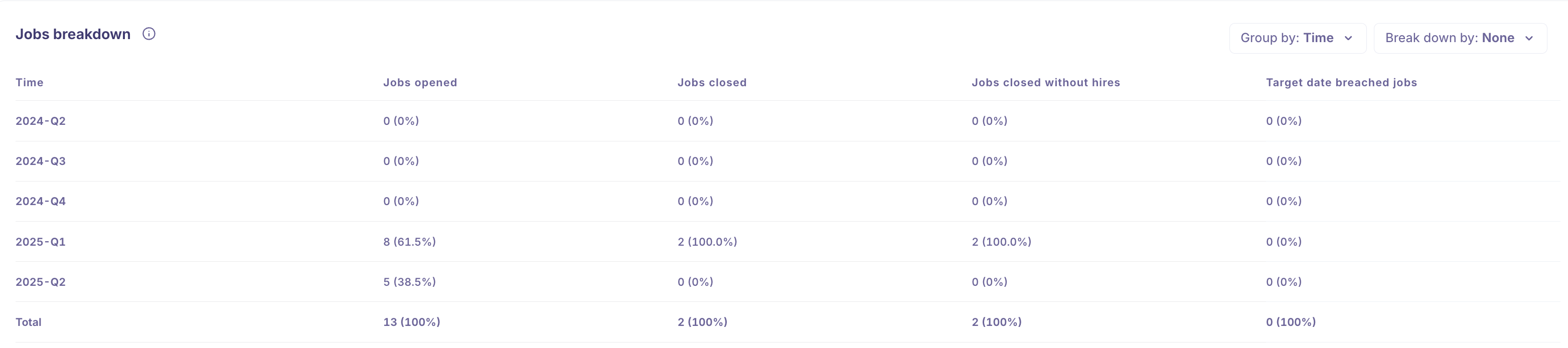
You can leverage the Group By and Breakdown By filters to segment and refine your offer data, unlocking deeper, more actionable insights into your recruitment performance.
Group By
The Group By feature helps you organize and summarize offer data based on key attributes, making it easier to identify patterns, trends, and performance across various dimensions. You can group your data by:
Time: Analyze offers created or accepted over specific time periods to identify activity peaks and trends.
Primary Recruiter: Understand recruiter-specific performance, including workload distribution and impact on hiring outcomes.
Primary Hiring Manager: Evaluate the involvement and effectiveness of hiring managers in driving offer decisions.
Department: Track hiring and offer success across different departments to identify high-performing teams or areas needing support.
Location: Examine offer data by job or candidate location to reveal regional hiring trends and geographical performance.
Breakdown By
The Breakdown By feature allows you to segment data by specific attributes, offering detailed insights into the hiring funnel and outcomes. You can break down metrics by:
Job Name: Analyze performance at the individual job level to see which roles are progressing smoothly or facing challenges.
Job Status: Review offers based on job statuses (e.g., open, closed) to understand progress and pipeline stages.
Primary Recruiter: Evaluate the effectiveness and workload distribution among recruiters.
Primary Hiring Manager: Gain visibility into hiring manager contributions and outcomes.
Department: Measure hiring activity and offer success rates by department to identify performance trends.
Location: Segment data by location to uncover regional hiring patterns and differences in recruitment dynamics.
Date range
Analyze your offer stage time over different periods:
Yesterday, 7 Days, 30 Days, 3 Months, 12 Months: Track short-term and long-term trends.
Custom: Define specific date ranges for tailored reporting.
Filters
Customize your reports using filters such as:
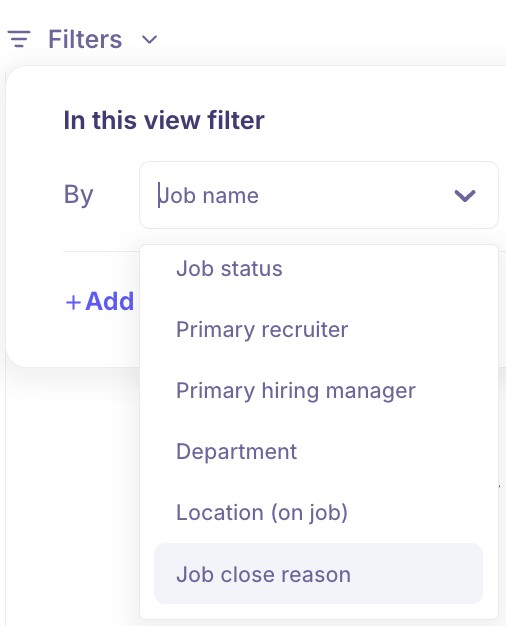
Job Name
Focus on individual job postings to analyze performance and outcomes for specific roles.Job Type
Filter data based on job type—such as full-time, part-time, or contract—to better understand hiring trends by employment category.Job Status
View metrics based on whether a job is currently open or has been closed, helping assess pipeline progress and closure rates.Primary Recruiter
Evaluate the performance and impact of individual recruiters on job outcomes and hiring efficiency.Primary Hiring Manager
Analyze the involvement and influence of specific hiring managers in the recruitment process.Department
Filter data by department to uncover trends and performance variations across different areas of the organization.Location (On Job)
View job postings by their geographical location to identify regional hiring patterns and demand.Job Close Reason
Understand the reason behind a job closure—whether it was due to a successful hire or other factors—offering insights into hiring outcomes and process effectiveness.
Functionalities
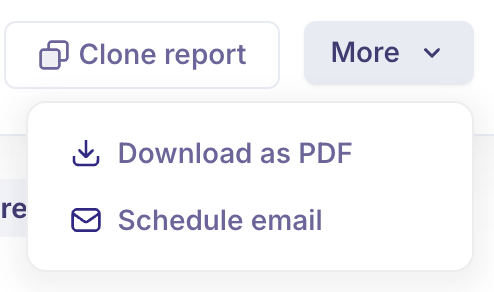
Download as PDF: Export and share your reports with stakeholders in a professionally formatted PDF.
Schedule Email: Automate report delivery at set intervals to ensure your team stays informed.
Clone Report: Easily duplicate existing reports for reuse or customization.
Refresh Date: Indicates the last time the report data was updated, helping you ensure you're viewing the most recent insights. Our Analytics data will be refreshed every 6 hours.
✅ Real-time Recruitment Use Case:
Scenario: Quarterly Hiring Review & Planning
A recruitment manager at a growing tech company needs to assess the performance of their hiring efforts over the past quarter to prepare for a leadership review and optimize future recruitment strategies. They log into Kula’s Job Analytics module and do the following:
Jobs Opened & Closed: They view the number of jobs opened and closed in the last 3 months to gauge recruitment activity and success rates.
Time to Close: They analyze the average time taken to fill positions to evaluate hiring efficiency and identify bottlenecks.
Target Date Breached Jobs: They flag roles that went past the target closing dates, which highlights delays or challenges in the process.
Job Open Trend: They review hiring patterns over the quarter using the bar chart to understand seasonal spikes or lulls.
Jobs by Department & Location: They examine which departments and regions had the most openings, helping align recruitment strategies with organizational needs.
Segmented Insights: Using Group By and Breakdown By, they compare recruiter performance and department-level hiring trends.
Data Sharing: The manager downloads the insights as a PDF and schedules a weekly email report for the leadership team.
This enables data-driven decisions for budgeting, headcount planning, and resource allocation for the upcoming quarter.
❓ Frequently Asked Questions (FAQs):
What is the purpose of the Job Analytics module in Kula?
It provides a comprehensive view of job requisition performance, helping you track hiring progress, identify trends, and make data-driven decisions.How often is the analytics data refreshed?
The data is refreshed every 6 hours to ensure you’re working with the most up-to-date information.Can I filter job reports by specific roles or departments?
Yes, you can use filters like Job Name, Department, Primary Recruiter, and more to customize your reports.What does the 'Target Date Breached Jobs' metric indicate?
It shows jobs that weren’t filled by the intended deadline, highlighting inefficiencies or delays in the hiring process.How can I track the time taken to fill roles?
Use the 'Time to Close' metric, which measures the average duration from job opening to job closure.Can I analyze recruitment performance by location?
Yes, the module offers filters and charts that show job performance across different geographical regions.What is the difference between ‘Group By’ and ‘Breakdown By’?
Group By is used to organize and summarize data (e.g., group by recruiter or department).
Breakdown By allows for deeper segmentation within that grouped data (e.g., break down recruiter data by location or job status).
Can I analyze hiring data for custom date ranges?
Yes, you can use predefined ranges (like 7 days, 30 days) or set a custom date range for tailored insights.Is there a way to automate report delivery to stakeholders?
Yes, you can use the Schedule Email function to send reports at regular intervals.Can I export reports for presentations or reviews?
Absolutely. Use the Download as PDF option to generate professional reports suitable for sharing.What does the ‘Refresh Date’ signify?
It indicates the last time the report was updated, helping you verify that the data is current.What is 'Job Close Reason' and why is it important?
It provides context on why a job was closed (e.g., successful hire, cancelled), offering insight into recruitment outcomes.