Job Board Configuration Options
Last updated: April 16, 2026
Before you can post jobs to external job boards from within Kula, you need to configure your job board settings at the account level. This is a one-time setup that unlocks distribution to free boards, paid boards via contracts, and aggregator networks like JobTarget and VONQ.
Navigate to Settings → Career page and Job boards → Job boards to access these options.
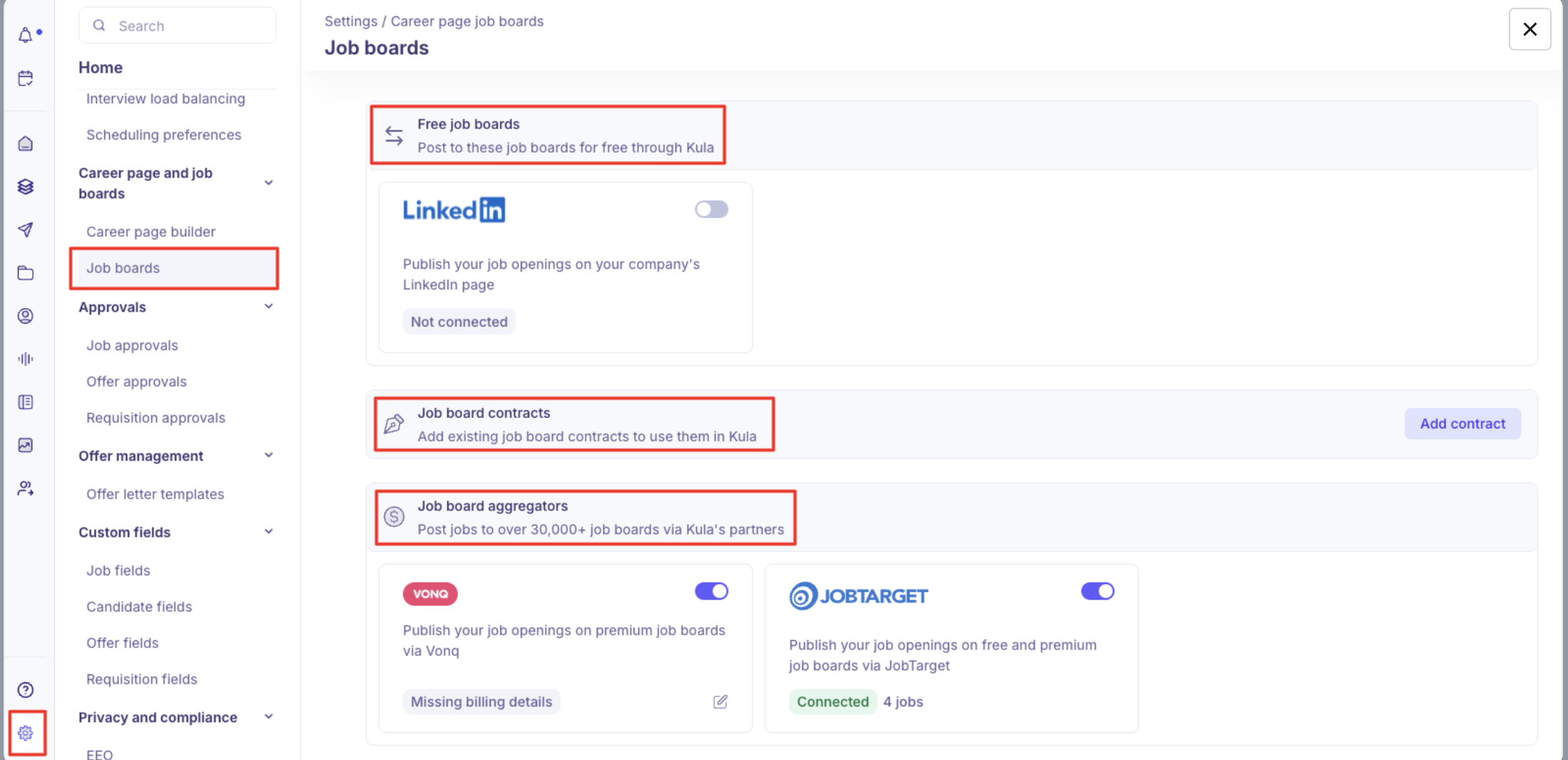
The Three Configuration Types
1. Free Job Boards — LinkedIn Limited Listings
Kula lets you post jobs to LinkedIn for free directly from the platform. No external payment or LinkedIn marketplace checkout is needed.
To set up LinkedIn free listings:
Go to Settings → Career page and Job boards → Job boards.
Under Free job boards, enable the LinkedIn toggle.
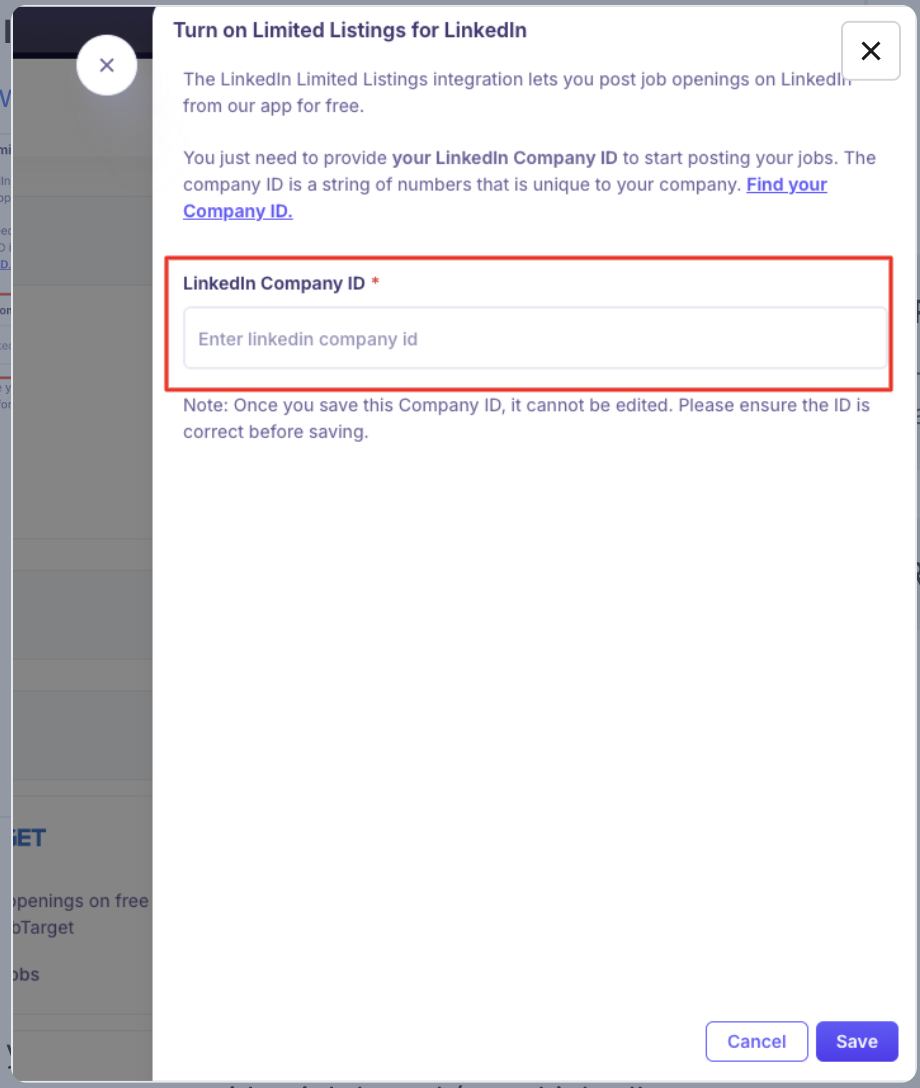
Enter your LinkedIn Company ID.
Click Save.
💡 Not sure where to find your LinkedIn Company ID? Here's how to find it →
Once saved, any job set to Listed → External job boards and Kula career page will be eligible to be posted to LinkedIn from the Job boards tab on the individual job.
2. Job Board Contracts
If your company already has a paid subscription or contract with a job board (e.g., LinkedIn Premium, Indeed, Welcome to the Jungle, or niche boards), you can connect those contracts here and use them when creating job posting campaigns.
To add a contract:
Go to Settings → Career page and Job boards → Job boards.
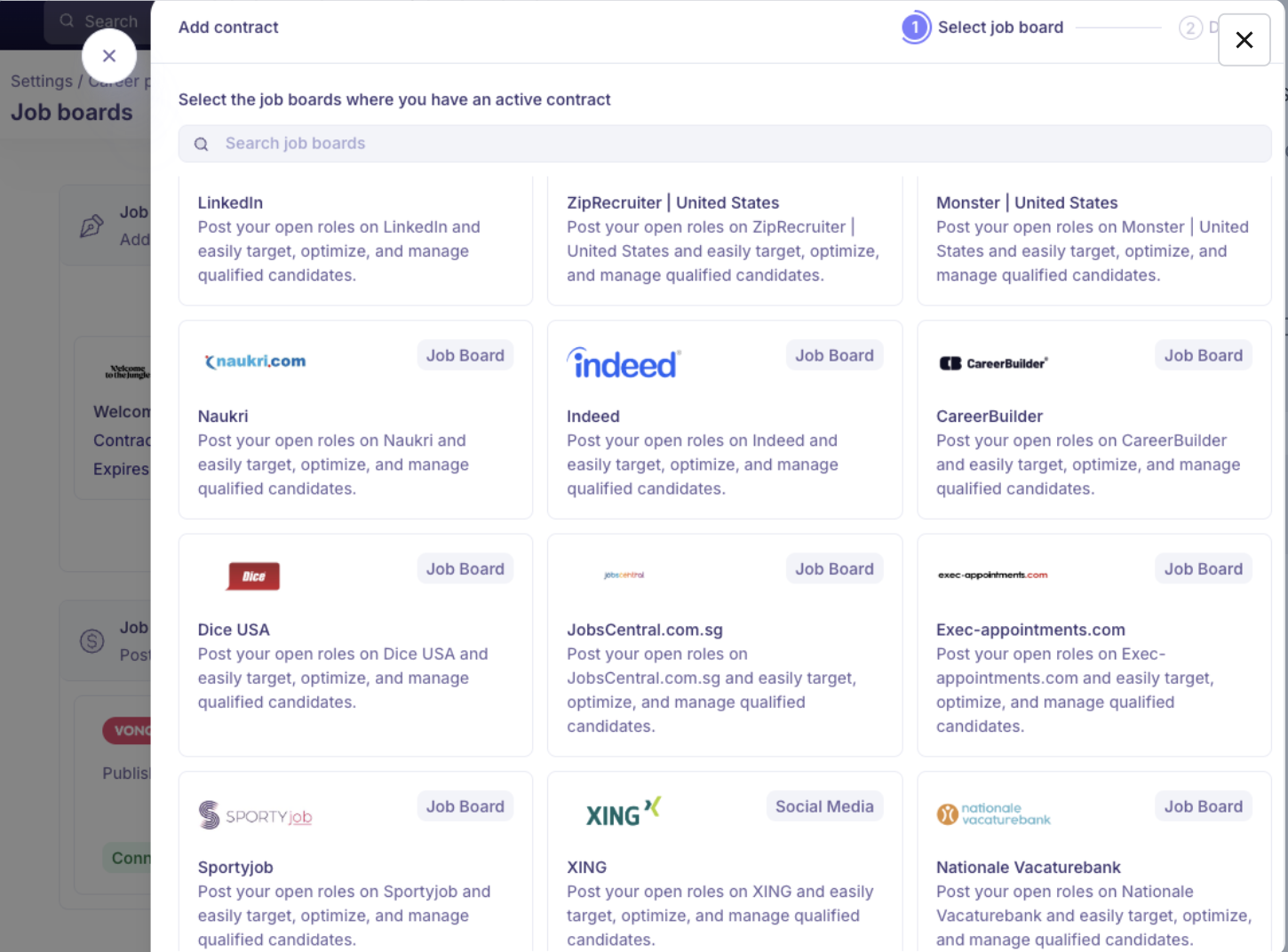
Under Job board contracts, click Add contract.

Search for and select the job board.
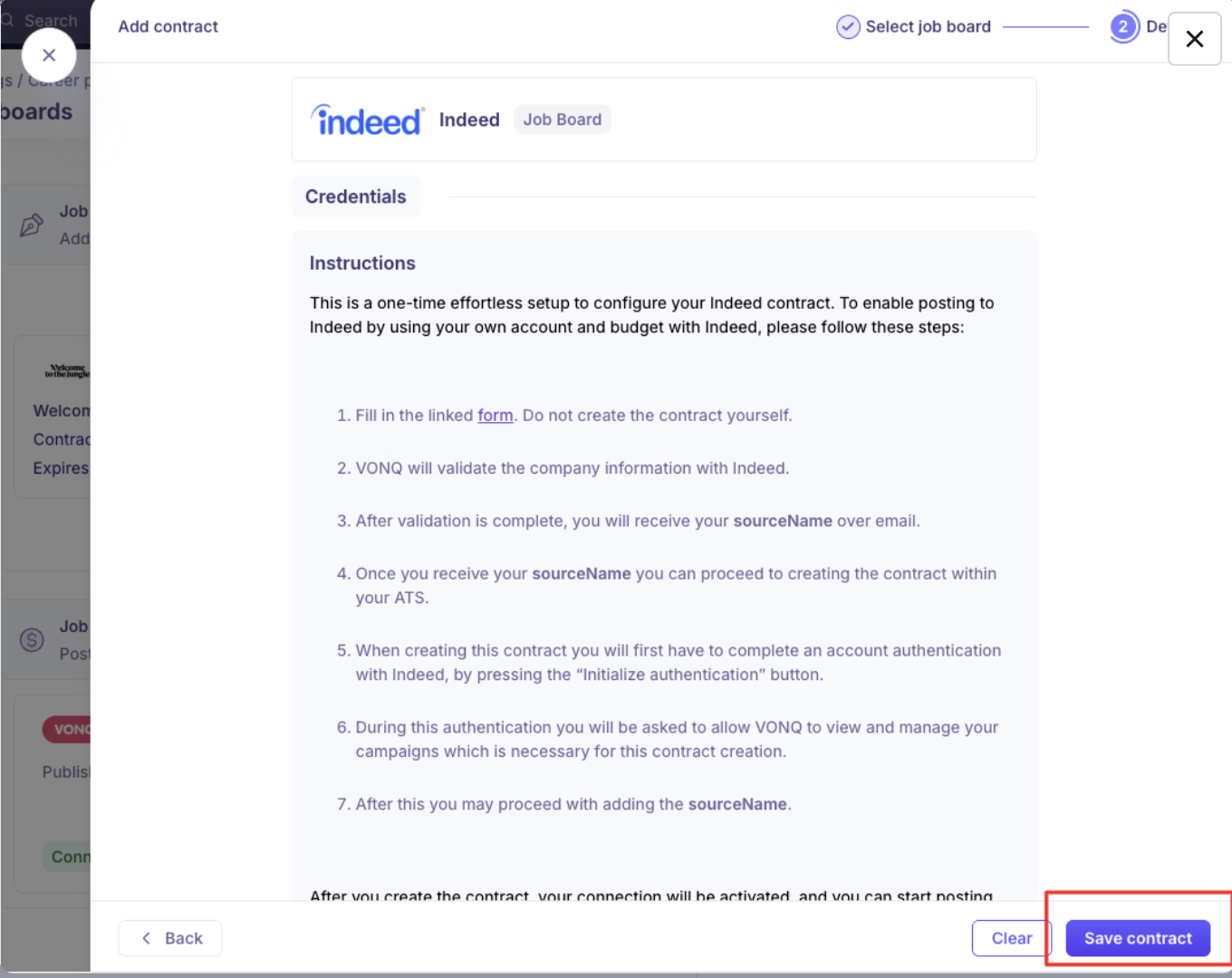
Follow the instructions for that board — each board has different credential requirements.
Enter the required details and authentication credentials.
Click Save Contract.
The contract is now active and available to use when posting individual jobs.
Important: Deleting a contract is permanent. If campaigns are live when a contract is deleted, they remain live but become unmanaged. Always end active campaigns before removing a contract.
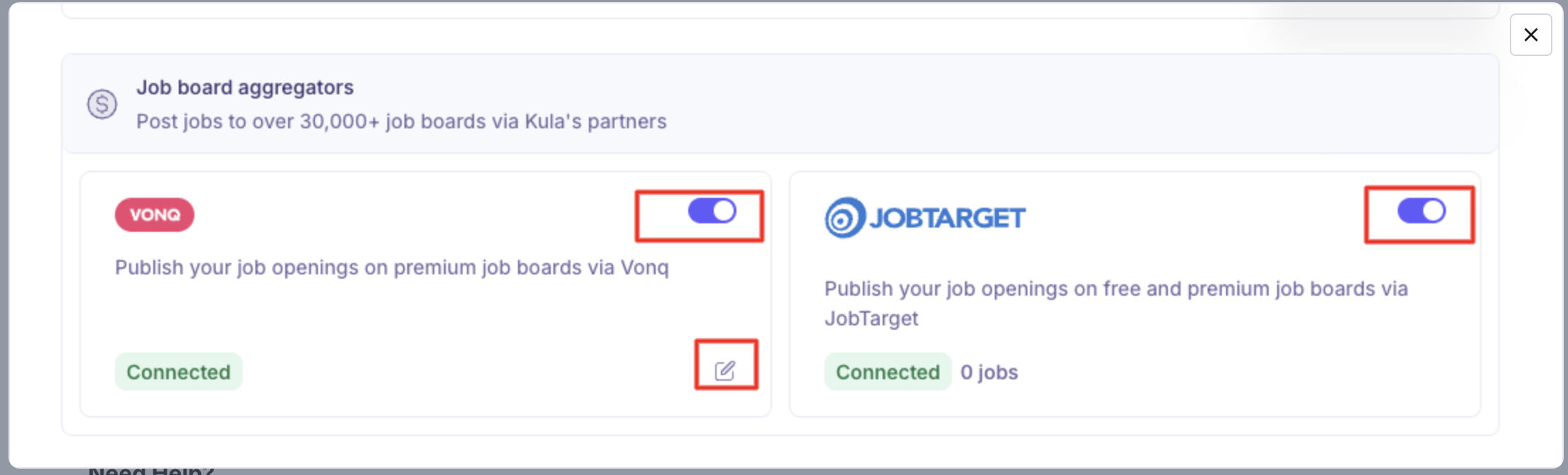
3. Job Board Aggregators — VONQ & JobTarget
Kula integrates with two aggregator networks that let you distribute jobs to thousands of boards simultaneously.
JobTarget
Post jobs to 25,000+ free and paid job boards through JobTarget.
Go to Settings → Job boards → Job board aggregators.
Enable the JobTarget toggle.
Choose your posting type:
Paid job posting — Access 100+ premium job boards. Select specific boards per role.
Organic job posting (Free) — Post to all available free boards simultaneously. Note: you cannot select individual boards; the job goes to all of them at once.
Click Save.
Note: ZipRecruiter is available as an organic free posting through JobTarget.
VONQ
Publish job openings on premium international job boards via VONQ.
Go to Settings → Job boards → Job board aggregators.
Enable the VONQ toggle.
Set up your wallet and add billing information — required to use the paid job board marketplace.
Click Save.
Paid job posts via both VONQ and JobTarget are only published after successful payment is confirmed.
FAQs
Q: My jobs are showing on LinkedIn but I didn't set up anything in Job board settings. Why?
LinkedIn has a "job wrapping" feature where it scrapes your Kula careers page and automatically pulls active job postings. Your LinkedIn POC may have set this up with a URL parameter (e.g., source=linkedin). This is separate from the LinkedIn limited listings toggle in settings — job wrapping happens outside of Kula's direct control.
Q: Jobs posted via LinkedIn are showing as Paused on LinkedIn Recruiter. What should I do?
This is typically a LinkedIn-side issue, especially if LinkedIn is scraping your careers page rather than receiving a direct feed from Kula. Check with your LinkedIn account manager first. Kula support can join a troubleshooting call if LinkedIn needs information from the Kula side.
Q: Does Kula support Indeed Apply Sync or have a certified Indeed ATS integration?
Kula currently supports Indeed distribution through JobTarget and VONQ integrations via XML feeds. Kula does not yet have a direct certified Indeed ATS integration. If you're experiencing a drop in Indeed visibility, note that Indeed updated its policy in March 2026 — free organic visibility for single-source XML feeds now requires sponsorship unless the ATS has a direct API integration. Reach out to Kula support for the latest status on Indeed partnership.
Q: Can I connect an existing Indeed or LinkedIn paid contract to Kula?
Yes. Use the Job board contracts section in Settings to add your existing contract credentials. Each board has specific credential requirements outlined in the setup instructions.
Q: I deleted a contract but the campaign is still running. Can I stop it?
Deleting a contract is permanent and leaves any live campaigns unmanaged — they continue running but can no longer be edited or stopped through Kula. Contact support at support@kula.ai if you need help stopping a live campaign after a contract has been deleted.
Need Help?
If you have questions or need assistance with setup, feel free to reach out to us at support@kula.ai or use the in-app chat for assistance.