Posting to LinkedIn
Last updated: October 16, 2026
Kula gives you three different ways to get a job in front of LinkedIn candidates — a free organic toggle, a Recruiter-side automatic sync (Job Wrapping), and paid promotion (through JobTarget's marketplace or a connected LinkedIn contract). They aren't interchangeable, and picking the wrong one is a common source of confusion.
Who can do this: Connecting a LinkedIn contract or enabling Job Wrapping's prerequisites requires Admin or Super Admin access to global settings. Posting an individual job to LinkedIn (organic toggle or paid campaign) requires the same job-editing permissions used to manage a job's posting settings, typically Recruiter, Admin, or Super Admin.
Where to find it: Account-level setup: Settings → Career page and job boards → Job boards. Job-level posting: within a job, the Job Boards tab.
The three ways to post to LinkedIn
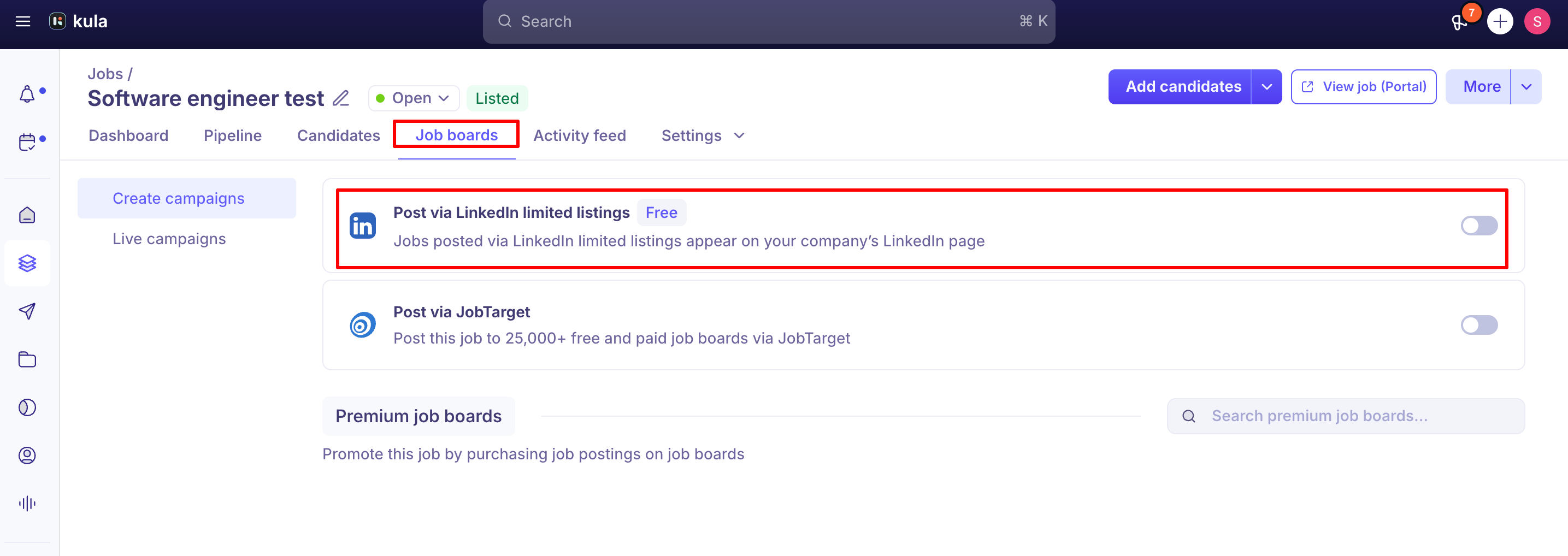
Free organic posting — a per-job toggle that publishes the job to your LinkedIn company page's organic (unpaid) job listings. No LinkedIn Recruiter account required. This is the "LinkedIn" option under Free Job Boards.
Job Wrapping — a one-time setup done on the LinkedIn Recruiter side (not in Kula) that automatically ingests every job from your Kula career page into LinkedIn as it's published, without you touching the Job Boards tab per job. Requires a LinkedIn Recruiter account with job posting capabilities.
Paid promotion — pay to promote a job through JobTarget's marketplace (no LinkedIn contract needed, you pay at checkout), or through your own connected LinkedIn Recruiter contract, where you create a posting campaign per job from that job's Job Boards tab and it uses your paid LinkedIn job posting credits.
If you just want a job visible on LinkedIn for free and don't mind manually toggling it per job, use organic posting. If you want every job to sync automatically without per-job action, set up Job Wrapping. If you're paying for premium/sponsored LinkedIn placement, use JobTarget's marketplace, or connect a contract and post via campaigns.
Promoting a job on LinkedIn (paid)
There are two ways to pay for LinkedIn promotion from Kula. Which one fits depends on whether your company already has a LinkedIn Recruiter contract.
Option 1: Buy LinkedIn promotion through JobTarget (no LinkedIn contract needed)
Make sure JobTarget is enabled for your account: Settings → Career page and job boards → Job boards → Job Board Aggregators.
Open the job you want to promote and go to its Job Boards tab.
Find the JobTarget card and turn it on for that job. JobTarget's marketplace opens inside Kula.
Browse the job boards. Paid boards show their price and posting duration.
Add the paid LinkedIn promotion to your cart, review the summary, accept the terms and check out. You pay at checkout in the marketplace.
Option 2: Use your own LinkedIn Recruiter contract. An admin connects the contract once, then you create a campaign for each job you want to promote. The steps are in "Posting via a connected LinkedIn contract (paid)" below.
Free organic posting
Open the job and go to its Job Boards tab.
Enable the LinkedIn option.
Enter the requested details and click Save.
Connecting LinkedIn as a free job board here does not by itself enable automatic syncing — it posts the specific job you toggled it on for, once. Each new job needs the toggle enabled individually unless you also set up Job Wrapping.
Important, recent LinkedIn policy change: LinkedIn changed its policy so that third-party platforms (including JobTarget) can no longer post organic jobs to LinkedIn on a customer's behalf. If your organic LinkedIn presence was previously coming through JobTarget's "LinkedIn Limited Listing Organic (Marketplace)" bundle, that path is no longer supported — new accounts don't get it at all.
This does not affect the direct, per-job organic toggle described above, and it does not affect paid LinkedIn postings through JobTarget or a connected contract.
To post to LinkedIn for free, use the LinkedIn toggle under Free Job Boards.
Setting up Job Wrapping (automatic sync)
Job Wrapping is configured entirely on LinkedIn's side, using your careers page as the source:
You'll need a LinkedIn Recruiter account with job posting capabilities.
In LinkedIn Recruiter, open the "Set Up Automated Job Postings" flow and add Kula as a new source.
For the ATS/source type, choose LinkedIn Jobs XML, and provide your careers page URL in the format careers.kula.ai/<account_name>.
Optionally enable applicant source tracking with the code source=LinkedIn so applications are attributed correctly.
LinkedIn's own team completes the ingestion setup on their end — this isn't something Kula support can trigger or expedite.
Once active, LinkedIn periodically pulls jobs from your careers page automatically — no per-job toggle needed. In most cases this reads your XML feed, but at least one real account had LinkedIn scraping the rendered career page directly instead, which can produce incomplete or misparsed fields (a location value was picked up as just "Addison" in one case).
If a Job-Wrapped listing on LinkedIn shows wrong or missing details that look correct in Kula, that's a LinkedIn-side ingestion issue to raise with their support, not a Kula data problem.
Posting via a connected LinkedIn contract (paid)
Step 1 — connect the contract (one-time, account level)
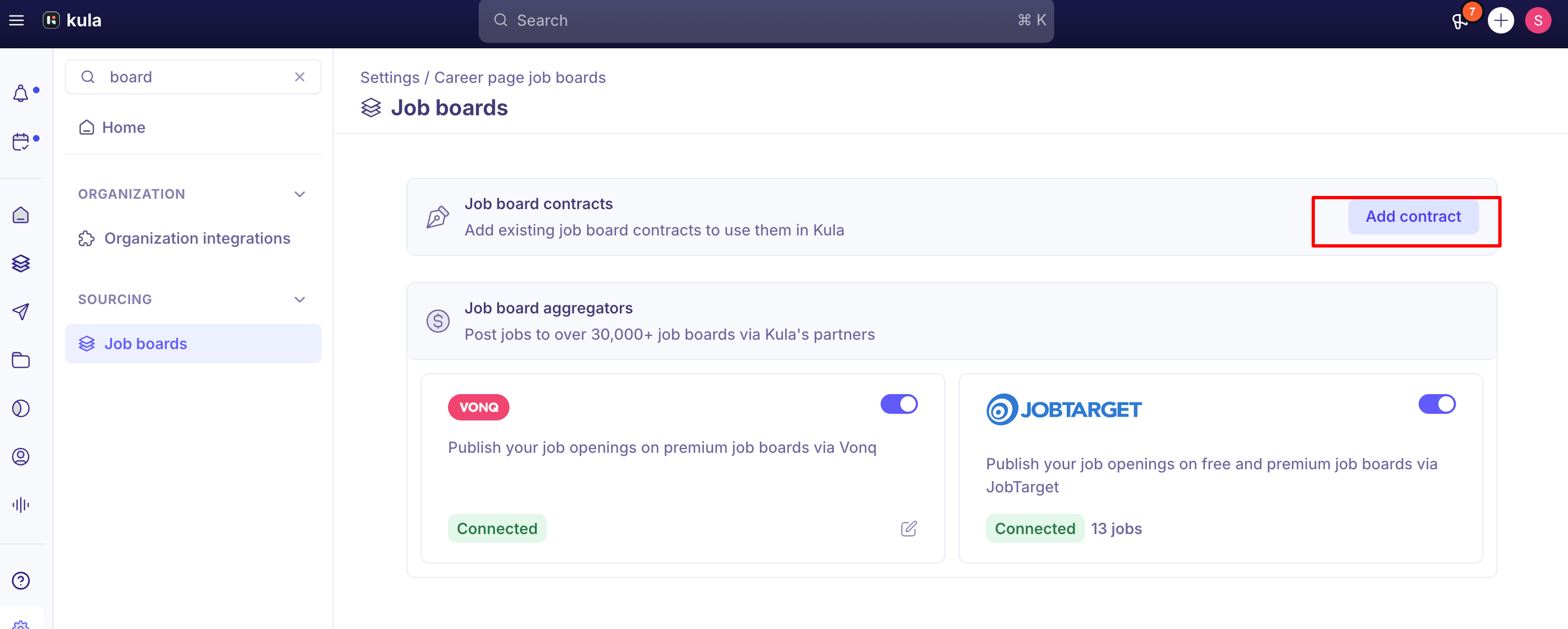
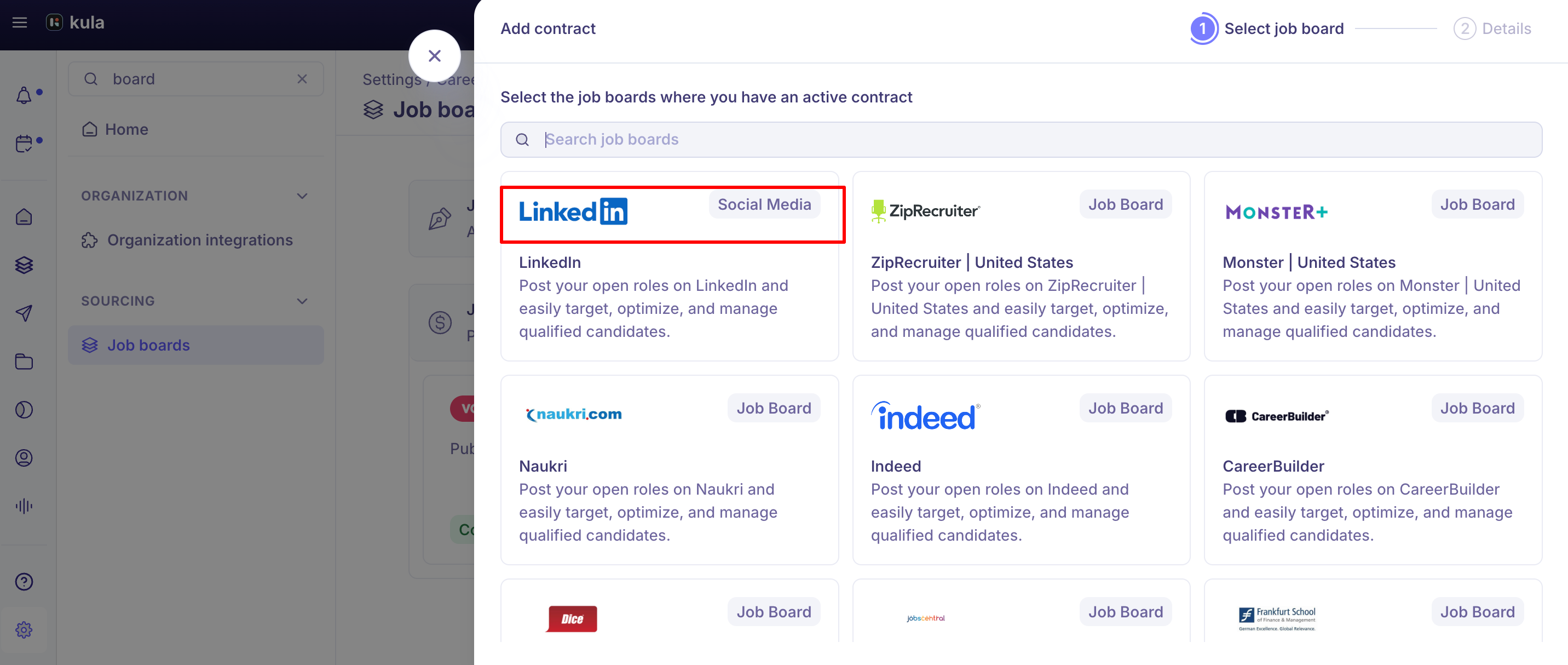
Go to Settings → Career page and job boards → Job boards → Job Board Contracts, and click Add contract.
Select LinkedIn and authenticate with your LinkedIn Recruiter account (log out of any other LinkedIn session first).
If your organisation has multiple LinkedIn Recruiter contracts, choose the one to use with Kula.
Configure the "Job posted" name — this is who shows as the poster on LinkedIn for jobs published through Kula.
Enter your LinkedIn company ID and save.
Step 2 — publish a job through the contract (per job)
Open the job and go to its Job Boards tab.
Add a campaign and select your connected LinkedIn contract (and any other contracted/premium boards you want in the same campaign).
Fill in the posting requirements — Kula pre-fills most fields from the job, but review before submitting.
Submit and track status under Live Campaigns; incomplete setups are saved under Draft so you can resume later.
Good to know
The "Job posted" person on a LinkedIn contract needs an active seat in that LinkedIn Recruiter contract, or posting fails. If a campaign is stuck with "Missing active seat for poster", the job poster's LinkedIn seat isn't active. Choose a poster with an active seat.
The LinkedIn company ID and job-poster name can't be freely changed once entered. Per LinkedIn's own listing requirements, Kula validates changes to these fields to prevent accidental edits — expect to go through a confirmation step rather than editing them in place.
A job's location added after the job was already posted to LinkedIn may not sync. If you add a location after publishing, check it appears on the LinkedIn listing. If you add a location post-publish, confirm it actually appears on the live LinkedIn listing rather than assuming it synced.
Publishing and removal aren't instant. A new LinkedIn posting or the removal of a closed job's posting can take up to two days to reflect on LinkedIn's side — this delay is on LinkedIn's end, not Kula's, and is a common source of "my job isn't showing up yet" tickets.
Direct Apply (applying without leaving LinkedIn) isn't currently supported for the free/basic organic posting path. It's an open engineering item, not a toggle you're missing. Contracted/paid postings may behave differently depending on the specific board setup — check with support if this matters for your use case.
Confidential jobs are excluded from all LinkedIn posting paths — organic, Job Wrapping, and paid contract postings alike, consistent with how confidential jobs are excluded from every job board product.
FAQ
What's the difference between "LinkedIn" and "JobTarget via LinkedIn Promotion" in my source report? LinkedIn is the free, organic path — candidates who found the job directly through your LinkedIn company page. JobTarget via LinkedIn Promotion is a paid/sponsored placement distributed through JobTarget. Same platform, two different posting mechanisms, tracked separately in Kula's reporting.
Does the candidate see a different application experience depending on how the job was posted? No — candidates discover and apply to the role on LinkedIn the same way regardless of whether it was posted organically, via Job Wrapping, or through a paid contract.
I connected LinkedIn as a free job board — why isn't every new job posting automatically? The free job board toggle posts one job at a time; it doesn't create an ongoing sync. For jobs to post to LinkedIn automatically as they're published, you need Job Wrapping set up on the LinkedIn Recruiter side.
My job isn't showing up on LinkedIn yet — is something broken? Possibly not — both new postings and removals can take up to two days to reflect on LinkedIn. If it's been longer than that, check the job's Job Boards tab for an error, or contact support.
Can I post the same job to LinkedIn through more than one LinkedIn contract? Not today — Kula supports one LinkedIn contract per account. Posting through a second contract for a specific job isn't currently possible.
Do I need LinkedIn Recruiter to post to LinkedIn at all? No. The free organic toggle works without a Recruiter account. Job Wrapping and paid contract posting both require a LinkedIn Recruiter account (Job Wrapping specifically needs job posting capabilities on that account).
How do I promote (pay to boost) a job on LinkedIn? See "Promoting a job on LinkedIn (paid)" above. If you don't have a LinkedIn Recruiter contract, use JobTarget's marketplace. If you do, connect it and post through a campaign.
Need help?
If a LinkedIn posting fails, gets stuck "In Progress," or shows incorrect details compared to what's configured in Kula, contact Kula support with the job link and account name.