Archiving and Closing a Job
Last updated: April 10, 2026
Kula gives you two ways to retire a job once hiring is complete or a role is no longer active: closing and archiving. They serve different purposes and have different effects on your data and workflow.
Closing a Job
Closing marks a job as inactive while keeping it accessible and reportable.
When to close
The role has been filled
Hiring has been cancelled or put on indefinite hold
You want to stop accepting applications but preserve all data
What happens when you close a job
The job is removed from your active jobs view
The job post is unpublished from your career portal
Connected job board listings are automatically removed (where the integration supports auth)
Existing candidates remain in their pipeline stages
All data (candidates, notes, scorecards, history) is preserved
The job can be reopened at any time by changing the status back to Open

How to close a job
Go to Jobs & Requisitions → Jobs
Open the job
Click the status badge or More Options (⋯)
Select Close Job
Confirm the action
Archiving a Job
Archiving is a final step that moves a closed job out of your active workflow entirely. It is typically done after a job has been closed and you no longer need it in your day-to-day view.
When to archive
The job is closed and hiring is fully complete
You want to clean up your jobs list without deleting historical data
The role is permanently discontinued
What happens when you archive a job
The job is moved out of the standard jobs list
It is no longer visible in default views (filter by "Archived" to find it)
Candidate data and history are fully preserved for reporting and compliance
Archived jobs cannot be reopened — you would need to clone the job to start a new version
How to archive a job
First, ensure the job is in Closed status
Go to Jobs & Requisitions → Jobs
Open the closed job
Click More Options (⋯)
Select Archive Job
Confirm the action
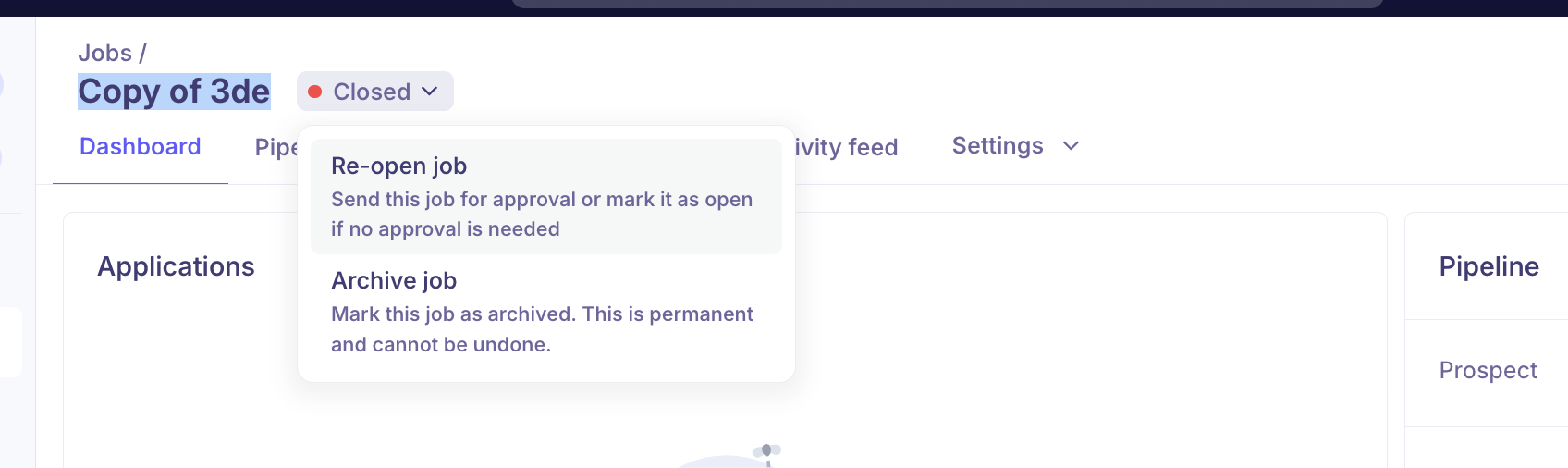
Closing vs. Archiving: Quick Comparison
Close | Archive | |
Job is still visible | Yes (in closed filter) | No (hidden from default view) |
Can be reopened | ✅ Yes | ❌ No (clone instead) |
Candidates preserved | ✅ Yes | ✅ Yes |
Removed from job boards | ✅ Yes (auto) | ✅ Yes (already removed) |
Use case | Hiring complete, may reopen | Permanently done |
Recommended Workflow
Hiring complete → Close job → Send rejection emails to remaining candidates
                                      ↓
               Role permanently discontinued → Archive job
                                      ↓
               Role reopens later → Reopen (or Clone if structure changed)
FAQs
Q: Can I reopen an archived job?
No. Archived jobs cannot be reopened. If the role comes back, clone the archived job to create a fresh copy.
Q: Will archiving a job delete candidate data?
No. All candidate records, notes, and history are preserved even after archiving.
Q: What happens to job board postings when I close a job?
Kula automatically removes the job from connected job boards when it is closed or deleted, provided the board integration credentials are still valid.
Q: Can I archive a job that is still Open?
No. A job must be Closed before it can be archived.
Q: Should I close or archive a job when someone is hired?
Close the job first. Once you've completed any final steps (rejection emails, data review), archive it to keep your jobs list clean.
Need Help?
If you have questions or need assistance with setup, feel free to reach out to us at support@kula.ai or use the in-app chat for assistance.