Job Status: Draft, Open, Closed
Last updated: April 10, 2026
Every job in Kula has a status that reflects where it is in the hiring lifecycle. Understanding each status helps you manage your pipeline, control visibility, and keep your hiring data clean.
Status Overview
Status | What it means |
Draft | Job is being set up. Not visible to candidates, cannot receive applications. |
Open | Job is active. Applications are being accepted and the pipeline is live. |
Closed | Hiring is complete or the role has been filled. The job is inactive. |
Draft
A job starts as a Draft when it is first created. In this state:
The job is not visible on your career portal
Candidates cannot apply
The team can still configure the pipeline, hiring team, scorecards, and job post
Jobs imported from another ATS (e.g., Greenhouse) default to Draft status
Move a job out of Draft once the setup is complete and you're ready to begin accepting applications.
Candidates cannot be added to a Draft, Closed, Archived, or Not Approved job — only Active (Open/Scheduled) jobs support candidate additions.
Open
An Open job is fully active:
The job post is live on your career portal (if listed)
Candidates can apply directly or be added manually
The pipeline is active — candidates can move between stages
The job can be posted to job boards (LinkedIn, Indeed, etc.)
Flows and automations tied to the job are running
This is the default state for an active hiring role.
Closed
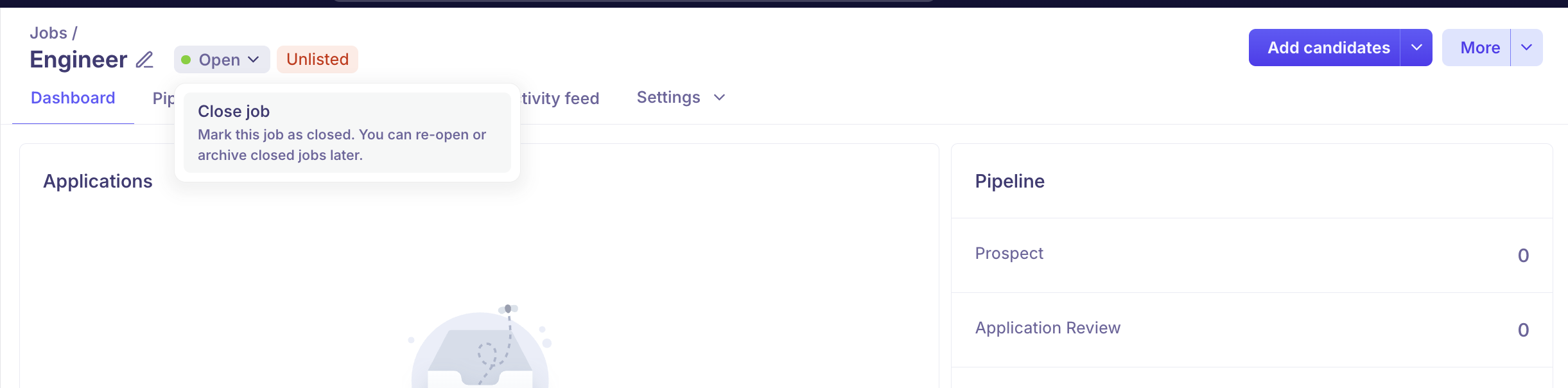
Closing a job marks it as complete:
The role is no longer accepting applications
The job is removed from active views
Candidate data and history are preserved for reporting
The job can be reopened if hiring resumes
When a job is closed or deleted, Kula automatically unpublishes it from connected job boards (where the integration supports this).
Closed jobs are distinct from Archived jobs. Closing is a status change; archiving is a final action that moves the job out of your active workflow entirely.
How to Change a Job's Status
Go to Jobs & Requisitions → Jobs
Open the job you want to update
Click the status badge or the More Options menu
Select the status to closed
Status Transitions
Draft → Open
Open  → Closed
Closed → Open (reopen)
Closed → Archived
FAQs
Q: Can I reopen a closed job?
Yes. Closed jobs can be reopened. Go to the job and change the status back to Open.
Q: What happens to candidates when a job is paused?
They remain in their current pipeline stages. No action is taken on existing candidates — only new applications are blocked.
Q: Does closing a job notify candidates?
Not automatically. You can manually send rejection emails to candidates still in the pipeline before or after closing.
Q: Can I still see candidates after a job is closed?
Yes. All candidate data, pipeline history, and notes are preserved after closing.