Unsubscribe and opt-out management
Last updated: September 26, 2026
When you email a candidate through a Flow, they have a way to opt out directly from the email itself. This article covers how that unsubscribe link works, what happens when a candidate uses it, other ways outreach to a candidate stops, and what to know about the limits of opt-out today.
Who can do this: Any candidate receiving a Flow email can use the unsubscribe link — no account or login required on their end. Manually stopping or removing a candidate from a Flow yourself requires the same Flow access covered in Pausing and stopping sequences
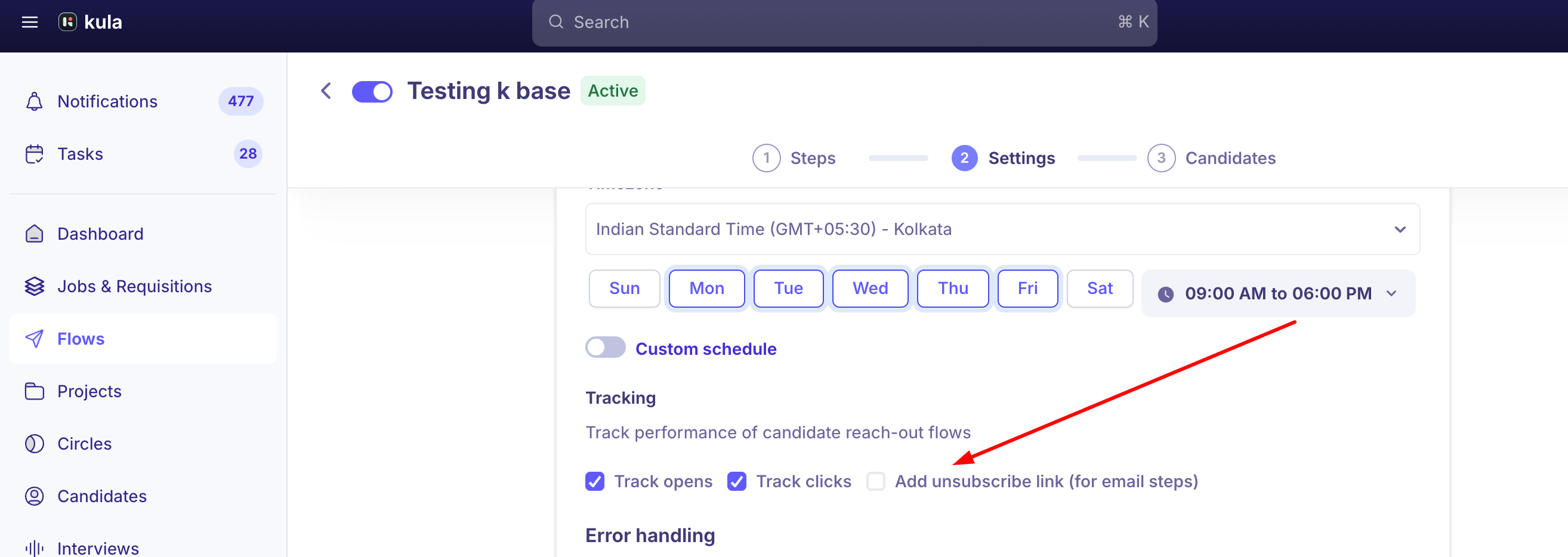
Where to find it: Flow > Settings
How the unsubscribe link works
Every Flow email a candidate receives includes an unsubscribe link if the checkbox i enabled. If a candidate clicks on the link:
They're marked Not interested on that Flow.
The Flow stops sending them further messages.
The action is logged as an activity on the candidate's record, so you can see it happened and when.
Rejection Reason
Flows have a rejection-reason setting used specifically for this case — when a candidate is automatically marked Not interested by clicking unsubscribe, Kula applies the reason configured in the Flow's settings, separate from the custom rejection reason a recruiter can choose when manually marking someone Not interested themselves.
Other ways outreach to a candidate stops
Unsubscribing isn't the only thing that halts Flow messages to a candidate:
A hard email bounce stops the Flow for that candidate. If a candidate's email address is invalid or their inbox rejects delivery, Kula stops sending further steps to them rather than repeating a failed send. You can find candidates with bounced emails using the Email Errors filter within a Flow.
Rejecting a candidate stops Flow messages to them too. Once a candidate is rejected — including through an ATS integration, not just directly in Kula — any Flow they're part of should stop messaging them.
A recruiter can manually stop or remove a candidate from a Flow at any time, independent of anything the candidate does. See Pausing and stopping sequences for the full mechanics.
Capturing consent on your application form (a separate, manual option)
Outside of the Flow unsubscribe link, some organizations add a Yes/No consent question directly to their job application form: Job → Job Post → Application Form → Add Section → Add Question.
This captures whether a candidate consented at the point of applying, but it's a manual setup you configure yourself — it records an answer rather than automatically enforcing anything about future outreach.
Good to know
The unsubscribe link is built into every Flow email automatically — you don't need to add it yourself or remember to include it in a template.
Clicking unsubscribe is logged as an activity, so you (or a teammate) can see exactly when and why a candidate stopped being part of a Flow, rather than it looking like the Flow silently went quiet.
Kula doesn't currently support bulk, newsletter-style campaign management or a two-way sync with external marketing platforms. If you're trying to manage opt-outs the way a marketing tool would (a shared suppression list across many campaign types), that's not a native capability today — Flows and Projects/Talent Pools are the closest native tools for ongoing candidate engagement.
A rejected candidate or a hard-bounced email should also stop Flow messages, not just an explicit unsubscribe click — so a candidate doesn't need to unsubscribe for outreach to stop in those cases.
A consent question on your application form records an answer — it doesn't by itself stop future outreach. Don't rely on it as an enforcement mechanism until you've confirmed how (or whether) it's wired to your Flows.
FAQ
Is there a way for candidates to unsubscribe from our email outreach? Yes — every Flow email includes an unsubscribe link. Clicking it marks the candidate Not interested, stops that Flow for them, and logs the action as an activity.
If a candidate unsubscribes, does that stop them from ever being added to a different Flow later? This isn't confirmed either way — the unsubscribe link is documented as stopping the Flow they were in and marking them Not interested, but whether that creates broader, cross-Flow suppression wasn't confirmed by any source available. Worth a direct in-product check if this matters for your compliance needs.
Do I need to do anything special if a candidate's email bounces, or will they keep getting messages? A hard bounce should stop the Flow for that candidate automatically, the same way a rejection does — you don't need to manually intervene, though you can use the Email Errors filter to find and review bounced candidates.
Can I add a consent question to my application form to track opt-in? Yes, as a manual setup (Job → Job Post → Application Form → Add Section → Add Question, Yes/No Consent) — but this captures an answer rather than automatically preventing outreach to candidates who decline.
Can I sync Kula's opt-out list with an external email marketing tool? Not natively — Kula doesn't currently offer a two-way sync with external marketing platforms or bulk newsletter-style campaign management.
Need help?
If you have questions or need assistance, reach out to us at support@kula.ai or use the in-app chat.