Automated stage-based emails
Last updated: September 9, 2026
Instead of manually sending an email every time a candidate reaches a certain point in your process, you can configure an email activity on a pipeline stage to send automatically the moment a candidate enters it.
This article covers how automated stage emails work, what to expect when candidates move (or are added) into an automated stage, and a few rough edges worth knowing about, since this is a newly-rolled-out capability.
Who can do this: Managing automations (creating, editing, or removing them) is available to Super Admins, Admins, and the job's Primary Recruiter. Hiring Managers can view a stage's automation but can't edit it — attempting to returns a permissions error. External recruiters and recruiters not on the job's team can't access automation configuration at all.
Where to find it: Open a job (or a reusable interview plan) → Settings → Interview Plan → each stage row shows a lightning-bolt icon and an "N Activities" count — click it to open the automation builder for that stage. The stage's kebab menu also offers Edit automation / Remove automation directly.
Building an automated email into a stage
Clicking the lightning-bolt icon on a stage opens a full-screen drag-and-drop builder. From there you can add activities (email being one of five types — the others are Interview, Review, Assessment, and Survey), drag to reorder them, and the picker won't let you add the same activity type to a stage twice.
For an email activity specifically:
Timing. The first activity on a stage runs either "Immediately (on stage entry)" or "After a delay." If it's not the first activity, it can run immediately after the previous activity, with a delay after the previous activity, after an interview is completed, or after a scorecard is submitted — the wording in the builder adapts to whatever activity precedes it.
Delay range. Delays can be set in hours (1–720) or days (1–30). Invalid entries auto-correct when you click away — 0 becomes 1, anything over the maximum clamps down to it, decimals are stripped, and letters revert to the last valid value. Save is never blocked by an invalid delay entry.
The email itself. The email an automated activity sends is the one configured on that activity inside the Interview Plan — not a template pulled from Settings → Templates.
What happens when a candidate enters an automated stage
Moving an existing candidate into a stage that has automation shows a confirmation: a "Move to stage with automation?" prompt with the choice to cancel, move without triggering the automation, or move and let it fire. This gives you a deliberate opt-out for that specific candidate if you don't want the automated email to go out.
Adding or importing a candidate directly into an automated stage — creating them from scratch with the stage already set, or bulk-importing via CSV — fires the automation too, but shows an inline heads-up rather than the confirmation modal you'd see on a manual move. There's no way to opt a specific candidate out on this path the way you can with a move.
Transferring a candidate to another job cancels any pending automation from the source job and fires the destination job's automation for the stage they land on.
Adding a candidate to an additional job (while they stay active on their original job) fires the new job's automation; the candidate's status on the original job is unaffected.
Using Quick Review's Y-press shortcut to advance a candidate fires that stage's entry automation, the same as a manual move would.
A candidate applying directly through your careers portal fires the entry-stage automation on submission — after your Fraud Detector check first, if you have one enabled, so a flagged application won't trigger the automation. This only applies to jobs that are Listed on your public careers page.
When an automated activity gets canceled
Moving a candidate out of a stage before its automation finishes cancels any pending activity for that stage — silently, with no warning modal (the warning only appears on the way in, when you move a candidate into an automated stage).
Rejecting a candidate stops any pending automation immediately, even though the reject confirmation itself doesn't mention automation.
Closing a job shows a warning ("Active automation for N candidates will be stopped") before canceling every in-flight automation tied to that job.
Watching an automated email go out
An "Activities underway" widget shows live progress for a single move, transfer, or add — including merge tokens (candidate name, job, stage, activity, interviewer/reviewer names) resolved in real time as the activity runs. There's roughly a 15-second window after triggering where hovering reveals a Stop button that cancels the pending activity (though the candidate's move itself still goes through) — closing the widget does not stop anything in progress, only the Stop button does.
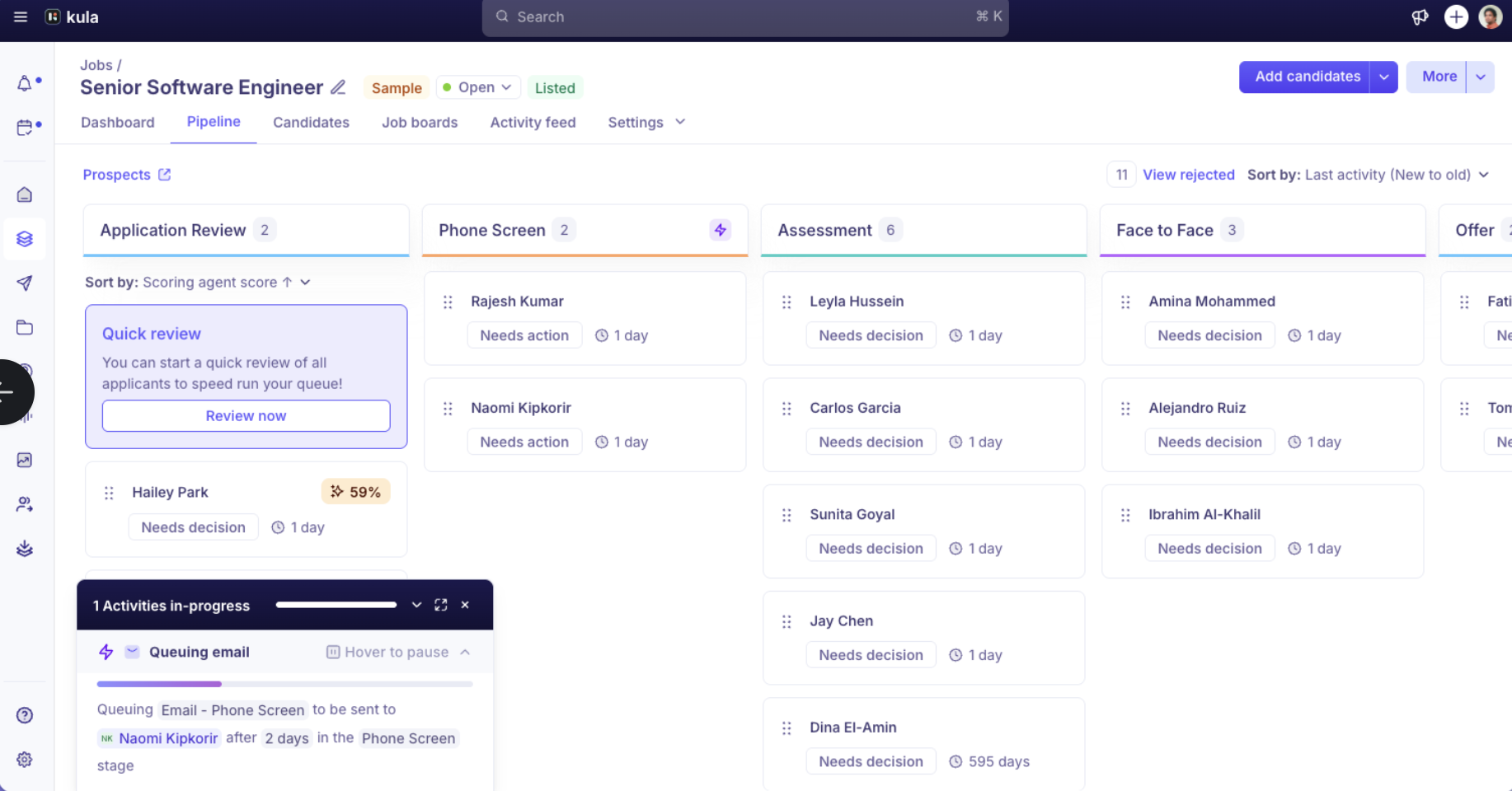
Every automated activity, along with any errors, shows up in the candidate's Recent Activities feed — this is the audit trail to check first if something seems off. In-progress automations show as a running fraction (for example, "5 of 6 candidates"), alongside Completed, Stopped, and scheduled states. If an activity fails, a red icon appears on the candidate's application page, and hovering over it shows the failure reason.
Bulk moves work a little differently: they show one aggregate progress widget covering the whole batch, without a per-candidate Stop option — the 15-second Stop window is only available on single moves, transfers, and adds.
Automated emails are sent from Kula's system address
Unlike an ad-hoc email you send yourself (which goes out from your connected mailbox, showing your name in "From"), automated stage emails are sent as system emails on behalf of your organization rather than from an individual user's mailbox. Don't expect an automated email to show your personal "From" name the way a one-off email would.
What's not automated yet
A few related requests come up often but still aren't supported, per Kula's own roadmap note in the 9 Sep 2026 release:
Automating an activity on the Rejection stage isn't available yet — it's explicitly on the roadmap, not shipped.
Branching an automation on what a scorecard actually says (for example, only sending a follow-up if the evaluation was "Strong Hire") isn't possible — automation can trigger off a scorecard being submitted, but it can't read or react to what's inside it. This is also on the roadmap, described as a future scorecard-evaluation trigger.
AI-assisted automation authoring ("describe the automation you want in plain English") is on the roadmap, not available today.
A standalone schedule-interview activity type distinct from the existing Interview activity is also listed as upcoming.
Sending a candidate-facing email when they're paused or put on hold still doesn't appear to be a supported trigger — worth confirming directly if a customer asks, since this wasn't explicitly addressed in the latest release.
Internal (non-candidate-facing) notifications, like alerting an onboarding point of contact when a hired candidate reaches an onboarding stage, also don't appear to be supported — automation is built around activities tied to the stage itself (candidate-facing or system activities), not arbitrary internal alerts.
Good to know
Turning on automation doesn't retroactively apply to candidates already sitting in that stage. It only fires for candidates who enter the stage after you save the automation — if you configure automation on a stage that already has candidates in it, nothing happens to those candidates.
Automation reacts to a stage move — it doesn't cause one. If a customer asks whether automation can advance a candidate to the next stage on its own, the answer is no; something else (a person, or a separate progression rule) still has to move them first.
A "trigger after scorecard is submitted" activity is waiting on a human, not broken. If nothing has gone out, check whether the relevant interviewer has actually submitted their scorecard yet before assuming the automation itself failed.
This is available to every account today, with no toggle, request, or enablement needed from Kula — if a customer doesn't see the lightning-bolt icon on their Interview Plan stages, that's worth investigating as a bug rather than a plan or access limitation.
Removing an automation from a stage is forward-only. Candidates already partway through that stage's automation stay on it; only candidates entering the stage after the removal skip it.
A completed automation won't re-fire if a candidate re-enters the same stage later — for example, if they're moved back after being moved forward.
FAQ
I turned on automation on a stage that already has candidates sitting in it, but nothing happened for them — is it broken? No — automation only applies going forward, to candidates who enter the stage after you save it. Candidates already in the stage aren't retroactively enrolled.
I set an email to send after the scorecard is submitted, but nothing has gone out — what's wrong? Most likely nothing — that trigger fires once a human actually submits their scorecard. If no one has submitted one yet, the automation is waiting on that, not malfunctioning.
Can automation move a candidate to the next stage automatically? No — automation only reacts to a stage move that's already happened; it can't advance a candidate through your pipeline on its own.
Can I set up different automated follow-ups depending on how an interview went — for example, only sending something after a "Strong Hire"? Not currently. Automation can trigger off a scorecard being submitted, but it can't read what's inside the scorecard and branch based on the evaluation.
I bulk-imported or added candidates directly into a stage with automation set up — will they still get the automated emails? Yes — adding or importing a candidate directly into an automated stage fires the automation, with an inline heads-up rather than the confirmation prompt you'd see when manually moving a candidate in.
Can I automate sending a survey to candidates at a certain stage now? Yes — Survey is one of the five activity types (alongside Email, Interview, Review, and Assessment) you can now add to a stage's automation.
Why doesn't the automated email show my name as the sender? Automated stage emails are sent as system emails on behalf of your organization rather than from an individual's connected mailbox, so they won't carry your personal "From" name the way an ad-hoc email would.
Who can set up or change a stage's automation? Super Admins, Admins, and the job's Primary Recruiter can create and edit automations. Hiring Managers can view but not edit them. External recruiters and recruiters not on the job's team don't have access to automation configuration.
Need help?
If you have questions or need assistance, reach out to us at support@kula.ai or use the in-app chat.