Sharing reports with your team
Last updated: March 25, 2026
Once your custom report is created and saved, you can share it with your team to ensure everyone has access to the same data and insights. Sharing helps improve collaboration and enables teams to make data-driven decisions together.
Overview
Kula allows you to control who can view or access your reports. You can:
Keep reports private
Share with specific users
Make reports accessible to everyone
This ensures the right level of visibility while maintaining control over sensitive data.
Before you begin
Make sure that:
You have added the required report blocks
You have configured filters (if needed)
You have clicked Save on the report
👉 Sharing options are available only after the report is saved.
Step 1: Open your report
Go to Reports and Analytics
Open your saved custom report
Step 2: Access sharing options
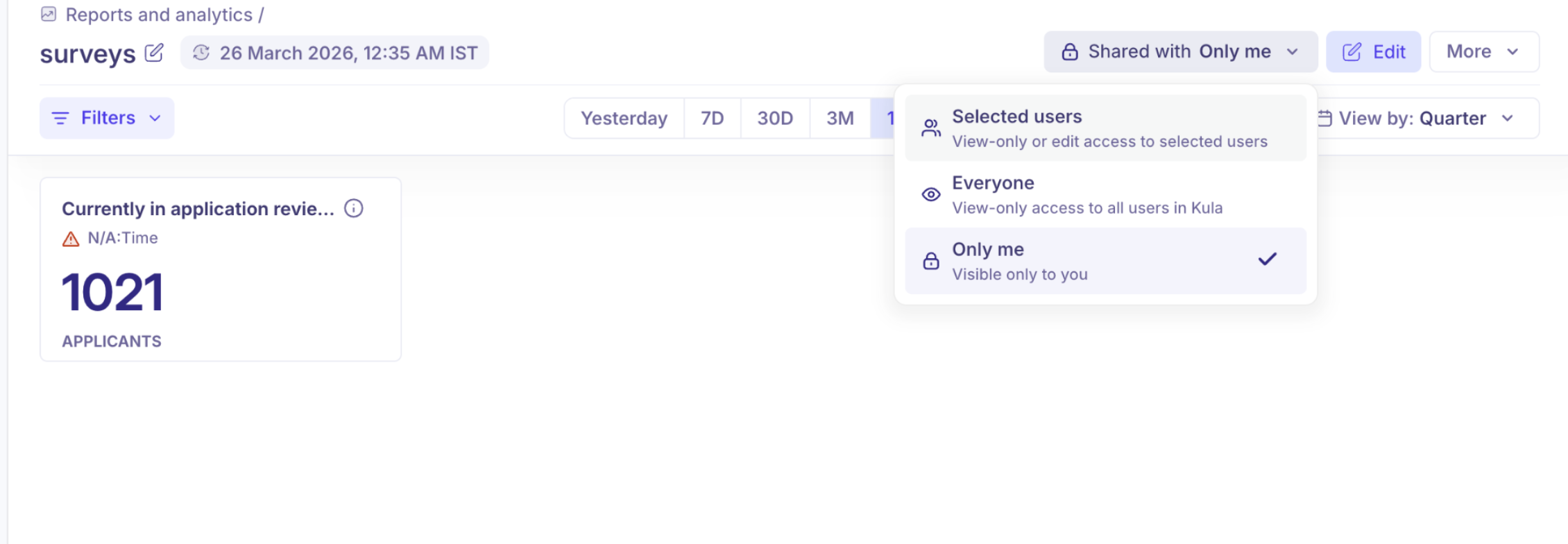
Click the sharing dropdown in the top-right (e.g., “Shared with Only me”)
You will see different visibility options
Step 3: Choose who can access the report
You can select one of the following:
🔒 Only me
Report is visible only to you
Best for drafts or personal analysis
👥 Selected users
Share the report with specific team members
You can provide:
View access
Edit access
👉 Use this when collaborating with hiring managers or recruiters
🌍 Everyone
Makes the report accessible to all users in Kula
Typically provides view-only access
👉 Ideal for leadership dashboards or company-wide metrics
Step 4: Save your sharing settings
Once you select the desired option, changes are applied automatically
Your report is now accessible based on the selected permissions
Best practices
Use Only me while building or testing reports
Share with Selected users for team-level collaboration
Use Everyone for standardized dashboards across the organization
Avoid giving edit access unless necessary
Notes on permissions
Access to reports depends on user roles and permissions
Users may only see data they already have access to
Sharing increases visibility of the report, not underlying data access
Summary
Sharing reports in Kula allows you to:
Control visibility (private, selective, or global)
Collaborate with teams effectively
Ensure consistent access to hiring insights
Once shared, your report becomes a centralized source of truth for your team’s analytics.
Need Help?
If you have questions or need assistance with setup, feel free to reach out to us at support@kula.ai or use the in-app chat for assistance.