Posting Jobs us JobTarget
Last updated: July 9, 2026
JobTarget is a job board aggregator marketplace that lets you post your jobs to multiple job boards with one-time setup in Kula. You can browse available boards, select the ones that match your hiring needs, and manage postings through JobTarget's marketplace interface. Both free (organic) and paid postings are available. This article explains how to set up JobTarget and post jobs to reach more qualified candidates.
This article covers:
One-time account setup for JobTarget
Enabling JobTarget for a specific job
Browsing and selecting job boards
Adding boards to cart and checking out
Frequently asked questions
One-Time Account Setup for JobTarget
JobTarget requires a one-time account-level connection in Kula. Once enabled, you don't need a separate JobTarget account or login—Kula handles the integration behind the scenes.
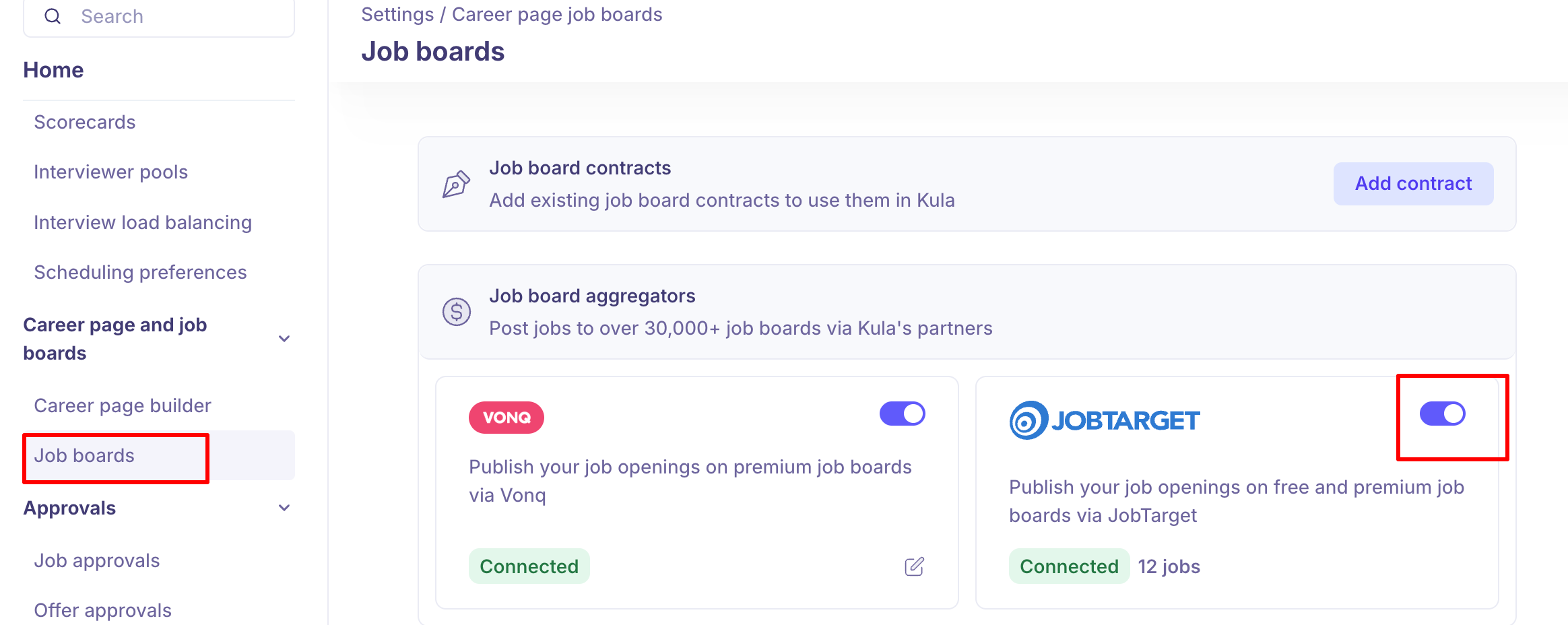
Go to Settings > Job boards
Find the JobTarget toggle and turn it on.
Your account is now connected to JobTarget. You're ready to enable JobTarget on individual jobs.
Tip: This is a one-time setup. Once enabled, all users at your organization can post jobs to JobTarget without needing to repeat this setup.
Enabling JobTarget for a Specific Job
After account-level setup, you need to enable JobTarget for each job you want to post to the marketplace. This allows both free (organic) and paid postings for that job.
Open the job you want to promote.
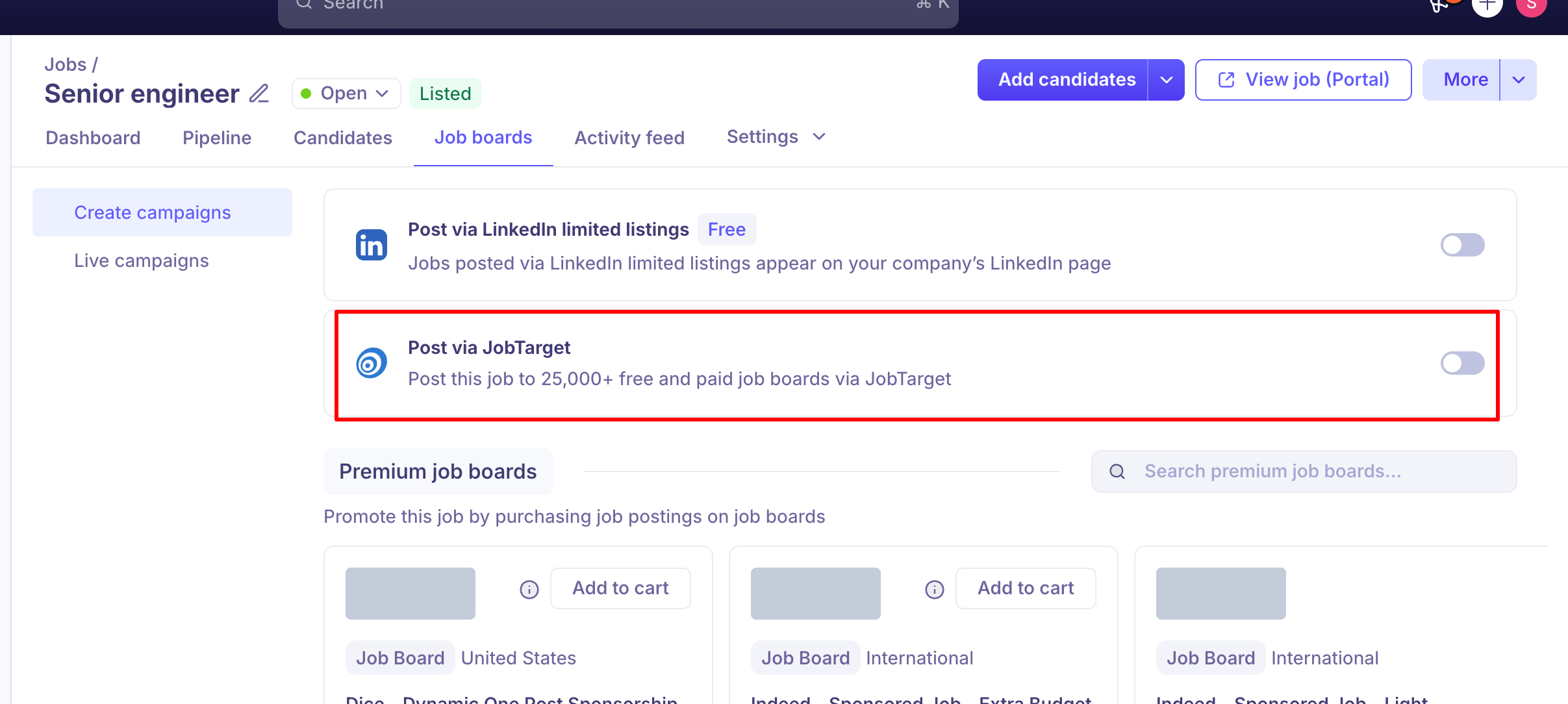
Go to the "Job Boards" tab.
Find the JobTarget card in the list of available job boards.
Toggle JobTarget on for this job.
A "Manage" panel opens—this is JobTarget's own marketplace interface where you'll browse and select job boards.
Tip: You can enable or disable JobTarget for any job at any time. Disabling removes the job from active postings but doesn't affect what's already been published.
Browsing and Selecting Job Boards
The JobTarget marketplace panel lets you browse available job boards, compare pricing and duration, and add the ones you want to post to.
Once the JobTarget panel opens, you'll see several browsing options:
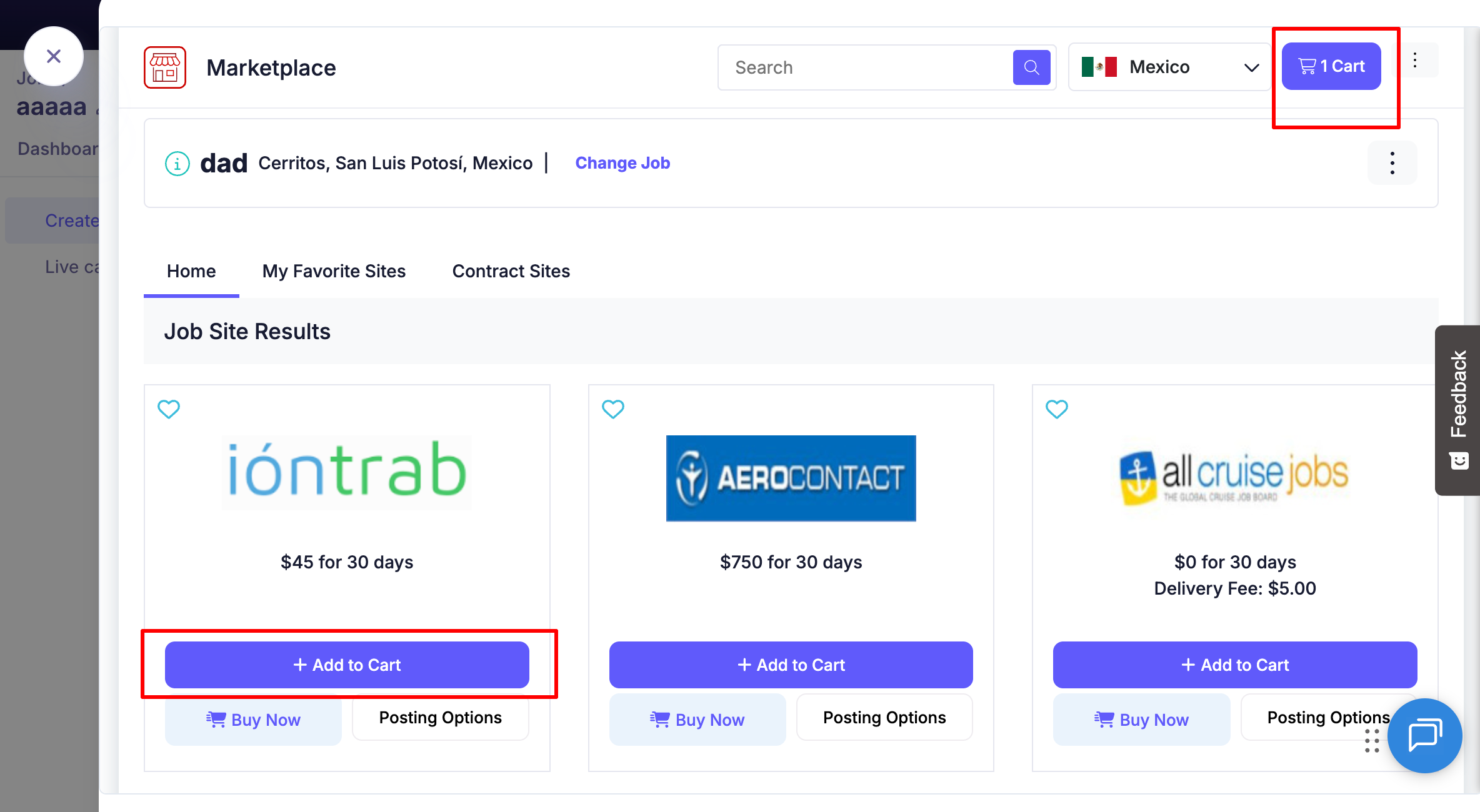
Home: Browse all available job boards in the marketplace
My Favorite Sites: Quick access to job boards you've marked as favorites
Contract Sites: Job boards you have existing partnerships or agreements with
Each job board card displays:
Board name and description
Price (free or paid cost)
Duration (e.g., "30 days")
Audience size or reach information (if available)
Review the boards that match your hiring needs, considering job type, geography, and budget.
Job Board Types
Type | Description |
Free Boards | No cost; good for organic reach and building candidate flow |
Paid Boards | Cost per posting; typically higher visibility and targeted reach |
Niche Boards | Industry-specific boards (e.g., tech, healthcare, finance) |
General Boards | Broad audience; good for filling multiple types of roles |
Adding Boards to Cart and Checking Out
Once you've selected the job boards you want, add them to your cart and complete the checkout process.
For each board you want to post to, click the "Add to Cart" button.
You can add multiple boards. As you add boards, they appear in your cart.
Click on the "Cart" button to review your selections.
In the Cart Summary, you'll see:
All selected job boards
Price per board and total cost
Duration for each posting
Review the terms and conditions.
Check the "Agree to terms" checkbox.
Click "Checkout" to complete your purchase and post the job to all selected boards.
Your job is now live on the selected boards and will receive a posting expiration date based on each board's duration.
Tip: Start with a mix of free and paid boards to balance cost and reach. Monitor which boards bring the best candidates over time, then adjust your board selection for future postings.
Frequently Asked Questions
1. Do I need a separate JobTarget account?
No. JobTarget is integrated into Kula, and Kula handles the connection behind the scenes. You only need to enable it once in your Kula settings.
2. Can I post the same job to multiple job boards at once?
Yes. That's the main benefit of JobTarget. Add all the boards you want to your cart, then checkout once to post to all of them simultaneously.
3. How much do job board postings cost?
Prices vary by board. JobTarget shows the cost and duration for each board in the marketplace. Some are free (organic), while others are paid. You can see the total cost in your cart before checkout.
4. Can I remove a job board posting after it goes live?
Yes. Disable JobTarget for that job in the Job Boards tab, or contact JobTarget support if you need to remove it from specific boards before the posting expires.
5. How long do jobs stay posted on job boards?
Duration varies by board—each board card shows how long postings last (typically 30 days). Postings expire after that period, but you can repost anytime.
6. What's the difference between free and paid job boards?
Free boards provide organic reach with no cost but typically lower visibility. Paid boards charge per posting but offer higher visibility and more targeted reach to job seekers.
7. Can I track which job board sent me candidates?
You can see where candidates came from in their application history. Ask candidates which board they found the job on during screening to track effectiveness.
Need Help?
If you have questions about posting jobs to JobTarget, or need assistance with the marketplace, reach out to support@kula.ai or use the in-app chat for help.