Approving or rejecting an offer
Last updated: September 25, 2026
Once an offer needs approval, its assigned reviewers are notified and must approve — or reject — it before it can be sent. This article covers what a reviewer sees and does.
Who can do this: Whoever is assigned as a reviewer for that step — typically a Hiring Manager, Admin, or Super Admin, or any individually named approver
Where to find it: Your Home page → Open tasks → Approvals tab → Offer approvals (or open the candidate's offer directly)
Where to review a pending offer
Pending offer approvals show up under Open tasks → Approvals → Offer approvals on your dashboard. You can also open the candidate's offer directly.
Approve or reject
Open the offer awaiting your approval.
Click Approve offer to approve it, or Reject to send it back.
If you reject, you'll be asked for a reason (up to 250 characters) before it's recorded.
What happens next
If every reviewer required at this step approves, the offer moves to the next step (if any) or is fully approved.
If a step needs all reviewers to approve and even one rejects, the whole approval is rejected — the offer moves to Rejected internally, and whoever submitted it is notified.
Steps run one at a time. Reviewers in a later step don't see the offer until everyone required in the earlier step has approved.
A rejected offer isn't automatically back to Draft — whoever created it needs to resubmit it before it can be re-approved.
Approving on someone else's behalf
If your organisation allows it, you can approve an offer on behalf of another reviewer. This is permanent and moves the approval forward as though they'd approved it themselves.
Good to know
Reviewers can send each other a manual reminder from the approval flow, on top of the automatic reminders.
Rejecting an offer flags it so it needs full re-approval the next time it's submitted, even if you only rejected at one step.
Offer approval reminders
Kula automatically nudges reviewers who haven't responded to a pending offer approval. This article explains when reminders go out, and how to send one yourself.
Who can do this: Recruiter, Hiring Manager, Admin, Super Admin
Where to find it: Candidates → open a candidate's application → Current job tab → Offer → approval flow
How automatic reminders work
When an approval step opens, Kula notifies every reviewer immediately, then automatically reminds anyone who hasn't yet approved or rejected.
Reminders go out roughly once every 24 hours.
Kula sends up to 3 automatic reminders per reviewer, per step.
A reminder skips a reviewer's non-working days, and won't send while they're marked out of office for a week or longer.
Reminders stop as soon as the reviewer responds, the step is no longer active, or the offer is no longer pending approval — for example, if it was cancelled.
Send a reminder yourself
You don't have to wait for the automatic cadence — anyone looking at the approval flow can nudge a reviewer directly.
Open the offer's approval flow.
Click Send reminder next to the reviewer you want to nudge.
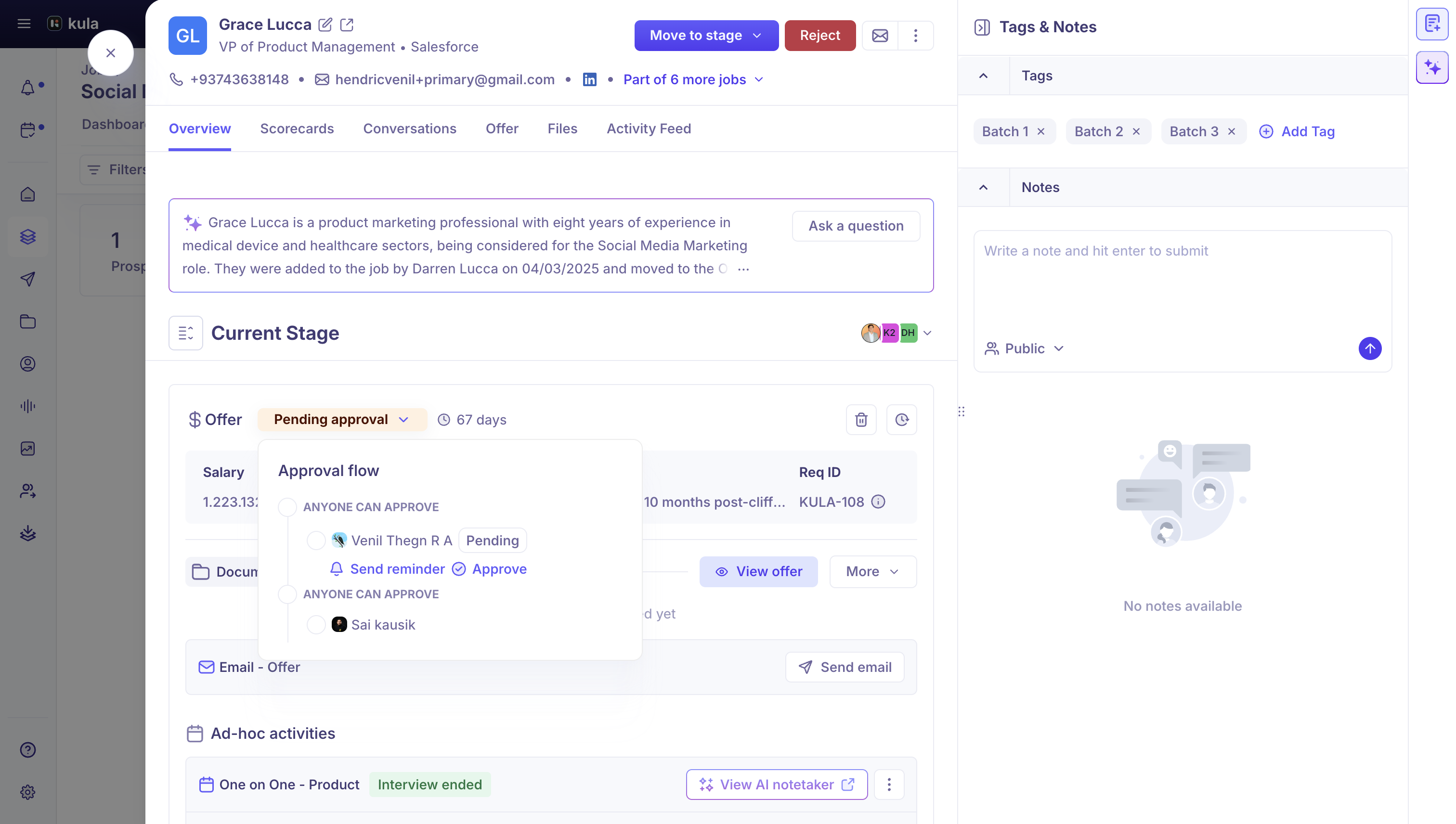
The reviewer gets the same notification either way — a manual reminder doesn't reset or replace the automatic 24-hour schedule.
What the reminder email says
The first notification tells the reviewer an offer needs their approval; every reminder after that says they're still waiting on their approval. Both link straight to the offer's approval screen in Kula — the Approve and Reject buttons in the email open the app rather than acting immediately, so you always make the actual decision inside Kula.
Good to know
The reminder cadence — roughly 24 hours, up to 3 reminders — is fixed. There's currently no setting to change how often or how many times Kula reminds a reviewer.
FAQ
Can I change how often reviewers get reminded about a pending offer?
Not currently — the reminder cadence (about every 24 hours, up to 3 reminders) is fixed and isn't configurable from Settings. You can always send a manual reminder in the meantime.
Why did a reviewer stop getting reminders?
Kula stops reminding once they've approved or rejected, if the approval step has moved on, or if the offer is no longer pending approval — for example, if it was cancelled.
I approved an offer but it's still not fully approved — why?
If the step has more than one required reviewer, everyone (or the number set for that step) needs to approve before it moves on. Check who else is listed as a reviewer for the current step.
The offer I rejected is stuck — what happens now?
A rejected offer doesn't go back to Draft automatically. Whoever created the offer needs to resubmit it, and it'll need full approval again.
Need help?
If you have questions or need assistance, reach out to us at support@kula.ai or use the in-app chat.