Moving candidates between stages
Last updated: September 22, 2026
Moving a candidate from one interview stage to the next is one of the most common actions in Kula.
This article covers the different ways to do it, what happens when the destination stage has an automation attached, and a few limits worth knowing.
Who can do this: Any user with access to the job and edit permissions on that application — typically the recruiter or hiring team members on that job — can move a candidate between stages. Bulk moves and automation configuration follow the same job-level access.
Where to find it: The job's Pipeline (Kanban) view, the candidate/application detail page, or the Candidates list view for bulk moves.
Ways to move a candidate
Drag and drop — in a job's Pipeline (Kanban) view, drag a candidate's card from one stage column to another.
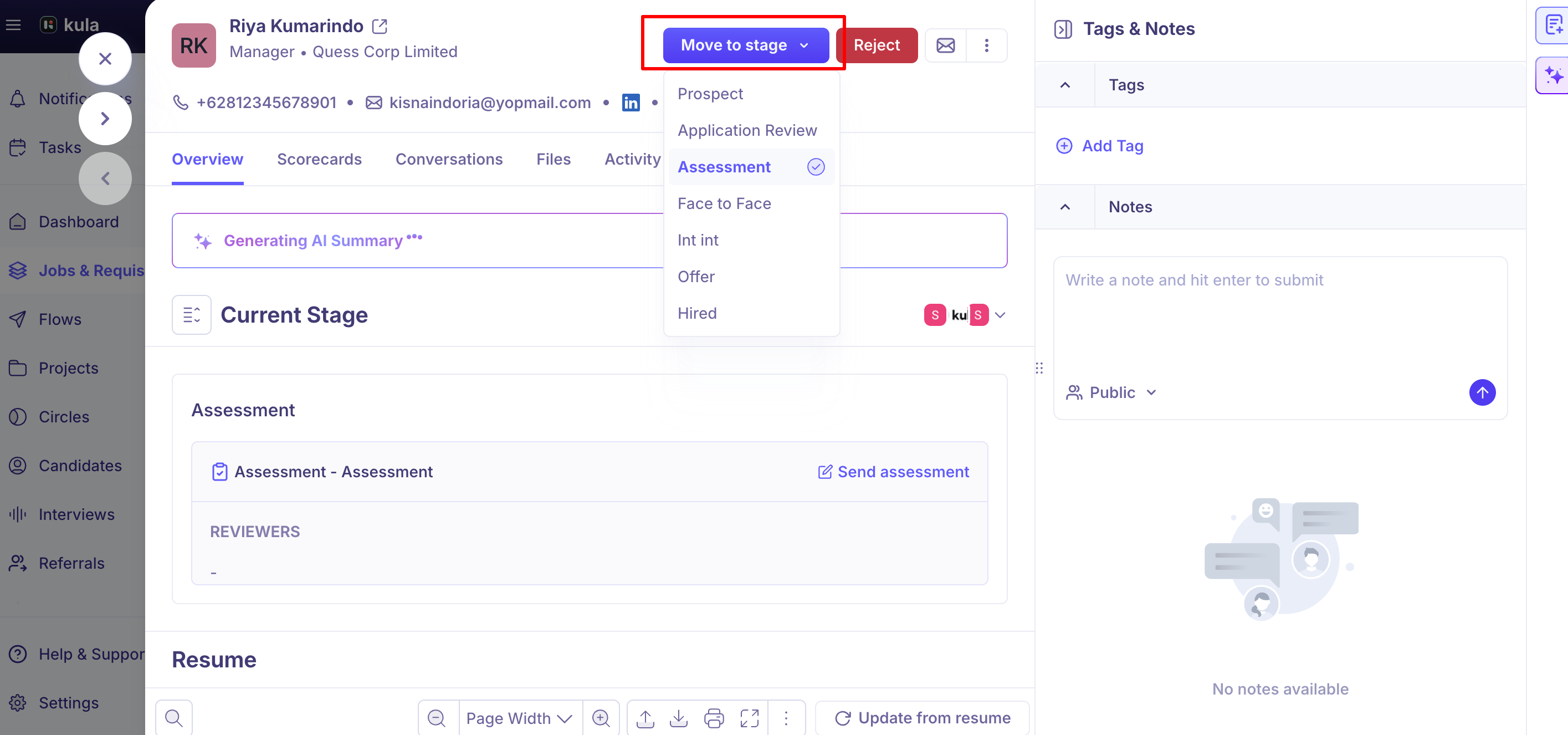
Move to stage button — from a candidate's application or detail page, use the "Move to stage" action to select a destination stage directly, without needing the Kanban board.
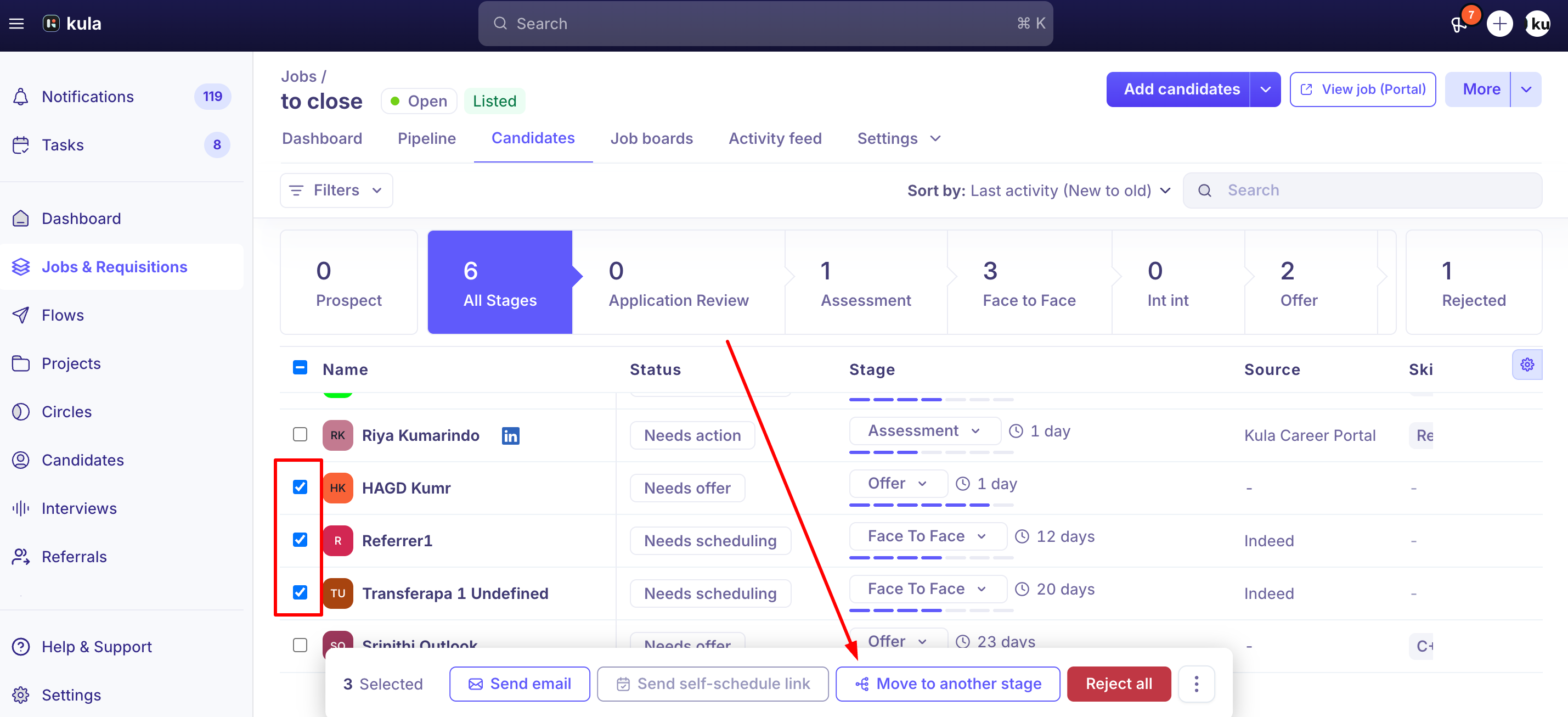
Bulk move — from the Candidates list view, select multiple candidates and use the bulk "Move to stage" action to move them all at once.
When the destination stage has an automation
If the stage you're moving a candidate into has an automation configured (for example, an email sequence that fires automatically when a candidate enters that stage), Kula shows a "Move to stage with automation?" confirmation before completing the move, with three options: Cancel, Move without automation, and Move.
Choosing "Move without automation" completes the move but skips triggering the automation — no automation-related emails or actions fire.
Choosing "Move" completes the move and lets the automation run as configured. To set up or change what runs when a candidate enters a stage, see Stage automation.
This confirmation only appears on the Move path.
If a candidate is created directly into an automated stage (for example, via "Add candidates → Create from scratch" or a CSV import) rather than moved into it, the automation can run immediately without this confirmation. If a newly added candidate received automation emails that no one sent by hand, this is usually why.
Moving to Hired
Moving a candidate to the Hired stage can trigger integration-specific behavior depending on what your account has connected — for example, accounts with Rippling or BambooHR integrations may see a prompt to push the candidate's hire into that HRIS at the point of the stage move.
Good to know
Stage moves aren't always manual. If your account has stage automations or AI-driven progression rules configured, a candidate can be moved between stages automatically, without a recruiter clicking anything. If a candidate seems to have moved on their own, check whether an automation is configured on that stage.
Can't find the rule behind a stage move? If a candidate moved automatically and you can't find an automation on that stage, contact support so we can check the account's configuration.
Bulk moving candidates across multiple pages of a filtered list has had reliability issues. Selecting "all" candidates, then deselecting a few on the currently visible page, hasn't always applied bulk actions correctly to the intended set — worth double-checking the final selection before confirming a large bulk move, especially with filters applied.
FAQ
What are the different ways to move a candidate to a new stage? Drag and drop in the job's Pipeline view, the "Move to stage" button on a candidate's application page, or a bulk "Move to stage" action from the Candidates list view for multiple candidates at once.
Why did a candidate move to a new stage without anyone doing it manually? Your account may have a stage automation or AI progression rule configured on that stage. Check the stage's automation settings; if nothing is set up there, contact support.
Can I move a candidate straight from their interview scorecard page? Not currently — you'll need to go to the candidate's application page or the job's Pipeline view to move them to a new stage.
If I send an offer, does the candidate automatically move to the Offer stage? No — you'll need to move them to the Offer stage manually; sending the offer itself doesn't trigger the move.
What happens if I move a candidate into a stage that has an automated email attached? You'll see a confirmation asking whether to move with or without triggering the automation, so you can choose "Move without automation" if you don't want it to fire.
Need help?
If you have questions or need assistance, reach out to us at support@kula.ai or use the in-app chat.