Setting hiring team members on a job
Last updated: August 7, 2026
The hiring team is the group of people with full access to a specific job and its candidates — recruiters, hiring managers, coordinators, and external recruiters.
This article covers adding, editing, and removing hiring team members on a job that already exists, along with the Primary Recruiter/Hiring Manager concept and the real quirks worth knowing before you rely on it.
Who can do this: Managing a job's hiring team typically requires Recruiter-level access or above (Admin, Super Admin). A user can only be added to a hiring team if their organization-level role has the relevant permission enabled — an Organization Member role, for example, does not have this by default and needs to be changed (or given a custom role with that permission) before they'll even show up when you search for them.
Where to find it: Jobs → [job] → Settings → Hiring Team.
Roles on a hiring team
A hiring team member is one of: Recruiter, Hiring Manager, Coordinator, or External Recruiter. There is no "Interviewer" or "Sourcer" role on the hiring team — if you want someone to conduct interviews without giving them full hiring-team access, see "Hiring team access vs. interviewer access" below rather than adding them here.
Adding, editing, and removing members
Go to Jobs → [job] → Settings → Hiring Team.
To add someone, search for them by name. Only users whose organization-level role has hiring-team permission enabled will appear — if someone doesn't show up, check their role under Settings → Users first rather than assuming the search is broken.
Assign their role (Recruiter, Hiring Manager, Coordinator, or External Recruiter).
To remove someone, take them off the list and save.
Save your changes.
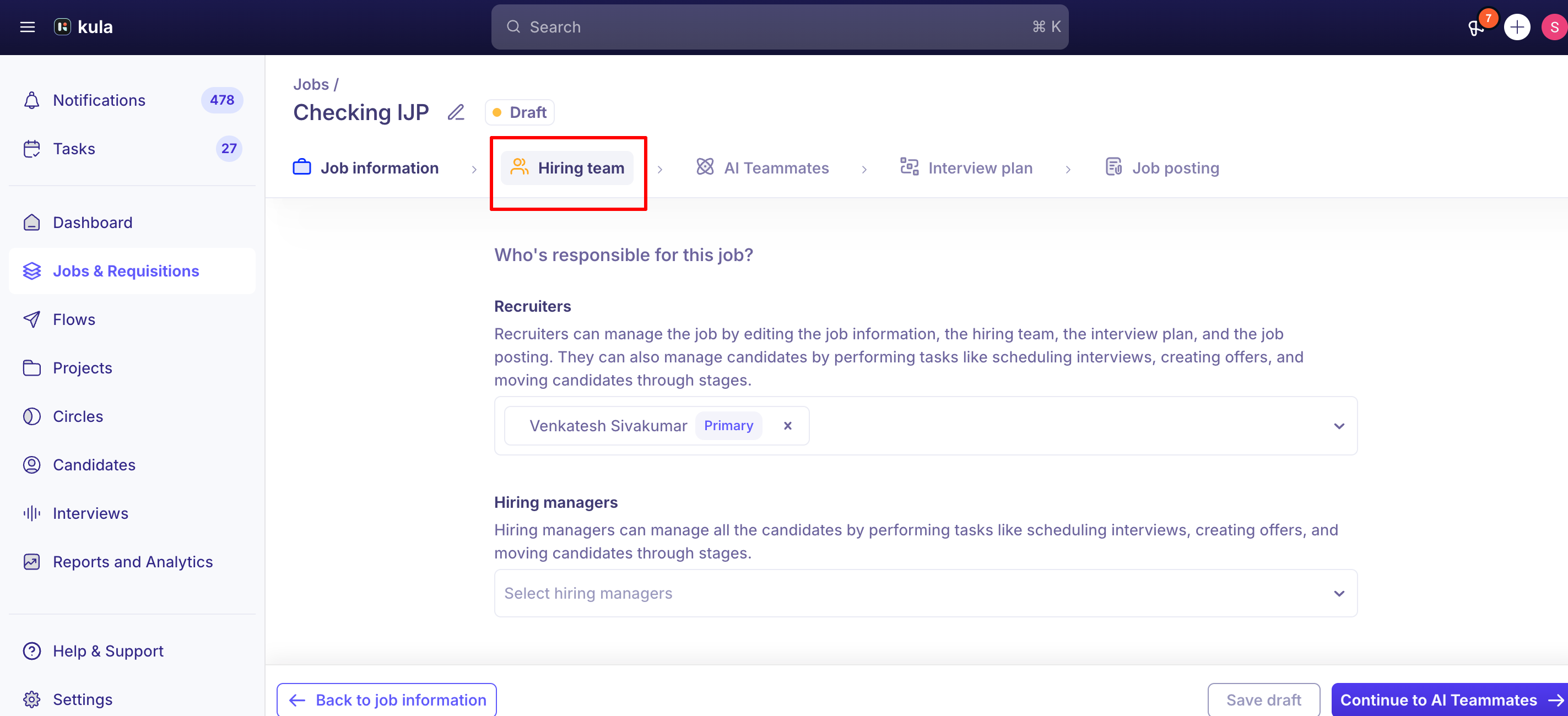
Primary Recruiter and Primary Hiring Manager
When a job has more than one Recruiter or more than one Hiring Manager, one of each can be marked Primary. This matters for a few real, specific things:
Job approval routing — the assigned Hiring Manager is used when routing job approvals.
The Hires report — can be grouped by Primary Recruiter, if you want to see hiring activity attributed that way.
Calendar sync reliability — if your account uses cross-domain calendar sync, keep the Primary Recruiter on the same email domain as the interviewers on that job; mismatched domains have caused sync issues.
What Primary Recruiter does not control: hire attribution in the Recruiter Performance report. That report credits whoever actually moved the candidate to the Hired stage — not whoever is marked Primary Recruiter. If those two people differ on a job, expect the Recruiter Performance report and the Hires report (grouped by Primary Recruiter) to tell different stories.
Multiple Hiring Managers on a job vs. one on a requisition
A job's hiring team can include more than one Hiring Manager — this isn't limited to one person. This is different from a requisition, where the Hiring Manager field is currently a single-owner field and only accepts one person.
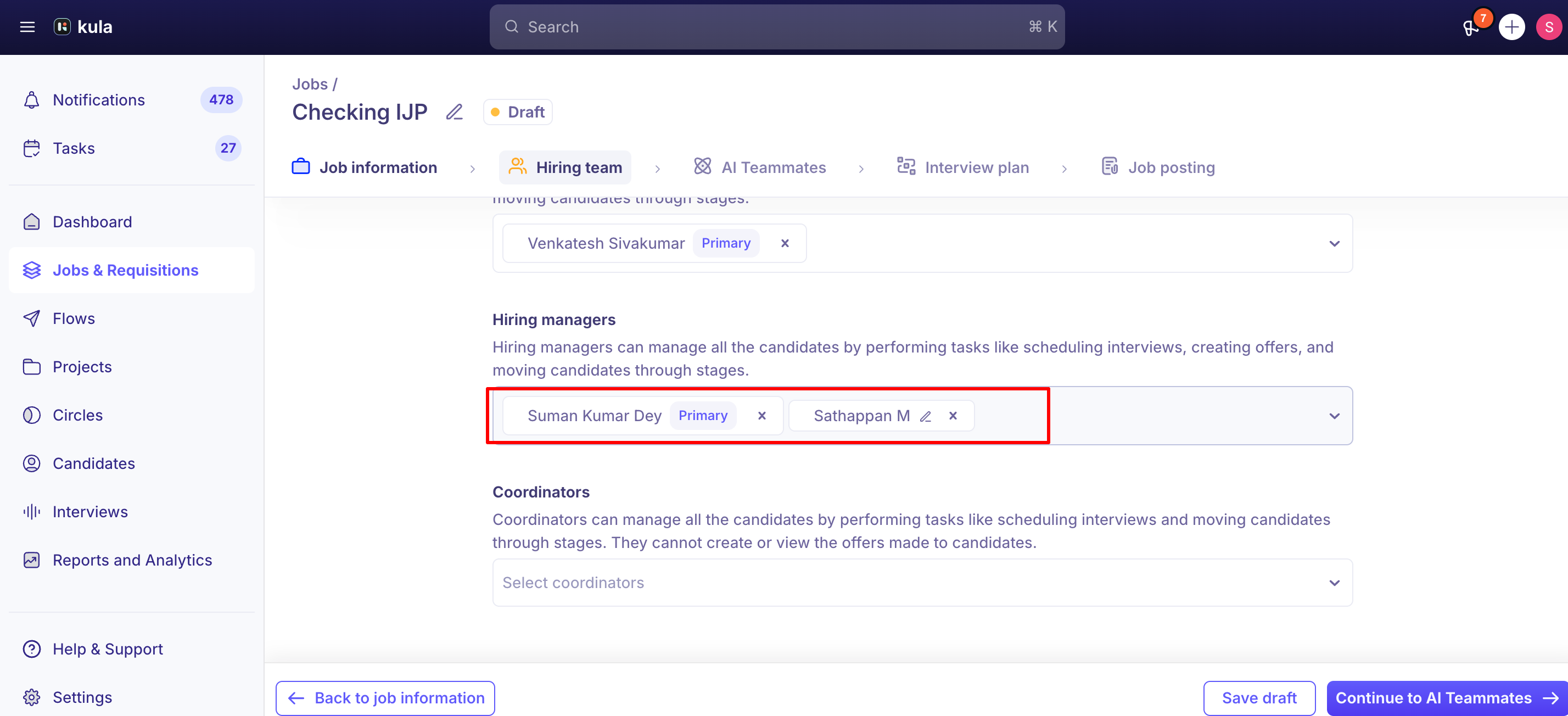
Hiring team access vs. interviewer access
Adding someone to the hiring team gives them full access to the job and all its candidates, including private application-form fields — broader access than most interviewers actually need.
If someone only needs to conduct interviews for a job, add them as an Interviewer through interview scheduling or the job's interview plan instead of adding them to the hiring team.
Formal hiring team membership (Recruiter, Hiring Manager, or Coordinator) also bypasses your account's scorecard-visibility setting entirely — an interviewer added only through scheduling is still subject to whatever scorecard-visibility rule (never / after submission / always) your account has configured, but a hiring team member sees scorecards regardless of that setting.
Good to know
A user has to have the right organization-level role before they can be added to a hiring team at all. If someone isn't showing up when you search for them, check their role under Settings → Users — an Organization Member role commonly doesn't have hiring-team permission by default.
Removing someone from a hiring team isn't fully reflected everywhere. The removal doesn't currently show up in the job's Activity Feed, and the removed person can still appear in unrelated pickers, such as "Add Reviewers," even after they're off the hiring team.
Adding and removing hiring team members in the same save can silently drop the removal. Do the add and the removal as two separate saves if you're doing both at once.
A Hiring Manager could previously be silently auto-removed even after a successful save — this was a real, confirmed bug, recently fixed. Worth ruling out if you ever see a Hiring Manager unexpectedly missing after saving.
Only add someone to the hiring team if they need full job/candidate access. For interviewer-only involvement, use interview scheduling or the interview plan instead — hiring team membership also overrides your account's scorecard-visibility setting.
Cross-domain calendar sync is more reliable when the Primary Recruiter shares an email domain with the job's interviewers. Mismatched domains have caused real sync problems.
FAQ
I can't find a specific person when I search to add them to the hiring team — why? Their organization-level role likely doesn't have hiring-team permission enabled. Check their role under Settings → Users; an Organization Member role commonly needs to be changed, or given a custom role with that permission, before they'll show up.
Can I add more than one Hiring Manager to a job? Yes, a job's hiring team can include multiple Hiring Managers. This is different from a requisition, where the Hiring Manager field currently only accepts one person.
I added one person and removed another in the same save, but the removal didn't take — is that a bug? Yes, this is a known issue. Save the removal separately from the addition rather than combining them in one save.
What does marking someone as Primary Recruiter or Primary Hiring Manager actually do? It affects job approval routing (Hiring Manager) and lets you group the Hires report by Primary Recruiter. It does not affect who gets credit in the Recruiter Performance report — that's based on whoever moved the candidate to Hired.
I got an error mentioning "primary_recruiter_missing_in_recruiter" when saving — what does that mean? The person marked Primary Recruiter isn't currently in the job's Recruiter list. Confirm they're listed as a recruiter on the job, or remove and re-add them so they land as primary correctly.
Someone I removed from the hiring team still shows up when I try to add reviewers elsewhere — is that expected? Currently, yes — removals from the hiring team aren't fully propagated to every picker in the product, including "Add Reviewers." This is a known, unresolved gap.
Should I add an interviewer to the hiring team just so they can review the candidate? Not recommended. Hiring team membership grants full access to the job and candidate data, including private application-form fields, and overrides your account's scorecard-visibility setting. Add them as an Interviewer through scheduling or the interview plan instead if that's all they need.
Need help?
If you have questions or need assistance, reach out to us at support@kula.ai or use the in-app chat.