Stage-level automation (emails, tasks)
Last updated: August 12, 2026
Configure an activity on a stage to run automatically — without a recruiter manually sending it — the moment a candidate enters that stage.
Who can do this: Requires the same job-editing permissions used to configure the interview plan.
Where to find it: Job → Settings → Interview Plan → [stage] → edit activity. Automation is configured per activity, not as a separate settings page.
What stage automation does
Normally, an activity on a stage (an email, an interview, an assessment, a review, or a survey) has to be triggered manually — a recruiter opens the candidate and sends it.
Stage automation lets you mark an activity to fire on its own as soon as a candidate reaches that stage, so the whole stage runs without anyone touching each candidate individually.
Common uses seen in real accounts: automatically sending a self-scheduling link the moment a candidate lands in a phone-screen stage, automatically sending a survey or assessment invite on entry to a stage, and chaining a second automated activity to fire only after the first one's scorecard is complete.
Setting the trigger for an activity
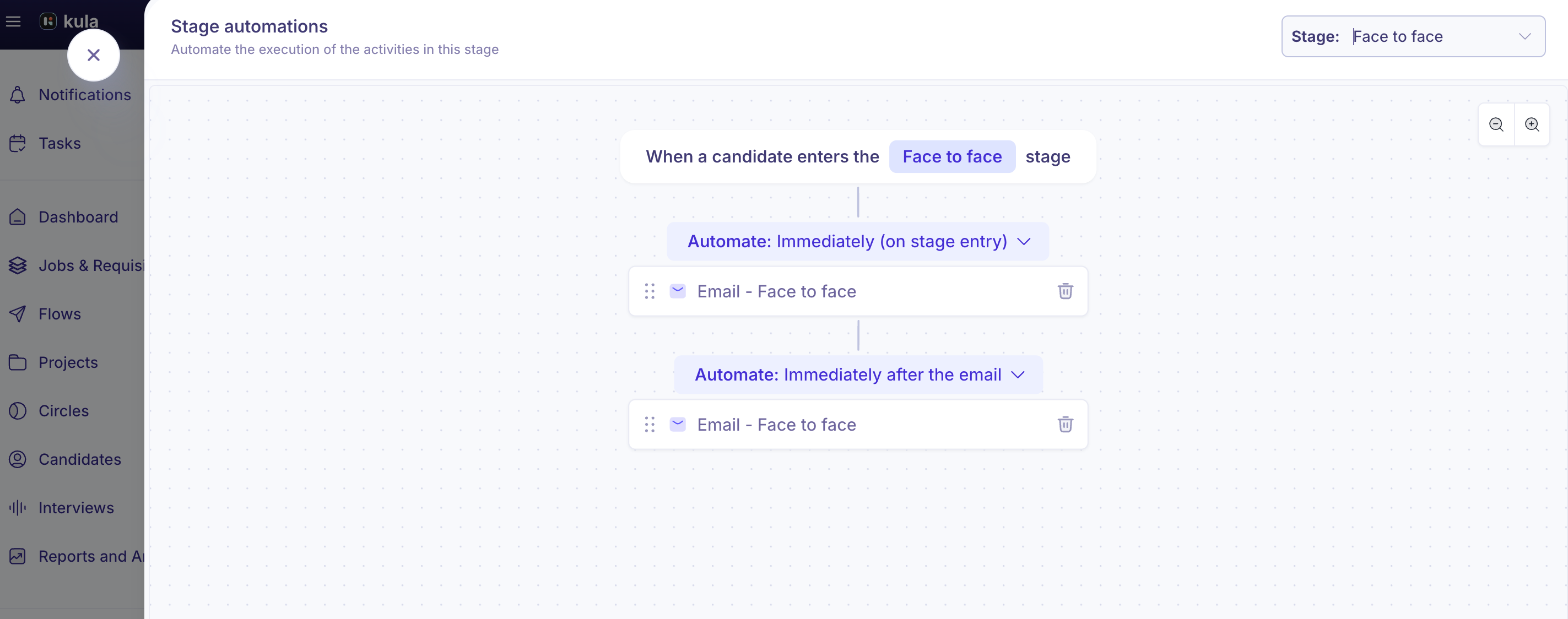
When you edit an activity on a stage, you can set when it runs:
Immediately on entry — the activity fires as soon as a candidate reaches the stage.
After scorecard of previous activity — the activity waits until the scorecard for the prior activity on that stage has been submitted, then fires. This is the same "scorecard gate" mechanic referenced in "Linking scorecards to stages" — it only applies from the second activity in a stage onward, since a first activity has no prior activity to gate on.
For Interview, Review, and Assessment activities, you can also select which specific users should be assigned when the automation fires, rather than relying only on an interviewer pool.
Good to know
Moving a candidate into an automated stage and directly adding one into it don't behave the same way. Manually moving a candidate into a stage with automation shows a "Move to stage with automation?" confirmation with the choice to move with or without triggering it. Adding a candidate directly into that stage — for example, creating a candidate from scratch with that stage pre-selected, or a bulk import — fires the automation immediately with no confirmation and no opt-out. If you're bulk-adding candidates into a stage that has automated emails, be aware they'll go out immediately with no chance to review first.
Rejections and other automated screening take priority over stage automation. Kula runs knockout-question rules, then fraud detection (if enabled), then AI scoring (on Application Review stages), then stage automation, in that order. If any of the earlier checks auto-rejects a candidate, the stage automation for that candidate does not run. If a candidate is rejected for any reason while a stage automation is mid-flight, the automation stops.
Closing and relaunching a job can silently disable its stage automations. As of this writing, there's an open, unresolved bug where closing a job, reopening it, and relaunching it leaves all previously configured activities visible in the interview plan builder, but the underlying automation rules go inactive — with no warning at any step. If you've reopened a job that used to have automated stages, it's worth manually re-checking (or re-saving) those activities rather than assuming they're still live.
Automation triggers on stage entry only — not on a time offset or a scheduling event. You can't currently set an automation to fire, say, 10 hours before a scheduled interview, or the moment a candidate books a slot through a self-schedule link. Only "on entering this stage" and "after the previous activity's scorecard" are supported today. Time- and booking-based triggers are a known, requested gap that hasn't shipped yet.
"Task" isn't an automatable activity type at the stage level. The activity types you can automate on a job's pipeline stage are Email, Interview, Assessment, Review, and Survey. Automated task creation exists in the separate Outreach Flows feature for CRM/sourcing sequences — see "Adding steps: email, LinkedIn, task" — not in a job's interview plan.
FAQ
How do I make an activity send automatically instead of manually? Job → Settings → Interview Plan → the stage → edit the activity → set its trigger to "Immediately on entry" (or "After scorecard of previous activity" if it should wait on a prior step).
Why did automated emails go out to candidates I just bulk-imported, with no warning? Adding candidates directly into an automated stage (via creation or import) fires the automation immediately, unlike moving an existing candidate into that stage, which shows a confirmation first. Double-check any automated activities on a stage before bulk-adding candidates into it.
Will stage automation still run after I close and reopen a job? Not reliably right now — there's a known, open issue where closing, reopening, and relaunching a job can leave automations showing in the builder but inactive behind the scenes, with no alert. Re-check automated stages after reopening a job.
Can I trigger an automated email a set number of hours before an interview, or as soon as a candidate books a slot? Not yet. Automation currently only triggers on stage entry (immediately, or gated behind a prior activity's scorecard) — time-offset and booking-based triggers aren't available today.
Can I automate sending a task to a teammate when a candidate reaches a stage? Not within a job's interview plan — "Task" isn't an automatable stage activity type. Task automation is available within Outreach Flows for CRM/sourcing sequences instead.
Need help?
If an automated activity isn't firing, is firing at the wrong time, or an automation seems to have stopped working after reopening a job, contact Kula support.