Candidate data deletion requests
Last updated: August 20, 2026
When a candidate asks you to remove their data, you delete them from Kula. This article covers how to do it, what Kula erases, what it keeps, and how to get the remaining details removed as well.
Who can do this: Super Admin, Admin — and anyone on a custom role with the Delete contacts permission
Where to find it: Candidates → open the candidate → More → Delete candidate
Delete a candidate
Open the candidate's profile from Contacts.
Select More, then Delete candidate.
Check the Jobs, Projects and Flows tabs in the dialog to see what the candidate is currently part of.
Enter a Reason for deletion.
Select Delete contact.
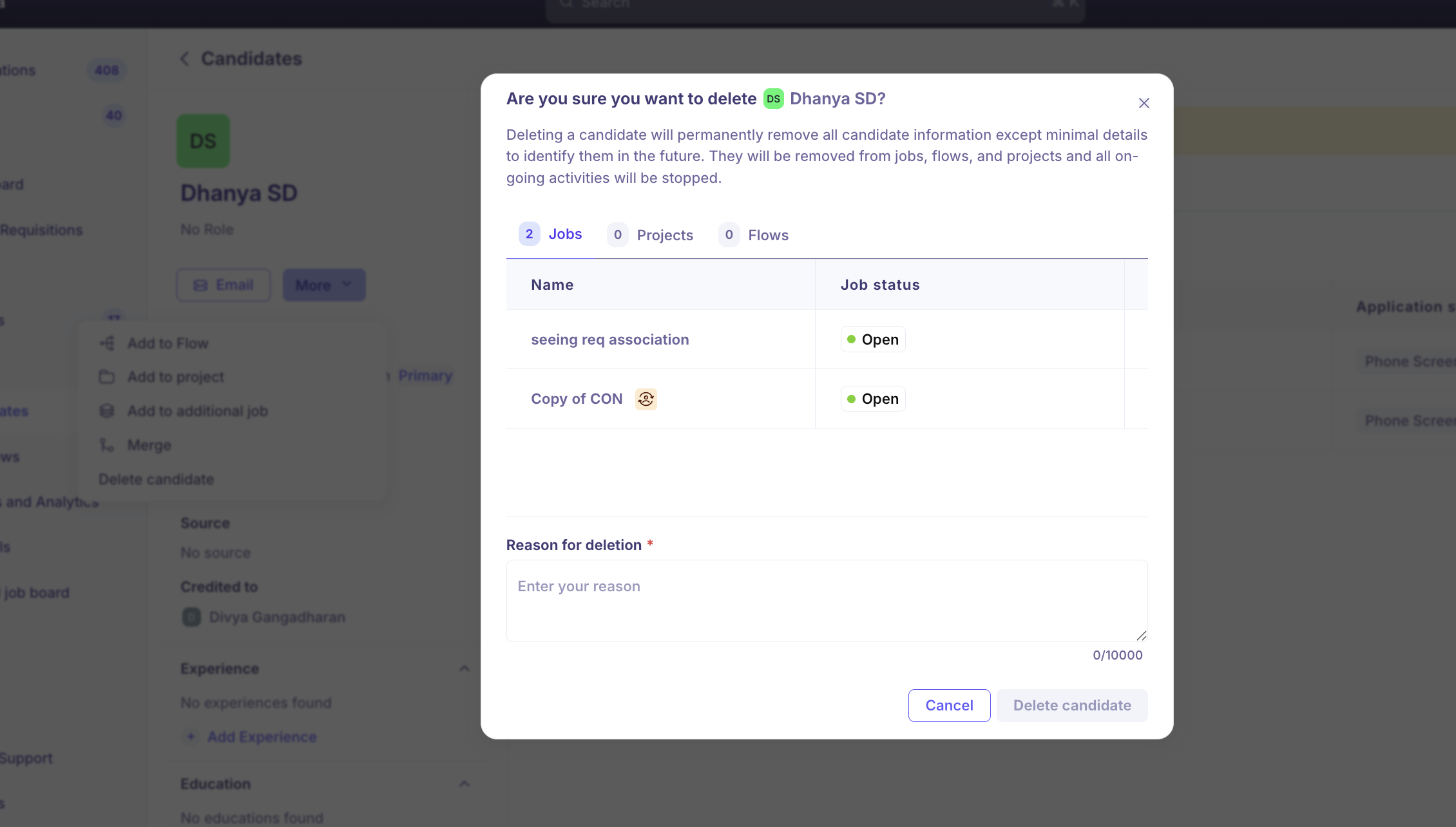
The reason is required — the confirm button stays disabled until you enter one — and holds up to 10,000 characters. Kula confirms with "Candidate deleted successfully" and returns you to the contacts list.
What happens when you delete a candidate
Kula removes the candidate from every job, flow and project they were part of, and stops all ongoing activity for them.
Erased | Kept |
|---|---|
Resumes and attached files | First and last name |
Email conversations and messages | Email address |
Work experience and education | Reason for deletion |
Notes, tags, skills and custom field values | Who deleted them, and when |
Interviews, scorecards and offers | |
Phone number, location and social links | |
Background checks and referrals |
Anyone who opens the profile afterwards sees "This candidate has been deleted", along with the reason and the name of the person who deleted them.
Kula keeps the name and email on purpose. It is what lets a recruiter see a warning if they later try to add the same person again, instead of importing them back into your database without realizing.
Remove the last details as well
For a request that requires everything to go, including the retained name and email:
Email support@kula.ai with the candidate's email address.
Ask for permanent deletion.
Our engineering team removes the remaining record from the platform and from backups, and confirms in the ticket when it is done. If you have more than one Kula instance, list each one — deletion is per instance.
What your team sees afterwards
Two different warnings appear once a candidate has been deleted, and they do different things.
Where you see it | What it says | What happens if you continue |
|---|---|---|
Adding a candidate whose email matches a deleted one | "Candidate was deleted previously" — with the reason and who deleted them | Kula restores the original record and attaches the new details to it |
Editing another candidate's email, LinkedIn or GitHub to one that belonged to a deleted candidate | "Use email from deleted candidate?" | Kula releases that email or link from the deleted record and attaches it to the candidate you are editing |
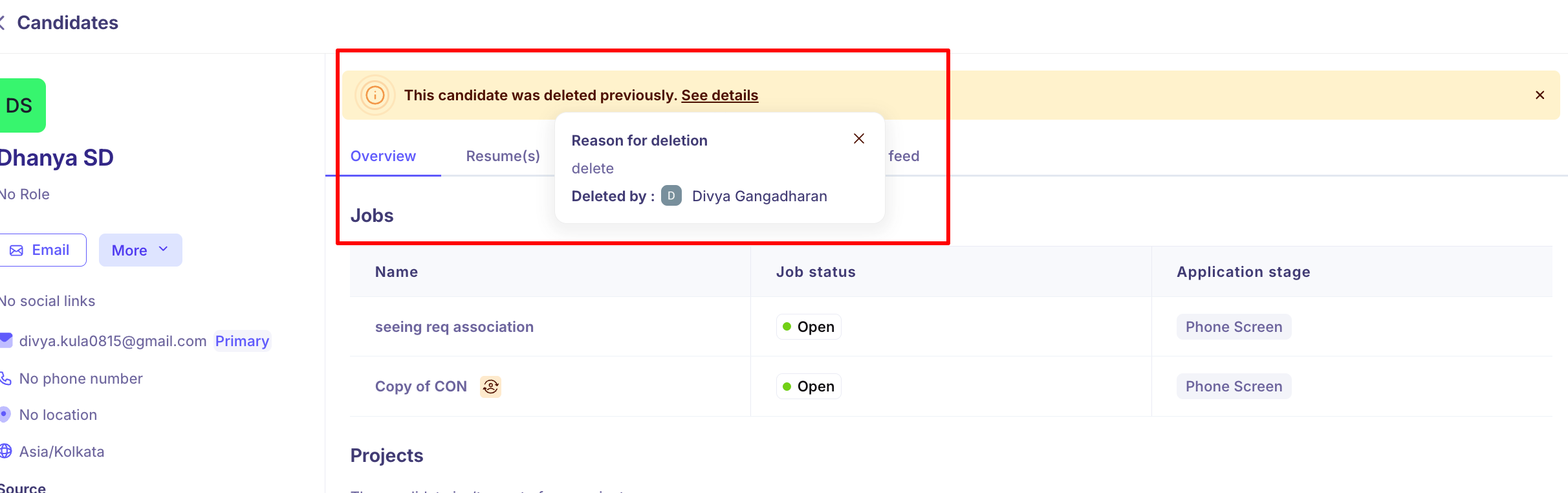
Opening a candidate who was deleted and later restored | "This candidate was deleted previously. See details" | Nothing — it is a notice. Select See details for the reason and who deleted them |
In both of the first two cases, the data erased at deletion does not come back.
Good to know
The reason for deletion is visible to your team later. It appears on the deleted profile, in the warning when someone re-adds the person, and in the banner on a restored profile. Keep it short and factual — "GDPR erasure request, 14 March" — and do not put the candidate's personal details in it.
You can only delete one candidate at a time. Selecting several candidates in the contacts list gives you Add to Flow, Add to Project, Add to Job, Add tags and Merge — there is no bulk delete.
Kula does not delete candidates automatically. There is no retention period setting and no scheduled clean-up, so every deletion is a manual action.
Deletion is per Kula instance. If your organisation has more than one, delete the candidate in each.
Recruiters cannot delete candidates by default. The Delete contacts permission sits on Super Admin and Admin only.
FAQ
Every time we delete a candidate from Kula, is it a permanent delete? No. The deletion erases their resumes, conversations, experiences and files, but Kula retains the name, email address and deletion reason so nobody re-imports them by accident. Email support@kula.ai for a permanent deletion that removes those too.
Can you also remove the data from backups? Yes, as a support request. Send the candidate's email address to support@kula.ai and ask for permanent deletion — engineering removes the record from the platform and from backups.
We deleted a candidate by mistake and now we can't add them to another role. What do we do? Add them again with the same email address. Kula shows a "Candidate was deleted previously" warning, and confirming restores the original profile so you can put them on a new job. The data erased at deletion — resumes, notes and history — does not come back.
Can we delete a batch of candidates at once? No. Deletion is one candidate at a time from the profile, and the bulk actions in the contacts list do not include it. For a large erasure request, contact support@kula.ai.
Need help? If you have questions or need assistance, reach out to us at support@kula.ai or use the in-app chat.