Requisition analytics
Last updated: December 9, 2025
Requisition analytics give you visibility into your hiring pipeline before jobs even go live. Track how quickly requisitions move through approval, where bottlenecks occur, and how your planned headcount aligns with actual hiring activity.
Use this data to identify delays in your approval process, forecast hiring timelines more accurately, and ensure your workforce planning stays on track. Requisition analytics help you spot problems early—before they impact your ability to fill critical roles.
Key metrics overview

The following are the key metrics added to the requisitions default report
Requisitions opened: The number of requisitions that were marked as open during the selected time period.
Requisitions filled: The number of requisitions that were filled by associating either an offer or a hired candidate during the selected time period.
Requisitions closed: The number of requisitions that were closed during the selected time period.
Avg. time to fill: The average time taken from the date the requisition was marked as open to the time it was filled.
Chart and visualizations
Trend of requisitions opened: The trend of shifts in the count of requisitions opened during the time period selected.
Requisitions by department: The requisitions opened during the selected time period, split by department.
Requisitions by requisition type: The requisitions opened during the selected time period, broken down by requisition type (New hire, Backfill, Internal)
Percentage of requisitions filled by department: The percentage of requisitions that were opened during the selected period, that were filled, broken down by department.
Requisitions breakdown table
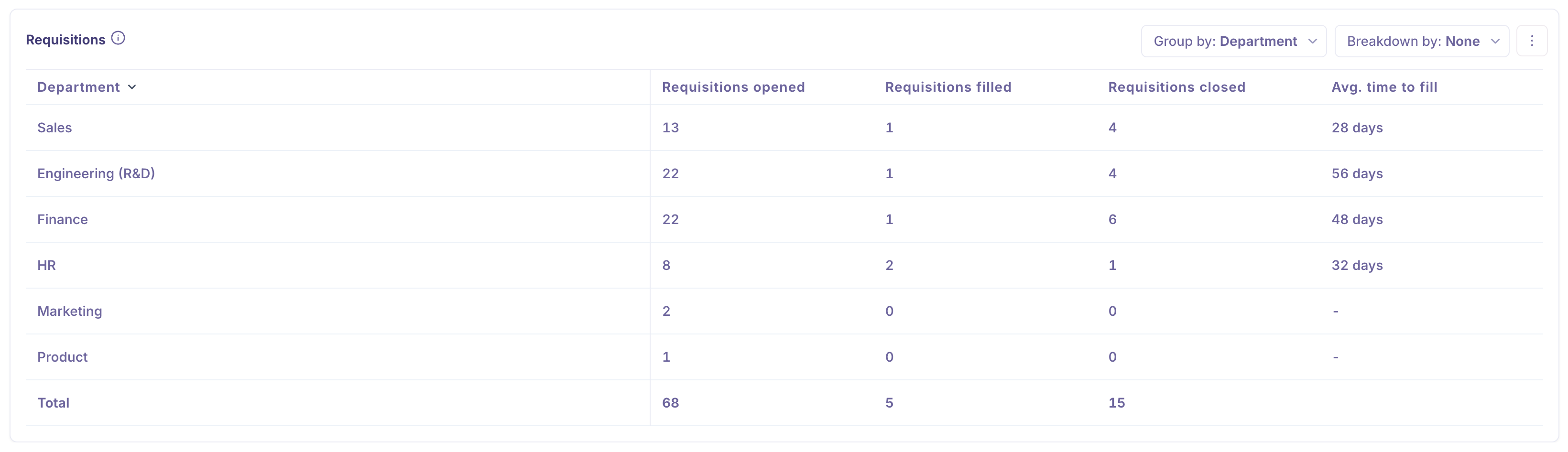
Metrics
Requisitions opened: The number of requisitions that were marked as open during the selected time period.
Requisitions filled: The number of requisitions that were filled by associating either an offer or a hired candidate during the selected time period.
Requisitions closed: The number of requisitions that were closed during the selected time period.
Avg. time to fill: The average time taken from the date the requisition was marked as open to the time it was filled.
Group by
Time: Group the requisitions data by time periods.
Associated job: Group the data by the associated jobs for the requisitions
Requisition type: Segment the data by requisition type, New hire, backfill, or internal.
Recruiter: Group the data by the assigned recruitment partner
Hiring manager: Split the data by the assigned hiring manager
Department: Dice the data by department on the requisition
Office: Segment the data by office on the requisition
Work type: Group the data by work type on the requisition
User: Group the data by the user who created the requisition
Breakdown by
Associated job: Break the data down by the associated job for the requisitions.
Requisition type: Break the data down by requisition type, new hire, backfill, or internal.
Recruiter: Slice the data by the assigned recruitment partner.
Hiring manager: Break the data down by hiring manager.
Department: Slice the data by department on the requisition.
Office: Break down the data by office on the requisition.
Work type: Break down the data by work type on the requisition.
Filters supported
The following filters are supported.
Requisition type: Filter by the requisition type, New hire, Backfill, or Internal
Requisition status: Filter by the requisition status
Recruiter: Filter by the recruitment partner assigned to the requisition
Hiring manager: Filter by the hiring manager assigned to the requisition
Department: Filter by the department in the requisition
Office: Filter by the office in the requisition
Work type: Filter by the work type in the requisition
Associated job name: Filter by the job that is associated with the requisition
Associated job status: Filter by the status of the job associated with the requisition
User: Filter by the user who created the requisition
Clone, download, and schedule the report
Clone report
The requisition report can be cloned as a custom report, and new blocks can be added, and the existing requisition blocks can be configured for your requirements.
Download PDF
The requisition report can be downloaded as a PDF by selecting More > Download PDF from the top right.
Schedule email
The requisition can also be scheduled to be delivered to recipients at pre-configured intervals. The report can be scheduled daily, weekly, or monthly at a specific time. For a weekly schedule, choose which day of the week to send it. For example, you can schedule the report for every Monday at 9 AM, and in the case of a monthly schedule, it can be scheduled to go on a particular day of the month.