Requisition custom fields
Last updated: September 24, 2026
Add fields beyond the defaults to capture the information your team needs when creating a requisition.
Who can do this: Configuring requisition fields requires the "Manage requisition settings, fields, and approvals" permission (Admins and Super Admins have this by default). Anyone who can create or edit a requisition will see and fill in whatever fields are configured.
Where to find it: Settings → Custom Fields → Requisition fields.
Default fields
Every requisition ships with a set of default fields: Role, Department, Office, Work Type, Salary, Recruiter, Hiring Manager, and key dates (like target hire date). Requisition ID is also a default field, but it behaves differently from the others — see Good to know.
Adding a custom field
Custom requisition fields support the same field types available elsewhere in Kula: text, number, date, single-select, multi-select, and yes/no.
A People/User field type — a picker scoped to active workspace users — was added in mid-2026, making it possible to reference specific people (not just the built-in Recruiter and Hiring Manager fields) directly from a custom field.
Each custom field can be marked mandatory or optional, and you can scope a field to only appear for specific departments — useful if certain information (like a sales-specific compensation structure) is only relevant to some teams and would otherwise clutter the form for everyone else.
Reordering fields
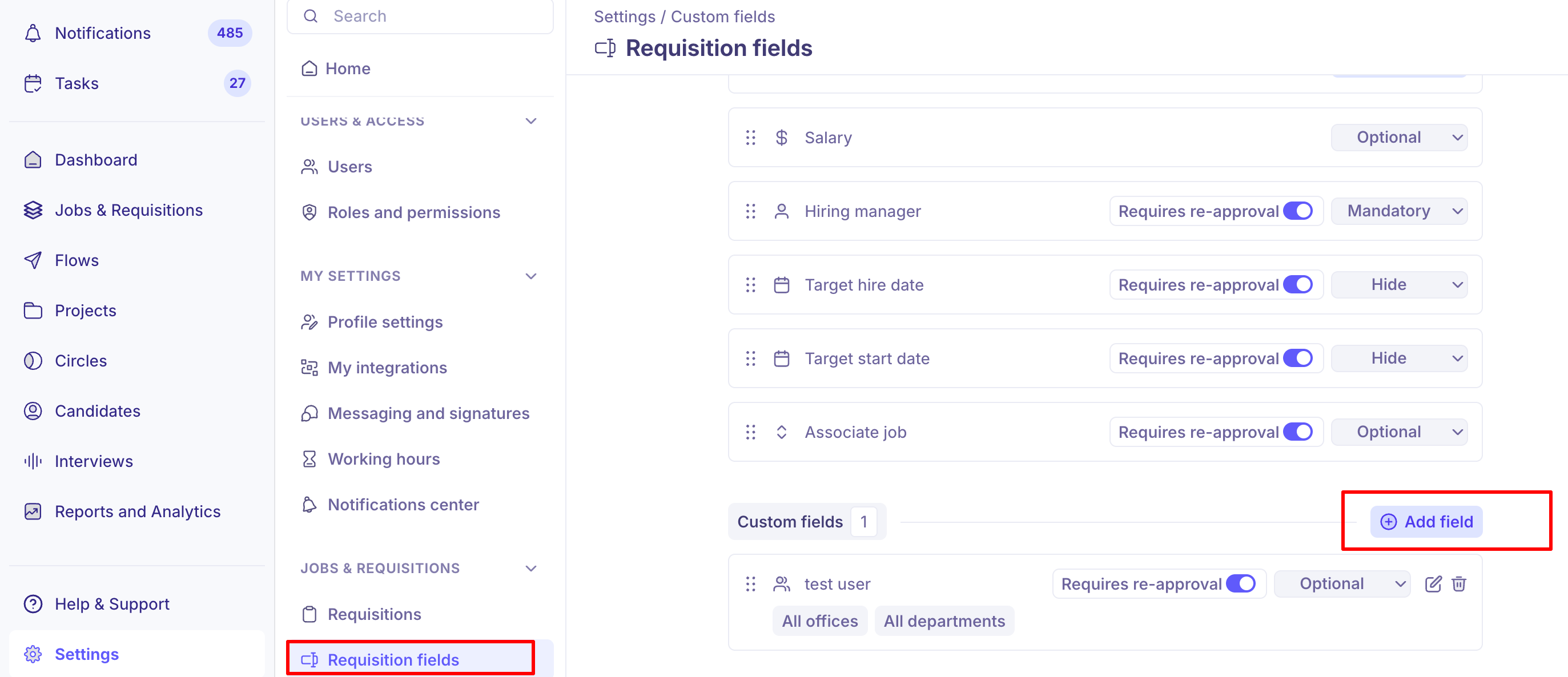
You can rearrange the order fields appear in on the requisition form. Default and custom fields currently can't be interleaved into a single custom order — you can reorder within each group, but not freely mix a custom field between two default ones. If your team needs a fully custom question order, keep this limitation in mind.
Fields and reapproval
If your account has requisition approvals enabled, editing certain fields on an already-approved or open requisition can trigger a reapproval cycle. Whether a given custom field triggers reapproval is controlled per-field when you configure it. See "Requisition approval workflows" for how reapproval works overall.
Good to know
The Requisition ID field can't be made optional or hidden. It's enforced as mandatory and immutable once requisitions are turned on for your account, since jobs depend on it. This is intentional, not a bug — unlike other default fields, you can't hide or loosen this one.
The Headcount and Job association fields can now be made optional or hidden. This wasn't possible earlier in 2026 — they used to be locked as mandatory by default. If you don't need every requisition tied to a job or don't use headcount grouping, you can now turn these off.
There's no conditional or dependent field logic yet. You can't set up a field to only appear based on another field's value (for example, showing extra fields only when Work Type is "Contract"). The current workaround is to use the field description to tell users when to fill it in (e.g., "Only fill this in if Work Type is Contract — otherwise enter NA") and mark it mandatory so it isn't missed.
Custom field values are now carried over correctly when cloning a requisition and enabling headcount. This didn't always work reliably in the past; it's since been fixed.
Numeric custom fields preserve comma-formatted input exactly as entered (for example, 1,50,000), including anywhere that value later appears, such as offer letters. Values with math symbols, scientific notation, or apostrophes aren't accepted.
FAQ
Where do I add a custom field to requisitions? Settings → Custom Fields → Requisition fields.
What field types can I use? Text, number, date, single-select, multi-select, yes/no, and a People/User field type for referencing specific workspace users.
Can I make a custom field only show up for certain departments? Yes — you can scope a field to specific departments so it only appears on relevant requisition forms.
Can I make the Requisition ID field optional? No — it's enforced as mandatory and can't be hidden once requisitions are enabled for your account, because jobs depend on it.
Can I hide the Headcount or Job association fields if I don't need them? Yes — these were previously locked as mandatory but can now be made optional or hidden.
Can I fully reorder fields, mixing default and custom fields together? Not yet — you can reorder within default fields and within custom fields, but you can't freely interleave a custom field between two default ones.
Does editing a custom field trigger reapproval? It can, depending on how that field was configured. See "Requisition approval workflows" for how reapproval works.
Need help?
If a custom field isn't saving correctly or isn't showing where you expect, contact Kula support.