Compensation settings and equity awards
Last updated: October 22, 2026
Compensation settings control whether salary ranges are required on jobs and shown on your career page. Equity awards let you add a stock or option grant to an individual offer. This article covers both.
Who can do this: Super Admin and Admin can manage compensation settings (the Manage compensation permission).
Where to find it: Settings → Jobs & Requisitions → Compensation (organisation settings);
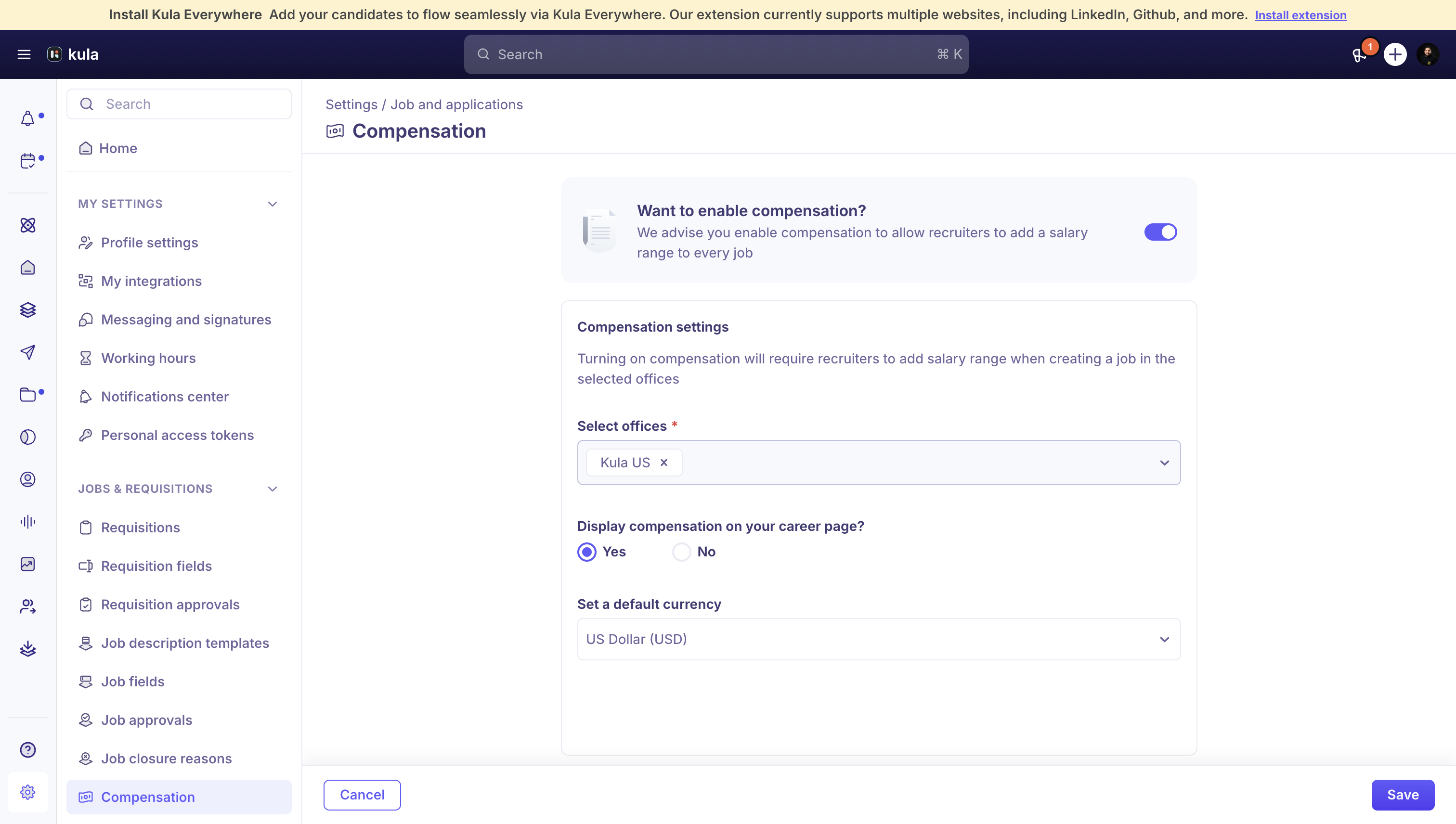
Turn on compensation settings
Go to Settings → Compensation.
Turn on compensation, then select which offices it applies to. Turning this on requires recruiters to add a salary range when creating a job in those offices.
Choose whether to display compensation on your career page.
Set a default currency.
Pay bands on a job profile
If your organisation uses job profiles, each one can carry its own pay band — a minimum, midpoint, and maximum salary (with a currency), plus a matching minimum, midpoint, and maximum equity range, scoped to one or more offices.
Equity awards on an offer
Equity is added to an individual offer, separately from the organisation-level compensation settings above. Each offer can carry one equity award with these fields:
Field | What it captures |
|---|---|
Type of equity | Common stock, preferred stock, restricted stock, or stock option |
Amount | A share count or a money amount, depending on the currency you choose |
Strike price | The price to exercise the grant, for stock options |
Date of grant | When the equity was granted |
Cliff of vesting | The cliff period, in months, quarters, or years |
Cycles after cliff | How the remaining equity vests after the cliff |
Vesting period | The total length of the vesting schedule |
Start date of vesting | When vesting begins |
Equity fields appear in the Additional compensation section when you're customising an offer's details, and can be pulled into your offer letter template with tokens for equity amount, type, cliff, and vesting period.
Good to know
Equity fields can be marked as needing re-approval — changing them on an approved offer sends it back for approval, the same as salary or job title.
Equity with no currency set is treated as share units rather than a money amount.
FAQ
Do I set equity in the compensation settings or on the offer itself? Organisation-level compensation settings (Settings → Jobs & Requisitions → Compensation) only control salary ranges and whether compensation shows on your career page. Equity is added per offer, in the Additional compensation section. For more, see Customising offer details.
Why did changing the equity amount send my offer back for approval?
Equity fields can be configured to require re-approval whenever they change after an offer's been approved, the same as salary. For more, see Offer statuses in Kula.
Can I show a single salary instead of a range?
Not as a separate option yet. Salary on a job is entered as a minimum and a maximum, and both are required when compensation is turned on for the job's office. A single-amount option is on our product team's list, but we can't give a date for it.
Need help?
If you have questions or need assistance, reach out to us at support@kula.ai or use the in-app chat.