Connect Zoho People to Kula
Last updated: September 24, 2026
Connecting Zoho People lets you push a hired candidate straight into Zoho People as a new employee, with the details you already hold in Kula filling the form for you.
Who can do this: Super Admin, Admin
Where to find it: Settings → Organization → Organization integrations → HRIS and onboarding
What the connection window looks like
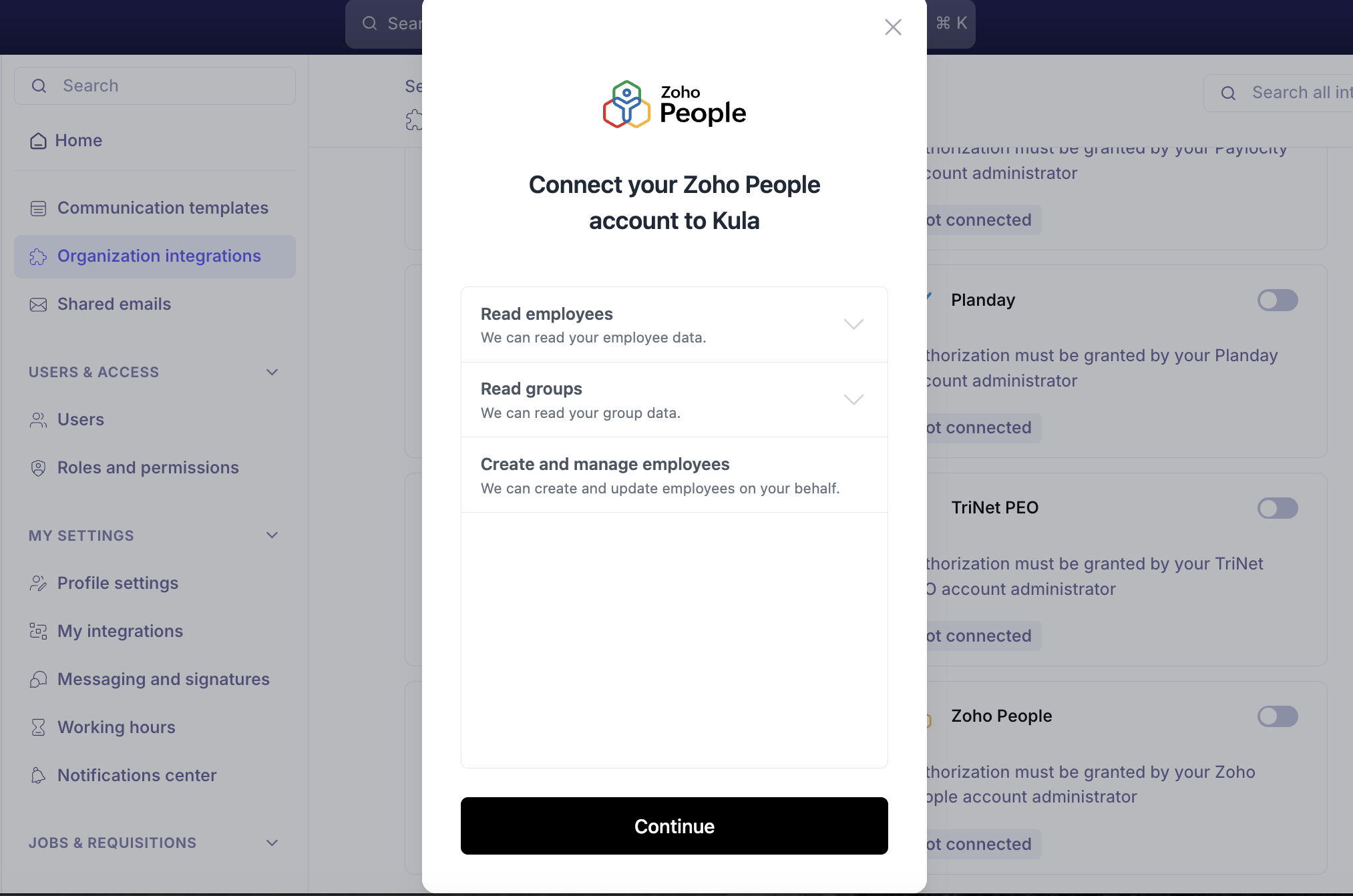
Turning the toggle on does not connect Zoho People straight away. It opens a secure connection window: the permissions Kula is asking for, then your Zoho People domain, then a sign-in on Zoho's side.
Zoho People asks for three permissions — the shortest list of any HRIS connection, alongside Planday.
Permission | What Kula can do |
|---|---|
Read employees | Read your employee data |
Read groups | Read your group data |
Create and manage employees | Create and update employees on your behalf |
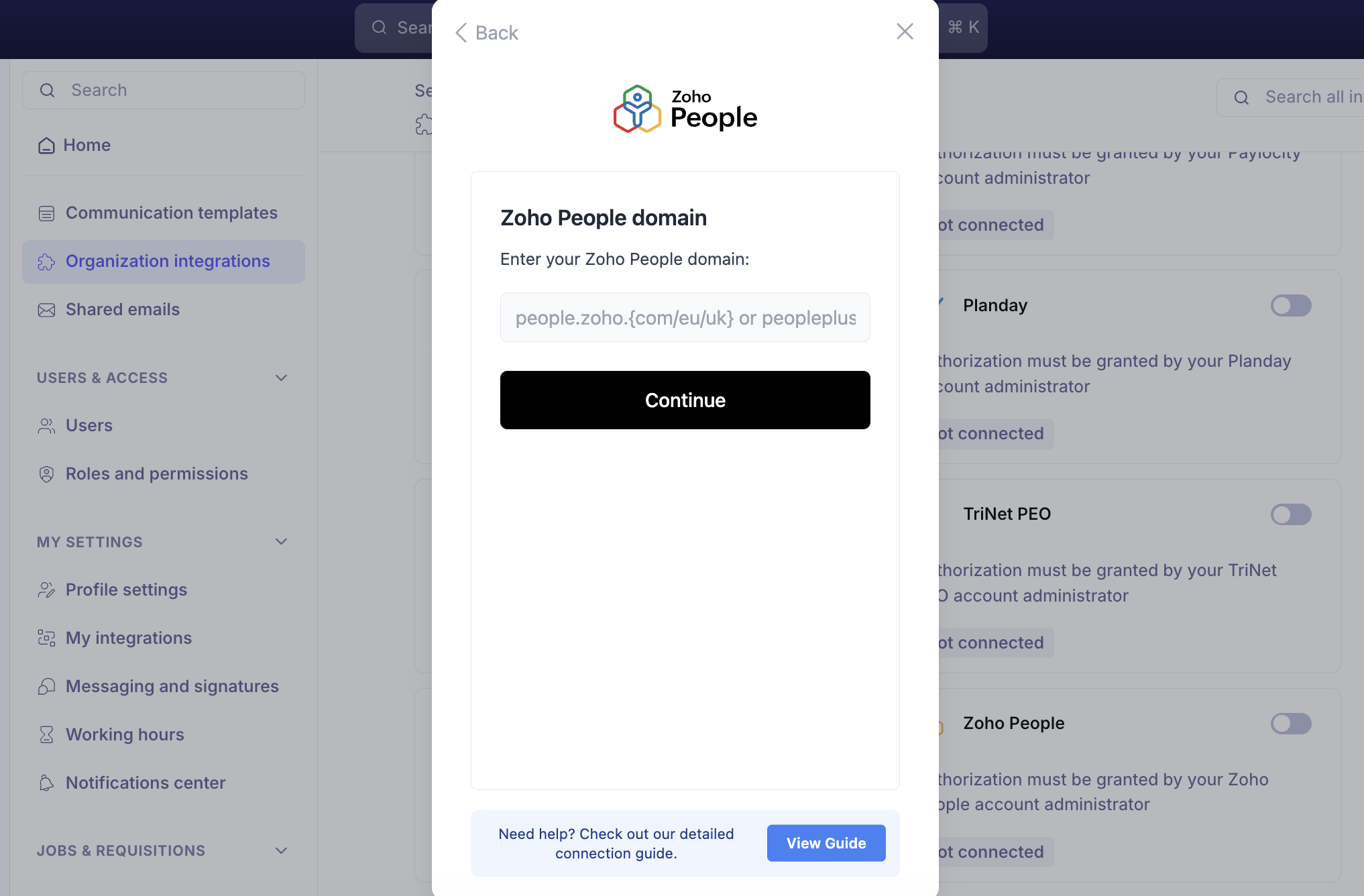
Every screen has a View Guide button in the footer, next to "Need help? Check out our detailed connection guide." Use it. It opens Zoho People's connection guide, which has screenshots of every Zoho People screen you need to click through — this article tells you what to do, the guide shows you what it looks like on Zoho People's side.
Before you connect
You must have an Admin profile in Zoho People. A Standard profile gets all the way through the sign-in and then fails at the last step, so check first:
Log in to Zoho People and click the gear icon in the top right corner.
Go to Manage Accounts.
Find your name in the Users table and check the role beside it says Admin.
If it does not, ask a Zoho People admin to change your profile or to run the connection themselves.
Know your Zoho People domain
Kula asks for this before the sign-in, and Zoho runs different domains per region and product tier.
Your Zoho People account | Domain to enter |
|---|---|
Standard, global |
|
Standard, EU data centre |
|
Standard, UK data centre |
|
Zoho People Plus | The |
If you are not sure, open Zoho People and copy what is in your browser's address bar.
Connect Zoho People
Go to Settings → Organization → Organization integrations.
Find the Zoho People card under HRIS and onboarding.
Turn the toggle on. The connection window opens on Connect your Zoho People account to Kula.
Read the three permissions and click Continue.
Enter your Zoho People domain and click Continue.
Click Sign in with Zoho People and sign in.
On Zoho's own consent screen, tick I allow ... to access the above data from my Zoho account and click Accept.
Back in the connection window, choose how Kula should create employees in Zoho People.
Click Set up integration.
The field mapping screen opens automatically straight after a successful connection, so you can set your mappings while you are already there. You can reopen it at any time — see below.
Map your Kula fields to Zoho People
Field mapping decides which Kula value fills which Zoho People field, so the employee form arrives prefilled instead of blank.
Hover over the connected Zoho People card.
Click Edit.
Match each Zoho People field to the Kula field that should fill it.
Save.
These Kula fields are available to map, from your job, requisition and offer records:
Group | Fields you can map |
|---|---|
Organisation | Department, Sub Department 1, Sub Department 2, Sub Department 3 |
Address | Full Address, Street, City, State, Country, Zipcode |
Office | Office Name, Office Location |
Dates | Hire Date — the date the candidate was last moved to the Hired stage |
Push a hired candidate to Zoho People
Once the mapping is set, open the hired candidate's application and send them to Zoho People. Kula loads the Zoho People employee form, prefills every mapped field, and fetches Zoho People's own dropdown options live so the values you pick are always valid.
You can also attach documents from the application — offer letters and other files — and choose which Zoho People document category each one goes into.
For the full flow, see Handing off to your HRIS.
Fix an invalid connection
If the card shows Invalid, the authorisation was revoked or expired on the Zoho People side and pushes will fail.
Hover over the Zoho People card.
Click Re-authenticate.
Sign in to Zoho People again and accept the permissions.
Your existing field mappings are kept — you do not have to set them up again.
Good to know
Only hired candidates can be pushed. If the application is not in the Hired stage, Kula blocks the push.
Documents are limited to 20 MB per file. Anything larger is rejected. Files over 10 MB, and any push covering more than one document category, upload in the background — the push itself completes straight away and the documents follow.
Pushing the same person twice fails. If the employee already exists in Zoho People, Kula reports it rather than creating a duplicate.
A permissions error means Zoho People, not Kula. If the push fails with a permission error, the Zoho People credentials that authorised the connection do not have rights to create employees. Ask your Zoho People administrator to widen them and re-authenticate.
Where a job or requisition has more than one office, the first office is used when sending to Zoho People.
Zoho's domain is region-specific.
people.zoho.com,.euand.ukare different data centres, and Zoho People Plus has its own. Entering the wrong one fails the connection even with a valid Admin account.Zoho People asks for only three permissions — employees, groups, and creating employees. It does not read legal entities, work locations or employments, so those will not come across from Zoho.
An Admin profile in Zoho People is required. The Accept button will not complete the connection for a Standard profile — the flow fails at the final step rather than warning you up front.
The Accept button on Zoho's permissions screen stays inactive until you tick the consent checkbox above it.
At the end of the connection you choose how Kula should create employees in Zoho People. That choice affects every future push, so check it with whoever owns Zoho People before finishing.
FAQ
Which Zoho People domain does Kula want? The one your account actually runs on — people.zoho.com, people.zoho.eu or people.zoho.uk, or the Zoho People Plus equivalent. Open Zoho People and copy what is in your address bar rather than guessing. For more, see Zoho People's connection guide.
We signed in to Zoho People, accepted everything, and it still failed at the end. What went wrong? Almost certainly a Standard profile rather than an Admin one. Zoho People lets a Standard user sign in and approve, then rejects the connection at the final step. Check your role under the gear icon → Manage Accounts and have an Admin run it.
Can I send a candidate to Zoho People before they are marked as hired? No. The push is only available once the application reaches the Hired stage — Kula blocks it before then to avoid creating employees for candidates who have not accepted.
We changed our field mapping — do we need to reconnect Zoho People? No. Mapping and connection are separate. Hover over the card, click Edit, change the mapping and save; the connection is untouched.
Need help? If you have questions or need assistance, reach out to us at support@kula.ai or use the in-app chat.