Offers
Last updated: May 19, 2025
The Offer Stage is a key part of the hiring process. it's when you move from evaluating candidates to actually extending an offer. Having clear visibility into this stage helps you improve your hiring strategy and boost offer acceptance rates. With Offer Analytics in Kula, you get a clear view of how your offers are performing, spot trends, and make smarter, data-backed decisions.
Metrics Overview
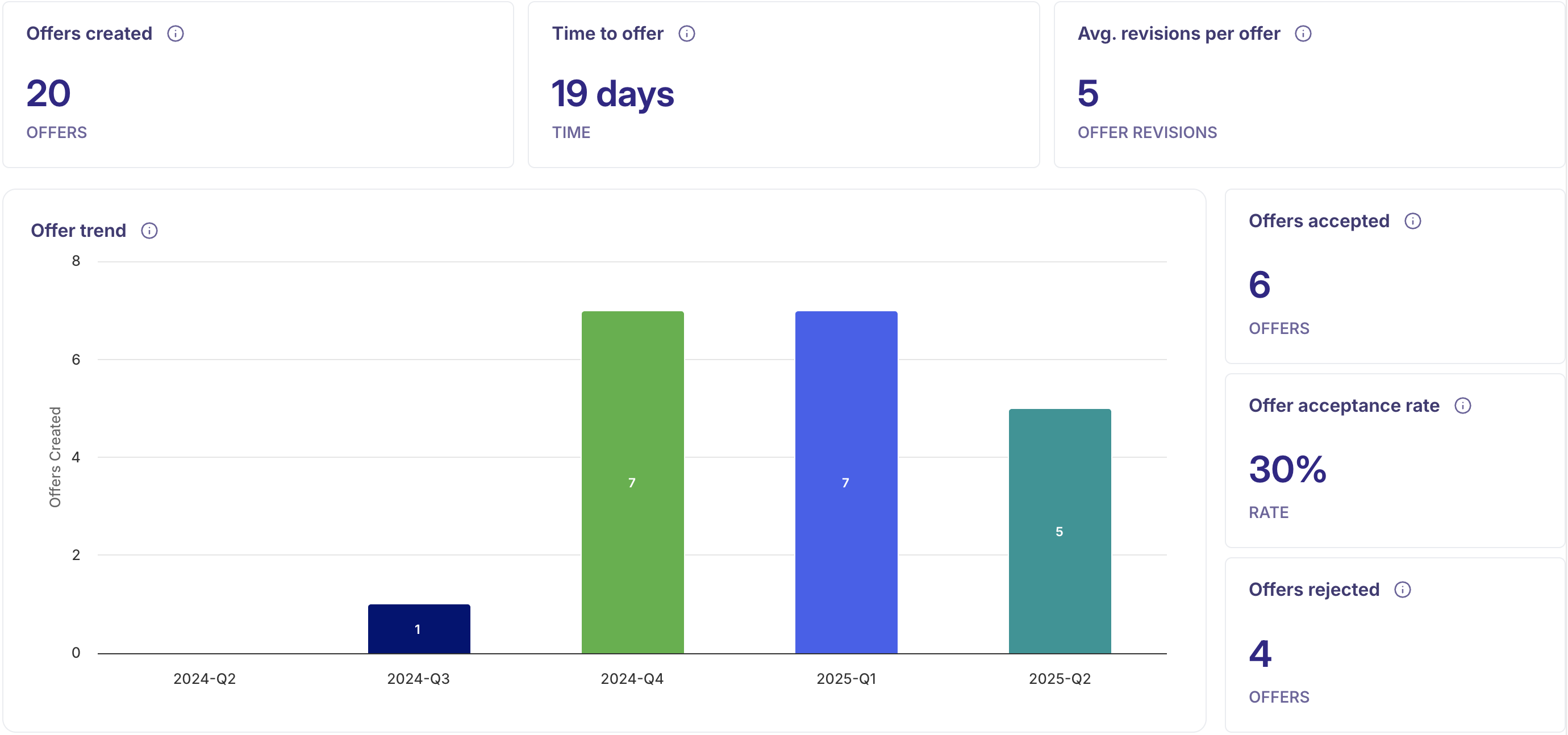
Offer Trend
This bar chart shows how many offers were sent out over a period of time. It helps you spot trends, track hiring momentum, and quickly identify any slowdowns or bottlenecks in your offer process.Offers Created
This shows how many offers were made during the selected time period. It gives you a quick snapshot of how active your team has been in extending offers.Time to Offer
This tells you the average time it takes from when a candidate applies to when they receive an offer. It helps you understand how fast your hiring process is—and where things might be slowing down.Average Revisions per Offer
This tracks how many times an offer is revised before it's finalized. A higher number could mean there's back-and-forth happening, possibly due to negotiations or inconsistencies in the offer details.Offers Accepted
This shows how many candidates said "yes" to your offers—a great indicator of how well your offers are landing.Offer Acceptance Rate
This is the percentage of accepted offers compared to total offers made. It helps you measure how effective your offer strategy is.Offers Rejected
This shows how many candidates declined your offers. It can point to possible issues with the offer itself or a misalignment with what candidates are looking for.Offers by department
This pie chart shows how offers are distributed across different departments. It gives you a quick view of which teams are hiring the most and helps you understand hiring trends across your organization.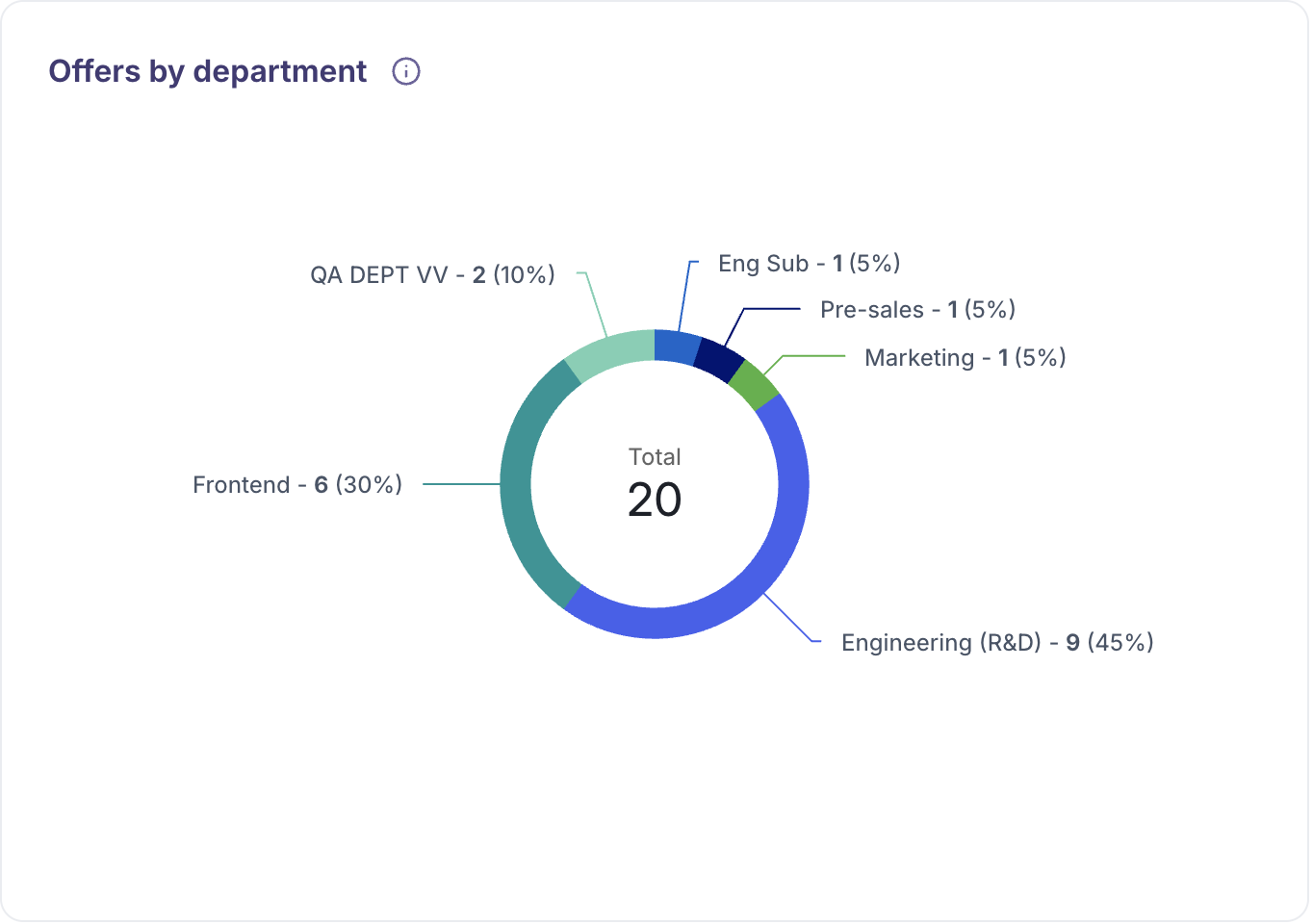
Offers by location
This pie chart breaks down offers by location, helping you see where most of your hiring is happening. It’s a great way to understand regional hiring patterns and identify areas with the highest recruitment activity.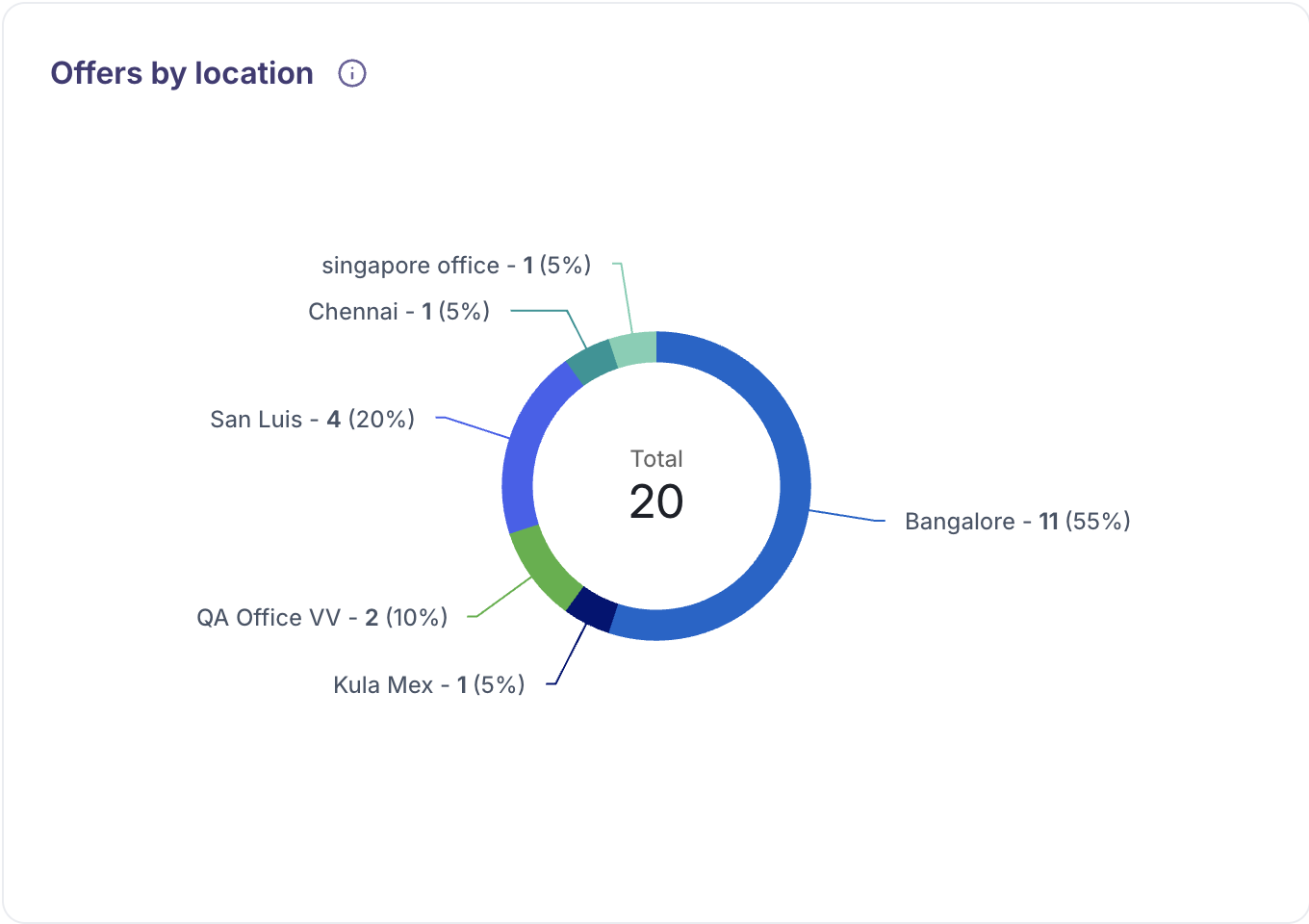
Data Analysis & Breakdown
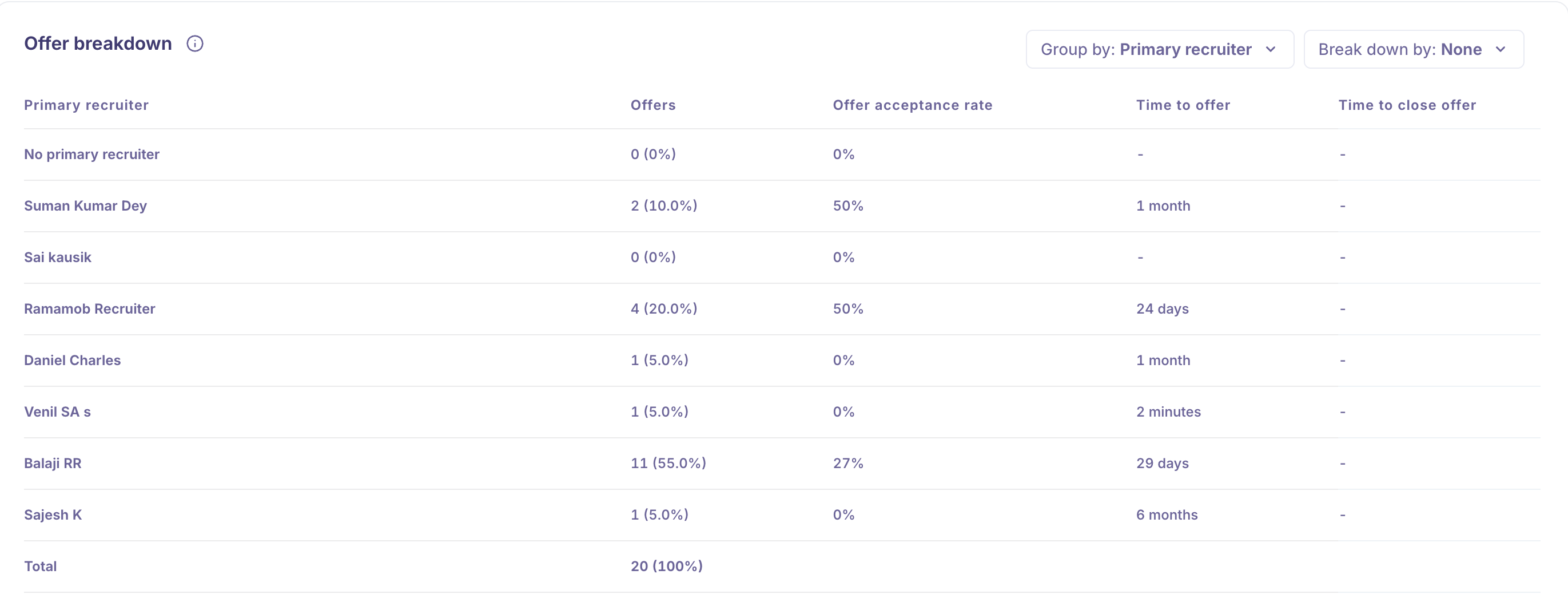
You can Leverage the Group By, Breakdown By filters to segment and refine your
Offer data, enabling more detailed and actionable insights.
Group By feature allows you to organize and summarize data based on key attributes. This helps in identifying patterns, trends, and performance across different segments. You can group data by:
Job Name: View summarized metrics for each job opening to assess performance at the role level.
Primary Recruiter: Analyze recruiter-specific data to understand individual workload, efficiency, and impact.
Primary Hiring Manager: Evaluate how different hiring managers are contributing to the offer process and outcomes.
Source: See which candidate sources (e.g., job boards, referrals) are leading to the most successful offers.
Department: Track hiring activity and offer success across different departments in your organization.
Location: Review offer data based on job or candidate location to identify regional hiring patterns and differences.
Breakdown By feature allows you to segment data based on specific attributes, providing deeper insights into the recruitment process. You can break down metrics by:
Job Name: Analyze performance and trends specific to each job opening.
Primary Recruiter: Evaluate recruiter effectiveness and workload distribution.
Primary Hiring Manager: Gain insights into hiring manager involvement and outcomes.
Source: Understand which sourcing channels are driving the most candidates.
Department: Assess hiring activity and efficiency across different departments.
Location: Analyze data by geographic region to understand where hiring activity is most concentrated and how recruitment efforts vary by location.
Date range
Analyze your offer stage time over different periods:
Yesterday, 7 Days, 30 Days, 3 Months, 12 Months: Track short-term and long-term trends.
Custom: Define specific date ranges for tailored reporting.
Filters
Customize your reports using filters such as:
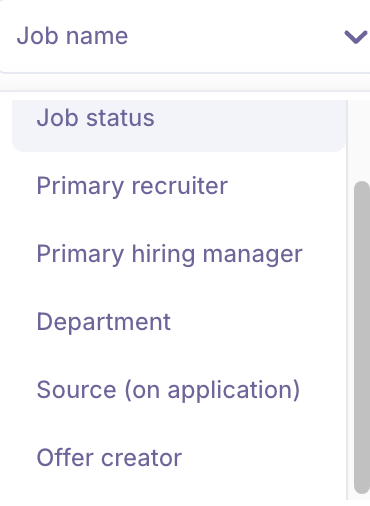
Job Name
Focus on specific roles to see how offers are performing for each job title.Job Type
Filter by full-time, part-time, or other employment types to compare offer trends across different job categories.Job Status
View data based on whether jobs are open, closed, or in progress to better understand how the offer process varies by job status.Department
Break down metrics by department to see which teams are driving the most hiring activity.Primary Recruiter
Assess the performance of individual recruiters by filtering data tied to their activities.Primary Hiring Manager
Gain insights into how different hiring managers handle the offer stage and impact acceptance rates.Source (On Application)
Understand which candidate sources (e.g., job boards, referrals, etc.) lead to successful offers.Location (On Application)
See how offer activity varies by geographic location to identify regional trends and opportunities.Offer Creator
Track offers based on who created them to evaluate consistency and effectiveness across team members.
These filters help you customize your view, making it easier to uncover insights that can improve your offer process and hiring outcomes.
Functionalities
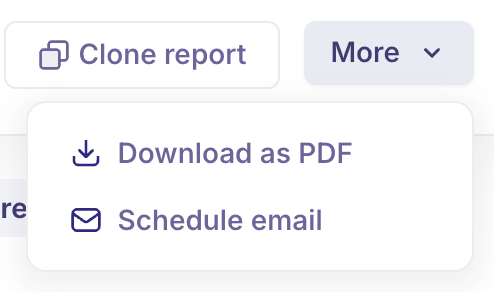
Download as PDF: Export and share your reports with stakeholders in a professionally formatted PDF.
Schedule Email: Automate report delivery at set intervals to ensure your team stays informed.
Clone Report: Easily duplicate existing reports for reuse or customization.
Refresh Date: Indicates the last time the report data was updated, helping you ensure you're viewing the most recent insights. Our Analytics data will be refreshed every 6 hours.
Use Case:
How a Recruiter Uses Offer Analytics to Improve Hiring
As a recruiter, managing multiple job openings and candidates can be overwhelming—especially when it comes to the critical Offer Stage. Using Offer Analytics, I gained clear visibility into how our offers were performing, which helped me pinpoint exactly where things could be improved.
By monitoring the Offer Trend over time, I quickly spotted periods when fewer offers were being sent out, signaling possible delays in approvals or candidate decisions.
Tracking Time to Offer helped me identify which roles were taking too long from application to offer. For those roles, I collaborated with hiring managers to speed up feedback and approval cycles.
Seeing a high number of Average Revisions per Offer indicated that some offers were getting stuck in negotiation or approval loops, so I worked on standardizing offer templates and clarifying compensation guidelines.
Using filters like Department and Location, I identified teams and regions where offer acceptance rates were lower. This allowed me to adjust our offer packages to be more competitive and better aligned with candidate expectations.
Segmenting data by Primary Recruiter and Candidate Source helped me understand which sourcing channels and recruiters were driving the most successful offers, enabling me to focus efforts on high-impact areas.
With these insights, I was able to streamline the offer process, reduce delays, and improve offer acceptance rates—leading to faster hiring and better candidate experiences.
FAQs:
Q1: What does the Offer Stage represent?
A: It’s the phase when recruiters extend formal job offers to candidates, transitioning from evaluation to hiring.
Q2: What key metrics can I track in Offer Analytics?
A: Metrics include Offer Trend, Offers Created, Time to Offer, Average Revisions per Offer, Offers Accepted, Offer Acceptance Rate, Offers Rejected, and breakdowns by department and location.
Q3: How does tracking “Time to Offer” help recruiters?
A: It highlights how long it takes from application to offer, helping identify delays and improve the overall hiring speed.
Q4: Why is “Average Revisions per Offer” important?
A: It shows how many times an offer is modified before acceptance—high numbers may indicate negotiation or approval bottlenecks.
Q5: How can the “Group By” and “Breakdown By” filters improve data insights?
A: They allow recruiters to segment offer data by job, recruiter, hiring manager, source, department, or location for more detailed analysis.
Q6: Can I customize the date range for offer reports?
A: Yes, reports can be viewed for predefined periods like last 7 or 30 days, or customized to specific date ranges.
Q7: What filters can I use to refine offer reports?
A: Filters include Job Name, Job Type, Job Status, Department, Primary Recruiter, Hiring Manager, Candidate Source, Location, and Offer Creator.
Q8: How can I share offer analytics reports with my team?
A: You can export reports as PDFs, schedule automatic email reports, or clone existing reports for easy sharing.
Q9: How often is the data updated?
A: Offer analytics data refreshes every 6 hours to keep reports current.
Q10: How does Offer Analytics help improve offer acceptance?
A: By identifying bottlenecks and low acceptance areas, recruiters can adjust offers, streamline processes, and improve candidate communication to increase acceptance rates.