EEO data collection
Last updated: September 26, 2026
The EEO report shows how candidates move from application to hire, broken down by gender, race, veteran status and disability status, using the answers candidates give to your EEO questions.
Who can do this: Super Admin and Admin by default, or anyone on a custom role with the View all default reports permission
Where to find it: Reports → EEO
Before you start: the report only has data once EEO questions are turned on for your application forms. They're off by default. To turn them on, see EEO data collection.
How to Turn on EEO questions
Go to Settings → Privacy and compliance → EEO.
Turn on Want to enable EEO questions?
Answer Are you a contractor for the U.S. federal government? — this decides which questions you are allowed to ask.
Under Select offices, choose All offices, or pick the specific offices the questions should apply to.
Select Save.
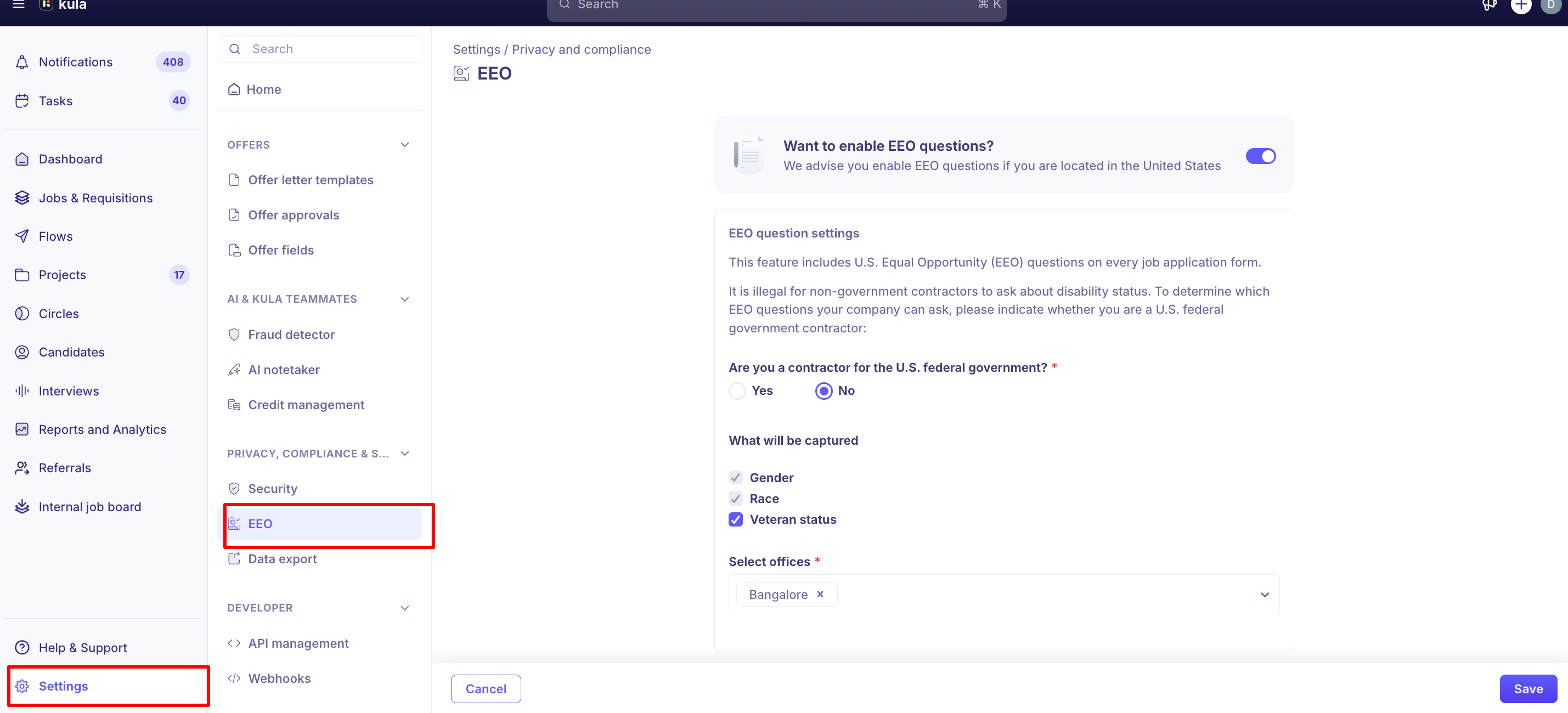
The rest of the page only appears once the toggle is on. Kula confirms with "EEO updated successfully".
Which questions your candidates see
You cannot pick questions individually. Your answer to the federal contractor question sets them.
Question | Not a federal contractor | US federal contractor |
|---|---|---|
Gender | Always included | Always included |
Race | Always included | Always included |
Veteran status | Your choice | Always included |
Disability status | Not available | Always included |
It is illegal for non-government contractors to ask about disability status, so Kula hides that question unless you answer Yes to the contractor question. Answering Yes also switches veteran status on and locks it.
Showing EEO questions on US roles only
The Select offices field controls which jobs get the questions. Pick the offices where you want them and jobs based at other offices are unaffected — useful when you hire globally but only need EEO data for your US roles.
Choosing All offices applies the questions to every job. If you are a US federal government contractor, the questions apply to all jobs regardless of the office selection.
To see which jobs currently carry the questions, filter your jobs list by EEOC data collection and choose Enabled or Disabled.
What the candidate sees
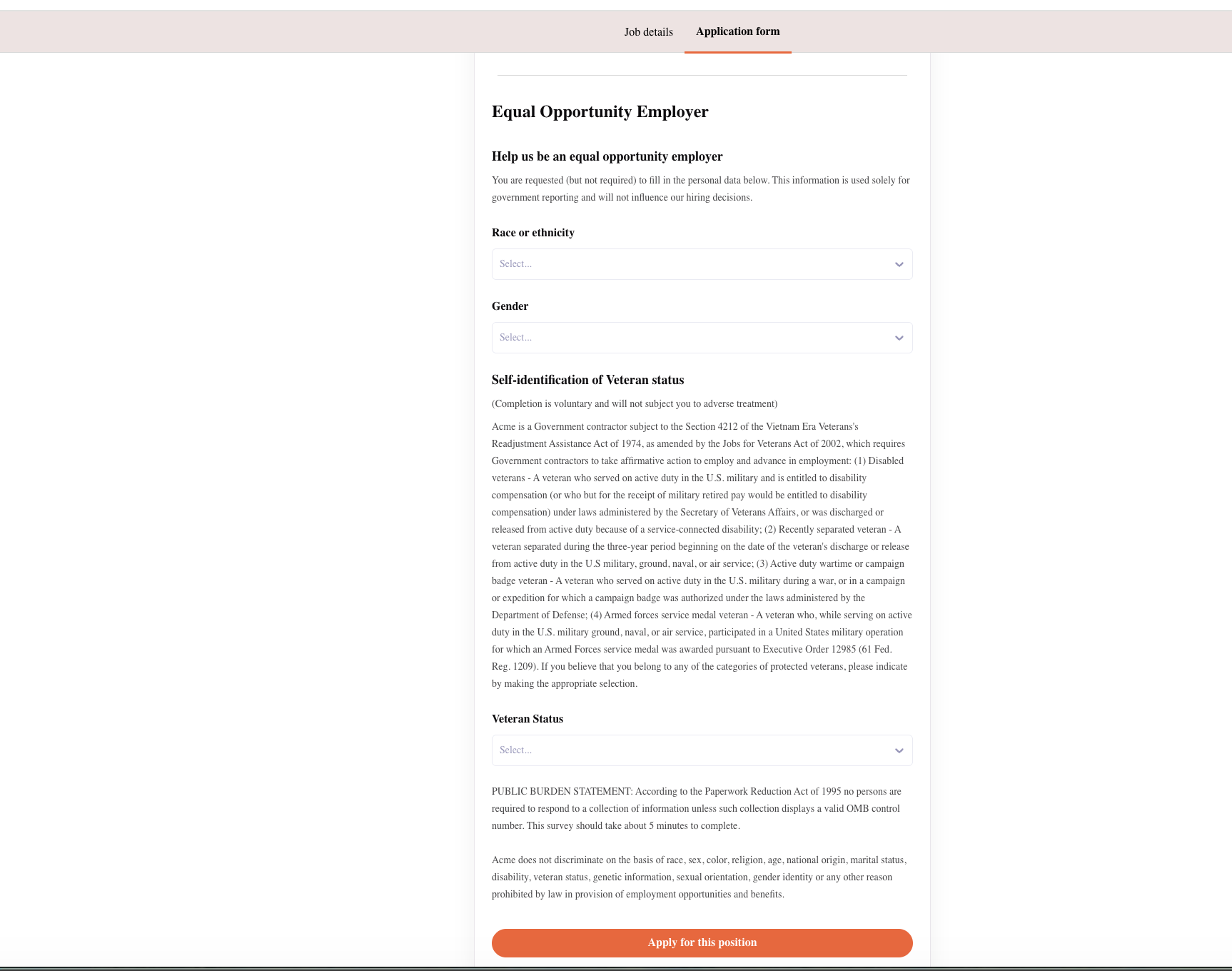
The survey appears at the end of the application form under the heading "Help us be an equal opportunity employer", introduced with: "You are requested (but not required) to fill in the personal data below. This information is used solely for government reporting and will not influence our hiring decisions."
Every question is optional and every one has a decline option — "Decline to self-identify", "I do not wish to answer", or "I choose not to self-identify my protected veteran status". A candidate can submit their application without answering any of them.
The veteran and disability sections carry the standard US federal wording, under the headings Self-identification of Veteran status and Self-identification of Disability, with your organisation's name inserted into the VEVRAA text.
The same questions appear on internal applications and referrals inside Kula, in a section headed Equal Opportunity Employer.
Where the answers go
EEO answers do not appear on the candidate's profile or on the application, so recruiters, hiring managers and interviewers do not see how an individual answered.
They surface in the EEO report under Reports and Analytics, as three tables:
Table | Rows | Columns |
|---|---|---|
Race | Race or ethnicity | Gender |
Veteran | Veteran status | Gender |
Disability | Disability status | Gender |
Each cell counts candidates at five points: applied, interviewed, offered, hired and rejected. Viewing the report needs reports access, which Super Admins and Admins have by default.
Good to know
A job with no office attached will not show the EEO questions unless you chose All offices, or you are a federal contractor. Kula matches the job's offices against your selection, so a job with none matches nothing.
Turning EEO off removes the questions from every job. Kula warns you before it does: "Disabling EEO questions will remove them from all jobs." Answers already collected stay in your reports.
There is no preview. You cannot see the EEO section from the settings page. To check it, open one of your live job posts and scroll to the end of the application form.
EEO answers are not in any export. The EEO report itself can be exported, but the per-candidate answers are not included in application CSV exports or in scheduled data exports.
Transferred candidates are counted once. If a candidate is moved from one job to another, only the new application appears in the EEO report.
Answering "Yes" to the contractor question cannot be partially undone. Veteran status and disability status both become mandatory inclusions while it is set to Yes.
Need help? If you have questions or need assistance, reach out to us at support@kula.ai or use the in-app chat.