Your tasks and to-do list
Last updated: September 23, 2026
Your dashboard's Open Tasks panel is where Kula surfaces the things waiting on you — scorecards to fill, approvals to act on, surveys to complete — so you don't have to go hunting for them job by job. This article covers what shows up there, and the related panel that tracks your job pipeline.
Who can do this: Super Admin, Admin, Recruiter, Hiring Manager, Organisation Member — whoever has something pending sees it here.
Where to find it: Dashboard (Home) → Open Tasks for scorecards, approvals and surveys; Tasks in the left navigation for outreach sends from your flows.
What shows up in Open Tasks
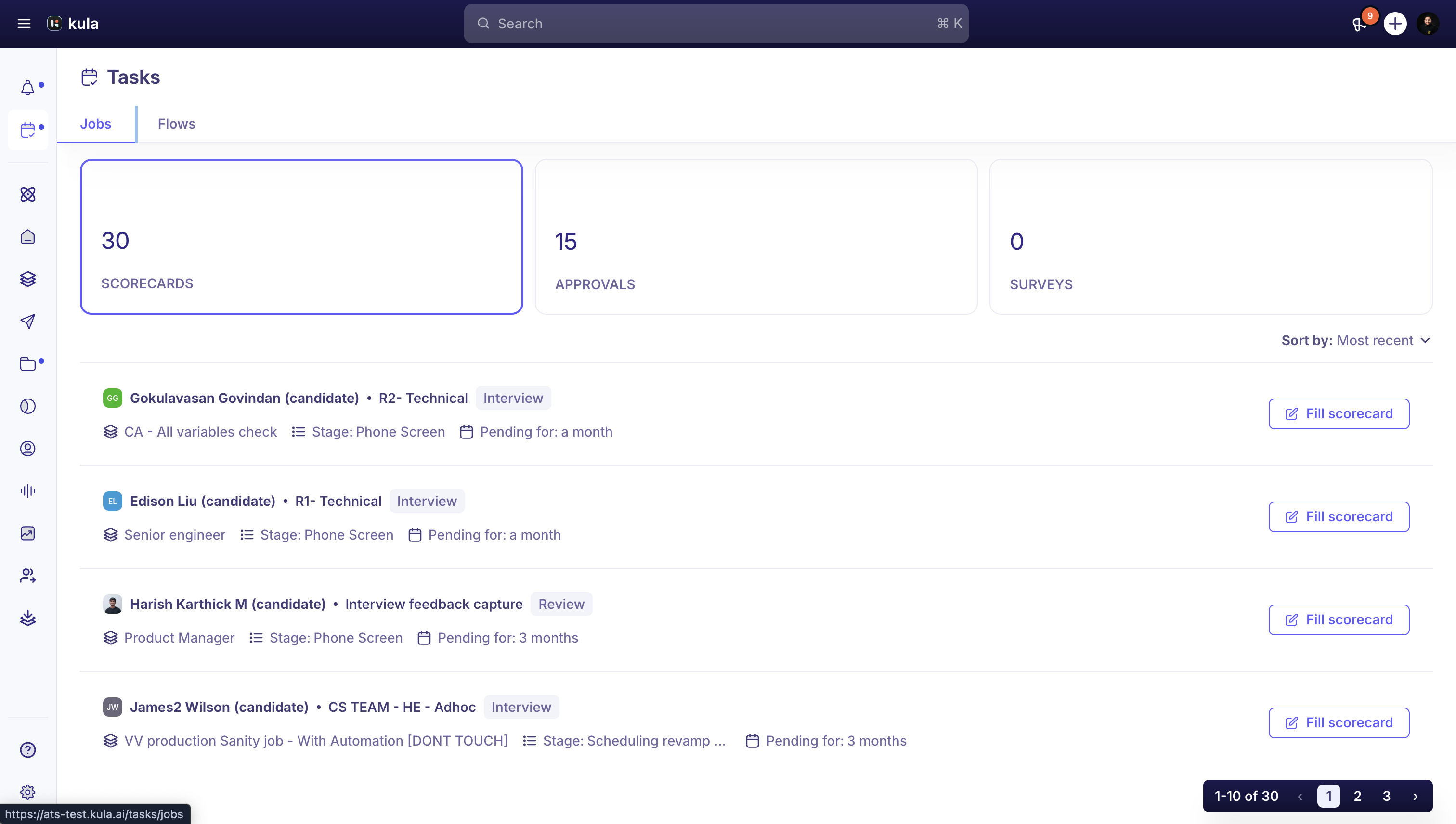
Open Tasks is split into three tabs:
Scorecard — an interview you were part of needs your feedback.
Approvals — a job, offer, or requisition is waiting on your sign-off. These all show up together in one list rather than separate tabs per type.
Survey — a survey assigned to you, for example by your hiring team, needs completing.
Open Tasks is built from your real, system-generated to-dos inside the hiring workflow — it isn't a place where you (or anyone else) can add a free-form note-to-self. See Good to know below.
Your job pipeline: Pending Activities
If you have permission to view jobs, your dashboard also shows a separate Pending Activities panel — this tracks candidates across your jobs who need scheduling, a decision, or an offer, plus anything overdue. You can scope it to My jobs, All jobs, or specific jobs you pick.
Managing your outreach tasks in the Tasks module
Every send your flows generate — emails, LinkedIn InMails, and LinkedIn connection invites — lands in the Tasks module in the left navigation, so nothing to a candidate slips through. This is a separate screen from the Open Tasks panel on your dashboard above: Open Tasks covers scorecards, approvals, and surveys, while the Tasks module covers your outreach queue.
Jobs and Flows tabs
The Tasks module has two tabs:
Jobs — tasks grouped by the job they belong to.
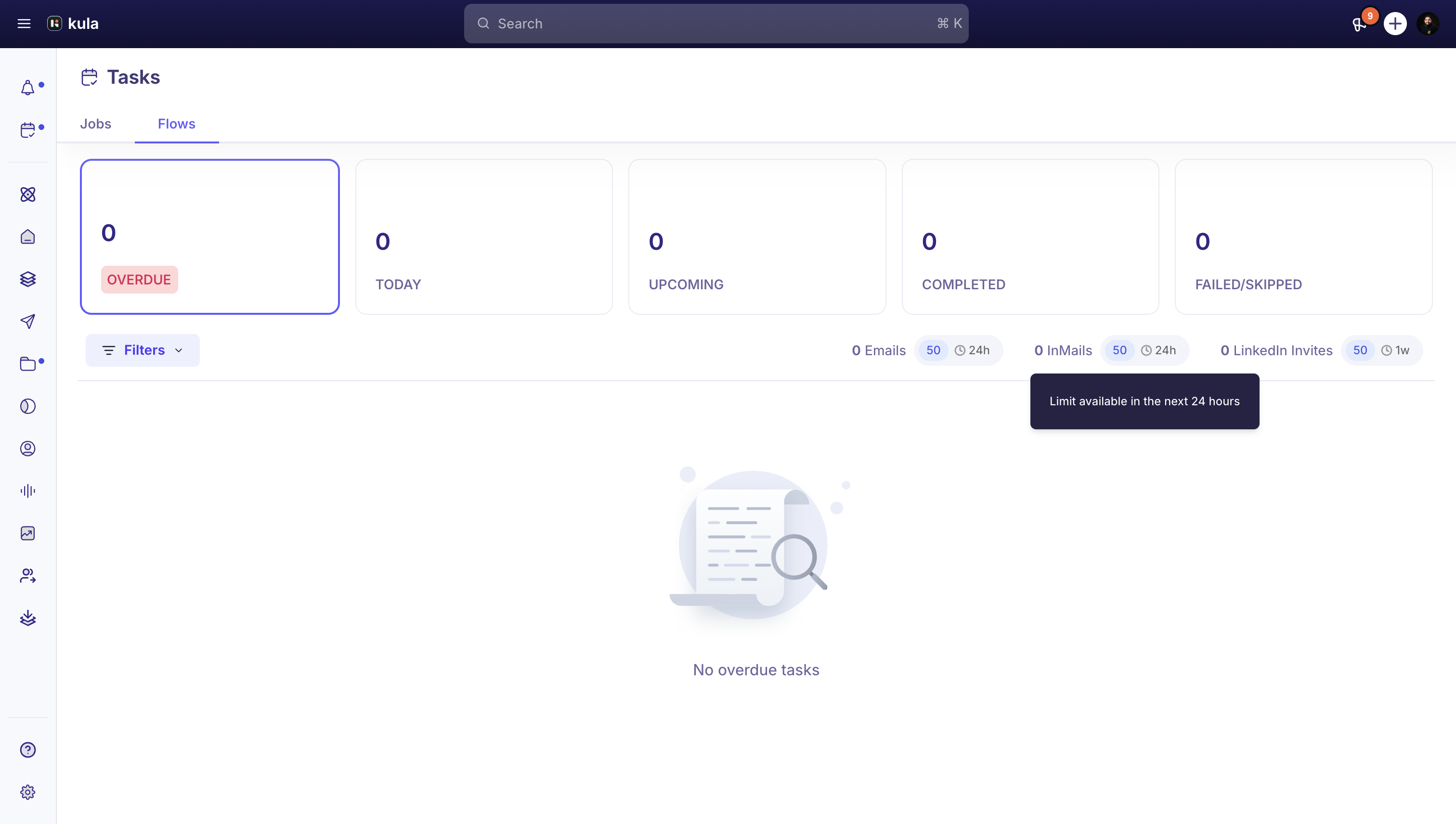
Flows — tasks grouped by their due status across all your active flows. This is where most day-to-day work happens. You only see this tab if Flows is turned on for your account.
Reading the status cards
The row of cards at the top of the Flows tab breaks your tasks into five buckets. Click a card to filter the list below to just those tasks.
Card | What it means |
|---|---|
Overdue | Tasks that were due before today and still haven't gone out. |
Today | Tasks scheduled to send today. |
Upcoming | Tasks scheduled for a future date. |
Completed | Tasks that were sent successfully. |
Failed/skipped | Tasks that couldn't be sent (for example, a channel error) or were skipped by a flow rule. |
A healthy queue keeps Overdue at zero. If it climbs, clear it before starting on Today.
Working through your queue
Click the Overdue or Today card to load that set of tasks.
Review each task, then edit and send it, click Skip, or click Reschedule to push it back (from 1 hour to 5 days).
Sent tasks move automatically into Completed. Tasks that can't be delivered land in Failed/skipped — check that card periodically for anything that needs a retry.
Sending limits
To protect your sending reputation and stay within each channel's fair-use rules, Kula caps how many tasks of each type you can send in a window. The defaults are:
Channel | Default limit | Window |
|---|---|---|
50 | rolling 24 hours | |
LinkedIn InMail | 50 | rolling 24 hours |
LinkedIn connection invites | 50 | current week (resets Sunday 00:00 UTC) |
These are defaults, not fixed caps — your admin can raise them (email up to 300/day, LinkedIn connection invites up to 100/week) in your channel settings. The number shown next to each channel near the Filters button is how much of your current window you have left.
If a task can't send because you've hit a limit, it isn't lost — Kula reschedules it for the next time you have room, rather than failing it.
Good to know
You can't create your own reminders or tasks. Open Tasks and Pending Activities only show items the system generates as part of the hiring workflow, such as scorecards, approvals and surveys.
Pending Activities only appears if you have permission to view jobs. If you don't see it, you may still see Open Tasks.
LinkedIn connection invites reset on a fixed weekly schedule (Sunday 00:00 UTC), not a rolling 7 days — pace them across the week rather than sending a burst on one day.
This Tasks module is separate from the Open Tasks panel on your dashboard — Open Tasks covers scorecards, approvals, and surveys; the Tasks module covers outreach sends from your flows.
FAQ
Does Kula have a reminder or snooze function so it can remind me about a candidate on a certain date?
Not for candidates. You can't set a custom reminder on a candidate — Open Tasks only surfaces system-generated items like scorecards, approvals, and surveys. For outreach tasks in the Tasks module, Reschedule pushes a task back by up to 5 days.
I don't see approvals broken out by job, offer, and requisition separately — where's that split?
Approvals in Open Tasks is one combined list — job, offer, and requisition approvals waiting on you all show up together, rather than in separate tabs.
Why does a task keep showing as overdue instead of failing?
If a task hasn't been actioned yet, Kula leaves it in your queue rather than failing it automatically — that's what Overdue means. It stays there until you send, edit, or skip it, or until whatever's blocking it (like a sending limit) clears.
My LinkedIn connection invites stopped sending partway through the week — why?
You've likely hit your weekly LinkedIn connection invite limit (50 by default). It resets every Sunday at 00:00 UTC rather than on a rolling 7-day basis, so pace your sends across the week.
Need help?
If you have questions or need assistance, reach out to us at support@kula.ai or use the in-app chat.