HackerRank assessments
Last updated: August 19, 2026
Connecting HackerRank lets you send its coding tests from inside Kula, and have results come back to the candidate's profile without anyone re-keying them. Kula also supports HackerRank's live coding interviews.
Who can connect it: Super Admin, Admin
Who can send tests: Anyone on the job's hiring team as a recruiter, hiring manager or coordinator
Connect HackerRank
Connect HackerRank on the integrations page — see [Connecting HackerRank to Kula]
What you'll need: a Recruiter-type User API Key from HackerRank. That account has to be on an enterprise plan with a recruiter licence, and be an activated recruiter-type account with company admin permissions — a standard HackerRank login won't produce a working key.
Once connected, Kula pulls the list of tests from your HackerRank account so you can pick from them by name.
Set it up on the job
Add a HackerRank assessment activity to a stage in the job's interview plan, and pick the test from your HackerRank library. Every candidate who reaches that stage then has the assessment waiting on them.
Adding activities to a stage is covered in [Creating an interview plan]
There's also a HackerRank interview activity for live coding sessions rather than take-home tests.
Send it to a candidate
Setting the activity up doesn't invite anyone. The invitation goes out when you send it for a specific candidate.
Open the candidate and find the assessment activity on their stage.
Click Send assessment.
On Details, choose the reviewer(s) who'll score the result, and confirm the test.
On Scorecard, set the scorecard those reviewers will fill in.
Send.
For a live coding session, the HackerRank interview flow adds a step: as well as details and a scorecard, you set the interviewers (or draw them from an interviewer pool), the calendar, the duration, and the HackerRank template to use, then handle the invites and emails before sending.
Send it without the interview plan: Ad-hoc Assessment
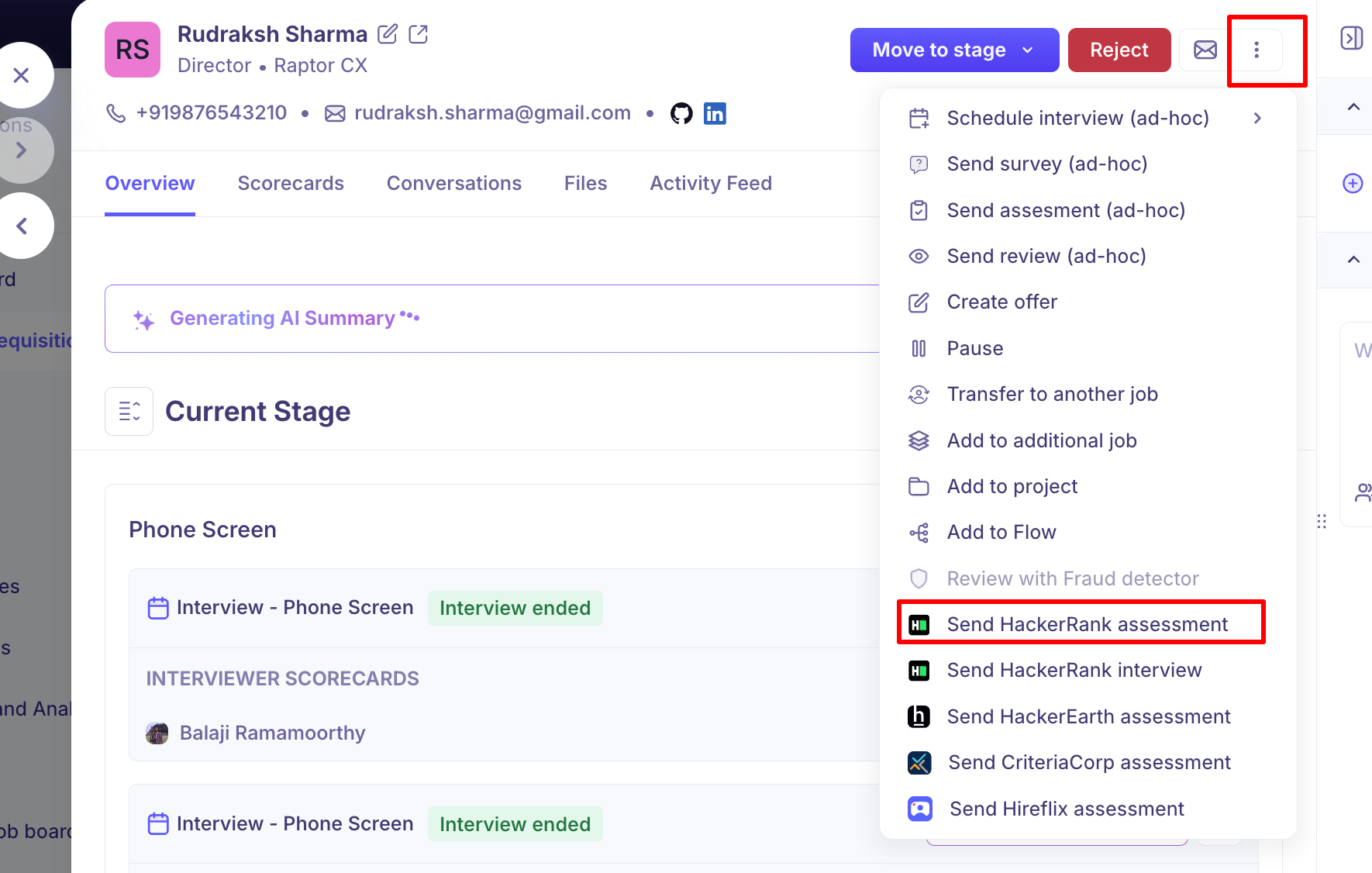
To send a test to one candidate without adding it to the plan, use Send HackerRank assessment from the candidate's actions menu — or Send HackerRank interview for a live session.
After it's sent
The activity gives you Edit assessment to change it, and Cancel to withdraw it. Cancelling deletes the assessment permanently and can't be undone.
Assessment Status in Kula
Kula invites the candidate through HackerRank, and HackerRank emails them the test. From then on the status on the activity follows the candidate through:
The following statuses will be shown in the candidate’s profile:
Sent – Assessment sent but not yet started.
In Progress – Candidate has started the test.
Completed – Test submitted; score and summary available.
Expired – Test link expired without completion.
You can click View Report to see the detailed scorecard from HackerRank directly.
When the test finishes, the result comes back to Kula and the activity moves to submitted, with a status badge and a link to HackerRank's report. Your reviewers are then asked to score it. See [Viewing assessment results on the profile]
Good to know
The candidate needs an email address. Without one the send action is disabled, with a tooltip explaining why.
You need a HackerRank for work account. If you don't have one connected, the action is disabled with the tooltip "You need a HackerRank for work account to perform this action".
Tests come from HackerRank, not Kula. Create and edit them in HackerRank; Kula reads your library and sends invitations.
The report opens in HackerRank. Kula links to it rather than storing a copy.
Only Super Admins and Admins can connect or disconnect the integration.
FAQ
Where do I get the API key? From a HackerRank recruiter-type account with company admin permissions, on an enterprise plan with a recruiter licence. A standard HackerRank account won't work.
My API key was rejected. Check the account it came from meets those requirements. The most common cause is a key from a personal HackerRank login rather than a recruiter account.
I can't see my test in the list. Kula reads the test library from the connected HackerRank account. If a test is missing, confirm it exists in that account — and that it's active.
What's the difference between a HackerRank assessment and a HackerRank interview? An assessment is a take-home coding test the candidate completes on their own. An interview is a live coding session. Both can be added to a stage or sent to one candidate.
Where do I see the candidate's results? On their profile, in the stage the assessment belongs to — with a link to the full report in HackerRank. For more, see [Viewing assessment results on the profile].
Need help? If you have questions or need assistance, reach out to us at support@kula.ai or use the in-app chat.